Imagine your organization operates across multiple departments, handling confidential files and sensitive financial records, as well as client data on a daily basis. Now, imagine a scenario where files start disappearing, unauthorized users gain access to restricted folders, or sensitive data is copied without anyone’s knowledge. What major losses can a company face with these small issues? Sooner, your organization will start losing customer trust and face legal consequences.
Here is our list of the best file activity monitoring software tools:


- ManageEngine DataSecurity Plus – Best for Windows environments needing detailed file access tracking
- SolarWinds Server & Application Monitor – Best for IT teams wanting integrated server and file monitoring
- Teramind – Best for organizations focused on insider threat detection
- PA File Sight – Best for real-time file change logging and alerting
- FileAudit – Best for quick setup with supervisor alerts on file activity
In today’s data-driven workplace, whether you’re a startup or a large enterprise, file security is non-negotiable. The lack of visibility into who is accessing, modifying, or sharing files can put the entire digital infrastructure at risk. This is why more businesses are adopting file activity monitoring tools. The only idea behind investing in this tool is that it helps track file transfers, monitor access patterns, and instantly alert teams about suspicious behavior.
These tools not only secure data but also help organizations stay compliant with regulatory standards like HIPAA, GDPR, and SOX.
Some common file-related challenges that have resulted in a higher demand for such tools include:
- Your team notices frequent unauthorized access to sensitive folders, but there’s no audit trail to trace who did what.
- Files are being deleted or renamed, and there’s no real-time notification system to alert the IT team.
- There’s growing concern around insider threats, but your current setup lacks visibility into employee file activity.
- You’re preparing for a compliance audit, but don’t have accurate logs of file access history.
- The organization shares files through shared drives and collaboration tools, but there’s no centralized monitoring in place.
Implementing a robust file activity monitoring software tool for your organization can help mitigate all of the above challenges. Thus, offering complete transparency and control over the data assets. With the right tool, IT teams can quickly detect anomalies, investigate incidents, and ensure sensitive information remains protected.
In this guide, we’ll provide a list of top tools that can help organizations protect their files and maintain operational integrity.
Our main goal is to support IT security professionals, system admins, and compliance teams in finding the right file activity monitoring software. One that not only tracks file transfers in real time but also protects your organization from potential data risks.
File activity monitoring software shows who accessed a file, when, and what they did.
Related post: Best File Integrity Monitoring (FIM) Tools
If you need to know more, explore our vendor highlight section just below, or skip to our detailed vendor reviews.
File activity monitoring software highlights
Top Feature
Tracks file and permission changes, rapid threat detection
Price
Standard $595 per year, Professional $945 per year, licensed by number of Domain Controllers. Perpetual license plans are also available
Target Market
Organizations on Windows needing to track critical files and security events on file servers
Free Trial Length
30-day free trialAdditional Benefits:
Features:

Top Feature
Monitors key files and log content to prevent data loss
Price
Starter $9 per month, Pro $35 per month, Classic $89 per month, billed annually
Target Market
Security professionals and server administrators needing instant file and directory change alerts
Free Trial Length
30-day free trial
Read more ▼

Top Feature
Identifies and classifies sensitive data across endpoints in real time
Price
Starts $795/year subscription for 100 workstations, perpetual starts $1,987 for 100 workstations
Target Market
Organizations demanding precision and scalability, easy policy enforcement across endpoints
Free Trial Length
30-day free trial
Read more ▼

Top Feature
Detects ransomware and exfiltration, blocks unapproved applications
Price
Subscription starts at US$745/year (2 file servers), Perpetual starts at US$1,863 (2 file servers)
Target Market
Enterprises needing a robust data visibility and leak prevention tool that helps combat insider threats and stay compliant
Free Trial Length
30-day free trial
Read more ▼
Top Feature
Monitors file attributes and last changes, catches unauthorized edits
Price
Starts $2,900 on-premises subscription, node-based licensing, pricing via online quote tool
Target Market
Teams needing in-depth file activity monitoring and reporting within broader server or application monitoring
Free Trial Length
30-day free trial
Read more ▼


Top Feature
Flags insider threats in real time with behavioral analytics
Price
Starter $14 per seat per month, pay yearly, 5-seat minimum, UAM $28, DLP $32, Enterprise custom
Target Market
Organizations unifying DLP, insider threat detection, employee monitoring
Free Trial Length
Free trial available, duration not disclosed by the vendor
Read more ▼

Top Feature
Blocks file copying and external storage, prevents data leaks
Price
Lite starts $199 for 1–9, Ultra starts $599 for 1–9, licensed per monitored server, subscription or perpetual
Target Market
IT teams and compliance officers needing precise control over file access and application execution
Free Trial Length
30-day free trial
Read more ▼

Top Feature
Maintains searchable file access trails, simplifies audits and forensics
Price
Team $40 per month, Small $68, Medium $112, billed every three years, Enterprise custom
Target Market
IT teams, auditors, and security professionals needing continuous visibility and control over file access
Free Trial Length
20-day free trial available, demo available
Read more ▼
Key Points To Consider Before Purchasing a File Activity Monitoring Software Tool
When planning to purchase software, an organization must consider different aspects rather than limiting itself to feature comparisons. You might find several file activity monitoring software that offer similar functionalities and features, but what truly differentiates the best from the rest are several other critical factors that can affect implementation, performance, scalability, and long-term ROI. Here are the key considerations one must never overlook when selecting a file activity monitoring tool for their business.
- Ease of Integration and Deployment: Not all tools available in the market support integration with existing software. So, make sure you choose a tool that integrates seamlessly with your existing IT infrastructure, including file servers and cloud storage. This integration will smoothen your business operations. Further, make sure it offers a quick deployment process and doesn’t demand high technical effort.
- Real-time File Activity Tracking: You won’t be able to stay ahead of your cybercriminals if you are not performing file checks in real-time. With the launch of new technologies, cybercriminals are adapting new methods to make their way into your system files. Hence, real-time monitoring is essential to detect and respond to unauthorized file access, unusual behavior, or data exfiltration attempts. It has become important to invest in a tool that provides instant visibility into tasks such as file creation, deletion, copying, renaming, and permission changes. Also, check whether it supports tagging and filtering based on users, file types, and folders for quick analysis.
- Compliance and Audit Readiness: A good file activity monitoring solution should simplify compliance with regulations like GDPR, HIPAA, SOX, and PCI-DSS. Look for automated audit logs, retention options, and built-in templates tailored for compliance reporting. Having these features in your tool will help you show traceability during internal or external audits.
- Alert Systems: Even if you have a monitoring system for your file activities, what if it doesn’t notify you on time? Having a proper alert system is equally important. Ensure the software tool you are planning to invest in provides customizable alerts and anomaly detection based on behavior baselines. It should notify security teams in real-time using multiple channels, such as email, SMS, etc., on detecting suspicious activity. For example, if a user suddenly accesses hundreds of files or a file is accessed outside of business hours, the tool must be capable enough to alert about these updates in real-time. Further, threshold-based alert configuration is a must-have.
- Scalability and Flexibility: Whether you’re a growing business or an enterprise with large data volumes, make sure to look for a tool that is scalable. Ensure it can monitor activity across hybrid environments (on-premises and cloud) and scale with increasing users and data. It should support centralized management for distributed file systems without performance lags.
- Reporting and Analytical Insights: What benefit will one have if the tool helps track data but doesn’t convert it into insightful reports? Having a tool that generates analytical insights and reports makes it easier for team members to understand the areas of improvement and unusual behavior. Make sure your tool offers rich analytics and customizable reports that give visibility into user behavior, data access patterns, and potential risks. Look for visual dashboards, trend analysis, and drill-down capabilities that help understand what’s happening, when, and why. These insights further help team members in better risk management and informed decision-making.
- Security Features: One of the important factors to look for in your chosen tool is that it aligns well with modern cybersecurity standards. Features like role-based access controls (RBAC), data encryption, secure log storage, etc., are critical. It should also support integration with your broader security ecosystems, i.e., SIEM, DLP, or EDR platforms.
- Cost and Vendor Support: Evaluate pricing models, whether it’s based on the number of users, servers, or data volume, and select a reliable software that offers flexibility without hidden costs. Additionally, ensure the vendor provides proper support through detailed documentation, a knowledge base, live chat features, or a dedicated staff team to answer queries and troubleshoot issues. A strong user community or forum can also help improve your experience.
To dive deeper into how we incorporate these into our research and review methodology, skip to our detailed methodology section.
The Best File Activity Monitoring Software Tools
Our professional team at Comparitech understands the importance of quality monitoring tools. Hence, the team has performed a thorough analysis on each vendor and their products to pen down some of the best file activity monitoring tools for businesses. Apart from covering feature comparisons, the team has assessed products based on their support system, feedback, and overall performance.
Our main goal is to bring the best and detailed reviews that will help your business stay secure for a longer period.
1. ManageEngine ADAudit Plus (FREE TRIAL)
Best for: Organizations of all sizes working on Windows-based systems can use this robust tool to track critical files and security events that take place within the file servers.
Price: ManageEngine ADAudit Plus subscription pricing starts at $595 per year for the Standard edition and $945 per year for the Professional edition, with licenses based on the number of domain controllers; perpetual licenses for 2 to 20 domain controllers range from $1,488 to $10,988 for Standard and from $2,363 to $16,488 for Professional, with custom quotes available for larger deployments. You can evaluate the product with a 30-day fully functional free trial plus personalized and instant demos.

ManageEngine ADAudit Plus is a tool for ensuring data integrity by tracking user activities on servers, particularly on files. While this system doesn’t include a sensitive data discovery and classification service, it will protect sensitive data along with all other files.
ManageEngine ADAudit Plus Key Features:
- User Behavior Analysis: Creates a baseline of regular activity per user
- Alerts on Unusual Activity: Sudden changes in behavior could indicate account takeover
- File Activity Monitoring: Records the user involved in a file access or content changes
- Real-Time Active Directory Monitoring: Track and audit all changes to Active Directory objects, such as user accounts, groups, and organizational units (OUs).
- Advanced Reports & Dashboards: Pre-configured and customizable reports provide insights into AD user activities, security events, and system performance.
Unique Buying Proposition
What really stands out to users in the ManageEngine ADAudit Plus tracks every single change and login event. It delivers real-time change auditing and user behavior analytics to keep your Active Directory, Azure AD, member servers, and workstations secure. Further, detects insider threats, ensures data integrity, and maintains compliance with regulatory mandates like HIPAA, PCI-DSS, and GDPR.
Feature-in-Focus: Tracks file activity and permission changes for rapid threat detection
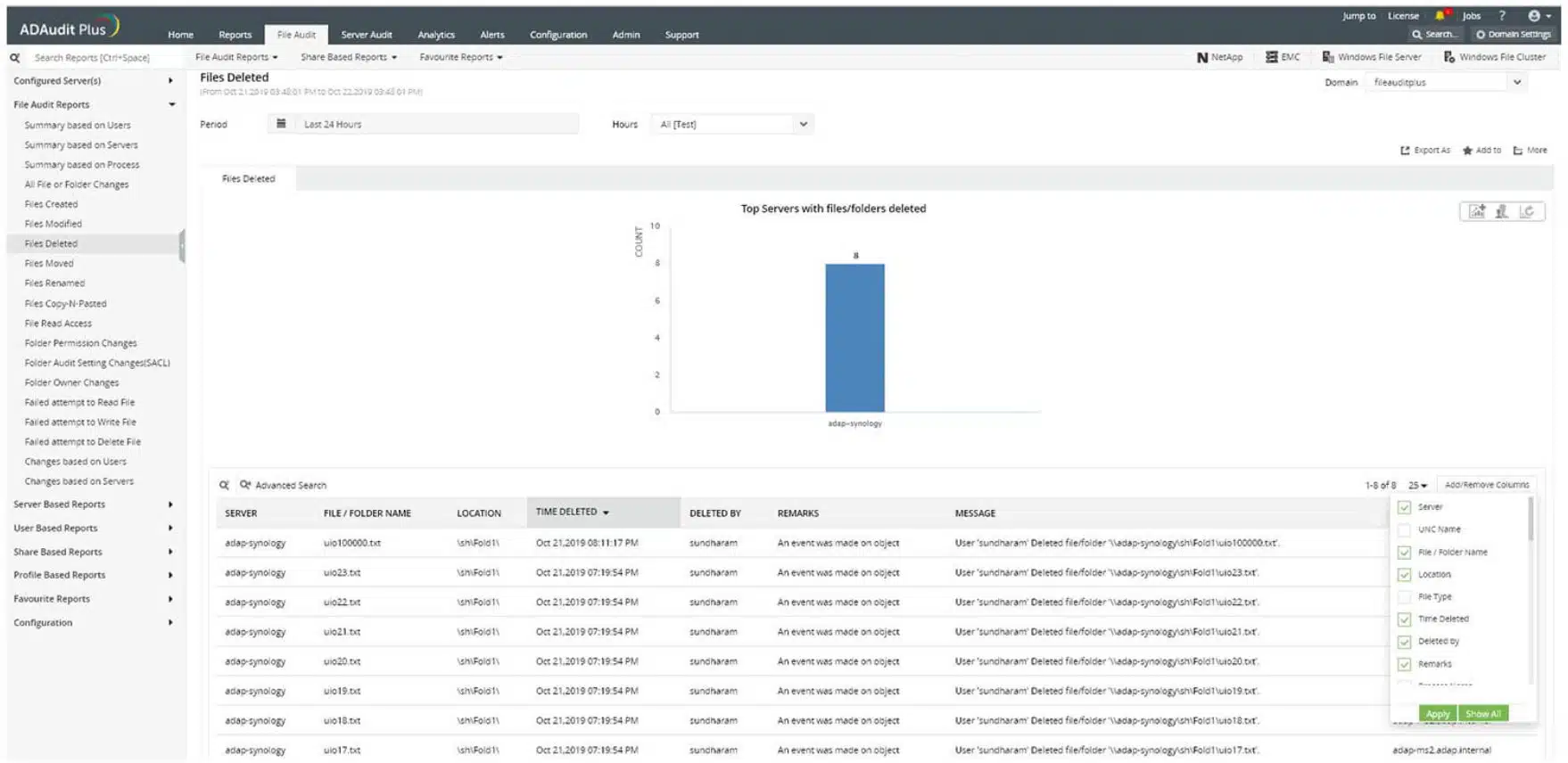
The robust tool provides complete visibility into file/folder activities and tracks permission changes. With this tool in hand, businesses can generate detailed reports on who accessed, modified, moved, or deleted files and folders, along with their permission details. Thus, instantly detects suspicious behavior and prevents unauthorized access across your file servers.
Why do we recommend it?
ManageEngine ADAudit Plus is a package of activity recording services. The name implies that the system operates on Active Directory. However, this is misleading because the tool lays down user activity records, referencing AD for user identities. This is a file activity monitoring tool that can be used for data loss prevention.
ADAudit Plus is available for AWS and Azure as well as for Windows Server. Each deployment will scan Active Directory and note its current status. If changes are made to objects in that system, the ADAudit Plus service raises an alert, which enables you to reverse those changes, which might include the addition of user accounts.
The file integrity monitor ties in with Active Directory. Thus, when a user accesses a file, the ManageEngine service logs that action. It also logs whether changes were made to the file during that session.
A major incentive to get ADAudit Plus is to comply with data security standards. The tool includes a compliance reporting module that can be tailored to the expectations of SOX, HIPAA, PCI-DSS, FISMA, and GLBA.
Who is it recommended for?
This package is suitable for businesses that need to prove protection standards compliance. The software runs on Windows Server, AWS, or Azure. There are two paid editions: one for LANs and the other for WANs. There is also a Free edition but that just processes data collected during the free trial of the paid versions.
Pros:
- Refers to Active Directory: Can use either Active Directory or Azure AD to verify file access permissions
- USB Tracking: Logs file movements onto and off a USB memory stick
- Compliance Reporting: Provides GDPR reports
- Group Policy Audit: Track changes to Group Policy Objects (GPOs), including modifications, deletions, and creation of policies.
- Historical Data Search: Search historical audit data to track trends, analyze security incidents, and provide historical context for compliance audits.
Cons:
- Focused on Windows: This system works almost exclusively on Windows-based systems
The ManageEngine ADAudit Plus runs on Windows Server, AWS, and Azure. There are three editions for ADAudit Plus: Free, Standard, and Professional. The Free edition will monitor 25 workstations, while the Standard edition will monitor activity on servers as well as workstations. The Professional edition adds on Active Directory monitoring. You can get the Professional Edition on a 30-day free trial.
EDITOR'S CHOICE
ManageEngine ADAudit Plus is our top pick for a file activity monitoring tool because this service combines file access monitoring with comprehensive Active Directory auditing. This allows organizations to not only track who is accessing critical files but also monitor changes to user permissions and group memberships, ensuring tighter security and better compliance management. One of the important services of ADAudit Plus is its real-time file access monitoring, which logs every read, write, and modification event on files and folders. This enables IT administrators to quickly detect unauthorized access or suspicious activity, ensuring sensitive data remains secure. The tool also tracks who accessed the files, when, and from which device, giving organizations full visibility into their data access patterns. ADAudit Plus offers customizable alerts to notify administrators of unusual activity, such as unauthorized access to sensitive files or failed login attempts. This proactive approach to monitoring enhances security by enabling swift responses to potential threats. Through its intuitive interface, ADAudit Plus provides access to compliance reporting for standards like GDPR and HIPAA, and cross-domain support. The package offers a scalable, powerful solution for organizations of all sizes, making it the ideal choice for file activity monitoring in Active Directory environments.
Download: Get a 30-day FREE Trial
Official Site: https://www.manageengine.com/products/active-directory-audit/download.html
OS: Windows Server
2. Site24x7 Infrastructure (FREE TRIAL)
Best for: Ideal for security professionals and server administrators who need instant alerts on file and directory changes. Organizations planning to invest in a tool that helps detect data breaches faster and maintain system integrity must try this.
Price: Site24x7’s monitoring packs start at $9 per month (Starter), $35 per month (Pro), and $89 per month (Classic), billed annually, with each pack bundling server, website, and network monitoring capacity; a full 30-day free trial is available from the official site.

Site24x7 is a cloud-based system monitoring platform that covers networks, servers, and applications. The service is packaged in different bundles and Site24x7 Infrastructure is one of them. This is a flexible plan and you choose which aspects of physical and virtual infrastructure you want the tool to monitor. One of the options is its file monitoring capabilities.
Site24x7 Infrastructure’s Key Features:
- Cloud-Based: A SaaS platform
- Full Stack Observability: Monitors networks, servers, and applications
- Tracks File Changes: The administrator specifies files for special monitoring
- Folder Monitoring: Sets folder size limits and alerts when that level is approached
Unique Buying Proposition
One thing users will appreciate is that it offers a centralized view to monitor URLs, ports, event logs, syslogs, and file activity across Windows and Linux servers. Buyers will no longer need to manually track and gain proactive alerts to ensure their infrastructure stays secure and reliable.
Feature-in-Focus: Monitors key files and log content to prevent data loss
With this tool in hand, organizations will gain better control and monitor key files and directories for creation or deletion to prevent data loss. Site24x7 also enables real-time content checks to catch log file errors instantly. Thus, helping team members to respond faster and reduce fallout from system issues or breaches.
Why do we recommend it?
Site24x7 Infrastructure watches over servers and services and it includes a file activity monitor. This tool is good for tracking the activities of users around stores of sensitive data. The system watches over file storage space and makes sure that there is still enough available for natural file creation processes, such as log file creation.
The file and directory monitoring system in Site24x7 includes comprehensive tools for protecting stores of sensitive data. This is an excellent data loss protection service because it includes active checks on changes in files as well as general file storage performance statistics.
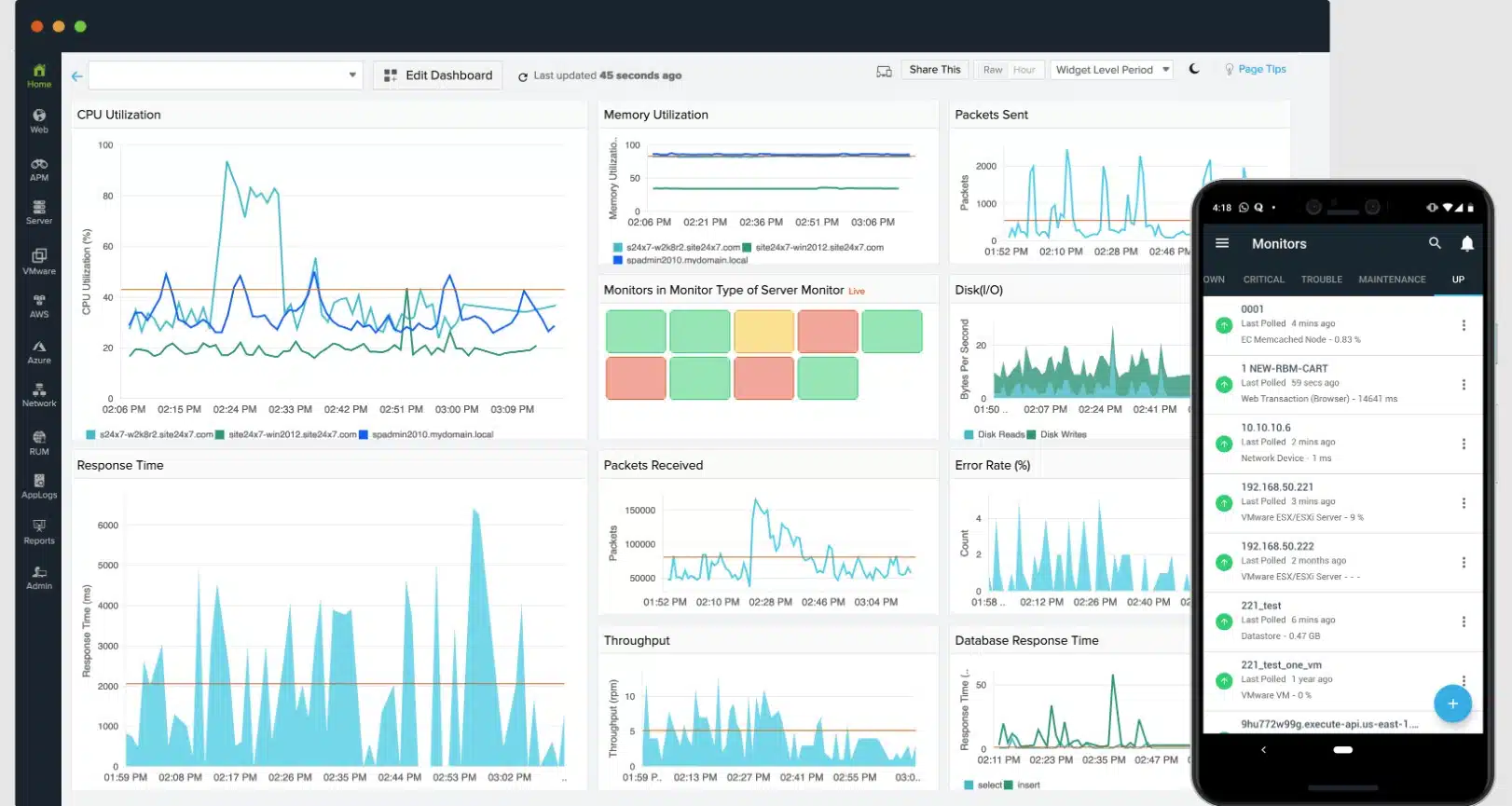
The system can be set to pay extra attention to specific directories. It will track any changes to files including file permission changes – which is a sign of hacker activity. In this mode, the Site24x7 service will raise an alert and write to a log every time files are created, deleted, or modified in a nominated directory. The service also scans directories to highlight files that have not been accessed in a long time, which lets you know which files are good candidates for archiving or deletion.
This service will perform general monitoring tasks on file storage, such as tracking the growth rate of directories and recording metrics such as the number of files per directory or per device. You can centralize the monitoring of all of your servers in one overview that offers a drill-down path to see statistics on each individual location.
Who is it recommended for?
Site24x7 provides packages of monitoring systems, so you don’t just get the Infrastructure Monitoring system, you also get network monitoring and application monitoring, plus other utilities, such as log management. This makes the tool great value for money because it covers all of your monitoring needs.
Pros:
- Log File Access: Record the user account involved and the content that changed
- Alerts for Folder Creation: Also writes to a log file if a directory is created
- Log File Monitoring: Alerts if log files get corrupted
- Cross-Platform Monitoring: Monitors servers running Windows and Linux and also cloud platforms
Cons:
- Cloud Only: No on-premises version
Site24x7 is a subscription service and you can get it on a 30-day free trial.
3. ManageEngine Endpoint DLP Plus (FREE TRIAL)
Best for: With an intuitive interface and remote deployment via lightweight agents, Endpoint DLP allows you to easily configure and enforce security policies across all endpoints. Thus, making it a smart choice for organizations demanding precision and scalability.
Price: Endpoint DLP Plus Professional Edition offers both annual subscription and perpetual licenses, with the pricing page listing slabs starting at US$795 per year for 100 workstations and higher tiers for larger environments. Perpetual licenses start at US$1,987 for 100 workstations. Buyers can also download a 30-day free trial, access the online Endpoint DLP Plus demo environment, and request a personalized demo or price quote directly from the official site.
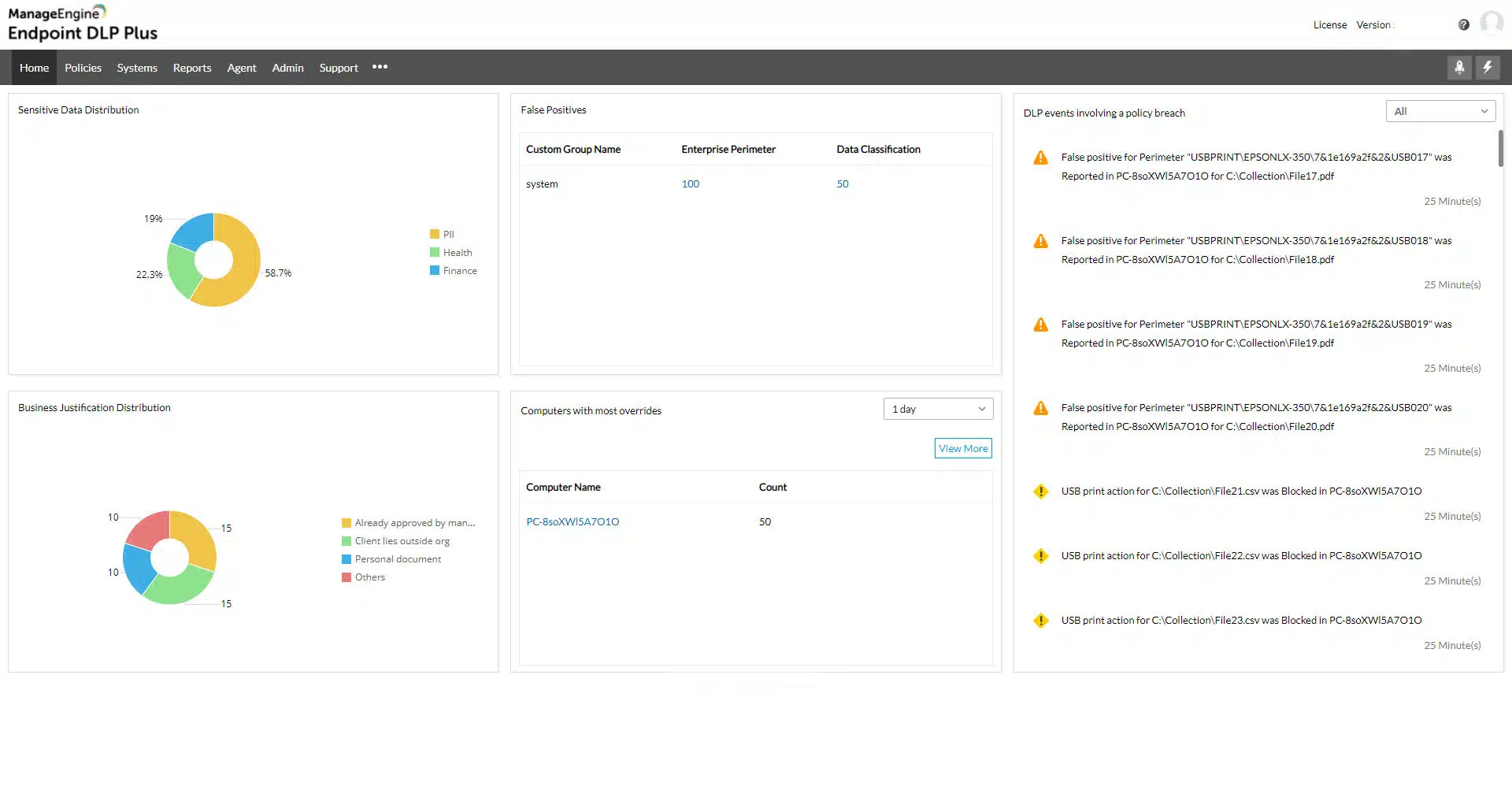
ManageEngine Endpoint DLP Plus provides protection for the files that hold sensitive data and controls the movement of those files while tracking user activity. This system can be adapted to identify data based on a specific data protection standard, such as PCI DSS, HIPAA, or GDPR.
ManageEngine Endpoint DLP Plus Key Features:
- Sensitive Data Discovery: Can be tailored to specific data protection standards
- Control of Data Movements: Emails, cloud uploads, file transfer protocols, and USB sticks
- Granular Controls: Operates permissions by user groups
Unique Buying Proposition
In my professional opinion, ManageEngine Endpoint DLP stands out from the rest because it offers access to a wide range of excellent features. It helps secure sensitive data by restricting USB and auxiliary device access while allowing authorized printing with watermarks for accountability. Further, granular user activity monitoring lets you detect and block data exfiltration attempts in real time. Thus, empowering you to protect intellectual property without hindering legitimate work.
Feature-in-Focus: Identifies and classifies sensitive data across endpoints in real time
Endpoint DLP’s key feature ensures sensitive data is identified, tracked, and protected at every touchpoint. The tool helps quickly locate and classify both structured and unstructured sensitive data. Be it intellectual property, health records, or financial information, the tool uses advanced content inspection capabilities.
Why do we recommend it?
ManageEngine Endpoint DLP Plus is a data loss prevention package. It scours all data stores for sensitive data and then classifies the instances that it finds. The process can be adapted to suit the requirements of a specific data protection standard. The tool then controls all movements of that sensitive data.
The DLP package routinely scans all endpoints for instances of sensitive data and categorizes all examples that it finds. The base package operates on a LAN but that functionality can be extended to multiple sites. Files that are found to contain sensitive data are protected by containerization, which makes them impossible to access directly or move.
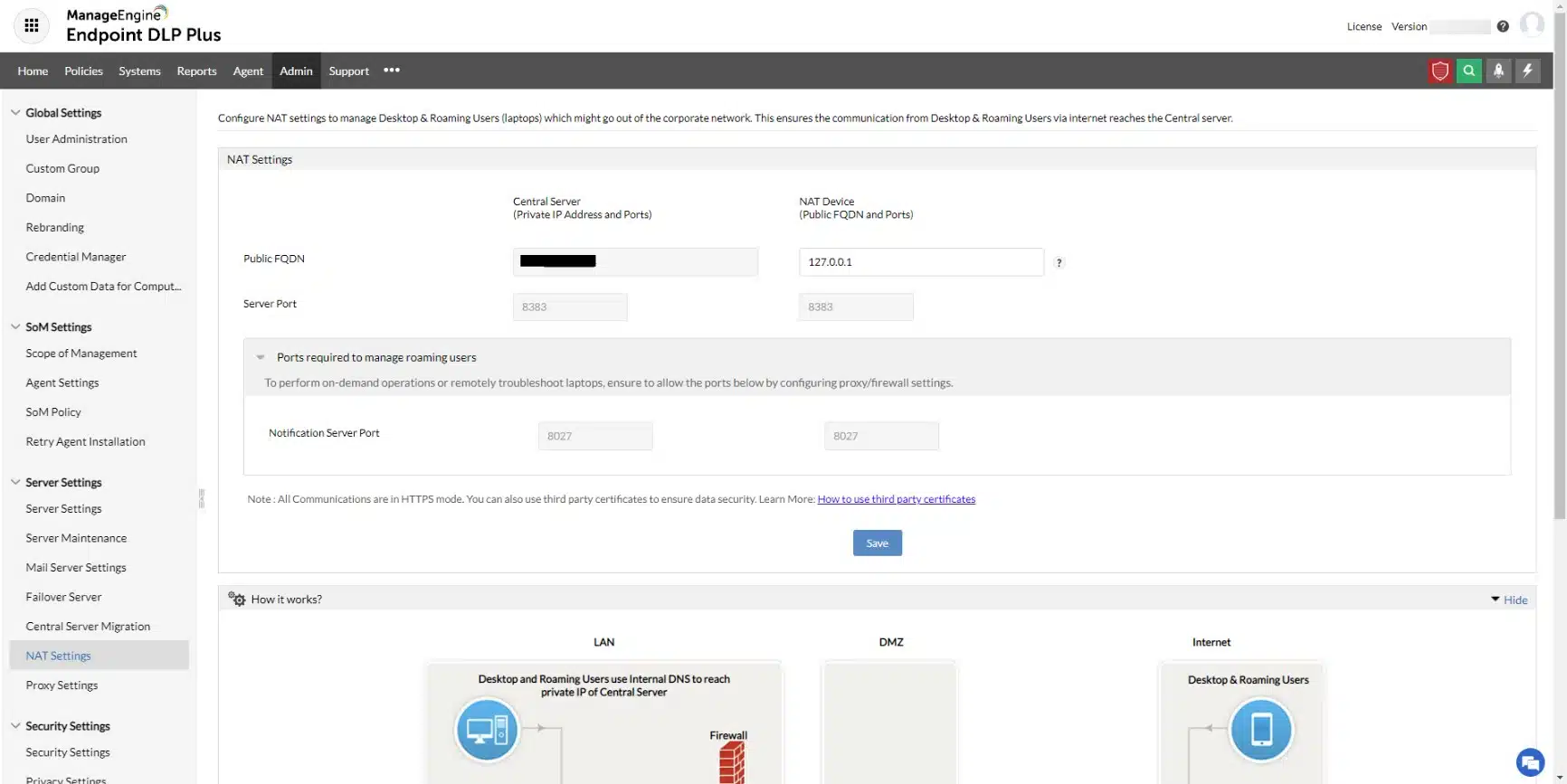
Within the console for Endpoint DLP Plus, the administrator needs to define a list of trusted applications. These will be able to get access to the contents of protected files and they should themselves be protected by access rights credentials. Data access actions within these applications get logged with each instance attributed to a user account. If data access is unusual, an alert is raised and all of the activities of that account get logged for an investigation into an insider threat or account takeover.
Data movements are also tracked and controlled, while not banned. In some instances, copying or transferring files and extracts is necessary, so specific users are permitted to perform specific actions. These controls extend to USB devices, print queues, email systems, and cloud upload facilities.
Who is it recommended for?
This system will appeal to businesses that need to comply with a data protection standard, such as PCI DSS, GDPR, or HIPAA. There is a Free edition that will scan up to 25 endpoints. That is suitable for small businesses. The paid package can operate over a LAN or a WAN. The software runs on Windows Server.
Pros:
- Data Identification: Keywords, regex, and fingerprinting
- Insider Threat Detection: User behavior analytics
- Data Containerization: Protects files with encryption
Cons:
- Windows Software: Not available for Linux
Endpoint DLP Plus runs on Windows Server. You can get the Free Edition to manage data on up to 25 computers. The paid plan is called the Professional Edition and you can get it on a 30-day free trial. If you decide not to buy at the end of the trial, the package switches over to the Free Edition.
4. ManageEngine DataSecurity Plus
Best for: Enterprises needing a robust data visibility and leak prevention tool that helps combat insider threats and stay compliant.
Price: DataSecurity Plus File Server Auditing is licensed per file server with both subscription and perpetual options. Subscription plans start at US$745 per year for 2 file servers, with higher slabs published on the pricing page, while perpetual licenses start at US$1,863 for 2 file servers with AMS from US$373. A 30-day free trial is available, and larger environments can request a personalized quote from the vendor.

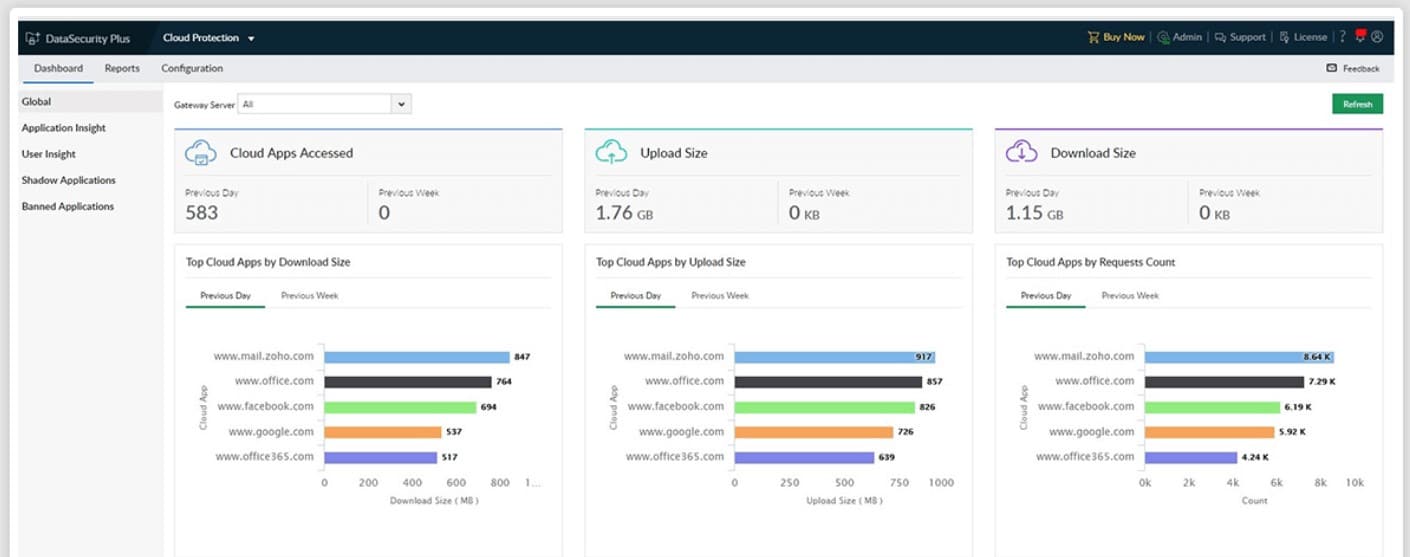
ManageEngine DataSecurity Plus is a file monitoring software platform that displays file and user activity on a network. You can see who accessed the file, when, and what they accessed. There are also several visual displays like graphs and pie charts that show you a more complete overview.
ManageEngine DataSecurity Plus Key Features:
- Data Risk Assessment: Sensitive data discovery and classification
- File Server Auditing: File access logging
- Data Movement Tracking: Through emails, peripherals, or cloud uploads
Unique Buying Proposition
From a business standpoint, ManageEngine DataSecurity Plus can be a good choice for it helps identify and block unauthorized and productivity-draining cloud applications, including social media, e-commerce platforms, and other risky websites. Further, the tool provides complete visibility into shadow IT usage and helps you take control of the data flow across cloud environments.
Feature-in-Focus: Detects ransomware and exfiltration while blocking unapproved applications
ManageEngine DataSecurity Plus key features help detect and swiftly respond to ransomware attacks, file transfer anomalies, and data exfiltration attempts. With built-in application control, the buyers can further block malicious apps and ensure only trusted software runs. Thus, reducing the attack surface and data leakage risks.
Why do we recommend it?
ManageEngine DataSecurity Plus is a very similar package to the Endpoint DLP Plus system. With this tool, you get sensitive data discovery and classification and also control over data movement channels. The tool also manages file servers to ensure junk temporary files are cleared out and that file access permissions are sufficiently controlled.
For instance, you can see a pie chart of All File and folder changes which is broken down into Create, Delete, Modify, Permission Change, Overwrite, Rename, and Move. You can also view the most active users, most accessed files, and most modified files within the file server.
One premium feature included with ManageEngine DataSecurity Plus is file access analytics. File access analytics highlight access trends, monitor access times and detect anomalous file access. For example, the tool can identify if a file was accessed outside of working hours and if the user was authorized to access the content.
The built-in auditing and regulatory compliance of ManageEngine DataSecurity Plus are also extremely useful. The tool is compliant with PCI DSS, HIPAA, GDPR, SOX, GLBA, and FISMA. By auditing access privileges you can better control access to files and ensure you don’t leave yourself open to penalties or other liabilities.
Who is it recommended for?
This tool, like Endpoint DLP Plus is good for those businesses that need to prove compliance with data security standards. It also tracks Web services and identifies when workers are spending time on non-business sites, such as social media systems. The package includes four modules, which are charged for individually.
Pros:
- Controls Data on Cloud Systems: Identifies shadow copies of files
- Ransomware Detection: Identifies malware by behavior
- File Copy Protection: Prevents sensitive data files from being copied
Cons:
- Software for Windows Server: Not available for Linux
For ManageEngine DataSecurity Plus file server auditing the price starts at $745 (£584) per year. The price includes file integrity monitoring, tracking file interactions, alerts, detect/quarantine ransomware and more. You can download the 30-day free trial version.
5. SolarWinds Server & Application Monitor
Best for: If you are someone who is looking for in-depth file activity monitoring and reporting capabilities within a broader server or application, this must be the right fit for your case.
Price: SolarWinds Server & Application Monitor uses on-premises subscription licensing based on node count, with pricing starting at $2,900 according to the official SolarWinds quote configurator; buyers can also request a quote and download a fully functional 30-day free trial from the site.
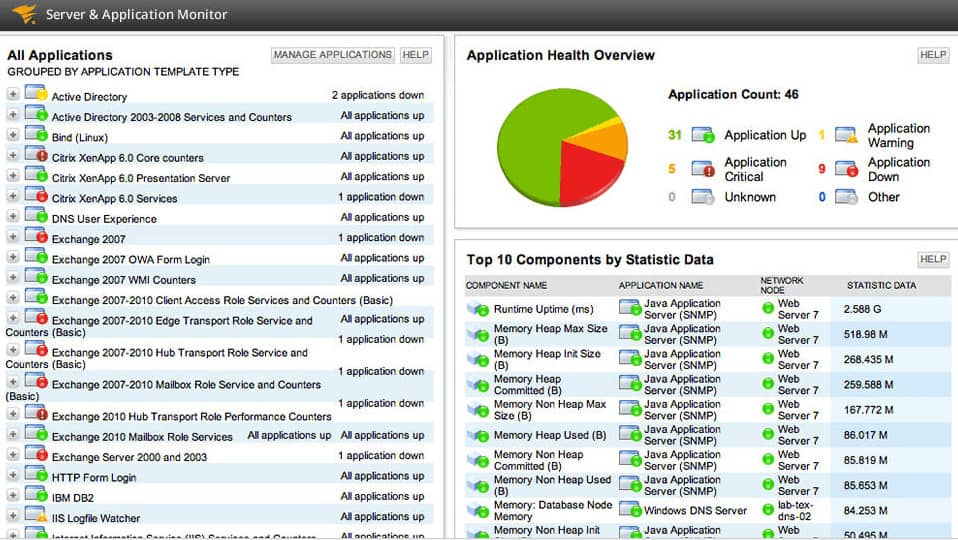
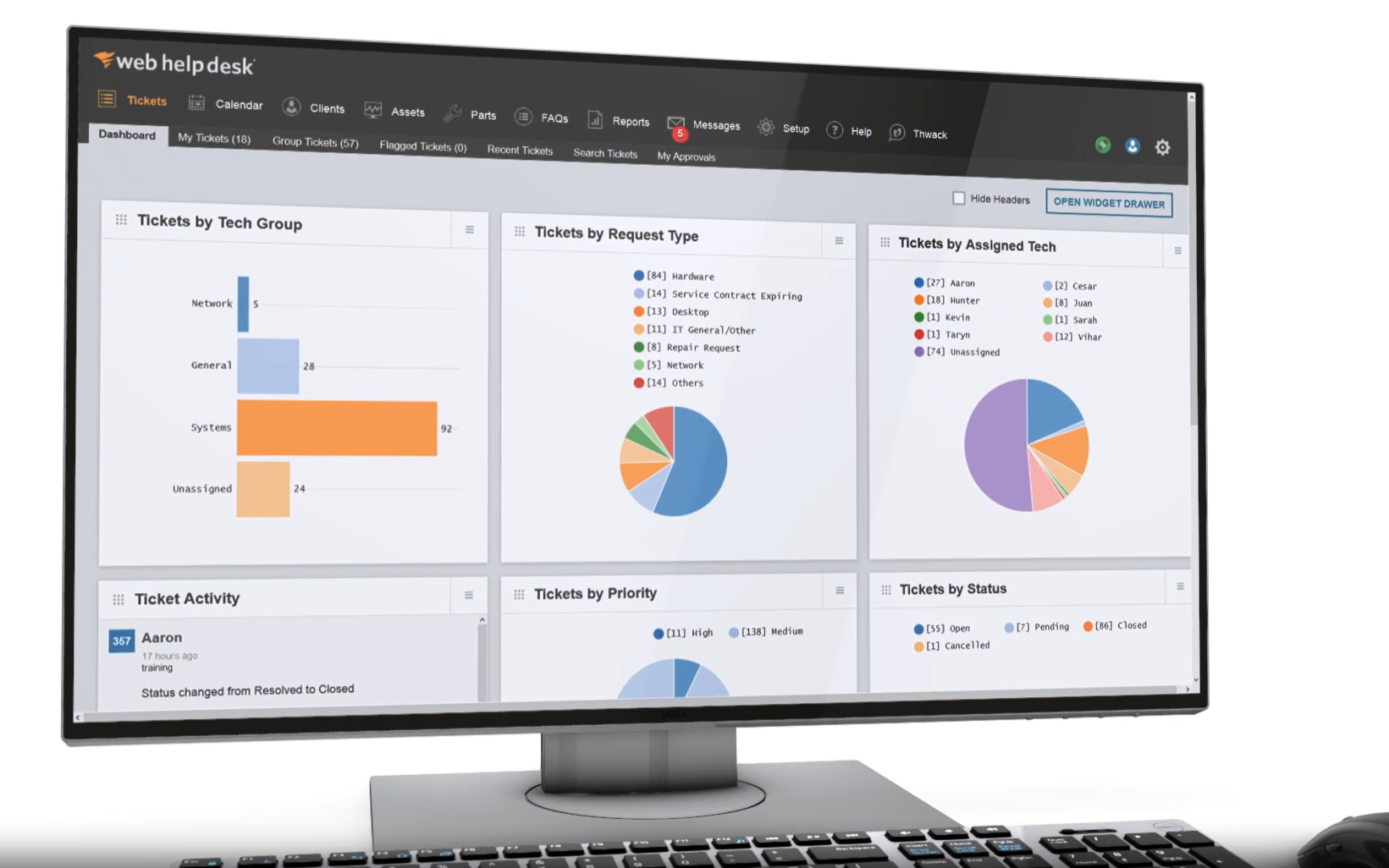
SolarWinds Server & Application Monitor is an application and file monitoring tool that tracks file changes in real-time. From the dashboard, you can view file characteristics like content, size, age, and count. These monitors keep you updated on changes within the network. For example, file age monitor tells you when the file was last modified.
SolarWinds Server & Application Monitor’s Key Features:
- On-Premises Software: Runs on Windows Server
- Tracks File Changes: Maintains monitors on files
- File Attributes: Logs file size, age, and name
- Folder Monitoring: Notes changes in file counts
- Checksum Tracking: Stores the MD5 checksums of files
Unique Buying Proposition
SolarWinds Server & Application Monitor (SAM) empowers IT teams with easy-to-use, built-in file server monitoring templates that are both powerful and flexible. When presenting this to your buying team, inform them that even if they are customizing templates, importing existing scripts, or creating detailed reports through a web-based interface, SAM will help them monitor the exact file activity metrics they need quickly.
Feature-in-Focus: Monitors file attributes and last changes to catch unauthorized edits
SAM enables proactive file activity monitoring by tracking critical attributes such as file age, count, size, and name. With the help of this tool, team members can even detect the last modification made to any file. Thus, making it easy to identify unauthorized or unwanted changes before they become a problem.
Why do we recommend it?
SolarWinds Server & Application Monitor provides tracking for server activity to ensure that resources do not run out. Part of the functions of the tool involves counting files and if the count unexpectedly changes, there could be unauthorized activity. This is a particularly important function for guarding archives and log file directories.
The fast-track system configuration of SolarWinds Server & Application Monitor makes it ideal for SMEs. After installing the software the program will start to automatically discover connected devices. In less than an hour, you can have a functional file monitoring platform with monitoring templates included out-of-the-box.
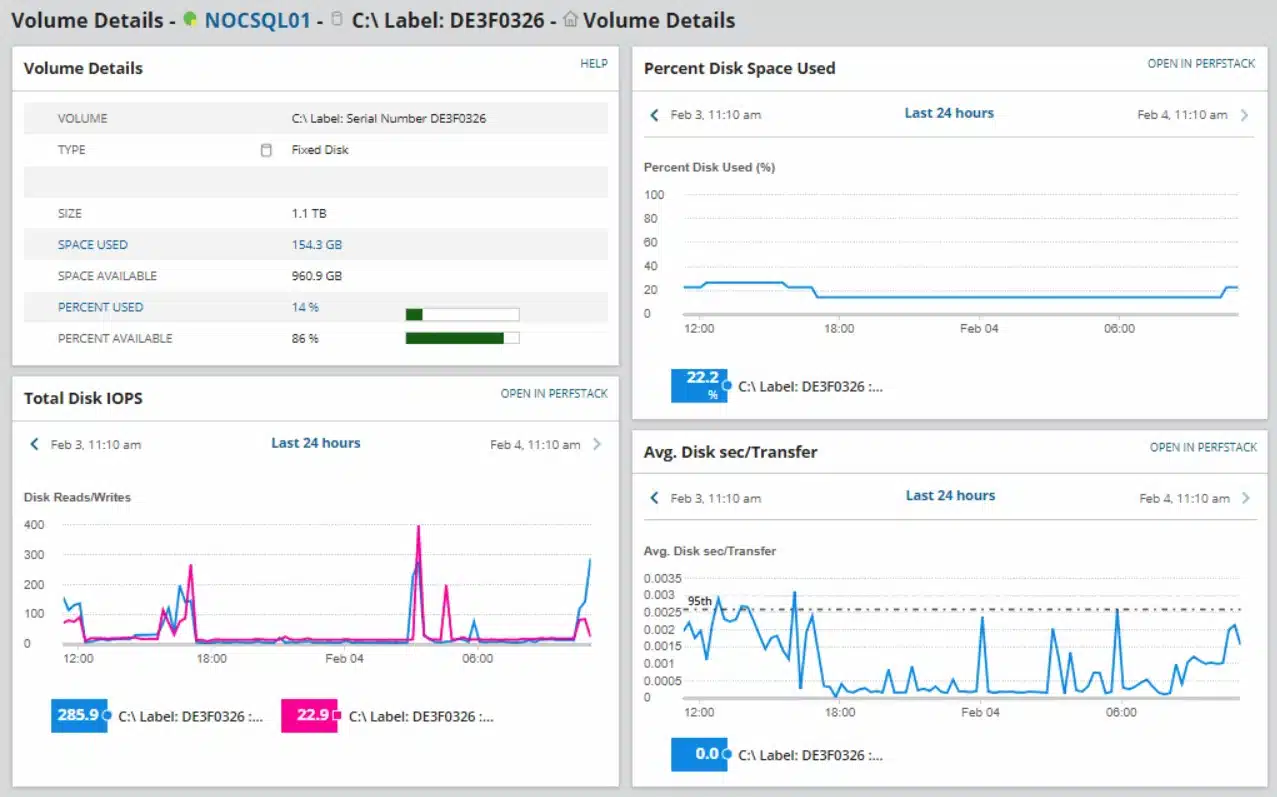
Of course, you don’t have to catch everything in real-time: SolarWinds Server & Application Monitor does it for you. Monitors like the file count monitor alert you if the number of files within a directory exceeds the configured threshold. The alerts function highlights potentially malicious activity so that you can take a closer look. Alerts can be customized so that you choose what parameters should be used.
The SolarWinds Server & Application Monitor identifies all activity on files in real-time, while also keeping track of all server resource utilization. The monitor includes an alerting system so key technical staff can get on with other tasks without missing key events occurring on the file system and the server in general.
Who is it recommended for?
SolarWinds Server and Application Monitor isn’t a dedicated file integrity monitor but it does notice file creation or deletion actions. This is a supplementary service, while the main focus of the package is to prevent applications from performing badly by watching their activities and spotting server resource shortages.
Pros:
- Folder Alerts: Place limits on file counts per folder and alert if this threshold is approached or hit
- File Alerts: Get an alert if specific files are changed
- File Server Monitoring: Track the performance of and activity on file servers
- Multiple Platforms: Scans across the network to monitor physical, virtual, and cloud servers
- Crosses OSs: Runs on Windows Server but can access other servers running other operating systems
Cons:
- Windows Only: This software won’t run on Linux
If you require a file monitoring solution with application monitoring capabilities then SolarWinds Server & Application Monitor is highly recommended. SolarWinds Server & Application Monitor starts at a price of $2,995 (£2,349). There is also a 30-day free trial.
You can enhance file activity tracking by also using the SolarWinds Log Analyzer. You can buy both the Server & Application Monitor and the Log Analyzer in the Log and Systems Performance Pack. Both tools appear in a single console, so you don’t have to keep switching windows in order to keep track of events on your system. The pack installs on Windows Server. Download the 30-day free trial.
6. Teramind
Best for: Ideal for organizations looking to unify data loss prevention, insider threat detection, and employee monitoring in a single platform.
Price: Starter, UAM and DLP are $14, $28 and $32 per seat per month on the Pay yearly option (billed annually for 5 seats), while Enterprise uses custom pricing via sales; Teramind also provides a free trial, a custom demo and a live demo.
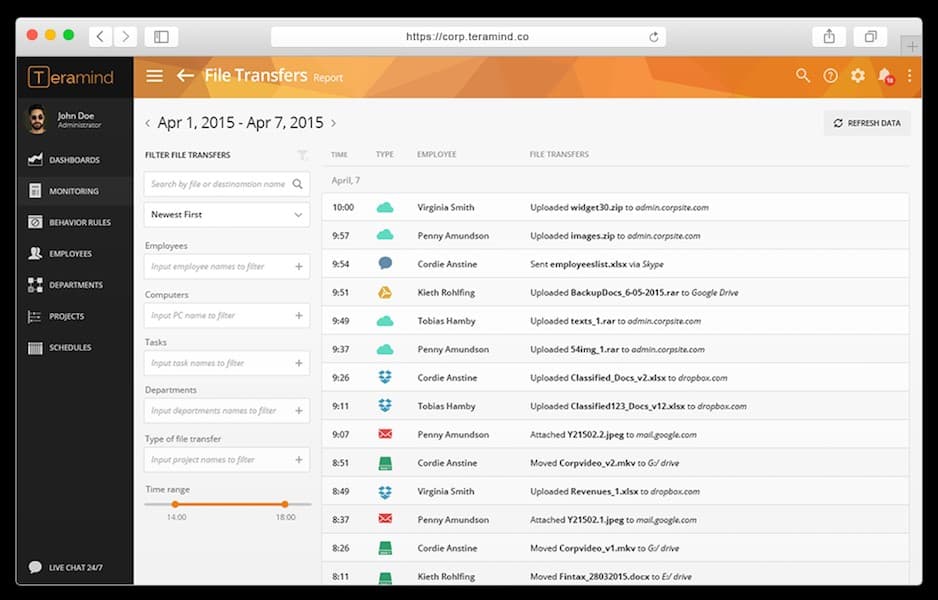
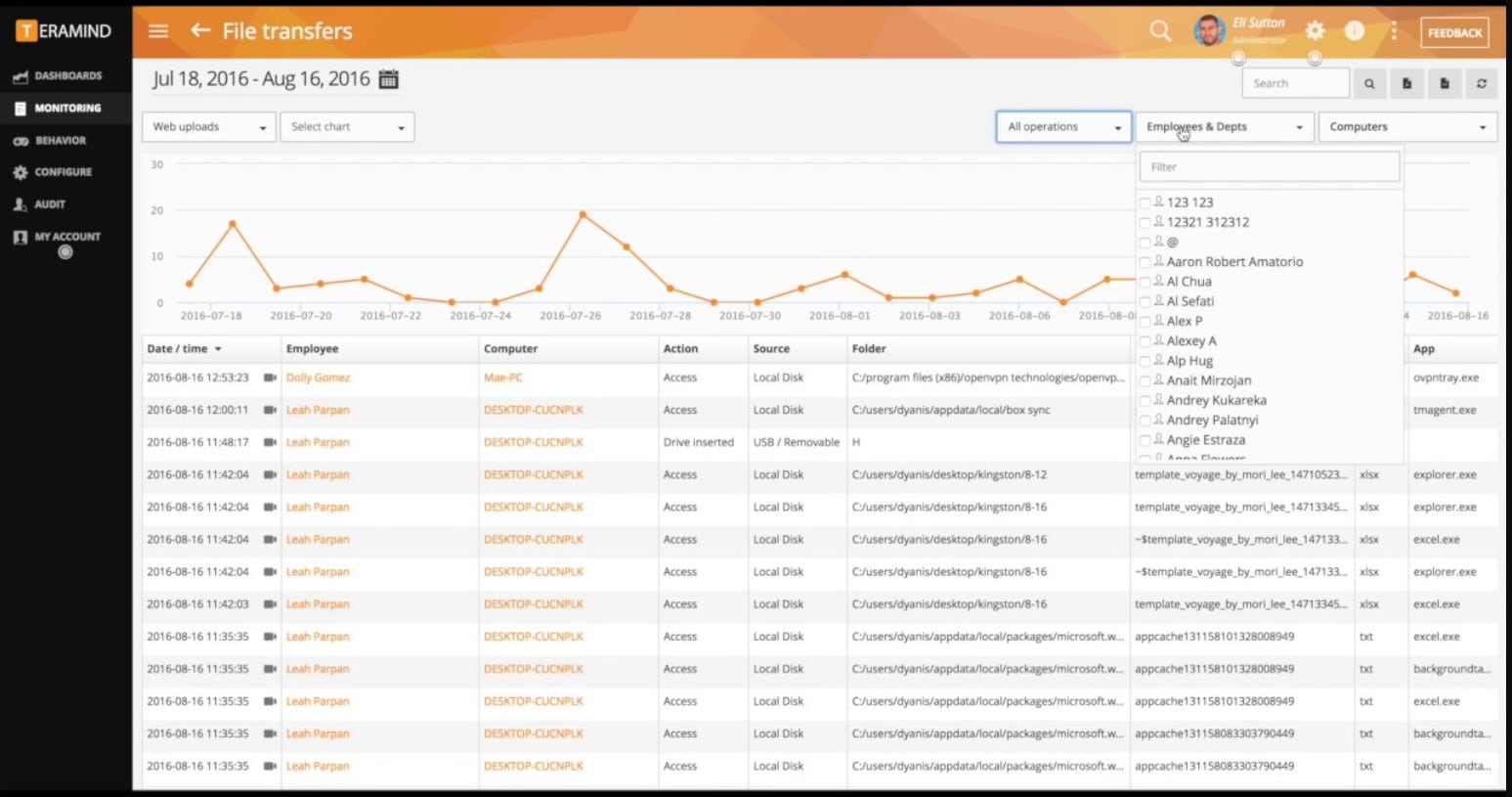
Teramind is a file activity monitoring software designed specifically for user activity monitoring. The product monitors file access, creation, deletion, and write operations. User activity is monitored through screen recording and textual logs so you can take a closer look at user activity to verify its legitimacy.
Teramind’s Key Features:
- Behavior Analysis: Focuses on insider threats
- Tracks User Access: Records Web and application access
- Content-Based Access Controls: Some users are blocked from accessing files with sensitive data
Unique Buying Proposition
Teramind delivers end-to-end data security that protects all forms of sensitive data. Be it structured, unstructured, or intellectual property or across on-premises and cloud environments, it offers full data protection. Using this tool, whether it’s files, code, designs, or communications, your critical assets will stay secure, thanks to proactive monitoring and control.
Feature-in-Focus: Uses behavioral analytics to flag insider threats in real time
Teramind uses intelligent behavior analytics to flag policy violations, insider threats, and suspicious user actions in real time. By monitoring patterns and anomalies, it helps you stop malicious activity before it escalates into a breach.
Why do we recommend it?
Teramind is a cloud platform that provides data loss prevention by focusing on insider threats. This remit also extends to combating account takeover. Data theft or sabotage requires the use of genuine user accounts. That makes intruders and disgruntled employees difficult to spot. This service deploys user behavior analytics to identify suspicious activity.
There is also a notifications system to keep you updated on developments in the network. For example, the notifications system tells you when files are uploaded to the cloud either as an email attachment or through a cloud service like Google Drive, Dropbox, or OneDrive. You also can block uploads to the cloud storage if you believe an activity is malicious in nature.
Who is it recommended for?
This is a cloud-based package and so you don’t need to find server space or maintain the software. All of these factors make this an affordable system for data protection.
Pros:
- Selective Controls: Doesn’t block authorized users from doing their jobs
- Redaction: Prevents employees from seeing data without deleting it
- Optical Character Recognition (OCR): Can identify words in images
Cons:
- User Scrutiny: Mainly built to spy on employees
Teramind is available on-premises or in the cloud and comes in three editions—Starter, UAM, and DLP—so you can align features to your monitoring and DLP needs without changing infrastructure. Licensing is per seat on a pay-yearly basis with a five-seat minimum for paid plans, and Enterprise is custom through sales. A free trial, live demo, and custom demo are available.
7. PA File Sight
Best for: IT teams and compliance officers who need precise control over file access and application execution must try this tool.
Price: The tool is licensed on a per-monitored-server basis. You can choose from Subscription Licenses or Perpetual Licenses.
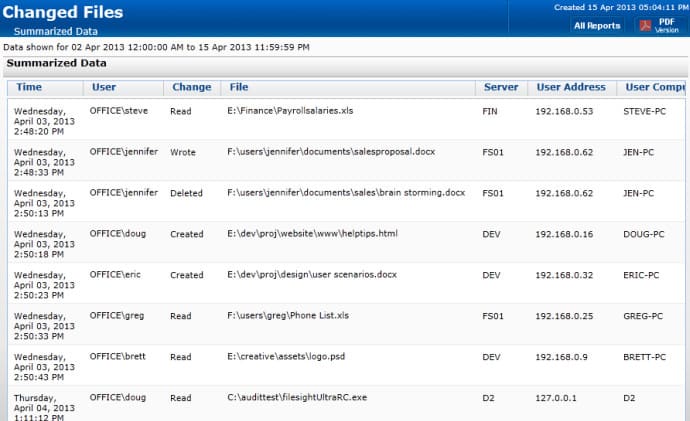
PA File Sight is a file monitoring solution with real-time file monitoring capabilities. The software monitors for file creation, deletion, modification, and movement of files. It also monitors the IP address, data/time and computer name of the interactions to help identify different users and spot suspicious activity. You can start monitoring as soon as you finish the setup process, which can be completed in just a matter of minutes.
PA File Sight Key Features:
- Protects Files: Blocks changes to files by unknown programs
- Application Whitelisting: Maintains a list of authorized software and blocks all others from running
- Controls User Actions: Blocks actions, such as file copying according to the user’s status
Unique Buying Proposition
The tool adds a powerful layer of defense to your systems. PA File Sight strengthens endpoint security by allowing only trusted applications to run. With intuitive exception management and strict blocking of unknown or untrusted programs, it prevents malware and unauthorized software from ever launching.
Feature-in-Focus: Blocks file copying and external storage to prevent data leaks
PA File Sight detects when users attempt to copy files and can automatically block the action. It also restricts access to cloud storage folders and external drives using real-time policies. Thus, helping team members to prevent data leakage and enforce secure file usage across the network.
Why do we recommend it?
PA File Sight provides data protection. It looks out for ransomware activity and also blocks unauthorized access to files or movements of data. The system works by fencing all files and preventing all programs from running. The administrator then whitelists specific applications and they should have their own access credentials requirements.
The program also has automated alerts. PA File Sight alerts you on changes made to files so that you can detect log tampering. Alerts come with a range of supporting information including user account, user IP address, computer name, target file, what the activity was and the date/time. Having this information available to refer to helps to put all the necessary information in one place so that you can start to address an attack.
When it comes to auditing, PA File Sight is an excellent choice. Not only is it compliant with PCI, HIPAA, FISMA AC-19, SOX, and ISO 27001/27002, but it also has reports. Reports can be generated in text, HTML, PDF or .CSV. Reports show specific users, specific time range, and the time period.
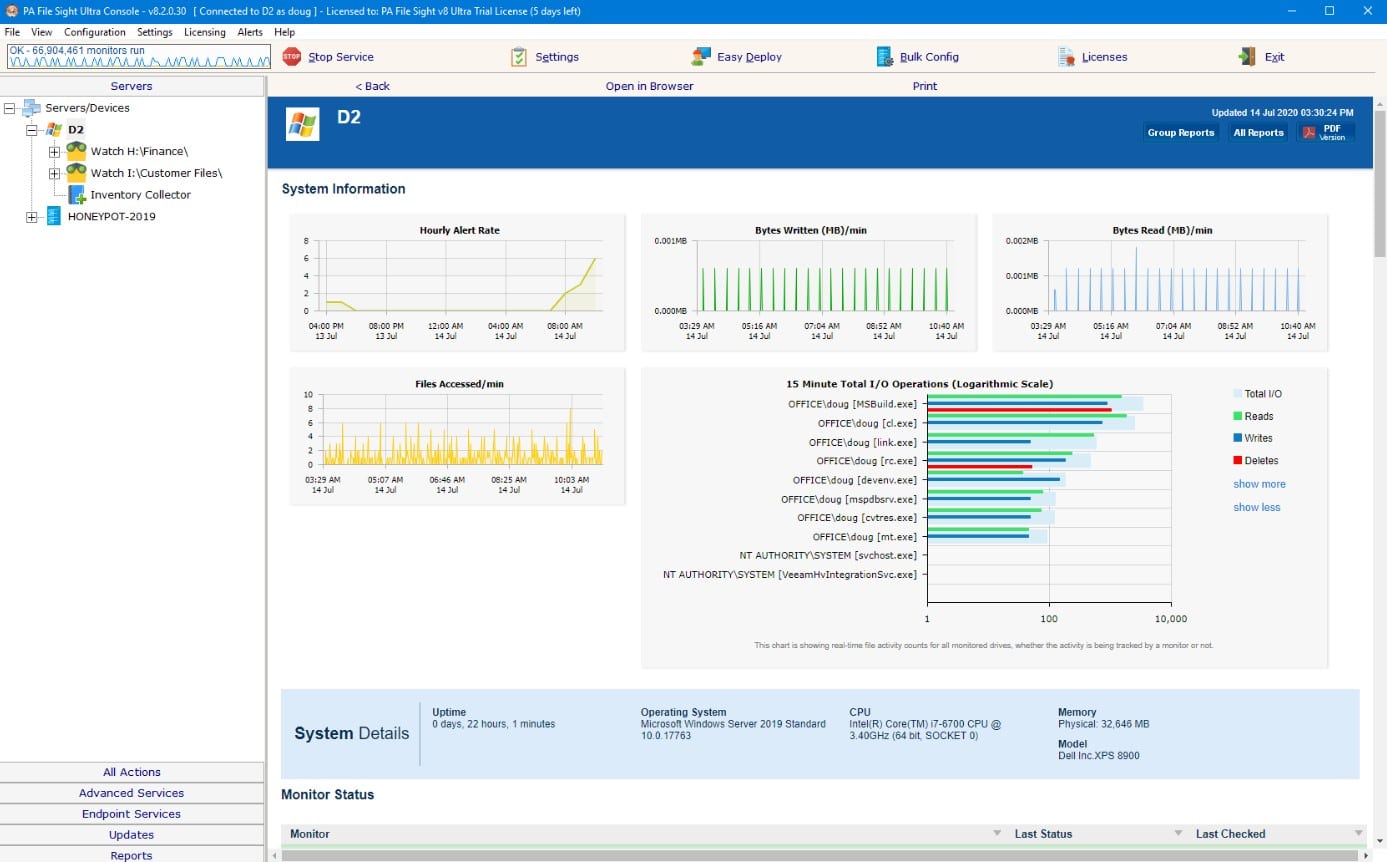
There are two editions, PA File Sight Lite and PA File Sight Ultra. The Lite edition starts at $199 for 1–9 licenses (per monitored server) and monitors file activity with alerts. The Ultra edition starts at $599 for 1–9 licenses and adds Microsoft SQL Server database support, reporting, advanced alerting, and external-drive blocking.
Who is it recommended for?
Businesses that need to protect data from attacks need this tool. That description encompasses just about every business currently in operation because loss or damage to operational data can mean ruin to a business. For example, ransomware can prevent a business from continuing. This software runs on Windows Server.
Pros:
- Protects Against Ransomware: Malware isn’t allowed to run
- Selectively Block Access: Controls access to cloud platform and USB devices
- Activity Alerts: Draws the administrator’s attention to risky user behavior
Cons:
- Available for Windows Server: Won’t run on Linux
8. FileAudit
Best for: IT teams, auditors, and security professionals who need continuous visibility and control over file access across hybrid environments might find it a perfect fit.
Price: Four pricing packages are available; Team is $40 per month, Small is $68 per month and Medium is $112 per month, all billed every three years, while Enterprise uses custom pricing through the sales team. A 20-day free trial and a demo are available.
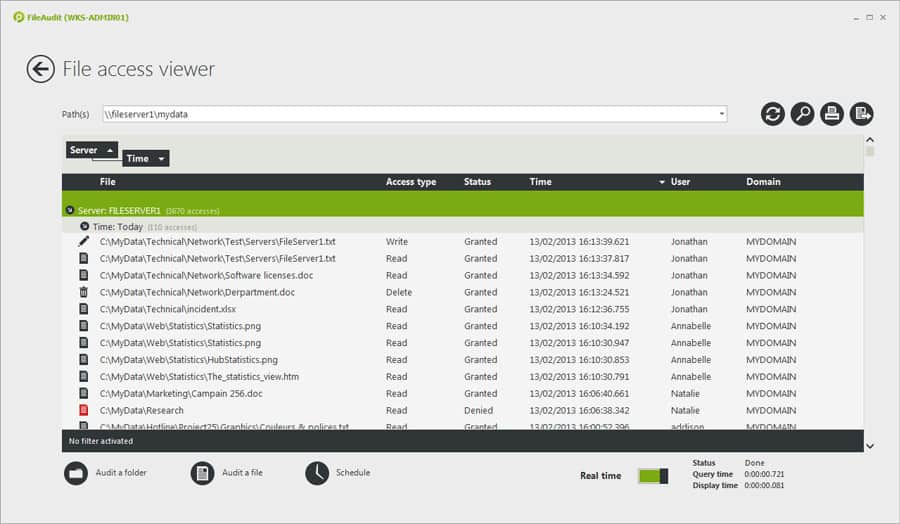
FileAudit is a real-time file monitoring tool that has been designed to help monitor how employees interact with files. The platform monitors file changes, read-write, deletion, and ownership. Having this information on hand makes sure that you can immediately discover and address cyberattacks before the damage is done.
FileAudit’s Key Features:
- Tracks File Access: You can tailor this activity to specific files or specific locations
- Identifies Endpoints: Records the device that file access was made from
- Logs Activity: Records both successful and blocked file access events
Unique Buying Proposition
FileAudit offers a searchable dashboard that gives you full visibility into file and folder access events across multiple Windows file servers and cloud storage. The tool helps eliminate all the blind spots and simplifies audit workflows with real-time monitoring from a single system.
Feature-in-Focus: Maintains searchable file access trails to simplify audits and forensics
FileAudit simplifies access auditing by maintaining a centralized, audit trail of all file and folder activity. The secure and searchable log helps you quickly investigate incidents and enhance accountability.
Why do we recommend it?
IS Decisions FileAudit is a software package that protects files on Windows computers and cloud platforms. The system scans files on OneDrive, SharePoint Online, Google Drive, Dropbox, and Box. this system tracks user activities and spots irregular activity when accessing files. It also tightens up permissions and access rights.
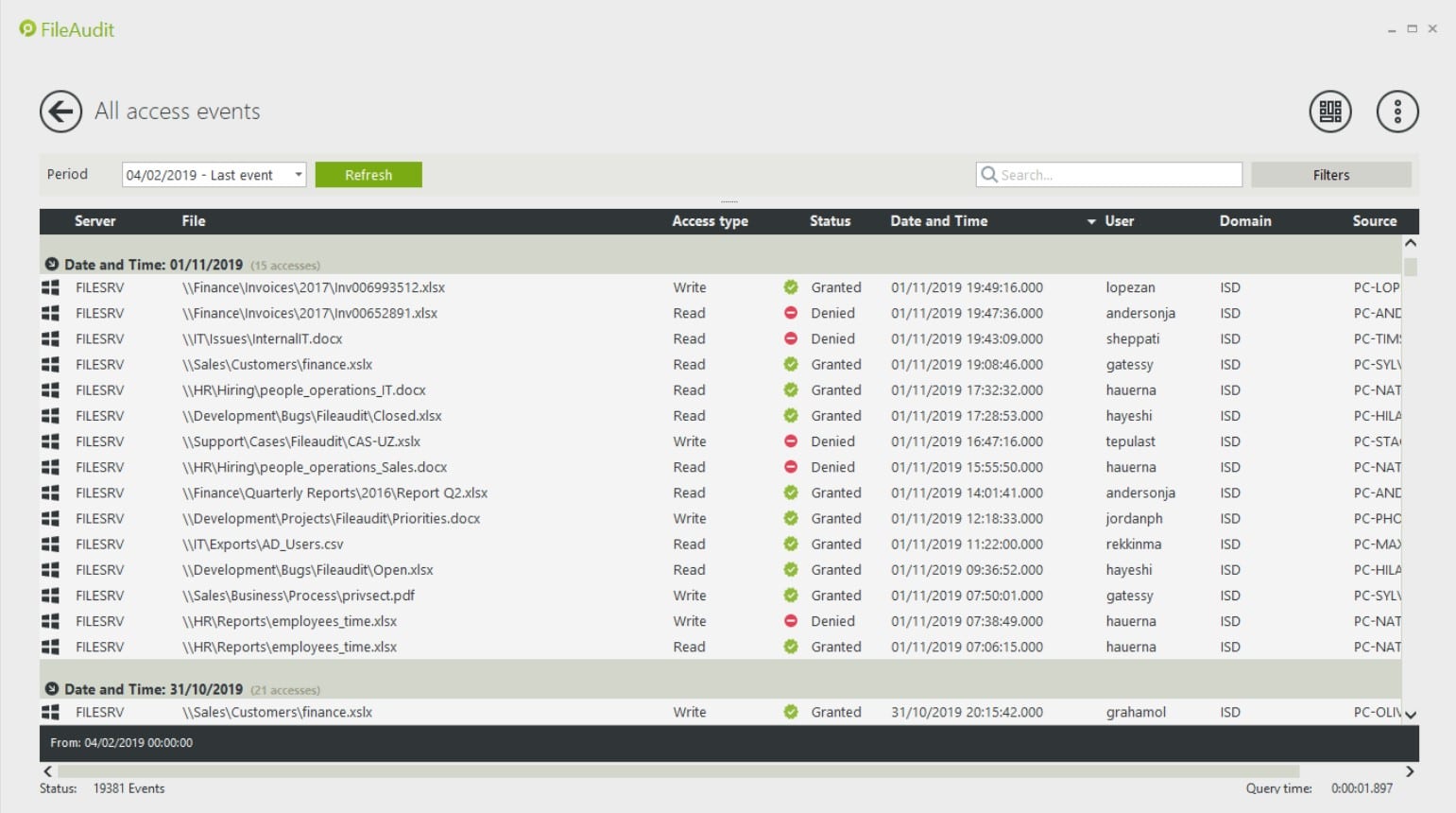
There are also automated email alerts to notify you about user actions. Alerts are generated for certain events like the deletion of a file or if a user has been denied access to a file. Staying on top of this information helps to diagnose suspicious behavior as early as possible.
There are four versions of FileAudit available to purchase: Team, Small, Medium, and Enterprise. The Team version costs $50 (£39) per month for 100 users and one server. The Small version costs $85 (£66) for 500 users and three servers.
Who is it recommended for?
You will need to be running Windows on all of your on-site files servers, specifically, this tool operates on the NTFS system. The cloud platform protection is an add-on service for which there is a fee. You can’t have the cloud protection system by itself. The four plans for the system cater to businesses of all sizes.
Pros:
- NTFS Permissions Tracking: Records changes to the permissions system
- Cloud Scanning: Extends monitoring to cloud drives, such as Dropbox, Sharepoint Online, OneDrive, and Google Drive
- Log Analysis: Data viewer with analytical tools
Cons:
- Operates on Windows Server and Cloud Platforms: Doesn’t protect data on Linux servers
The Medium version costs $140 (£109) for 1000 users and five servers. The Enterprise version supports over five servers with more than 1000 servers (but you’ll need to contact the sales team directly). You can download the free version here.
Selecting the right file activity monitoring software
File activity monitoring is part and parcel of document management in an enterprise environment. Tools like ManageEngine ADAudit Plus and Site24x7 Infrastructure have been built with this purpose in mind, offering file and directory monitoring capabilities. Each tool is easy to use with simple configuration and an overview of file interactions.
The file access analytics feature included with ManageEngine DataSecurity Plus is useful for those enterprises that want to automate some of their threat detection. Automation pays dividends to response time when reacting to malicious activity.
Our Methodology for Choosing Network Connectivity Troubleshooters
By investing in the right file activity monitoring tool, organizations can track file access, detect unauthorized changes, and enhance data security. It plays a crucial role in maintaining compliance and protecting your sensitive information. However, with so many tools in the market, IT teams can find it frustrating to compare and find the right tool for their business. To make it easier, we have listed some key factors that will guide IT teams through the evaluation process.
1. Real-Time File Activity Tracking
Make sure the tool you are planning to select offers real-time monitoring of file activity across systems. With this feature, IT teams will be able to track who accessed a file, what actions were taken (read, write, modify, delete), and when. This capability helps organizations stay ahead of potential insider threats and security incidents by gaining instant visibility into file-level events.
2. Automated Log Collection and Centralized Visibility
Choose a tool that automates log collection and allows IT teams to access all the file activity data in a single dashboard. With centralized visibility, your IT and security teams will be able to analyze patterns, detect anomalies, and respond to suspicious behavior faster without combing through siloed systems manually.
3. User Behavior Analytics (UBA)
A modern file monitoring tool should go beyond simple tracking. Look for User Behavior Analytics capabilities within your tool, as it will help detect unusual file access patterns better. Let’s say there was a sudden spike in your file downloads or access during odd hours. The tool with UBA capabilities will track these actions and trigger alerts in real-time. Thus, improving proactive threat detection and incident response.
4. User Identification and Timestamping
Every access event should be tied to a specific user account and timestamp. This feature enables accountability and simplifies incident investigation by providing a clear audit trail of who accessed what and when.
5. Targeted Protection for Sensitive Files or Directories
Rather than monitoring every single file, the tool should allow administrators to focus on specific files or directories. This helps optimize performance and ensures that your most sensitive or business-critical assets receive the highest level of protection.
6. Automatic File Restoration via Backup
Look for tools that come with an integrated backup mechanism. In the event of file tampering, the system should be able to automatically restore the original version of your file. This adds a crucial layer of business continuity and data integrity.
7. Blocking File Copies
A strong security solution should include controls to prevent files from being copied or exfiltrated, especially onto unauthorized devices or external storage. This helps prevent data leakage and strengthens overall endpoint security.
8. Granular File Access Controls
The ability to set fine-grained permissions and monitor access rights is important. Try to look for a tool that allows you to easily define who can access what, detect privilege escalations, and prevent unauthorized modifications to sensitive files.
9. Compliance Reporting
Whether it’s GDPR, HIPAA, SOX, or any other regulation, your tool should support compliance reporting. Having a built-in compliance reporting feature in your tool will help team members save time, especially during audits. Further, this feature helps maintain a solid security posture.
10. Custom Alerting and Notifications
Make sure the tool can send alerts based on customizable rules and thresholds. This allows team members to focus on other crucial events, such as access to confidential folders or unusual file transfers. One should not ignore this feature as it can be a great advantage.
11. Free Trial or Demo Option
Always test before you commit whenever investing in a software tool. Look for vendors that give you options like free trials or demo sessions. This lets you evaluate the tool’s interface, features, and performance without the upfront commitment. You get clarity on whether the particular software meets your business objectives or not.
12. Cost-Effectiveness and Scalability
Select a solution that offers long-term value. Whether you’re a small business or a growing enterprise, the tool should scale with your needs without hidden costs. Balance essential features with affordability, and avoid overpaying for unused functionality.
13. Robust Support
Post-purchase assistance is important for seamless deployment and operation. Make sure the vendor you are planning to go with provides thorough documentation, video tutorials, and a responsive support team to handle queries and troubleshoot issues faster. This can be beneficial when implementing advanced configurations.
Broader B2B Software Selection Methodology
There are thousands of file activity monitoring software available, and each claims to offer unique features and functionalities. Choosing the right one in such a case becomes a bit difficult for an organization. Hence, apart from going through these feature lists, our expert team evaluates the software based on other requirements as well. We believe that B2B software evaluation cannot be limited to only measuring and comparing performance.
Instead, it is equally important to dig into other aspects, such as scalability, customer experience, value for cost, vendor reliability, etc. In short, each and every detail of the vendor and its product must be thoroughly assessed and presented for an informed decision.
Here is the evaluation criteria that our Comparitech team follows during the B2B tool review and evaluation process:
- Does the set pricing structure align with the features provided by the tool?
- Can the tool help overcome an organization’s operational challenges?
- In case the business expands in the future, will your tool be capable enough to support the business?
- What opinions do new or existing users have about the product?
- How quickly does the vendor’s support team respond after a ticket is raised by the user?
- How good is the tool based on usability and limitations?
In every review, most of these factors are covered to make it easier for the buyer to compare and select the right product. In fact, if there is any information that can be helpful or act as a drawback for the buyer, our team highlights it in reviews clearly.
For more information on how Comparitech’s team assesses each software or product, we recommend checking out our B2B software methodology page.
Why Trust Us?
Every time you read a software or product review on Comparitech, be assured that you are tapping into a resource that guarantees integrity, precision, and deep technical updates. Our experts aim to help businesses make smart decisions with insightful and unbiased evaluations. We understand that one cannot rely only on feature comparison to select the best tool for their organization; hence, our team goes beyond and reviews tools based on other aspects as well, such as support system, vendor availability, etc.
Our team independently tests each tool, reviews real user feedback, studies vendor policies, and explores support infrastructure to provide a complete picture of each product. Every recommendation is based on proper analysis and relevance, not only on brand popularity. Our transparent approach ensures that readers get value from each review, whether you’re comparing tools for your small business or large organization. Over the years, thousands of business professionals have trusted Comparitech’s reviews because of the way we combine hard data with user-centric analysis. We’re not here to tell you what to buy, but to help you understand different options and make informed business decisions.
File Activity Monitoring Software FAQs
What is File Integrity Monitoring?
File integrity monitoring is an ongoing automated process that validates the status of files held on a system through indicators such as file size and last modified date. Any changes to files should be logged and unauthorized changes rolled back.
Why is deep packet inspection vital to file activity monitoring?
Deep packet inspection is a network monitoring part of file integrity monitoring. It is able to add information about the user who tries to modify a file, such as location and home device.
Can file activity monitoring prevent data loss?
File activity monitoring is able to add to existing DLP technology by protecting the contents of files and monitoring access to it. Thus, it is able to catch unauthorized file access, blocking theft, deletion, corruption, or alteration of the contents.