IP address management is necessary for your network if you use dynamic addressing. The Dynamic Host Configuration Protocol (DHCP) allocates addresses to nodes on your network on leases, which can be renewed.
However, the reclaiming of abandoned addresses and the process of ensuring that addresses are kept within ranges for subnets and not duplicated is complicated and time-consuming. So, you need to use an automated IP address manager in order to run a DHCP environment.
These IPAM tools address the following pain points in any organization:
Inefficiencies that come with using manual methods and spreadsheets to manage IP addresses.
- Frequent unplanned IP conflicts and downtimes.
- Limited visibility across platforms.
- Poor scalability in growing networks.
- Lack of automation and provisioning workflows.
- Compliance and audit gaps.
To address the above pain points, we have come up with a list of the best IPAM tools. If you can’t read the whole article, here is our summary list of the best IPAM tools:
- ManageEngine OpUtils IPAM EDITOR’S CHOICE Combination of an IPAM and a switch port mapper. Runs on Windows Server and Linux. Download a 30-day free trial.
- LightMesh IPAM Cloud-based subscription service that has modules for network management that include IP address management.
- SolarWinds IP Address Manager Full DDI with IP address monitoring, DHCP management, and DNS correction. Runs on Windows Server.
- Men&Mice Micetro DDI IP address manager combined with DHCP and DNS monitoring to provide a full DDI. Installs on Windows and Linux.
- Morpheus Cloud-based DDI with excellent security monitoring features.
- BlueCat Overlay for Microsoft A DDI suite with network security monitoring. Installs on Windows.
If you need to know more, explore our vendor highlight section just below, or skip to our detailed vendor reviews.
Βest IPAM Tools for Windows and Linux highlights

Top Feature
Combines IP address management with switch port mapping, supports DDI visibility and rogue access detection
Price
Starts at $138 per year for 250 used switch ports and IP addresses
Target Market
Network engineers, data centers, MSPs needing IP and port management
Free Trial Length
30-day free trial
Additional Benefits:
- Helps spot rogue access and irregular activity signals
- Avoids pool exhaustion by reclaiming abandoned addresses for reuse
- Reduces DDI drift with real-time address state visibility
- Improves accountability with multi-user access and logged console actions
Features:
- Self-installing software, runs on Windows Server and Linux
- Works with DNS servers and Microsoft DHCP server, DDI controller capabilities
- Scans IPv4 and IPv6 subnets, links IPs to MACs and switch ports
- Monitors DHCP scopes and leases, alerts on pool exhaustion and lease conflicts
- Uses Active Directory access and record updates to reconcile IP and host changes

Top Feature
Cloud SaaS IPAM with visual subnet planning, network containers and cloud integration
Price
Free tracks up to 1,000 IP addresses, Pro $35 per month or $385 per year, Team $249 per month or $2,739 per year, Enterprise custom
Target Market
Cloud-ready IPAM for network engineers, IT infrastructure teams, cloud network planners
Free Trial Length
30-day free trial
Read more ▼

Top Feature
Centralized DDI console, manages DHCP DNS IPAM across vendors, discovers subnet scopes and scans for abandoned addresses
Price
Negotiated pricing
Target Market
Enterprise-scale DHCP DNS IPAM, large networks, mixed environments
Free Trial Length
30-day free trial
Read more ▼

Top Feature
Overlay DDI orchestration, central dashboard coordinates DHCP DNS IPAM across hybrid and multi-cloud environments
Price
Negotiated pricing
Target Market
Enterprise and multi-cloud overlay, large networks and mixed environments
Free Trial Length
Free trial available, duration not disclosed by the vendor
Read more ▼

Top Feature
Cloud control panel runs IPAM with DHCP DNS server control for full DDI management
Price
Negotiated pricing
Target Market
Cloud and hybrid orchestration for cloud architects DevOps teams and enterprises in multi-cloud and hybrid environments
Free Trial Length
No free trial stated, demo version available on the service’s website
Read more ▼
Top Feature
Overlays Microsoft DNS and DHCP into BlueCat Address Manager, single source for DDI
Price
Negotiated pricing
Target Market
Enterprises using Microsoft DNS and DHCP, unified DNS and DHCP capabilities
Free Trial Length
No free trial offered
Read more ▼
Key points to consider before purchasing IPAM Tools for Windows and Linux
IPAM is an important functionality for the smooth functioning of your networks and devices, and this is why administrators prefer to have complete control and visibility into it. While all IPAM tools can offer this visibility, you must also consider aspects like compatibility, compliance, and security to ensure that the IPAM tools add value. Some aspects to consider are:
- Platform Compatibility: This is one of the most significant and sometimes even overlooked aspects. The IPAM you select must fit well into your organization’s existing tech stack. Also, if you use multiple environments, or plan to do so in the future, look for a tool that works across all your environments.
- Integration with DHCP and DNS: It helps to have an IPAM tool that integrates with DHCP and DNS for unified views and easy management. For Linux environments, check if the tool supports BIND, ISC, and DHCP.
- Automation and APIs: Prioritize tools that offer automation workflows and seamless integration through APIs. It also helps if the tool supports configuration management platforms like Ansible or Terraform. All these capabilities make it easy to tie IP assignments into provisioning workflows for better user management.
- Scalability and Performance: While selecting a tool, keep an eye on its scalability and performance, as these can be critical when your infrastructure grows and expands.
- Security: Another important aspect is security. Look for tools that offer encryption, access controls, and the use of secure communication protocols. It is also good to have audit logging for compliance.
- Reporting: The tool must generate detailed reports on address usage and scope to ensure that rogue devices do not operate in your network. These reports can help to communicate critical information with the concerned stakeholders.
Though all these factors are significant, rank them from the most essential, so you can zero in on the tool that meets your specific requirements. Our list includes tools with varying capabilities to help you make an informed decision.
To dive deeper into how we incorporate these into our research and review methodology, skip to our detailed methodology section.
DDI
The allocation and replacement of temporary addresses all around your network has many consequences for other sections of the addressing system, which need to be coordinated. A typical DHCP environment will include a DHCP server that distributes new addresses to devices as they connect to the network, a DNS server, which maps between hostnames and IP addresses, and an IP address manager (IPAM), which is a central store of available addresses. These three tasks need to be coordinated. For example, if all of the IP addresses on your network get reallocated through the DHCP server, all of the cross-reference entries in the DNS server will have to be updated. The IPAM needs to know which addresses are available. That includes the task of recovering abandoned addresses and registering them as available again.
The coordination of these three addressing functions into a coordinated tool is called ‘DDI,’ which stands for DNS, DHCP, and IPAM. The extent to which you automate the interaction between these three servers is up to you. Just because you have a degree of manual intervention in your system does not mean that you do not have a DDI environment. As long as the DNS server gets updated when you change IP addresses and your IPAM pool of available addresses gets updated when different addresses are live, then you have a DDI. Whether it is all done without you lifting a finger or if you actually have to copy over some files from one application to another, you are still running a DDI.
IPAM in DDI
The role of IPAM is central to any dynamic addressing system. However, address management is not limited to dynamic addressing. You can issue fixed addresses to particular pieces of equipment and permanently allocate all of your addressing. You still need a central record of which device should have which address in case the node loses its own address and needs to get it reallocated.
You can run a restricted DHCP system with subsections of the total range of addresses (scope) reserved for subnets. You can also run a mixed environment, with dynamic addressing for most of the nodes on your network and fixed addressing for key devices.
The DHCP server can be set to allocate addresses automatically or you can work with a manual allocation system. However, you still need a central registry of which addresses are in use and which are still available.
So, no matter what addressing method you use, you will still need an IP address manager. A key function of an IPAM is the recovery of abandoned addresses. There are some very simple but effective tools that can sweep your network and assemble a list of addresses that are currently in use. These tools are called ‘Ping sweepers’ or ‘IP address trackers.’ Such tools give you partial IPAM functionality. If you have a small network, you could get by with just an IP tracker. However, you will have to make up the other IPAM functions manually by setting up a spreadsheet or list of available addresses.
When you perform a sweep of the network, you then need to compare the list of results to the list of allocated addresses that you have in your spreadsheet. You would then manually update any records that show incorrect availability statuses.
Automated IP address managers
You don’t have to have a fully automated IPAM. If you contribute some ‘sweat equity’ to your IP address management system, you are still running an address manager – just with a lot of personal involvement.
When you manage a small network, that manual intervention is not so time-consuming. However, as your network grows, you will find that you just don’t have enough hours in the day to carry out all of your IPAM tasks. At this point, you will be faced with a choice: either take on an extra member of staff to watch over the addressing system of your network or go for full IPAM automation.
Although it’s great to create employment, the kind of applicants you will need to look for in a systems administration role need to be qualified and experienced. There is a global shortage of such people, so you aren’t really doing anyone a great favor by putting even more pressure on an undersupplied tech skills market. Also, using an automated tool costs less than employing more staff. An automated tool won’t go on vacation or get sick. Automated tools don’t get hangovers or get distracted – they are not prone to human error. So, you would be better off investing in a good IP address manager to automate all of your address management functions than getting a human to do it.
The best IPAMs
There are a lot of DDI solutions out there. You can go for separate elements, to build up your DDI system with an IP tracker and separate functions for address record keeping. You can buy in a full IPAM and complement it with a DHCP server and a DNS server from different providers, or you can opt for a fully-integrated DDI solution.
This guide focuses on IP address managers, so if you are just looking for an IPAM, rather than a full DDI, the list of recommended tools that we have put together will cut down your research time and help you zoom in on the best options available.
Here is our list of the best IPAM tools for Windows and Linux:
1. ManageEngine OpUtils IPAM (FREE TRIAL)
Best for: IP and port management
Relevant for: Network engineers, data centers, and MSPs.
Price: Starts at $138 per year for 250 used switch ports and IP addresses.
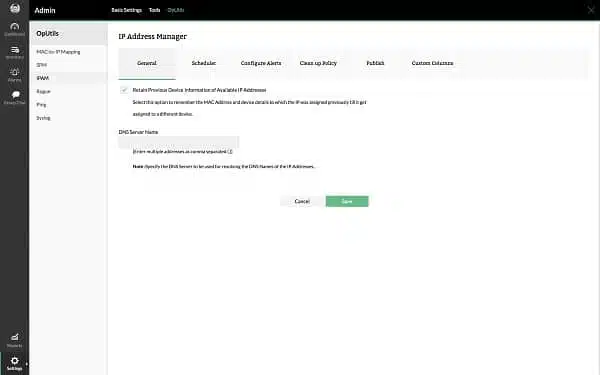
OpUtils is produced by ManageEngine, which provides a range of IT management tools. This bundle includes an IPAM and a switch port mapper. This combination is a very good package for detecting rogue access to your network and irregular activities that might indicate compromised user accounts. The software is self-installing and runs on Windows Server and Linux. Although there is a free version of OpUtils, that edition doesn’t include either the IPAM or the switch port mapper.
Key Features:
- Versatile Platform Support: Compatible with both Windows Server and Linux, offering flexibility in deployment.
- DHCP/DNS Integration: Seamlessly works with existing DHCP and DNS servers to centralize DDI management.
- Device Discovery: Continuously scans for new devices, ensuring up-to-date network visibility.
- Subnet Management: Assists in efficient allocation of IP address space to prevent exhaustion.
Unique Business Proposition
OpUtils brings together IP address management and switch port mapping in the same console, reducing tool sprawl and providing better visibility. It can also scan IPv4 and IPv6 subnets to track addresses and tie them to Macs and switch ports. It integrates with DNS and DHCP to enable you to see the state of addresses in real time.
Feature in Focus: DHCP Monitor
A highlight of this tool is that it can continuously scan and monitor DHCP scopes to identify which IP addresses are used or free. It can also monitor active leases and MAC addresses, so you can get alerts on pool exhaustion and lease conflicts.
Why do we recommend it?
OpUtils IPAM is part of the OpUtils package – the other part is a switch port mapper. The full package takes care of all addressing issues on your network. There are a couple of other utilities in the bundle as well, which include a bandwidth monitor and network device config backups.
The IP Address Manager is able to interact with both your DHCP servers and DNS servers, giving the tool DDI controller capabilities. However, it is only able to communicate with the Microsoft DHCP server. The tool can also access Active Directory on Windows to check on the status of equipment. The data retrieved from that source is shown in the dashboard alongside its allocated IP address. The IPAM can also update Active Directory records to reconcile altered IP and host addresses.
The OpUtils IPAM will check on the exhaustion of address pools and advise you when subnets are running out of addresses. The package also includes a guided subnet address allocation function that can help you allocate the address pool more effectively. The tool will also check the network and alter the statuses of any addresses that it finds have been abandoned, making them available for reuse. This function is performed by the Scope Monitor module of OpUtils, which also updates the DHCP server with address usage information.
The dashboard is customizable and you can create many user accounts for the system to enable each team member to have direct access to the tool. All actions performed in the console are logged. The interface includes attractive graphical representations of live data and you can also get an overview of activities from stored historical data.
Who is it recommended for?
The OpUtils software package installs on Windows Server or Linux and it is also available as a service on AWS Marketplace. You get better functionality if you are running Windows Server because the tool is able to integrate with Active Directory. This extends the IP address management to device permissions.
Pros:
- Comprehensive Toolset: Includes additional utilities like switch port mapping, enhancing network monitoring.
- Effective Address Management: Automatically detects and resolves IP conflicts and misconfigurations.
- Cross-Platform: Supports installation on diverse operating systems, broadening its applicability.
Cons:
- Complexity: Comes with a steep learning curve due to its extensive features and capabilities.
You can get the full version of OpUtils on a 30-day free trial.
2. LightMesh IPAM
Best for: Cloud-ready IPAM
Relevant for: Network engineers, IT infrastructure teams, and cloud network planners.
Price: LightMesh offers four plans; Free; Pro – $35/month or $385/year; Team – $249/month or $2,739/year. Enterprise – Custom.
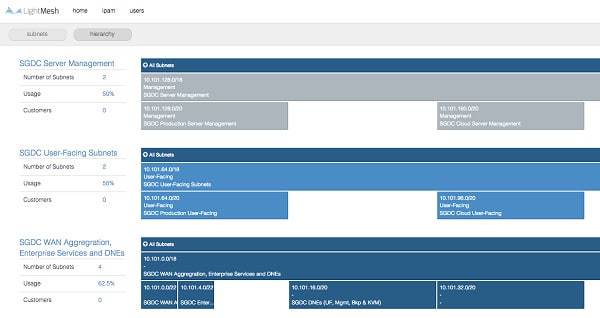
The LightMesh package is Software-as-a-Service (SaaS) delivered from the cloud. The network management system includes a number of modules. These are:
- Network device inventory
- IP address management
- Switch Configuration Automation
- Backup automation and data security measures
- ITIL process integration
- Lifecycle management
- Impact and change assessment tools
The IPAM in this pack will communicate with your DHCP server and DNS server to provide one single access point for all of your DDI functions. This coordination saves you from having to log in to your DNS and DHCP systems in order to track operations.
Key Features:
- Cloud-Based: Offers a SaaS model for easy access and management from anywhere.
- Comprehensive Discovery: Automatically identifies network infrastructure and updates inventory in real-time.
- Scripting Environment: Allows for automation of tasks with custom scripts, enhancing operational efficiency.
Unique Business Proposition
This is a modern IPAM solution that comes with features, like visual subnet planning, automated discovery, and cloud integration with AWS and Azure, to identify IP-related blind spots. With such features, it provides real-time network visibility and audit trails with granular controls. It unifies on-premises and cloud networks as well.
Feature in Focus: Network Containers
LightMesh enables you to group related subnets under a larger subnet or container. The advantage of this feature is that it provides a hierarchical structure for subnet management. Also, it prevents subnets from overlapping, making it easy to locate subnets when needed while mapping network assets with the way your business is organized.
Why do we recommend it?
Tidal LightMesh provides an IP address manager for on-premises networks plus a service discovery routine for cloud accounts on AWS, Azure, and GCP. The service can plan your subnets and segment your DHCP for proper address management. The console lists all active IP addresses and their associated devices.
The LightMesh service starts off by scanning your network for its infrastructure. It logs all of the encountered equipment in an inventory and draws up a network topology map from that. Both the inventory and the map get updated automatically if you add, move or remove a device.
The IPAM works off the topology map and inventory. It coordinates with the DHCP server to add IP addresses to each node on the network. The periodic checks on devices run by LightMesh also serves to detect abandoned addresses, so that keeps the pool of available addresses up-to-date.
The dashboard can be accessed by any team member once you have set up accounts. Each account can be customized to restrict access to functions – this can be done either per user or in groups. As well as giving access to live data, including graphs and alerts, the interface includes a RET programming environment that enables you to create scripts to automate tasks. All actions performed in the LightMesh system are logged for auditing.
Who is it recommended for?
This is a good solution for any type of business but the provider’s increasing expansion in its cloud tracking services means that it is particularly interesting for companies that run hybrid environments or those that run virtual offices. The cloud-based version is free to track up to 1,000 IP addresses.
Pros:
- Scalable Solution: Suitable for businesses of all sizes, with features particularly beneficial for larger enterprises.
- Team Collaboration: Supports multiple user accounts with customizable permissions for team-based management.
- Audit Trail: Keeps detailed logs of all actions, facilitating troubleshooting and compliance.
Cons:
- Focus on Larger Networks: While highly effective, smaller networks may not fully utilize its extensive features.
The LightMesh package is priced by subscription and there are three different service levels: Small Team, Medium Team, and Enterprise. LightMesh is available on a 30-day free trial.
3. SolarWinds IP Address Manager
Best for: Enterprise-scale DHCP, DNS, and IPAM
Relevant for: Organizations with large networks and mixed environments.
Price: Negotiated pricing
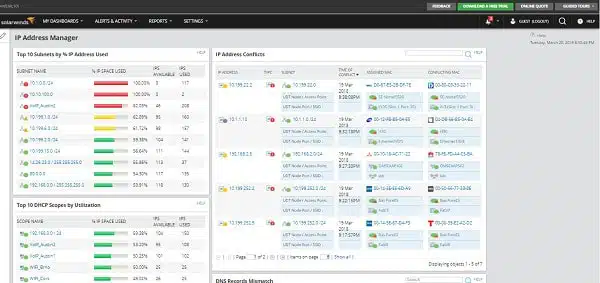
The SolarWinds IP Address Manager is a full DDI package because it includes DHCP and DNS management functions. The tool is very easy to set up because it will discover your addressing system, including subnet scopes. The tool doesn’t act as a DHCP server or a DNS server; however, it can manage those services that are provided by Microsoft, Cisco, ISC, and BIND. You won’t need to worry about out-of-date entries in your DNS server with this package.
The tool is self-installing and runs on Windows Server. It keeps tabs on all of the allocated IP addresses on your network; it checks periodically to make sure that all addresses that are marked as in use have not been abandoned.
Key Features:
- DDI Capabilities: Integrates DHCP, DNS, and IPAM functionalities for comprehensive network management.
- Automatic Discovery: Efficiently identifies all network devices and their IP status without manual intervention.
- Rogue Device Detection: Actively monitors and alerts on unauthorized devices connected to the network.
- Dynamic Updates: Automatically adjusts DHCP pools and updates DNS records to ensure accuracy.
- Customizable Dashboard: Offers a personalized interface for different team roles with event logging for accountability.
Unique Business Proposition
SolarWinds IPAM brings together multiple capabilities, including DHCP, DNS, and IPAM, into a single console to reduce tool sprawl. It also supports multiple vendors, making it a good choice for diverse environments. Its other features, like strong reporting, relevant alert generation, and conflict detection, make it a highly useful tool.
Feature in Focus: Conflict Detection
A salient feature of SolarWinds IPAM is the option to add DHCP and DNS servers to the same console. The advantage of this integration is that you can view scopes, leases, zones, and records through the same interface for comprehensive visibility.
Why do we recommend it?
SolarWinds IP Address Manager is a full DDI package. It provides a DHCP and DNS server but you can use the native Windows services for those functions if you prefer. This is a classic IPAM and it will scan for abandoned addresses and update your DHCP accordingly.
The tool can deal with dynamic addressing, static addressing, or a mix of both. There is also a self-service screen available to users so that they can initiate the allocation process by requesting an IP address. That address can be dedicated or allocated from a pool reserved for a subnet.
If you want to resize your subnets, you will be able to use the built-in Subnet Allocation wizard, which will advise you on the optimum use of address scopes for each subnet. The tool will keep an eye on address pool exhaustion and alert you if the allocation to a particular subnet seems to be too small.
The SolarWinds IP Address Manager is able to interact with VMWare functions, specifically VMware vRealize Orchestrator (vRO)/vRealize Automation (vRA). This enables it to manage the complexities of virtualization addressing.
The IPAM can host multiple user accounts, which means that you can distribute access to team members. The dashboard is customizable and that will allow you to restrict the controls available to junior team members. Event logging keeps a record of who did what and when, so you can quickly work out whether a disruptive decision was implemented by a misinformed member of staff or was actually a hacker attack.
You get live data reports in the IPAM dashboard and you can also print out statistical reports – there are standard report formats included with the tool, but you can also create your own. The dashboard of the IP Manager gives real-time statistics on the address usage of the network and there are also standard report formats shipped with the software. The system includes a Report Writer, which enables you to customize reports. Reports can be automatically distributed to a predefined list of recipients via email, or they can be set up on a web space with access controls.
Who is it recommended for?
This service is a software package that runs on Windows Server. The system is designed for use by large organizations Alerts notify busy administrators if problems are detected. It is only able to manage networks that are run from Windows Server hosts. The package can integrate with SolarWinds network monitoring tools.
Pros:
- Comprehensive Management: Offers a complete DDI solution, enhancing network control and visibility.
- Efficient IP Utilization: Automatically identifies and recycles abandoned IP addresses, optimizing network resources.
- Subnet Wizard: Includes tools for effective subnet planning and allocation, simplifying network expansion.
Cons:
- Target Audience: Primarily designed for IT professionals, with complex features that may not suit home users.
The IPAM is part of a suite of infrastructure management software produced by SolarWinds and it integrates with other tools, such as network and server monitoring systems. You can get a 30-day free trial of the SolarWinds IP Address Manager.
4. BlueCat Micetro (formerly Men & Mice Micetro DDI)
Best for: Enterprise and multi-cloud overlay
Relevant for: Large enterprises, MSPs, and organizations with hybrid and multi-cloud environments.
Price: Not publicly listed, request a quote.
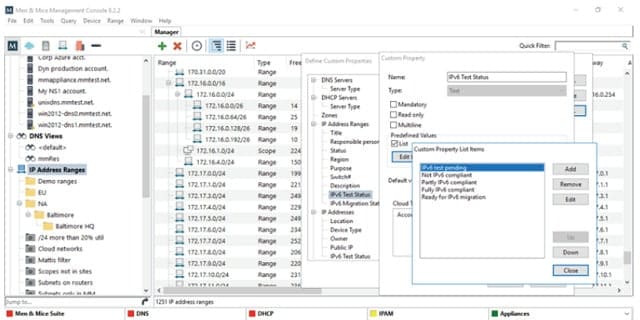
The Men & Mice Micetro DDI is an IPAM with DHCP server and DNS server management capabilities. This tool won’t replace your DHCP and servers, but it will centralize control of them in one dashboard so you don’t have to keep logging into different interfaces to ensure that your IP address policy is being enforced. You will still need to run separate DHCP and DNS server software. The tool is also able to manage Active Directory records on Windows.
Key Features:
- Comprehensive DDI Integration: Manages DHCP, DNS, and IPAM across multiple platforms for unified control.
- Cloud and On-Premises: Effectively manages hybrid environments, bridging the gap between physical and cloud networks.
- Customizable Access: Provides a browser-based interface with tailored access for different user roles.
Unique Business Proposition
This is an overlay orchestrator, which means you don’t have to remove your existing IPAM, DNS, or DHCP infrastructure. This tool simply sits on your existing infrastructure to provide the control, automation, visibility, and redundancy you need across on-premises and cloud environments. It supports many backends as well, for greater flexibility.
Feature in Focus: High Availability
A standout feature of this platform is its use of the ISC Kea DHCP server, which is known for its high availability. It offers multiple modes, like hot, standby, failover, etc, to provide flexibility and performance across mixed environments. With these modes, you can even bring in redundancy without the additional manual labor.
Why do we recommend it?
Men&Mice Micetro DDI goes a little further than just an IPAM because it provides coordination with your existing DHCP and DNS servers. The system is also able to link device addresses to the permissions structure in your Active Directory or LDAP instance and can integrate with IIS and Apache Web servers.
The DNS management module of the DDI Suite will interact with Windows, BIND, PowerDNS, and Unbound DNS servers. The DHCP management part of DDI Suite can organize DHCP servers run by ISC, Windows, Cisco IOS, and Kea software. The DHCP and DNS server management modules are optional, so you could just install the IP Address Manager. However, coordinating between DDI elements is an important time saver, so you should consider deploying the full DDI Suite.
The Men & Mice Micetro DDI can control Windows and Linux environments and will also manage Cisco IOS devices. This service is also capable of tracking address issues on Cloud services, including OpenStack, Azure and AWS native IPAM functions. It can interact with Azure DNS, Amazon Route 53, Dyn, NS1, and Akamai Fast DNS.
The dashboard of Men & Mice is browser-based. You can set up different accounts with access to different sets of data and controls in order to allocate access rights to team members safely. All changes performed through the system are logged with the user name registered for each action, so you will easily be able to track the performance of each admin team member.
The tool also includes scripting languages and APIs that enable you to exchange data with other applications on your network and automate many address administration tasks. The scripting languages supported by the system are SOAP, REST, and JSON-RPC. The standard DDI Suite package includes a number of pre-written automation scripts, which are called ‘wizards’.
Who is it recommended for?
This tool runs on-premises with versions for Windows and Linux. This makes it a better solution for businesses that are primarily based on their own networks. However, the tool is also able to reach out to cloud systems, so those operating hybrid environments should also consider this solution.
Pros:
- Extensive Compatibility: Supports a wide range of DHCP and DNS servers, facilitating versatile network management.
- Automation and Scripting: Includes APIs and pre-written scripts for streamlined task automation.
Cons:
- Interface Usability: Could benefit from enhancements in user-friendliness and more intuitive visualizations.
This IP address manager is able to organize and resize subnets and it is a very powerful scope management system that is suitable for large and complex networks. You can get a free trial of the DDI Suite in order to put it through its paces without any risk to your budget.
5. Morpheus
Best for: Cloud and hybrid orchestration
Relevant for: Cloud architects, DevOps teams, and enterprises managing multi-cloud and hybrid environments.
Price: Negotiated pricing.
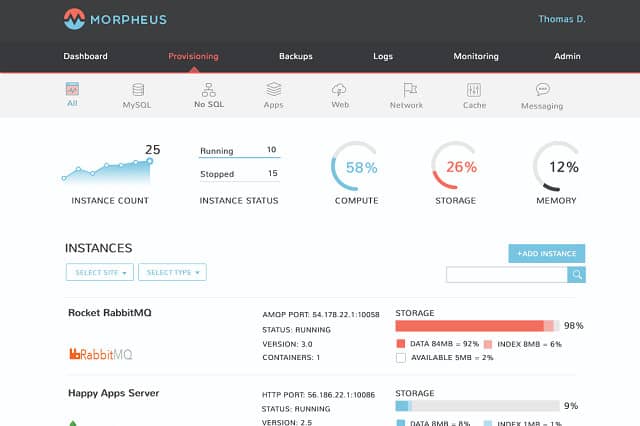
Morpheus gives you an IP address manager that also controls your DHCP and DNS servers, so you can run your entire DDI system from the Morpheus control panel. This is a Cloud-based system, so you access it through a Web browser. Morpheus is specifically aimed at businesses that want to run their network on the Cloud or even deliver their own services from the internet. It is also available for hybrid Cloud/on-premises systems.
Key Features:
- Hybrid Cloud Management: Designed for seamless integration of cloud and on-premises networks with DDI functionalities.
- Comprehensive IP Management: Offers centralized control over IP addresses, DHCP, and DNS services.
- Security and Compliance: Includes features to detect and prevent unauthorized access, with detailed logging.
Unique Business Proposition
Morpheus acts as a unified infrastructure orchestration system that includes IPAM, network, DHCP, and DNS functions. All these features are linked to provisioning workflows and cloud networks to help maintain consistency across your entire infrastructure. More importantly, this unified approach makes it easy to enforce policies and implement automation.
Feature in Focus: DHCP Modes
In this tool, you can choose from two DHCP modes – active and static. If a DHCP is in active mode, it can get the address automatically via the DHCP server. On the other hand, if the DHCP is in static mode, Morpheus can assign a static IP address from the pool. The mode can be changed based on your specific requirements.
Why do we recommend it?
Morpheus provides a way to integrate cloud and virtual systems into your on-premises network. From its cloud location, the Morpheus system blurs the boundaries between physical and virtual to create a hybrid environment. This is achieved by manipulating IP address management together with your DHCP and DNS systems.
Morpheus is a Cloud Management Platform, so it supports a lot of different administration functions. The IPAM section of the system will make sure that you don’t have duplicate IP addresses on your network and that your DHCP server doesn’t overlook equipment and leave it without an IP address. You can detect rogue devices connected to your system because they will need to have a system IP address allocated from the scope listed in your IPAM database.
Who is it recommended for?
Morpheus is a good solution for companies that are constructing their own SaaS products that have both internal and external IP address needs. The system is also a good fit for businesses that run hybrid environments. The package is unnecessarily complicated for an on-premises DDI solution.
Pros:
- Cloud-Native: Ideal for businesses focusing on cloud or hybrid environments, offering flexibility and scalability.
- Simplified Management: Centralizes DDI tasks in a user-friendly dashboard, streamlining network administration.
Cons:
- Complex for Smaller Networks: May offer more functionality than needed for simpler network infrastructures.
The IPAM will not allow unauthorized devices to be allocated to a network IP address, which effectively locks out those access attempts. So, the Morpheus IPAM includes some strong security procedures and every address-related event is logged for system auditing. There isn’t a free trial of Morpheus, but you can access a demo version on the service’s website.
6. BlueCat Overlay for Microsoft
Best for: Microsoft DNS and DHCP overlaying
Relevant for: Enterprises using Microsoft environments and requiring unified DNS and DHCP capabilities.
Price: Negotiated price.
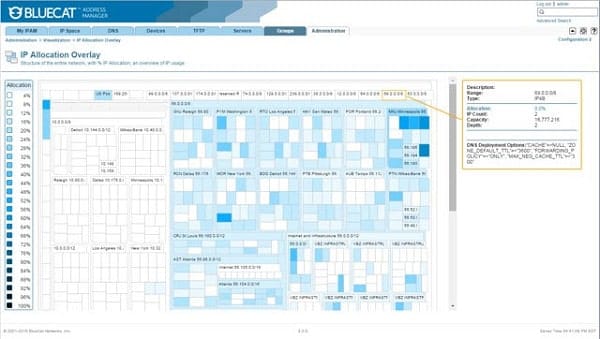
BlueCat offers an IPAM solution, but its presentation speaks more about its DNS and DHCP capabilities. The company focuses on address issues as security tools. This is strongly expressed in its DNS and DHCP management facilities, which, of course, are threaded together by the classic tasks of an IP address manager.
Key Features:
- Microsoft Integration: Tailored to enhance and work seamlessly with Microsoft DHCP and DNS servers for improved DDI management.
- Device Discovery: Keeps network inventory accurate with continuous monitoring and automatic discovery.
- IPv4/IPv6 Support: Prepares networks for future technologies with dual-stack capabilities.
Unique Business Proposition
As the name suggests, this tool acts as a bridge or overlay to bring Microsoft DNS and DHCP capabilities to BlueCat Address Manager. Instead of replacing your Microsoft servers, this is a more cost-effective way to add capabilities. More importantly, your existing workflows or operations will not be impacted by this addition.
Feature in Focus: Synchronization of Microsoft DDI Data
This tool works seamlessly to synchronize Microsoft DDI Data. It connects through remote PowerShell commands to pull DNS zone data, records, DHCP scopes, and other relevant information. This data is then imported and mapped with the BlueCat Address Manager via the API to provide a single source for DDI.
Why do we recommend it?
BlueCat Overlay for Microsoft provides a method of removing the dependency between hardware and addressing on a network. This tool operates on the standard DHCP and DNS servers that are bundled into Windows Server and adds on IP address usage detection.
The starting point of the address manager is its device discovery routine. This is a persistent module that will continue to seek out all equipment connected to your network, and updating the resource directory as it finds changes in infrastructure. Once all devices have been identified, the next task is to ensure that they each have an IP address allocated.
The tool won’t act as a DHCP server. The software installs on Windows and interacts with the native windows DHCP and DNS server software. This enables it to spot abandoned IP addresses and update its database. It will also coordinate entries in the DNS server with its own IPAM records and the activities of the DHCP server.
This is a good tool for migration from IPv4 to IPv6 because it is dual stack. All address-related issues can be managed centrally through the BlueCat dashboard, so you don’t need to keep switching between management consoles in order to prevent address duplication or shortages. The tool includes an approvals hierarchy, individual user account, event logging, and automated task workflows, so it will help you cut down on the damage of human error.
Who is it recommended for?
This package can provide constant IP addresses for systems where you need to group subnets by device function instead of location. An overlay network disconnects the addresses used for physical devices. So, you can spread adjacent addresses to devices that are physically far apart. The service maintains two levels of addresses and interprets between them.
Pros:
- Enhanced Security: Focuses on addressing as a security concern, adding a layer of protection against network threats.
- Efficient Address Management: Automatically resolves IP conflicts and recycles unused addresses.
Cons:
- Platform Specific: Best utilized in environments heavily reliant on Microsoft services, which may limit its use in diverse IT landscapes.
This package is suitable for large, team-managed networks. BlueCat Networks doesn’t offer a free trial of its platform and it doesn’t even publish its prices.
Centralize address management
A full-service DDI solution is preferable to a working method that requires manual actions to reconcile DNS, DHCP, and IPAM actions. You just don’t have time to keep track of these three separate addressing functions and if you slip up on your oversight, users will run into problems and business will be lost.
The industry convention for implementing DDI is to keep each module separate, with a preference for the native abilities of Microsoft DNS and DHCP systems, which are bundled into Windows Server. That is bad news for Linux users, but other DNS and DHCP server platforms are often compatible with the tools that are listed in this guide. It is certainly true to say that users of Windows Server are better catered to in the IPAM market than Linux owners.
As you can see in the description of our recommended IP address management tools, solution providers concentrate their DDI integration facilities into their IPAM software. So, you need a competently-planned IPAM in order to fully integrate your network’s DDI functions.
Do you use an IPAM? Do you prefer to keep it separate from your DHCP and DNS servers, or did you make sure to put an IP address manager with DDI oversight capabilities? Have you installed any of the tools on our list? Leave a message in the Comments section and share your experience with the community.
Our methodology for choosing IPAM tools
While selecting the best IPAM tools, we reviewed many tools in the market. Specifically, we considered the following aspects to determine which tools made it to our list.
1. Network Discovery and IP Visibility
One of the first things we looked for was the ability of a tool to identify active devices on a network. To this end, we checked if the tool can detect IP addresses, MAC addresses, host names, and device types, as this information can help administrators maintain an updated list of subnets and VLANs.
2. DHCP and DNS Integration
It helps to have IPAM tools that connect with DHCP and DNS services on both Windows and Linux systems. This integration ensures that IP addresses are aligned with network activity. Also, tools that could update DNS records automatically and support common services like Microsoft DHCP scored higher on our reviews.
3. Conflict Detection
We looked for tools that could identify and remediate IP conflicts, flag duplicate IP addresses, and identify unauthorized devices as soon as they enter the network. Also, these tools must send alerts, so remedial action can be taken right away.
4. Automation
Automation was another key determinant in our evaluation. We prioritized tools that could automatically assign available IP addresses, manage DHCP scopes, and reclaim unused IP addresses.
5. Reporting
Generating reports is a key feature we consider because it helps non-technical users and stakeholders to better understand the problem. The tools on our list are capable of generating extensive reports and audit reviews. The ones at the top of our list also provided search and filter capabilities.
6. Usability
This is another key aspect for us, as we want the tool to have an intuitive user interface for wider adoption. Such tools also reduce training time and increase the speed of common tasks.
Broader B2B Methodology
In addition to the above factors, we also evaluated the capabilities of the vendor in supporting the software, long after it was purchased. This vendor evaluation is an integral part of our evaluation process and applies uniformly to all our reviews. As a part of this evaluation, we consider factors like:
- The value of the software to your organization versus its cost.
- Scalability of the tool.
- Customer experiences and reviews while using the tool.
- Pricing transparency
- Vendor’s ability to offer customer support and tool upgrades.
For a more detailed view into our review process, read our B2B methodology page.
IPAM Tools FAQs
What is IPAM Linux?
IPAM stands for IP Address Management and IPAM Linux would refer to an IP address manager that runs on the Linux operating system – it isn’t a Linux distro. An IPAM scans a network and detects which IP addresses are in use. By comparing this list to the records of a DHCP server, it is possible to see which IP addresses have been abandoned and os should be returned to the SHCP pool of available addresses.
Why is IPAM used?
An IP address manager (IPAM) makes regular checks on the IP addresses that are in use on a network and refers to the DHCP server’s records to verify that all allocations are up to date. This work provides two benefits. It spots IP addresses that are no longer in use and so can be returned to the DHCP server’s list of available addresses and it also spots rogue devices that have connected to the network using their own fixed IP address. A device that uses an IP address that was not allocated to it is possibly a hacker conduit and should be disconnected from the network immediately.