

A Professional Services Automation (PSA) software platform is a centralized system that helps service-based businesses streamline operations and management. It centralizes ticketing, project tracking, billing, time management, and client communication to improve service delivery and profitability.
A PSA software solution solves key operational pain points that many MSPs face as they scale, as outlined below.
PSA software platforms help your MSP avoid the following pain points:
- Disconnected tools: Without PSA software, MSPs rely on separate systems for ticketing, billing, and project management, which creates data silos, duplicate work, and unnecessary administrative overhead.
- Manual processes: Relying on manual time tracking and invoicing increases the risk of missed billable hours, billing errors, and delayed revenue.
- Limited operational visibility: It becomes difficult to see technician workloads, ticket progress, and SLA performance in real time.
- Inconsistent reporting: Data spread across multiple tools results in incomplete, inaccurate, or difficult-to-trust reports when making decisions.
- Communication gaps: When service, sales, and finance teams use different systems, misalignment occurs, leading to delays, confusion, and billing errors.
- Inefficient resource planning: Without centralized data, assigning the right technicians and balancing workloads is challenging and often reactive.
- No single source of truth: Critical information lives in multiple places, forcing teams to piece together data rather than working from a single, reliable, shared view of the business.
This guide compares the best PSA software for MSPs. The goal is to help you choose tools that align with your business size, workflow complexity, and growth strategy.
Based on our independent research, defined selection criteria, and evaluation methodology, here is our list of the best PSA software for MSPs:


- N-able MSP Manager – Best for small to mid-sized MSPs wanting simple integrated ticketing and billing.
- HaloPSA – Best for mid-sized MSPs needing customizable ITIL-aligned workflows.
- ConnectWise PSA – Best for larger MSPs requiring deep integrations and enterprise automation.
- Datto PSA – Best for MSPs in the Kaseya/Datto ecosystem needing mature RMM integration.
While RMM provides the tools that technicians use in the day-to-day support of the IT systems of the MSP’s clients, the PSA package includes the personnel and contract tracking systems that the management of the MSP needs in order to ensure profitability.
If you need to know more, explore our vendor highlight section just below, or skip to our detailed vendor reviews.
Βest PSA software for MSPs highlights
Top Feature
Unified cloud RMM and PSA platform, help desk and automation in one console
Price
Starts at $149 per technician per month, billed annually
Target Market
MSPs and IT teams running everything from one cloud based platform
Free Trial Length
Free trial available, duration not disclosed by the vendor
Additional Benefits:
- Simplifies MSP operations, one cloud platform replaces multiple tools
- Keeps costs predictable as teams grow, per technician model avoids per device licensing
- Speeds rollout and daily use, designed for quick setup and easy navigation
- Reduces manual workload, automation improves efficiency for technicians
- Improves decision making, clearer insight into ticket volumes and profitability
Features:
- Combines monitoring, ticketing, patching, remote access in one platform
- Supports email to ticket conversion, calendar integration, automated ticket routing
- Automates routine work, ticket tagging and alerts
- Manages billing and time tracking, supports SLA management
- Provides reports and dashboards, client portal supports self service tickets
Top Feature
Unified PSA and RMM suite, ticketing, billing, automation, XMM adds Microsoft 365 governance
Price
Starts at $129 per user per month
Target Market
Small to mid-sized MSPs and internal IT teams wanting an affordable PSA platform
Free Trial Length
14-day free trial
Read more ▼
Top Feature
Cloud-native PSA and RMM platform, service desk plus endpoint operations in one console
Price
Starts at $79 per technician per month, billed annually
Target Market
Small to mid-sized MSPs and IT service firms looking to modernize operations
Free Trial Length
14-day free trial
Read more ▼

Top Feature
Cloud PSA for ticketing, time capture, billing, tight N-able RMM and N-central integration
Price
Negotiated pricing
Target Market
Small to mid-sized MSPs and IT service businesses
Free Trial Length
15-day free trial
Read more ▼

Top Feature
ITIL-aligned cloud PSA, configurable service desk workflows, billing and automation for MSPs
Price
$65 per agent per month
Target Market
Small to mid-sized MSPs seeking ITIL-aligned PSA
Free Trial Length
30-day free trial
Read more ▼

Top Feature
Enterprise-grade PSA backbone, deep automation and reporting, broad ecosystem integrations
Price
Negotiated pricing
Target Market
Established and larger MSPs managing multiple clients
Free Trial Length
Free trial available, duration not disclosed by the vendor
Read more ▼

Top Feature
Cloud-native PSA for MSPs, Datto RMM integration, mature automation framework
Price
Negotiated pricing
Target Market
MSPs needing a mature cloud-native platform for complex operations
Free Trial Length
Demo available upon request, duration not disclosed by the vendor
Read more ▼
Key points to consider before purchasing a PSA Tool
Use the checklist below to compare PSA platforms based on the practical requirements that affect daily operations, billing accuracy, and long-term scalability.
- Automation and Workflow Automation: Choose a PSA tool that automates repetitive tasks such as ticket routing, time tracking, and billing. Automation saves time and reduces manual effort.
- Ticketing and Service Desk Management: Ensure it has a robust ticketing system with SLA tracking, prioritization, and escalation capabilities.
- Billing and Invoicing Accuracy: Choose a PSA that automatically turns tracked time and expenses into accurate invoices to prevent lost revenue.
- CRM Integration: A PSA that connects smoothly with your CRM keeps client data, contracts, and communications in sync across platforms.
- Reporting and Analytics: Look for strong reporting features that show performance metrics, technician output, and profitability.
- Integrations and Ecosystem Compatibility: Ensure the PSA integrates seamlessly with your RMM, accounting, and documentation tools to create a cohesive tech stack.
- ITSM Alignment: The platform should adhere to IT Service Management (ITSM) best practices to ensure consistent, standardized workflows.
- Scalability and Customization: Opt for a system that scales and adapts as your MSP adds more clients or changes its operations.
Typical PSA software features
The benefit of off-the-shelf PSA systems is that they provide a template for the business management of an MSP. This makes it a lot easier for an experienced technician or a group of qualified IT professionals to set up in business as an MSP.
- Work distribution
- Service level agreement (SLA) goal tracking
- Recording of billable hours
- Contract management
- Billing
- Labor utilization
- Capacity planning
The PSA package fills in the business management knowledge that dedicated technical experts are not likely to have acquired during their careers.
Running a managed service provider
Anyone interested in setting up an MSP to offer IT professional expertise on a contract would need to invest in a PSA system and an RMM. Some software providers offer a bundle that includes both groups of software, offering all of the software support that the new MSP is going to need.
It is now possible to create a virtual office with each technician working from home. That scenario cuts costs and enables new startups to be very competitively priced. There are cloud-based PSA packages available that remove the need to buy a server to host the software. Removing that requirement takes away the necessity of scheduling non-billable tasks to maintain the MSP’s own systems.
Subscription-based SaaS PSA’s make starting up and running an MSP even easier because the business does not need to have any investors to cover the upfront costs of buying equipment, renting premises, or purchasing software. Thanks to off-the-shelf PSA and RMM systems, an RMM can start operations almost immediately. All it needs are the clients.
The Best PSA Software for MSPs
We have examined the PSAs currently available and drawn up a shortlist of the winners.
1. Atera (FREE TRIAL)
Best For: MSPs and IT teams that want to run everything from one cloud-based platform.
Price: Starts at $149/month per technician (billed annually).

Atera PSA is the professional services automation component of Atera’s all-in-one RMM-PSA platform. It was founded in 2011 in Israel. You can use it to handle service tickets, automate recurring tasks, manage billing, and monitor customer satisfaction, all within one system. Its help desk supports email-to-ticket conversion, calendar integration, and automated ticket routing.
Based on our assessment and analysis of community feedback, Atera stands out for its simplicity of deployment, ease of navigation, and predictable costs. However, its customization depth and integration range are intentionally limited compared to those of ConnectWise, Autotask, and other large, enterprise-focused brands. This design choice is not a flaw but a reflection of its design philosophy. It focuses on smaller MSPs and IT teams that value ease of use,
Based on our own testing and experience, Atera works best for lean or fast-growing MSPs that value efficiency over deep customization. If you are running a small to mid-sized operation and want a modern, AI-enhanced tool that’s quick to set up and easy to maintain, Atera is a strong choice.
Atera Key Features:
- All-in-One Platform: Atera combines monitoring, ticketing, patching, and remote access into one easy-to-use system—eliminating the need for multiple tools.
- Simple Per-Technician Pricing: You pay per technician, not per device. An affordable way to support unlimited endpoints as you grow.
- Built-In Automation: Automate routine work like ticket tagging, patching, and alerts to save time and boost efficiency.
- Clear Reports and Dashboards: Gain real-time insights into technician performance, ticket volumes, and customer profitability to inform smarter decisions.
- Easy Customer Portal: Your clients can submit and track tickets or find answers themselves through a simple, branded self-service portal.
Unique Buying Proposition
Atera’s unique strength is its ability to combine RMM, PSA, and AI-driven tools within a single, unified platform that operates on a per-technician pricing model with unlimited endpoints. It is a unique approach that eliminates device-based licensing used by many competitors, providing MSPs with a predictable and scalable cost structure.
Feature-In-Focus: Help Desk and Ticketing System
Atera’s primary focus as a PSA tool is its help desk and ticketing system. Help desk and ticketing systems serve as the central mechanism for managing service delivery, client support, and workflow automation within the PSA suite. This ticketing hub is tightly integrated with time tracking, billing, SLA management, and reporting.
Why do we recommend Atera?
We recommend Atera for MSPs because it delivers an all-in-one platform that simplifies IT management and keeps costs predictable. The per-technician pricing with unlimited endpoints is an attractive feature for growing MSPs that want scalability without rising license costs.

Who is Atera Recommended For?
Atera is suitable for MSPs and IT departments that want to manage operations from a single, cloud-based dashboard.
Pros:
- Unified platform: One system handles both monitoring (RMM) and service operations (PSA), reducing the number of tools MSPs need to maintain.
- Predictable pricing: Per-technician pricing, rather than per-device pricing, provides clearer, more scalable cost management.
- Operational automation: Ticket routing, recurring tasks, and alerts reduce manual work and improve efficiency.
Cons:
- Limited advanced customization: The platform may be less flexible than some standalone PSAs for highly complex custom workflows or niche integrations.
Atera offers four pricing tiers designed to match your team’s size and needs. The Professional plan is suitable for smaller teams that manage internal devices and networks. The Expert plan provides advanced automation and dual remote monitoring for growing teams. The Master plan targets mature MSPs that require stronger compliance controls and deeper business insights. Finally, the Enterprise plan is built for large organizations or IT departments that require premium support, enterprise-grade integrations, and dedicated account management.
You can begin with a free trial, test its automation and reporting capabilities against your existing workflow, and see how it scales with your client base before making a full commitment.
EDITOR'S CHOICE
Atera is our top pick! It is a SaaS system, so MSPs that use it also have all of their hardware needs taken care of. The system console with all of the RMM tools for technicians and PSA facilities for MSP management is accessible from anywhere through a standard browser. There is also a mobile app to give access to sales staff out in the field. The full system is available to all customers, charged for on a per technician basis.
Download: Register for a FREE Trial
Official Site: atera.com/signup/
OS: Cloud-based
2. Syncro (FREE TRIAL)
Best For: Small to mid-sized MSPs and internal IT teams seeking an affordable PSA platform.
Price: Starts at $129 per user/per month

Syncro PSA is a US-based PSA platform launched in 2017 to simplify MSP workflows. Syncro’s goal is to provide smaller and mid-sized MSPs with an affordable, easy-to-use system that covers most of their needs. It includes help desk ticketing, billing, contract management, an integrated RMM for device monitoring, and automated workflows to reduce repetitive work.
Syncro officially describes XMM (Extended Monitoring & Management) as the first platform from them that unifies RMM, PSA, and Microsoft 365 multi-tenant governance/capabilities into a single solution. Microsoft 365 management features are part of this offering.
The Microsoft 365 governance features are being rolled out gradually, with some still in early access or limited to specific plans. These tools are still maturing, so their depth and usability may not yet match dedicated Microsoft governance platforms, especially for MSPs with complex compliance needs.
Syncro Key Features:
- Monitoring, Alerts & Automation: You can monitor an unlimited number of endpoints, deploy patches, run scripts, and set automated remediations to resolve issues before they escalate.
- Powerful Scripting: Syncro includes hundreds of ready-made community scripts to tailor automation to your MSP’s workflows without heavy setup.
- Smart Ticketing & Help Desk: The platform’s intelligent ticket management provides contextual information and recommended fixes.
- Billing & Invoicing Automation: Syncro’s PSA can generate invoices based on time, assets, or policies.
- Unified Platform for RMM and PSA: Syncro merges remote monitoring, ticketing, scripting, and billing in one system.
Unique Buying Proposition
Based on our assessment and research, Syncro’s biggest advantage is in how smoothly its RMM, PSA, billing, and scripting tools work together in one unified platform. The idea of integrating RMM, PSA, and Microsoft 365 governance has the potential to become a key differentiator.
However, it has yet to fully demonstrate consistent stability and maturity across all use cases. Nonetheless, if your goal is to streamline day-to-day operations, Syncro offers solid real-world value and a straightforward path to scaling your service delivery.
Feature-In-Focus: Intelligent Ticket Management System
Synchros’s intelligent ticket management system automatically routes tickets, presents recommended remediation steps, and helps technicians resolve issues more efficiently. The centralized, intelligence-driven ticketing capability is the core PSA value driver around which time tracking, billing, and workflow automation are structured.
Why do we recommend Syncro PSA?
We recommend Syncro PSA because we found it to be effective for small to mid-sized MSPs that want automation and operational oversight without the overhead of managing multiple systems.
However, don’t expect it to offer the same advanced flexibility or deep customization found in larger, enterprise-grade PSA platforms. Syncro trades some of that advanced flexibility for simplicity, speed, and affordability. A design choice that fits its core audience.
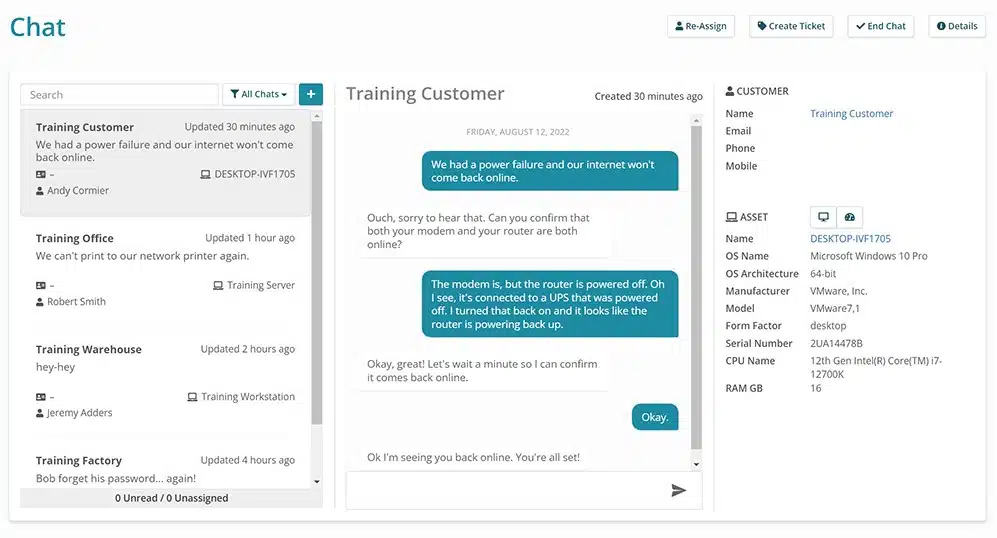
Who is Syncro recommended for?
Syncro’s core audience consists of small to midsize MSPs and internal IT teams that want an affordable, easy-to-manage, all-in-one PSA platform.
Pros:
- Strong overall value: The platform delivers good value for the cost, combining billing, RMM, and ticketing in a single solution.
- Accessible user interface: The UI is intuitive and easy to use without extensive training, enabling faster onboarding.
- Automation and scripting: Built-in scripting, task templates, and automated alerts or ticket creation reduce manual follow-up work.
- Scalable pricing model: Per-technician pricing with unlimited endpoints makes cost scaling more predictable and manageable.
Cons:
- Limited advanced customization: Advanced customization options and in-depth reporting may be more limited than those of mature PSA platforms.
- Performance at scale: Some users report lag or slower performance in very large environments or with high ticket volumes.
Synchro offers a 14-day free trial with full feature access. Paid plans start at $129 per user per month for the Core plan and $179 per user per month for the Team plan. Both provide access to the integrated PSA, RMM, billing, and other MSP tools on a single cloud platform.
Syncro’s development philosophy emphasizes quick deployment and customization for small- and mid-sized MSPs. That explains why it does not offer the same granular reporting, workflow scripting, or multi-tenant configuration depth you would find in larger platforms.
3. SuperOps PSA (FREE TRIAL)
Best For: Small to mid-sized MSPs and IT service firms looking to modernize operations.
Price: Starts at $79/technician/month (billed annually)

SuperOps PSA is a unified, cloud-native PSA-RMM platform founded in 2020 and headquartered in the United States. The platform is considered cloud-native because it is built and deployed entirely on cloud infrastructure, rather than adapted from on-premise software. It integrates service desk, endpoint management, billing, remote access, documentation, and network monitoring into a single system.
SuperOps helps MSPs track client devices, automate regular maintenance, manage tickets, and handle billing from a single dashboard. It comes with built-in AI that automates tasks, manages tickets, and retrieves the right data when needed. The AI will help your team spend less time on repetitive tasks and keep their operations running more smoothly.
SuperOps is a credible option for MSPs that want a modern, cloud-based PSA with built-in RMM. User data and reviews show it is easy to set up, simple to use, and well-supported. Notwithstanding, some features, such as reporting, project management, and third-party integrations, are still developing compared to older, more established PSA tools.
On the whole, SuperOps represents a forward-looking PSA solution with meaningful automation gains. However, as a buyer, you need to confirm that its current ecosystem and feature set align with your business operational scale and integration needs.
SuperOps Key Features:
- Unified PSA + RMM Functionality: Service desk, patch management, monitoring, remote access, project tracking, billing, and documentation all in one system.
- Agentic AI (Monica): Tasks such as ticket summarization, work-log automation, email rephrasing, and similar ticket recommendations.
- Automation of Routine Tasks: Patching, time tracking, and invoicing get automated workflows.
- Flexible Pricing Model: Some plans allow you to choose between PSA-only and RMM-only.
- Dashboard & Reporting Tools: Dashboards, alerts, live timesheets, resource tracking, KPIs, profitability reports.
Unique Buying Proposition
SuperOps is one of the few PSA platforms that was built natively with both PSA and RMM in a single architecture, rather than integrating two legacy products. But it is not the only one. Competitors like Syncro and Atera also combine PSA and RMM into a single platform, though their implementations differ in depth and AI features.
What makes SuperOps relatively distinct is:
- Its modern cloud-native codebase (developed post-2020, avoiding legacy technical debt).
- Its focus on agentic AI for contextual automation and documentation retrieval.
- A design philosophy aimed at unifying workflows around a single data model rather than layering integrations.
In other words, the integration concept isn’t unique in itself. However, the way SuperOps executes it (AI-driven, cloud-native, and built from scratch in recent years) is still uncommon in the MSP software market.
Features-In-Focus: Device-contextual, AI-driven Service Delivery
Every ticket is automatically enriched with real-time endpoint context and supported by agentic AI. SuperOps positions its PSA around the idea that service delivery should be deeply aware of devices.
Tickets are tied directly to endpoint data, remote access, compliance status, and automation. Its agentic AI, called “Monica,” uses this unified device context to automatically route tickets, suggest or implement fixes, deploy patches, and provide predictive insights to prevent issues from escalating.
Why do we recommend SuperOps?
MSPs may find value in adopting SuperOps because it simplifies day-to-day service delivery and financial management, and also provides measurable efficiency gains. User reviews on G2 and Capterra indicate that SuperOps is easier to set up and maintain than older PSA tools. MSP users reported that after implementing the software, ticket resolution became faster and the administrative workload decreased. The platform’s AI assistant, Monica, uses past tickets and documentation to recommend fixes and speed up responses.

Who Is SuperOps Recommended For?
The target market for SuperOps is small to mid-sized MSPs and IT service firms that want to modernize operations. These businesses often require an all-in-one solution that handles ticketing, monitoring, billing, and automation with minimal setup and maintenance.

SuperOps aligns with this group because it provides a cloud-native, easy-to-deploy platform with built-in PSA and RMM capabilities.
Pros:
- Fast setup and usability: Many users report quick implementation and an intuitive, easy-to-navigate interface.
- Cost efficiency at scale: The platform offers good value for money, particularly when managing large numbers of endpoints, with lower endpoint costs than many competitors.
- Customer support responsiveness: Users frequently cite responsive and helpful customer support.
Cons:
- Maturity of features: Some tools or modules are still under development or less polished than those of long-established PSA platforms.
- Third-party integrations: The range of available third-party integrations is more limited than that of larger PSA ecosystems.
SuperOps PSA is offered as a cloud‑hosted subscription service with transparent, per‑technician pricing. Licenses include platform support, ticketing, endpoint management (in unified plans), automation, and AI assistance. Pricing for the PSA‑focused plan starts at $89 per technician per month (billed annually) for core service desk, ticketing, automation, and billing features. A 14-day free trial is available with full access to features.
4. N-able MSP Manager (FREE TRIAL)
Best For: Small to mid-sized MSPs and IT service businesses
Pricing: Not publicly listed

N-able MSP Manager is a PSA I’ve seen most often used by small- to mid-sized MSPs that want structure. It helps MSPs handle day-to-day operations, including ticketing, time tracking, customer management, contracts, and billing. The platform integrates closely with N-able RMM and N-central.
The close integration with N-able RMM and N-central ensures that operational data flows automatically. Alerts can automatically generate tickets, time entries can roll straight into billing, and client data stays consistent across tools. MSPs that are still maturing their processes or moving away from spreadsheets and email-based workflows benefit from this integration, as it removes much of the friction.
MSP Manager works best when an MSP already has reasonably clean processes and doesn’t need extreme customization or complex workflow automation. Compared to other PSAs like ConnectWise Manage or Datto Autotask, reporting depth and automation are more limited, but setup time and ongoing administration are dramatically lower. From an operational standpoint, it’s a solid fit for teams that value speed, clarity, and reliability over endless configuration.
N-able MSP Manager Key Features:
- Cloud‑based Ticketing: Technicians can create, manage, prioritize, and track support issues from a single interface. The system also offers quick ticket creation and automated ticket generation from emails.
- Time Tracking: Built‑in timers let technicians record work accurately against tickets. This makes time capture easier and more consistent.
- Billing and Invoicing: Time and ticket data can be converted into invoices and exported to accounting systems like QuickBooks and Xero. Bulk invoicing options further help simplify the billing process.
- Customer and Contract Management: The MSP Manager organizes client information, service contracts, and service-level agreements (SLAs) in one place to support efficient service delivery.
- Reporting and Dashboards: Performance metrics, team workload, contract profitability, and service trends can be monitored with built‑in reports.
- Integration with RMM Tools: Seamless integration with N‑able RMM and N‑central enables automated ticket creation from alerts and maintains consistency of client asset data across systems.
Unique Buying Proposition
N-able MSP Manager’s unique buying proposition is its focus on making time tracking, ticketing, and billing effortless and reliable for MSPs at scale. MSPs support large numbers of end users, and when workflows are complex or disconnected, technicians resist tracking time, and billing becomes error-prone and time-consuming.
MSP Manager simplifies this by keeping ticketing and time entry tightly connected to reduce the effort required of technicians. When work is captured accurately and automatically translated into billing, MSPs can protect contract profitability, minimize administrative overhead, and spend less time chasing timesheets and invoices.
Feature-In-Focus: Integrated Ticketing, Time Tracking, and Billing System
The feature in focus in N-able MSP Manager as a PSA tool, according to N-able’s own product documentation, is its integrated ticketing, time tracking, and billing system that centralizes MSP operations in a single cloud-based workflow.
The platform’s built-in ticketing system allows technicians to create, manage, prioritize, and track support issues from a single interface. It includes features such as quick ticket creation, automated ticket generation from emails, and built-in timers to accurately capture work hours. These capabilities help ensure technicians can easily and consistently record time against issues.

Why do we recommend N‑able MSP Manager?
N‑able MSP Manager made our list of top PSA tools for MSPs because it offers simplicity, efficiency, and integration that directly address the operational challenges MSPs face. Its features are designed to streamline workflows, improve accuracy, and reduce administrative overhead. Technicians can create, manage, and track support issues effortlessly using its cloud-based ticketing system.

Who is N‑able MSP Manager recommended for?
We recommend N‑able MSP Manager for MSPs, particularly small to mid-sized IT service businesses. It provides a cloud-based PSA tool to manage support workflows, ticketing, time tracking, and billing.
Pros:
- Collaborative ticketing: Multiple engineers can work on the same ticket, which improves internal communication and gives customers complete visibility from opening to closing.
- Time tracking: Built-in timers capture previously unbilled work and expenses accurately.
- Streamlined billing: Conversion of time and ticket data into invoices reduces administrative overhead and simplifies the billing process.
- Flexible and scalable: The system adapts to growing MSP needs and supports expansion without workflow disruptions.
Cons:
- Limited advanced customization: Compared to larger PSA platforms, options for highly tailored workflows and automation are fewer.
- Reporting limitations: Some users may find the reporting and analytics less comprehensive than enterprise-level solutions.
- Integration requirements: MSPs not using N-able RMM or N-central may need additional setup or workarounds to achieve full operational efficiency.
N-able MSP Manager pricing is provided through custom quotes tailored to each MSP’s size and operational needs, and licensing typically requires a paid subscription. N-able also offers a 15-day free trial of N-central or N-sight; if you contact Sales, you may be able to add an MSP Manager trial as well.
5. HaloPSA
Best For: Small to mid-sized MSPs seeking an ITIL-aligned PSA platform
Price: $65 per agent, per month

HaloPSA is a cloud-based PSA platform designed for MSPs and IT service teams. Originally founded in the UK in 1994, HaloPSA is part of Halo Service Solutions, a company known for developing ITSM and service desk software. It is therefore no surprise that the software supports ITIL and ITSM practices, integrates with common RMM tools (such as N-able, NinjaOne, and Atera), and connects to platforms such as Microsoft 365, Xero, and QuickBooks.
Users in some forums even compare HaloPSA favorably with ConnectWise Manage and Autotask, citing lower licensing costs and reduced setup complexity. According to reports on some review sites, MSPs that adopted HaloPSA experienced improved service efficiency and greater visibility into their business performance. Case studies on the official HaloPSA website also describe MSPs reporting measurable improvements in service efficiency and workload management after switching from legacy tools.
HaloPSA is a strong PSA option for MSPs that want flexibility, automation, and an ITIL-based structure. The main downsides are that it may take time to set up (depending on your skill level). Secondly, its integrations aren’t as extensive as those of some older PSAs, and new users may need some time to get comfortable with all its options. The best way to know if it is right for you is to run a pilot project and see how well it fits your workflows in practice.
HaloPSA Key Features:
- Comprehensive Ticketing System: HaloPSA includes a full-featured service desk with workflow automation, SLA tracking, and ticket routing.
- Asset and Software Inventory Management: The platform tracks hardware and software assets throughout their lifecycle, including license management and warranty details.
- Billing, Invoicing, and Time Tracking: HaloPSA consolidates these into a single module that automatically converts logged time and expenses into accurate invoices.
- Custom Dashboards and Workflow Configuration: Users can design dashboards, reports, and workflows tailored to their internal processes
Unique Buying Proposition
HaloPSA’s main differentiator is its native flexibility and built-in alignment with ITIL/ITSM. Its real strength lies in how it makes enterprise-level customization and ITSM capabilities accessible to mid-market MSPs and delivers them more effectively than most competitors.
Gartner and industry analysts classify Halo under the ITSM Platform segment rather than just PSA, reflecting its stronger ITSM architecture. MSPs and end users can configure almost every element (forms, triggers, SLAs, dashboards) in the UI. Competing PSAs often restrict such control to partner channels or require scripting.
Feature-In-Focus: Service Desk and Help Desk Ticketing Systems
HaloPSA emphasizes service desk and help desk ticketing systems as the core of the platform. It highlights fast, simple, and fully configurable ticket management that centralizes communications and automates workflows for your MSP business.
All other modules, such as CRM, project management, time tracking, contracts, billing, and analytics, are positioned as complementary features that extend the value of the service desk.
Why do we recommend HaloPSA?
We recommend HaloPSA for MSPs because it delivers an ITIL-aligned architecture, supports standardized service delivery, offers transparent pricing, and is easy to use.
During testing and configuration review, the system proved flexible enough to model complex MSP workflows without scripting or third-party tools. According to Gartner Peer Insights, users cite its strong customization, automation, and reporting features as key operational benefits.

Who is HaloPSA recommended for?
HaloPSA is best suited for small to midsize MSPs that need a comprehensive, ITIL-aligned PSA platform.
Larger MSPs with multi-region environments might still prefer established enterprise PSAs with broader ecosystem support, but for most mid-market providers, HaloPSA offers an efficient and scalable fit.
Pros:
- Highly customizable: Many users report being able to tailor almost every part of the tool to their workflows.
- Good value for money: Users say they’ve replaced multiple tools and reduced licensing/tool overlap compared to legacy PSAs.
- Responsive support: Support teams are helpful, and onboarding assistance is widely praised.
Cons:
- Complex setup: The abundance of settings and configuration options makes initial setup nontrivial.
- Onboarding costs: Some users, especially smaller MSPs, find onboarding fees or required setup packages to be an unexpected expense.
- Resource-intensive configuration: Managing integrations and custom workflows often requires dedicated staff.
HaloPSA Pricing starts at approximately $65 per agent per month. There is also a one-time onboarding fee that covers the professional services needed to fully set up new customers on the platform. This fee generally covers system setup, workflow customization, data migration, staff training, and help with configuring key modules.
The platform includes unlimited 24/7 technical support via phone, chat, and email. You can build, run, and scale your workflows across all core modules, including service desk, CRM, billing, project management, asset tracking, and analytics. You can sign up for a 30-day free trial.
6. ConnectWise PSA
Best For: Established or larger MSPs that manage multiple clients
Price: Not publicly available
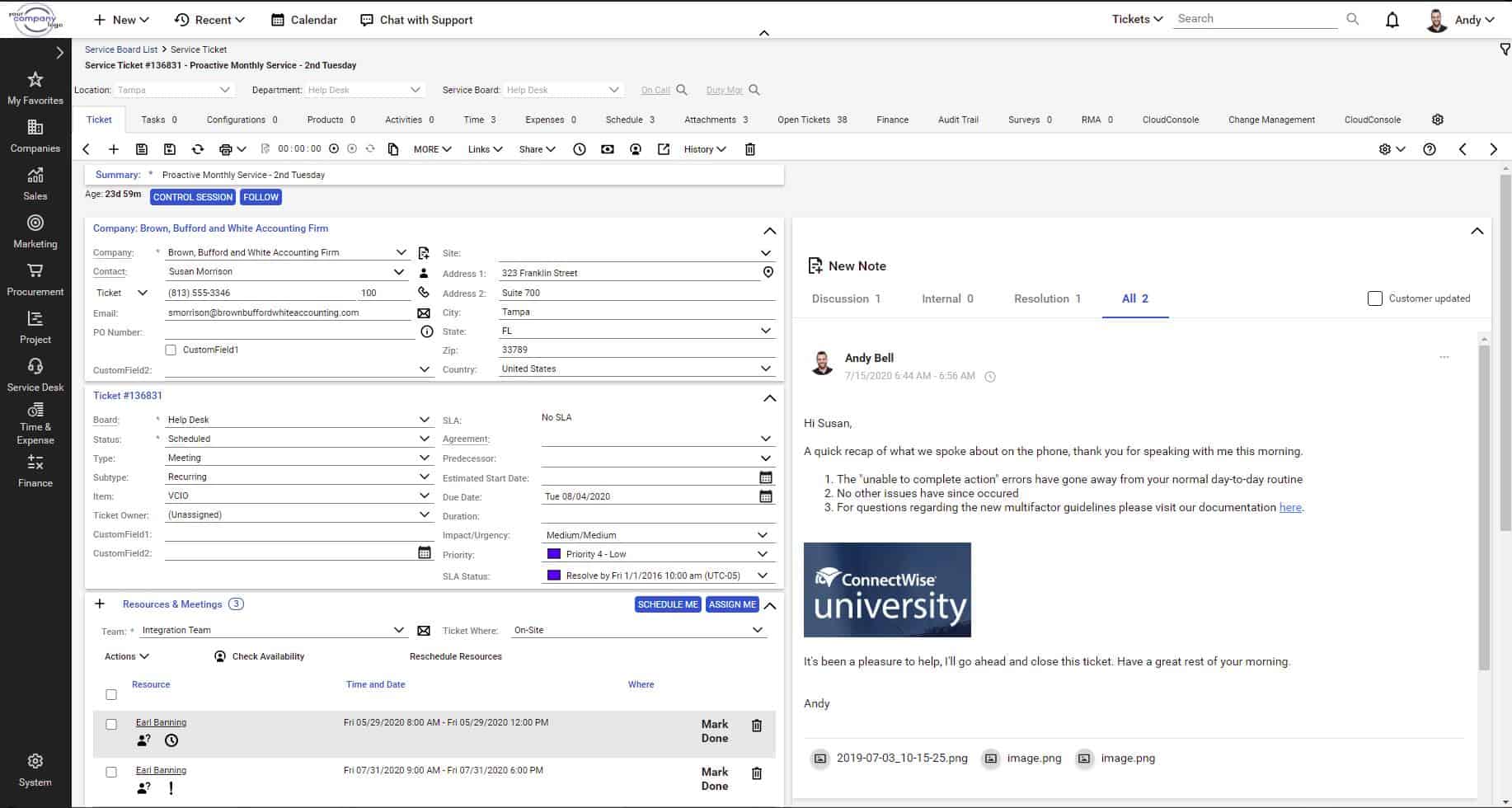
ConnectWise PSA is one of the longest-standing professional services automation platforms designed for MSPs, IT service firms, and technology solution providers. It was founded in 1982 in Tampa, Florida, USA, and has since become part of the larger ConnectWise software ecosystem, which includes RMM, cybersecurity, and remote support tools.
The platform integrates tightly with ConnectWise Automate, Control, and third-party tools such as QuickBooks, Microsoft 365, and ITGlue. Although it is capable, it is also demanding. Although it offers extensive automation and reporting features, setup and customization require time and expertise. The price is relatively high due to its enterprise features, but it can be cost-effective for MSPs that handle many clients.
From an operational standpoint, ConnectWise PSA remains a benchmark for mature, process-driven MSPs that need detailed financial tracking and deep integration options. However, smaller or newer MSPs may find that modern cloud-native PSAs, such as HaloPSA or SuperOps, offer a smoother experience with reduced administrative overhead.
ConnectWise PSA Key Features:
- Comprehensive Service Delivery Tools: Includes ticketing, project management, time tracking, SLA management, asset management, and billing modules.
- Deep Customization & Workflow Automation: Admins can set rules, automate routing and approvals, and use numerous settings to tailor to specific business processes.
- Strong Integration Ecosystem: Works with other ConnectWise tools, third-party RMMs, accounting tools, procurement, etc.
- Reporting and Business Intelligence: Custom reports, dashboards, metrics (SLAs, utilization, profitability) to monitor performance.
- Scalability & Enterprise Readiness: Supports large numbers of users, multiple clients, complex contract types, and multi-location operations
Unique Buying Proposition
ConnectWise PSA is a mature platform that integrates well across its broader ecosystem. It was built not just as a standalone PSA but as the operational backbone of a complete MSP software suite, linking directly with ConnectWise Automate (RMM), ScreenConnect (remote access), and Asio (cloud platform). This ecosystem approach enables MSPs to consolidate service delivery, asset management, billing, and customer communication under a single vendor.
Feature-In-Focus: Responsive Help Desk and Ticketing System
The term “responsive” emphasizes that the help desk and ticketing system can handle client issues quickly and efficiently. The platform includes time tracking, project management, billing, sales, and reporting. Its central value revolves around keeping the help desk productive and efficient. This ensures that client issues are tracked, managed, and resolved effectively.
Why do we recommend ConnectWise PSA?
ConnectWise PSA is built to manage complex operations at scale. Its robust financial tools, service tracking, and contract automation make it well-suited for MSPs handling multiple clients or recurring revenue streams.
It also offers one of the largest integration ecosystems in the MSP space, which makes it easy to integrate with RMM, accounting, and security tools.

Who is ConnectWise PSA recommended for?
We recommend ConnectWise PSA primarily for established or larger MSPs that manage multiple clients, complex SLAs, or multi-site operations.
In contrast, smaller or fast-growing MSPs that value speed, simplicity, and lighter overhead might find more immediate efficiency in cloud-native PSAs like SuperOps or HaloPSA, which trade some depth for faster deployment and easier maintenance.
Pros:
- Comprehensive feature set: ConnectWise PSA includes nearly every feature needed for project management, ticketing, finance, and client tracking.
- Strong integration ecosystem: Being a mature platform, it integrates with most common business and IT tools.
- Precise control for MSPs: Ideal for MSPs that require detailed management of workflows, billing, SLAs, and internal processes.
Cons:
- Complex setup: Initial setup, configuration, and training are time-consuming and require dedicated effort.
- Mobile limitations: Mobile apps or access often lack the full functionality available on desktop or web versions.
- Higher costs: Licensing, implementation, and maintenance can be expensive, and complexity grows with additional modules and integrations.
ConnectWise PSA remains one of the most capable and established PSA systems in the market. It is well-suited for MSPs that value structure, auditability, and enterprise-grade process management. However, setting it up and keeping it running can be tricky, especially for smaller teams.
Deployment is available as a cloud‑hosted solution, with licensing tailored to business needs. Contracts can be structured with monthly or annual billing terms, depending on negotiation and plan structure. Pricing is customized for each customer and available only via a vendor quote. Licensing is typically user‑based, per-technician. You can start a free trial.
7. Datto PSA
Best For: MSPs that need a mature, cloud-native platform capable of managing complex operations
Price: Not publicly available
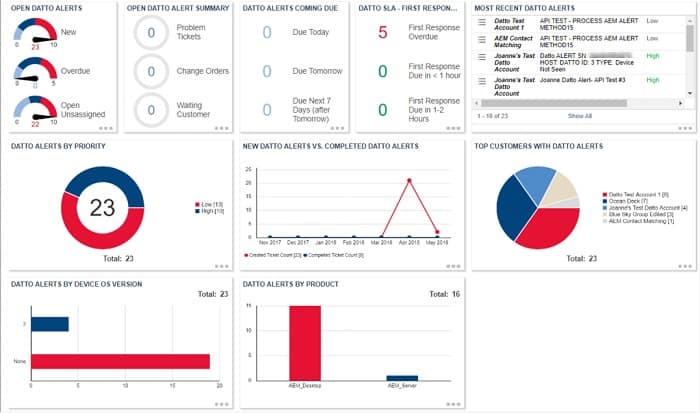
Datto PSA (widely known as Autotask PSA) is a cloud-based, AI-powered PSA explicitly built for MSPs. It was founded as Autotask Corporation in 2001 and later acquired by Datto, Inc. The platform is now part of the Kaseya IT Complete ecosystem.
Like most PSAs, the platform unifies MSP’s operations, including service desk, projects, billing, contracts, reporting, and documentation into a single, centralized system. Datto PSA integrates natively with Datto RMM, which enables a unified RMM-PSA experience that connects endpoint alerts, asset data, and ticketing in real time. It also supports more than 170 third-party integrations via open APIs. Security is built in, with 256-bit encryption, multifactor authentication, and geo-distributed data centers to meet compliance requirements.
Datto PSA remains a dependable, enterprise-grade option for MSPs that need tight integration with Datto RMM and a mature automation framework. You will enjoy it more if you’re already part of the Kaseya or Datto ecosystem.
However, new users may face a steeper learning curve and higher initial costs compared to newer, lightweight PSAs. If your business values stability, scalability, and deep integrations over rapid setup, Datto PSA is a practical long-term choice.
Datto PSA Key Features:
- Unified Service Desk & Ticket Management: You can manage all client requests in one place using ITIL-aligned ticketing.
- Dashboards, Reporting & Custom Widgets: Build custom dashboards to see real-time insights into ticket backlogs, SLA performance, and technician productivity.
- Integration Ecosystem: Datto PSA integrates natively with Datto RMM and connects seamlessly with over 200 third-party tools.
- Time Tracking, Billing & Contract Management: You can log both billable and non-billable time, generate accurate invoices, and manage contracts and service terms from a single system.
- Project & Resource Management: Easily schedule projects, assign resources, and monitor progress to keep client work organized and on track.
- Cloud-Hosted & Secure Platform: Because it’s fully cloud-based, you can access it anywhere with high uptime and strong security.
Unique Buying Proposition
Datto PSA generally promotes its PSA–RMM integration as its unique selling point. But based on our assessment of Datto and other similar PSA tools, the PSA–RMM integration that Datto PSA promotes as a key advantage is not unique in itself. Competing platforms such as ConnectWise, HaloPSA, and SuperOps also offer similar integrations or all-in-one ecosystems.
What distinguishes Datto PSA is the maturity and stability of its integration with Datto RMM, backed by the Kaseya IT Complete suite. Because both products are developed and maintained under the same corporate umbrella, data flows such as ticket creation from RMM alerts, asset synchronization, and automated billing are typically more consistent and reliable than those achieved through third-party integrations.
So, the real differentiator is not the concept of PSA-RMM integration, but rather the depth, polish, and ecosystem maturity Datto offers after years of refinement and large-scale deployment across thousands of MSPs.
Feature-In-Focus: Service Desk with ITIL-aligned Ticketing
The service desk with an ITIL-aligned ticketing module is central to the Datto PSA platform. Datto PSA organizes and manages support requests (tickets) in accordance with ITIL best practices. ITIL alignment ensures that tickets follow standardized processes for incident, problem, and service request management. It enables technicians to meet SLA targets and resolve client issues efficiently.
Why do we recommend Datto PSA?
We recommend Datto PSA because it delivers real measurable value for MSPs through its strong automation, deep integrations, and proven reliability. It connects with over 250 third-party tools, so MSPs can unify operations without replacing their existing stack.
The advanced integration with Datto RMM ensures that alerts, assets, and devices sync in real time. Lastly, it has appreciable user satisfaction in Gartner Peer Insights (4.8/5) in its PSA category. Its score suggests many users believe it delivers reliability, performance, and feature completeness.

Who is Datto PSA recommended for?
We recommend Datto PSA for MSPs that need a mature, cloud-native platform capable of managing complex operations and integrating tightly with other IT management tools. In fact, MSPs that operate using other Kaseya/Datto products will definitely benefit from a stable, unified platform that helps them streamline processes and support business growth.
Pros:
- Comprehensive feature set: Covers almost everything an MSP requires, from ticketing and contracts to billing and integrations.
- Deep integrations: Especially with Datto RMM, enabling automation and smoother operations between monitoring and service delivery.
- Strong reporting and dashboards: Provides management with clear insights into operations.
- Supports growth: Many users report it can handle expansion without requiring a PSA replacement.
Cons:
- Steep learning curve: New users may find setup and onboarding time-consuming.
- Performance issues: Some users report slower performance when managing large volumes of data or reports.
- High implementation and maintenance costs: Licensing, training, configuration, permissions, and module setup add complexity and expense.
Datto PSA pricing is typically discussed directly with a Datto sales representative. Licensing is per user/technician and scales with the size of the team. Subscriptions can usually be structured on a monthly billing cycle. Costs vary widely depending on modules, add‑ons, and negotiated terms, so exact list prices are not published online and require a quote.
The platform includes broad enterprise‑grade support and full PSA capabilities (service desk, CRM, contracts, billing, reporting, RMM integration, etc.) within the subscription. Prospective customers must request pricing and demo access directly through Datto to get specific costs and plan details.
PSA Software Comparison Table for MSPs
Use this side-by-side comparison to quickly shortlist the PSA that fits your MSP by deployment type, pricing model, setup effort, automation depth, customization level, RMM integration, and ideal MSP profile – so you can narrow the field before you invest time in demos and trials.
| Parameters | Atera | Syncro | SuperOps | N-able MSP Manager | HaloPSA | ConnectWise | Datto |
|---|---|---|---|---|---|---|---|
| Our rank (based on our evaluation of PSA software for MSPs) | 1 | 2 | 3 | 4 | 5 | 6 | 7 |
| Deployment Type | Cloud | Cloud | Cloud-native | Cloud | Cloud + On-prem | Cloud + On-prem | Cloud |
| Core Focus / Strength | Unified RMM/PSA + per-tech pricing | Unified platform + simple billing automation | Ease of use + AI-driven automation | Integrated ticketing, time tracking, and billing system | Customization + scalability | Deep ecosystem + enterprise-level automation | Tight RMM/PSA integration + financial accuracy |
| Pricing Model | Per technician (unlimited endpoints) | Per user (unlimited endpoints) | Per technician | Per technician | Per agent | Per user and modular pricing | Per user |
| Ease of Setup | Easy | Easy | Very easy | intuitive and lightweight | Moderate | Complex | Moderate |
| Automation Depth | Medium (scripted + AI tagging) | Medium-high (smart ticketing + scripts) | High (AI workflows) | Medium (predefined workflow automation) | High (custom triggers & SLAs) | Very high (deep automation engine) | High (workflow rules) |
| Customization Level | Moderate | Moderate | Moderate | Moderate | High | Very high | High |
| RMM Integration | Native | Native | Native | Native | Optional (add-on | Via ConnectWise Automate | Native (Datto RMM) |
| Ideal MSP Profile | Agile MSPs or internal IT teams | Small MSPs with automation focus | New/growing MSPs | Small to mid-sized MSPs | Mid/large MSPs | Large MSPs/enterprises | MSPs in Kaseya/Datto ecosystem |
Choosing PSA Software
The key to success for any MSP is having the right management procedures in place and a well-written PSA can provide those. Closed-loop systems flow help desk calls through ticketing systems, log time spent, channel through to the billing system, and end up in the accounts without any manual intervention. A good PSA takes care of all of the MSPs’ admin tasks.
Once an MSP has been running for a while, managers are in a better position to estimate quotes for new business. This is because historical data in the PSA will show exactly how much time and resources the MSP typically spends on each category of tasks and how much effort satisfying the contracts of a typical client takes.
So, getting the right PSA can ensure profitability for an MSP.
Our methodology for choosing PSA software for MSPs
We used the following criteria to compare PSA platforms in a consistent, repeatable way.
1. Workflow analysis
We mapped MSP processes from ticket intake to billing to pinpoint bottlenecks and areas where tasks can be slowed or duplicated. This helped us understand precisely how work flows through an MSP operation.
2. Goal setting
Based on the workflow review, we set clear objectives, including faster response times, more efficient resource use, and more accurate billing. These goals guided our evaluation of each PSA.
3. Long-term evaluation
We examined each vendor’s support quality, pricing model, and commitment to ongoing product development to ensure the solution would remain reliable and effective over time.
4. Operational impact
We considered practical factors like data migration, training requirements, and total cost of ownership alongside the subscription fee. This helped ensure the PSA would integrate smoothly into your daily operations and provide lasting value.
Broader B2B software selection methodology
We evaluate B2B software using a consistent, objective framework that focuses on how well a product solves meaningful business problems at a justified cost. This includes assessing overall performance, scalability, stability, and user experience quality. We examine real-world feedback from practitioners to understand how the software behaves outside controlled demos.
We also review vendor transparency, roadmap clarity, support responsiveness, and the pace at which meaningful improvements are released. We follow this approach to ensure each of our recommendations is grounded in practical value, long-term viability, and operational impact, not in marketing claims.
Check out our detailed B2B software methodology page to learn more.
Why Trust Us?
Our work is produced by a team of IT and business software professionals with extensive hands-on experience evaluating, deploying, and managing enterprise technology. We analyze software independently, using evidence-based methods and industry best practices to ensure our assessments remain unbiased and technically sound.
Our goal is to provide you with clear, reliable insights that help reduce risk, shorten evaluation cycles, and support confident decision-making when selecting complex business technology.
PSA software FAQs
What is a PSA in software?
PSA stands for Professional Services Automation. This is a package of tools that support the operations of a managed service provider. This doesn’t include the tools used by technicians to support the systems of clients – those systems are called Remote Monitoring and Management (RMM). Types of tools in a PSA package include a ticketing system, team management services, automated timesheet generation, contracts management, and service level agreement (SLA) conformance tracking.
What is a PSA MSP?
An MSP is a managed service provider. This is a business that provides outsourced services for other companies. The MSP sector needs tight control over contract definitions. The obligations of standards that need to be met in the delivery of the service are outlined in a service level agreement (SLA). Professional Services Automation (PSA) software systems manage contracts and SLAs and also interlace with operations systems to document activities and ensure that SLAs are met.


Any insights on ManageEngines MSP solution ?
Kaseya BMS, can’t be serious?
Hi, CM,
Kasaya BSM is one of the biggest sellers in the market. So, a lot of people seem to be taking them seriously.
Cheers,
Stephen