

If you’re seeing strange network behavior such as slow speeds, unexpected login prompts, or data that seems to go missing, you might be dealing with an ARP poisoning attack.
This guide is for anyone managing a home or business network who wants to understand what ARP poisoning is and how to spot it early. I’ll also cover some practical steps to prevent it from causing serious damage.
The short answer
Here’s what ARP poisoning is: an attack on your local network sends fake messages that trick computers into sending data to the wrong device, letting them intercept or alter traffic without your knowledge.
Immediate detection steps:
| Method | How to check | What you're looking for |
|---|---|---|
| Windows Command Prompt | Run arp -a, look up your gateway IP | Multiple MAC addresses for the same IP |
| Wireshark | Filter: arp.duplicate-address-detected | Warnings about duplicate IP usage |
| arpwatch (Linux/macOS) | Check /var/log/arpwatch.log | Alerts about changed IP-MAC pairings |
Quick prevention priorities:
- Home users: Use a VPN for sensitive data (this encrypts traffic so interception is useless)
- Small businesses: Enable port security on your managed switch
- Organizations: Deploy Dynamic ARP Inspection (DAI) if you have Cisco/Meraki/Juniper switches
Warning: There’s no perfect solution. Static ARP entries work but break easily when devices change. The best protection combines detection tools with network segmentation and encryption.
Understanding ARP poisoning (without all the jargon)
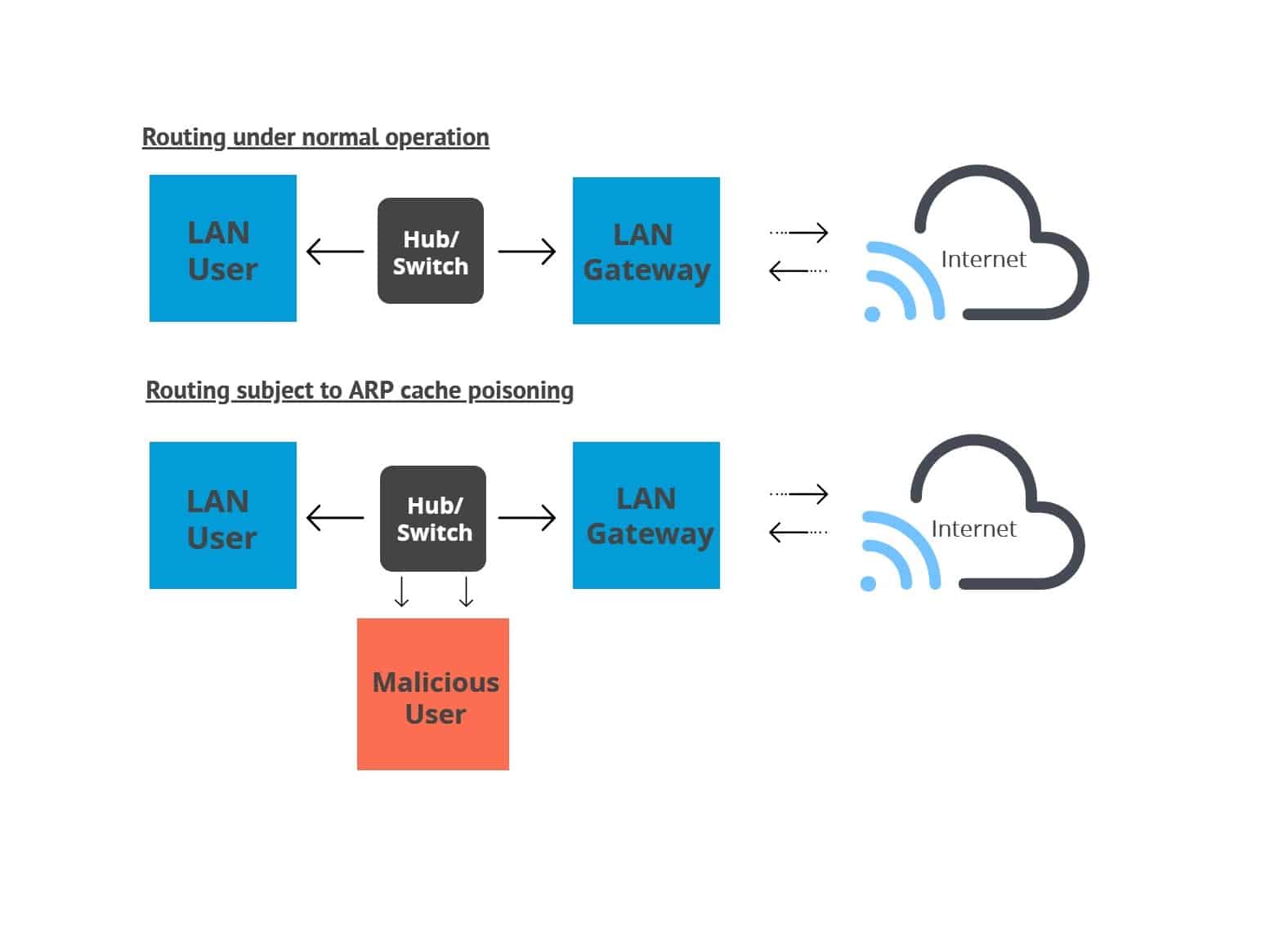 ARP (Address Resolution Protocol) is essentially your network’s phonebook. When Device A wants to talk to Device B, it knows the IP address but needs the physical (MAC) address to deliver the data. ARP broadcasts a request asking “Who has this IP?” and the owner responds with their MAC address.
That’s where the vulnerability lies: ARP trusts every response. There’s no verification that the reply came from the actual IP owner.
An attacker exploits this by broadcasting fake ARP replies saying “I’m the gateway!” or “I’m the file server!”. Even though they’re lying, other devices update their ARP cache (phonebook) and start sending traffic to the attacker’s machine instead.
Why this matters to you
A successful ARP poisoning attack enables:
- Data theft: Capturing unencrypted passwords, emails, or financial info
- Session hijacking: Taking over logged-in accounts without credentials
- Denial of service: Cutting off network access entirely
- Further attacks: Using the intercepted traffic to launch more intrusions
This attack only works on local networks (on the same wifi or ethernet). Once traffic reaches the internet, different protections apply. Yet if someone gains physical access or connects to your wifi, ARP poisoning becomes a real threat.
How to detect ARP poisoning: Practical methods
Method 1: Manual check using command line
For Windows:
arp -aLook at your default gateway entry. If you see more than one MAC address associated with the same IP, or if the MAC suddenly changes between checks, that’s suspicious.
For macOS/Linux:
arp -nIt’s the same principal here – compare MAC addresses against what you expect.
Note that this is a snapshot in time. An attack could pause during your check. For ongoing protection, automate monitoring (as in method 2).
Method 2: Wireshark packet analysis
Wireshark is a free, open-source tool that shows all network traffic passing through your device.

Detection steps:
- Install Wireshark from Wireshark.org.
- Start a capture on your active network interface.
- Apply this display filter: arp.duplicate-address-detected.
- Watch for warnings like “duplicate use of [IP] detected!”.
You can also filter specifically for ARP replies:
arp.opcode == 2
Then examine the source MAC addresses. If the same IP keeps responding from different MACs, you’ve likely got an active poisoning attempt.
What this looks like: Legitimate traffic shows consistent IP-to-MAC mappings. Poisoning creates conflicts where multiple MAC addresses claim the same IP.
Method 3: Continuous monitoring with arpwatch
arpwatch runs silently in the background and alerts you whenever ARP tables change unexpectedly.
Setup on Linux:
sudo apt install arpwatch # Debian/Ubuntu
sudo yum install arpwatch # CentOS/RHEL
sudo arpwatch -i eth0 # Replace with your interface
Logs appear in /var/log/arpwatch.log. The tool flags:
- New IP-to-Mac combinations
- Mac addresses appearing on multiple IPs
- Known IPs switching to new MACs
For macOS: arpwatch has no official Homebrew support in core, but you can install it via MacPorts:
bash sudo port install arpwatch sudo arpwatch -i en0
Alternatively, use tools like Wireshark or tcpdump for ARP monitoring without needing a dedicated ARP daemon.
Windows alternative:
arpwatch is not natively available for Windows. However, XArp offers a graphical interface with real-time alerts (commercial option).
Method 4: Enterprise detection tools
For organizations, these tools provide continuous, automated monitoring:
| Tool | Type | Best for |
|---|---|---|
| Zeek | Open-source IDS | Large networks, custom alert rules |
| Corelight | Commercial NSM | Full packet capture with ARP analytics |
| Darktrace Antigena | AI-driven | Automated response to anomalous ARP behavior |
| Cisco Secure Network Analytics | Enterprise | Integration with CISCO infrastructure |
These solutions correlate ARP activity with other network events, reducing false alarms while catching sophisticated attacks.
Prevention strategies that actually work
No single prevention method fits every situation. Here’s how to choose based on your environment:
1. Static ARP entries (smallest networks only)
You manually bind IP addresses to MAC addresses on each device, preventing any ARP updates.
Command example:
arp -s 192.168.1.1 AA:BB:CC:DD:EE:FF
- Pros: Extremely effective against basic poisoning attacks.
- Cons: Breaks whenever devices change, get replaced, or join the network. Not scalable beyond 10-15 devices.
2. Dynamic ARP Inspection (DAI) – best for managed switches
If you control your network infrastructure (CISCO, Meraki, Juniper, etc.), DAI is the gold standard.
How it works: DAI validates every ARP packet against a trusted database (built from DHCP snooping bindings). Invalid ARP packets get dropped before they reach endpoints.
While the exact configuration varies by vendor, the core principal is consistent: enable DHCP snooping first, mark uplink ports as trusted, and activate DAI on the relevant VLANs.
3. Encryption and VPNs (defense in depth)
Even if an attacker intercepts your traffic, encryption renders it useless.
What helps:
- HTTPS everywhere: Modern sites enforce TLS automatically
- End-to-end encrypted apps: Signal, ProtonMail, WhatsApp
- VPN for sensitive activities: Encrypts all traffic for your device
Remember: Encryption protects data, not availability. An attacker can still disrupt your connection even if they can’t read the contents.
4. Network segmentation
Break your network into smaller zones to limit an attacker’s reach.
Practical steps:
- Use VLANs to separate guests from internal systems
- Enable private VLANs on your router/switch
- Place IoT devices on isolated networks (they’re frequent compromise points)
- Restrict broadcast domains where possible
Each segment reduces the attack surface. Even if one zone is compromised, others remain protected.
5. Port security
Switch-level port security limits which devices can connect to specific ports.
Typical configuration:
- Limit maximum MAC addresses per port (often 1-2 for end-user ports)
- Violation modes: shutdown port, restrict, or protect
- Combine with 802.1X authentication for stronger identity verification
This prevents rogue devices from joining the network in the first place.
Create a layered defense strategy
No single tool catches everything. Combining defenses creates a safer network:
| Environment | Minimum protection | Recommended protection |
|---|---|---|
| Home Network | Router with updated firmware and VPN for banking/shopping | Add network segmentation, enable WPA3 |
| Small office (<20 users) | Port security and encrypted communications | Managed switch with DAI, central logging |
| Enterprise | DAI + 802.1X + VLAN segmentation | Full NDR/XDR platform, continuous ARP monitoring |
Ongoing maintenance checklist
Security isn’t a one-time setup. Schedule these checks quarterly:
- Review ARP tables on critical servers
- Audit switch port security configurations
- Check detection tool logs for anomalies
- Update firmware on routers and switches
- Validate backup procedures (in case of disruption)
Final takeaway
ARP poisoning remains a serious threat because it exploits a fundamental design weakness: ARP was built for convenience, not security. While the protocol hasn’t changed (and won’t, for compatibility reasons), modern networks have robust tools to defend against abuse.
You can’t fix ARP itself, but you can make poisoning ineffective through layered defenses. Perfect security doesn’t exist but you can make your network harder to compromise than the next target.
ARP poisoning and spoofing: FAQs
Can ARP poisoning happen on public wifi?
Yes. If you’re on the same network segment as other users (like at a café), an attacker could intercept traffic. Using a VPN adds encryption that protects you even if ARP is compromised.
Will a firewall stop ARP poisoning?
No. Firewalls operate at higher network layers (above ARP), so they can’t validate Layer 2 MAC-to-IP mappings. You need switch-level protections like DAI or endpoint monitoring like arpwatch.
Can I detect ARP poisoning on my phone?
Not directly. Mobile operating systems don’t expose ARP tables to users. For smartphones, rely on network-level protections (secure router with DAI) or use HTTPS-only browsing and a VPN.
Related post: How to prevent spoofing attacks
Image credit: Image design based on ARP Spoofing by 0x55534C under CC3.0
Perhaps if you typed arp -a (as shown in the screenshot) you might do better B-)
Thanks for pointing out the typo, Martin. It’s been fixed now.
Under “Static ARP entries” you state “this solution can only protect you from simpler attacks”, can you provide some examples of “non simple” attacks which can defeat static ARP entries? Thanks.
Using static entries will protect your system in most ways. However, it will still be susceptible to MAC spoofing, as well as the complications that arise from trying to manage too many devices.
Thanks for the reply, I appreciate it. I’ve done some research and it seems that defending against MAC spoofing is difficult if even possible. 802.1X appears to be a solution. If you have insight to the following I’d appreciate a reply. Is MITM even possible with MAC spoofing since both systems receive all communications? If both systems respond won’t that create network confusion leading to discovery? Other than volume of traffic, is there an advantage of MAC spoofing over just using promiscuous mode?