

Fileless malware is one of the hardest threats to defend against because it leaves almost no trace on your system. Unlike traditional malware, it never writes a file to disk. Instead, it runs entirely in memory, using tools already built into your operating system. This guide explains how it works, why it’s difficult to detect, and what you can actually do about it.
Quick Answer: What is fileless malware?
Fileless malware is malicious code that operates primarily in memory rather than being stored as a traditional executable file on a hard drive.
Instead of relying on obvious malware files, attackers abuse legitimate system tools already present on the operating system. On Windows systems, this commonly includes:
- PowerShell
- Windows Management Instrumentation (WMI)
- Registry scripts
- Scheduled tasks
- Office macros
- Browser scripting engines
Because many security products focus heavily on scanning files, fileless malware can bypass traditional signature-based detection methods.
How fileless malware works
Although techniques vary, most fileless attacks follow a similar structure.
1. Initial access
Attackers first gain access using methods such as:
- Phishing emails
- Malicious Office documents
- Exploit kits
- Compromised websites
- Browser vulnerabilities
In many cases, the initial payload is very small because the attacker intends to use native operating system tools afterward.
2. Abuse of legitimate tools
The attacker then launches trusted system utilities, commonly PowerShell. Rather than dropping malware files to disk, the attacker executes commands directly in memory. These commands may:
- Download additional payloads
- Create persistence
- Disable security tools
- Steal credentials
- Move laterally through the network
Because PowerShell is widely used by administrators and Microsoft software, malicious activity can appear legitimate unless carefully monitored.
3. Persistence
Some fileless malware survives reboots by storing scripts inside:
- The Windows Registry
- Scheduled tasks
- WMI event subscriptions
- Startup services
The malicious logic may still technically exist somewhere on the system, but not as a conventional malware executable.
4. Ongoing malicious activity
Once established, fileless malware may:
- Steal credentials
- Deploy ransomware
- Mine cryptocurrency
- Exfiltrate sensitive data
- Create botnets
- Maintain remote access
Attackers often delete logs and temporary traces to complicate incident response.
Why fileless malware is effective (and difficult to detect)
The key is PowerShell, which is a powerful Windows scripting tool with deep access to the operating system. It can modify user accounts, manipulate the registry, execute commands on remote machines, and bypass security features. Critically, PowerShell runs in protected memory that can’t be easily queried, making malicious activity hard to detect.
Firewalls and antivirus programs typically don’t block PowerShell activity because it’s used constantly by legitimate software. Blocking it outright would break a large portion of normal business IT infrastructure.
Real-world fileless malware examples
Here are some real-world examples of fileless malware:
PyLoose (2023)
Identified by Wiz researchers, PyLoose was a Python-based fileless attack targeting cloud workloads. It loaded an XMRig cryptocurrency miner directly into memory. Approximately 200 instances were found, making it one of the first publicly documented fileless attacks specifically built for cloud environments.
HeadCrab (2021)
Discovered by Aqua Security researchers in 2023, HeadCrab had already infected over 1,000 Redis servers since 2021. It ran entirely in memory, deleted all logs to cover its tracks, and used the compromised servers as a botnet for Monero mining.
Meterpreter / Metasploit (2017)
In February 2017, the Meterpreter tool (part of the Metasploit penetration testing framework) was found running in the memory of computers at over 100 banks across 40 countries. The attack was designed to compromise ATM machines and allow cash withdrawals. Kaspersky Labs discovered it after being called in by an affected bank. In Russia, attackers successfully controlled ATMs at eight branches and withdrew $800,000 before the attack was disrupted elsewhere.
Operation Cobalt Kitty (2017)
Operation Cobalt Kitty was an advanced persistent threat (APT) campaign targeting an Asian corporation. It aimed to steal proprietary business information and went undetected for over a year. PowerShell scripts communicated with an external command-and-control server, enabling a sustained campaign that included deployment of the Cobalt Strike Beacon. The attackers gained initial access by targeting users with the broadest access rights across the network, such as senior executives and infrastructure administrators.
WannaMine (2017)
Using the same EternalBlue exploit as the high-profile WannaCry ransomware attack, WannaMine runs entirely in memory and uses infected machines to mine Monero cryptocurrency. Because it leaves no file-based footprint, many infections persisted for months before detection.
How to defend against fileless malware
No single measure eliminates the risk, but the combination below significantly reduces your exposure.
Keep Windows and software updated
Microsoft has actively updated Windows Defender to detect anomalous PowerShell and WMI behavior. Installing updates promptly is the single most effective defense. Many fileless attacks rely on known vulnerabilities that patches close.
Control how PDFs and Office documents behave
Disable PDFs from loading directly in browsers. Instead, require them to be downloaded and opened locally, where security tools can inspect them.
Disable JavaScript in your PDF reader
Keep Microsoft Office macros disabled by default, and train staff never to enable them in documents received by email.
Restrict browser behavior
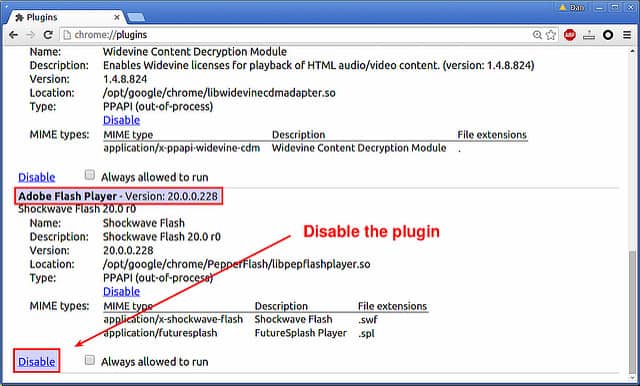
Block Flash entirely. It’s deprecated, and no legitimate site needs it. Consider restricting which browsers are permitted on company machines and deploying browser isolation tools. Microsoft Defender Application Guard, included with Microsoft 365, provides sandboxing specifically designed to contain fileless threats in Edge and Internet Explorer.
Strengthen user authentication
Fileless malware spreads further when it lands on a machine with broad network access. Operation Cobalt Kitty succeeded partly because it targeted high-privilege users. Limit access rights to what each role actually requires, use separate authentication credentials for different systems, and implement multi-factor authentication. This is particularly important for admin accounts.
Segment networks and restrict lateral movement
Keep sensitive systems isolated from general-use machines. A fileless infection on a standard employee workstation should not be able to reach critical servers. Network segmentation limits the blast radius of any successful intrusion.
Educate staff
The most common entry point for fileless malware is a user visiting a compromised website or enabling a macro in a document. Regular, practical security awareness training makes a real difference.
Summary
Fileless malware is harder to detect than traditional threats because it operates through legitimate system tools and leaves little to no disk-based evidence. However, the defenses are largely the same as sound general security practice: keep systems patched, restrict unnecessary capabilities, limit user privileges, and train staff on the realistic risks they face day-to-day.
Microsoft has invested significantly in making Windows Defender capable of detecting anomalous PowerShell behavior, which has meaningfully reduced the number of successful attacks. Staying current with Windows updates is the most important single step you can take.
Related: Virus vs malware differences