
Effective network management often requires the ability to control and optimize bandwidth usage
Bandwidth limiter tools play a critical role in ensuring that your network runs smoothly by allowing you to allocate bandwidth according to your priorities, preventing network congestion, and ensuring a balanced distribution of resources.
Here is our list of the best bandwidth limiter & controller tools:


- NetLimiter – Best for Windows businesses discouraging non-work traffic.
- NetBalancer – Best for home users and small businesses on Windows.
- SolarWinds Bandwidth Analyzer Pack – Best for Windows Server businesses with multi-site needs.
- Zscaler – Best for cloud-based multi-site with Zero Trust.
- SoftPerfect Bandwidth Manager – Best for home use and small businesses on Windows.
- Arista NG Firewall (formerly Untangle NG Firewall) – Best for organizations needing firewall-integrated bandwidth control.
These tools can help you monitor and limit bandwidth consumption, ensuring that mission-critical applications receive the necessary bandwidth while limiting non-essential traffic. Specifically, they address the following pain points for your organization:
- Uncontrolled bandwidth hogging by some applications or users.
- Poor Quality of Service (QoS) for bandwidth-intensive applications like VoIP.
- Lack of visibility into who is using bandwidth at different times.
- No per-user or per-device control.
- Difficult to enforce fine-grained policies to control bandwidth usage.
Choosing the right bandwidth limiter can address the above pain points. The best bandwidth limiter tools offer a range of features, including real-time monitoring, detailed reporting, and customizable rules for bandwidth allocation. These tools can help you identify bandwidth-hogging applications and devices, set usage limits, and even prioritize traffic based on the type of service. For businesses of all sizes, this can translate to improved productivity and enhanced user experience. Any enterprise would benefit from reduced lag and faster internet speeds for essential activities.
In this article, we will explore some of the top bandwidth limiter tools available today. We’ll examine their key features, ease of use, compatibility with different network environments, and pricing options. Our guide will help you find the best bandwidth limiter tool to meet your needs and ensure optimal network performance.
If you need to know more, explore our vendor highlight section just below, or skip to our detailed vendor reviews.
Best bandwidth limiter software highlights
Top Feature
Flow-based analysis combines SNMP monitoring with bandwidth dashboards
Price
Starts at $9 per month
Target Market
Network administrators and MSPs managing hybrid and cloud networks
Free Trial Length
30-day free trial
Additional Benefits:
- Improves visibility into congestion and capacity planning
- Identifies bandwidth hogs by protocol, source, destination and user
- Supports proactive alerts when utilization thresholds are crossed
- Combines traffic analysis with broader infrastructure monitoring
Features:
- Monitors traffic with NetFlow, IPFIX, sFlow, J-Flow, cFlow, NetStream and AppFlow
- Uses an on-site collector with a cloud analytics platform
- Records switch capacity utilization per interface
- Provides dashboards, historical reports and QoS analysis

Top Feature
Flow-based traffic shaping applies QoS and application prioritization
Price
Standard $172, Professional $595 and Enterprise $1,045 for 10 interfaces
Target Market
MSPs and capacity planners of large enterprises
Free Trial Length
30-day free trial
Read more ▼

Top Feature
Sensor-based bandwidth monitoring breaks usage down with Toplists
Price
Starts at $179 per month for 500 aspects
Target Market
Network administrators and MSPs needing device and application-level visibility
Free Trial Length
30-day free trial
Read more ▼

Top Feature
Application-specific throttling controls limits, priorities and blocking
Price
Standard license costs $29 for two years
Target Market
Gamers, power users and enterprises needing fine bandwidth control
Free Trial Length
28-day free trial
Read more ▼

Top Feature
Process-based bandwidth control manages upload and download limits
Price
Starts at $49.95
Target Market
Windows power users, gamers and home users
Free Trial Length
14-day free trial
Read more ▼

Top Feature
SNMP and flow analysis combine network performance with traffic insight
Price
Negotiated pricing
Target Market
MSPs and enterprises needing detailed bandwidth insights across multiple environments
Free Trial Length
30-day free trial
Read more ▼

Top Feature
Cloud-based bandwidth shaping prioritizes critical applications by policy
Price
Negotiated pricing
Target Market
Distributed teams and remote workers
Free Trial Length
Demo available upon request
Read more ▼

Top Feature
Windows traffic shaping applies quotas by IP, MAC, port and interface
Price
Single license costs $49 and site license costs $499
Target Market
Network administrators of small organizations
Free Trial Length
30-day free trial
Read more ▼
Key points to consider before choosing bandwidth limiter tools
While selecting the right bandwidth limiter tool, it’s important to consider the technical aspects, as well as the tool’s fit for your organization’s tech stack and budget. More importantly, list out your pain points and see if the tool addresses them.
Some factors to consider while selecting the best bandwidth limiter tools are:
- Compatibility: One of the biggest aspects is that the tool must be compatible with your tech stack. Make sure it works well with your firewalls and routers.
- Bandwidth Control: Another key feature is bandwidth control, where the tool must allow you to control bandwidth usage based on multiple criteria.
- Ease of use: It’s good to select a tool that is easy to use and comes with an intuitive user interface.
- Real-time Alerts: Monitoring becomes easy and proactive when the tool can send real-time alerts when bandwidth usage spikes or when the limit is reached, so you can take the required actions immediately.
- Reports: If you have compliance requirements or need to report to an external organization, it helps if the tool can generate reports for you.
Along with the above factors, consider the license costs, scalability, and security features.
To dive deeper into how we incorporate these into our research and review methodology, skip to our detailed methodology section.
The Best Bandwidth Limiter Software
Ultimately, your only choice is to limit the network capacity that is available to those bandwidth hogs. Fortunately, there are some excellent bandwidth limiters available and many of them are integrated into comprehensive network monitoring and traffic management tools.
Let’s examine the best bandwidth limiter tools on the market today.
1. Site24x7 Network Bandwidth Monitoring (FREE TRIAL)
Best for: Flow-based bandwidth traffic analysis
Relevant for: Network administrators and MSPs managing hybrid/cloud networks.
Price: Starts at $9 per month.
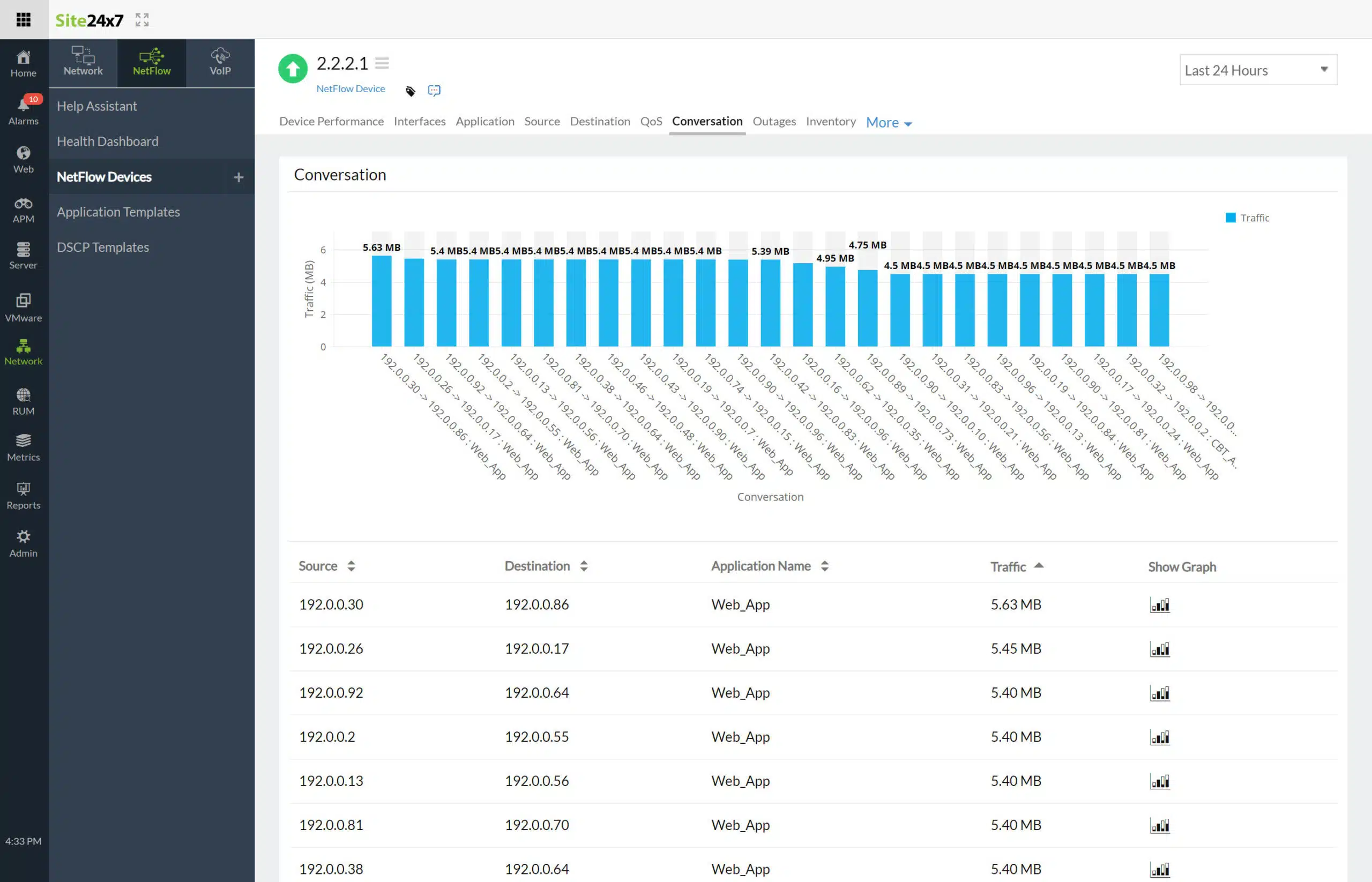
The Site24x7 Network Bandwidth Monitoring service is part of a cloud platform of IT asset monitoring and management systems. This tool utilizes an on-site collector to gather traffic data. The traffic information is uploaded to the Site24x7 platform where it is interpreted into tables and graphs.
When we tested Network Bandwidth Monitoring we found the following key features.
Key Features:
- Full Stack Observability: Monitors devices, endpoints, network traffic, applications, and cloud platforms
- Bandwidth Usage Analysis: By link and along a path
- Bottleneck Detection: Alerts for congestion
- Packet Throughput Analysis: Identifies packet loss and jitter
- Uses a Range of Protocols: NetFlow, IPFIX, sFlow, J-Flow, cFlow, NetStream, and AppFlow
Unique Business Proposition
Site24x7 combines flow-based analysis and SNMP device monitoring to help gain comprehensive insights. It supports most leading flow protocols along with 10,000+ device templates for quick deployment across different scenarios and use cases. Its real-time dashboards and detailed reports also make it a popular choice.
Feature in Focus: Detailed Bandwidth Analysis
Site24x7 supports multiple flow protocols and SNMP monitoring to collect data from different devices and analyze them in depth to provide the data you need about bandwidth usage. With this information, you can create appropriate rules for better managing your bandwidth usage.
Why do we recommend it?
The Site24x7 Network Bandwidth Monitoring system operates from a cloud platform and storage space for the gathered metrics is included in the subscription price. There are two focuses with traffic analysis, which are immediate reporting of congestion and long-term capacity planning. This package provides support for both of these needs.
This package is able to communicate with switches produced by different manufacturers. This is possible because the system is loaded with NetFlow, IPFIX, sFlow, J-Flow, cFlow, NetStream, and AppFlow protocol implementations. While some of these systems are producer-independent, there is no single protocol used throughout the world.
The Site24x7 system records the total capacity of each switch and then looks at the actual traffic volume running through each interface on the device. The tool has a series of adjustable performance thresholds that will trip alerts if they are crossed. Thus, you could set a level of 80 percent utilization and if that gets exceeded, you will get a notification because that gives you time to take action.
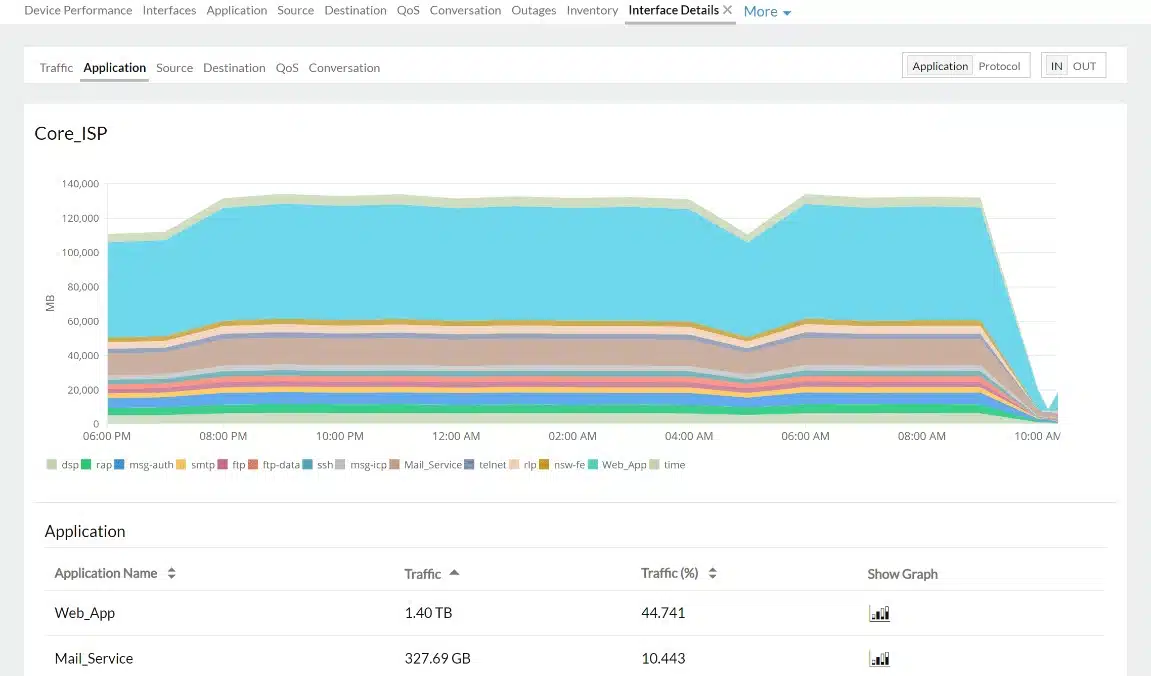
The data on traffic volumes gets stored, so you can use it to identify the regular periods of peak utilization and which users or software packages are active at those times. This alerting system is a type of bandwidth limiter, although the actual actions taken to reduce traffic need to be implemented manually.
Who is it recommended for?
This package is suitable for any size or type of business that runs a network. However, very small businesses that only have one wireless hub probably won’t need it. The unit is bundled into plans that include network device monitors, server activity monitoring, and application performance monitoring plus log management and network configuration management.
During our testing, we identified the following pros and cons related to Network Bandwidth Monitoring.
Pros:
- Records Switch Capacity Utilization Per Interface: Can also measure capacity usage over a path
- Records Traffic Metrics: Provides historical analysis
- Identifies Traffic Hogs: Analyzes traffic by protocol, source, destination, and user
- VoIP Traffic Analysis: Quality of Service reports
- A Cloud-Based System: Provided as a SaaS subscription platform.
Cons:
- Not Available as a Standalone Module: Forms part of a package of tools
The Network Bandwidth Monitoring function is bundled in with many other monitoring and management tools in plans. There are many plans on the Site24x7 platform, but one example is the Infrastructure edition, which starts at $9 per month. Take a look at the Site24x7 Network Bandwidth Monitoring service with a 30-day free trial.
EDITOR'S CHOICE
Site24x7 Network Bandwidth Monitoring is our top pick for a bandwidth monitoring tool because this platform provides both device monitoring and traffic analysis. This combination gives you complete observability for your network. Take a look at the protocol analysis statistics to see which applications are using up most of your bandwidth; you can also check the top talkers to see which endpoints generate the most traffic. With this information, it is possible to work out how to balance access to the network by putting a limit on the amount of traffic that application or endpoint can put through the network. That limit can be placed per hour to make sure that there is space for others. The Site24x7 platform has many system monitoring modules and its plans include all of them. So, you get server, application, and Web application monitoring together with the network monitoring service.
Download: Start a 30-day FREE Trial
Official Site: https://www.site24x7.com/signup.html?pack=44&l=en
OS: Cloud-based
2. ManageEngine NetFlow Analyzer (FREE TRIAL)
Best for: Flow-based traffic shaping
Relevant for: MSPs and capacity planners of large enterprises.
Price: There are three editions (all prices are for 10 interfaces): Standard – $172; Professional – $595; Enterprise – $1,045

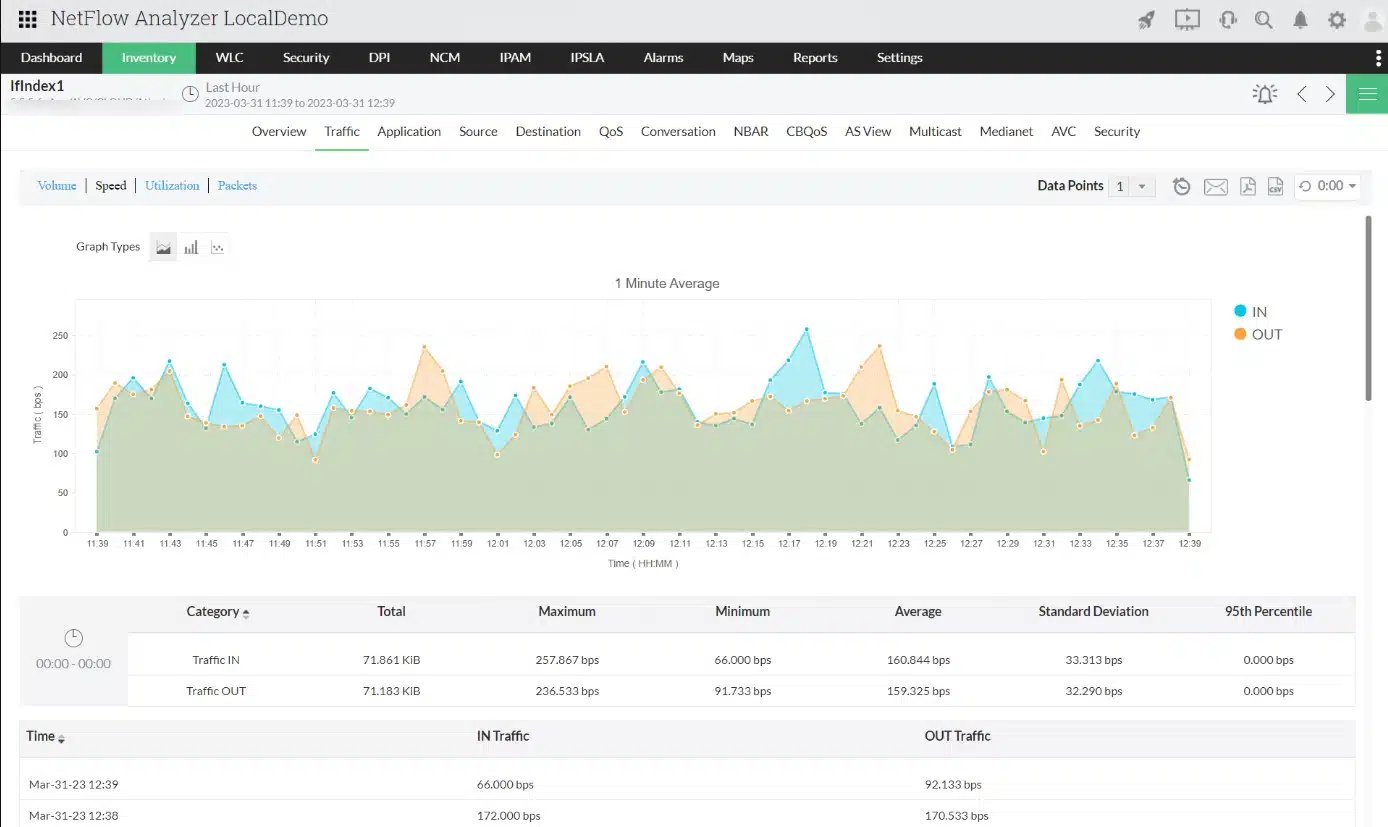
ManageEngine NetFlow Analyzer is a NetFlow traffic analyzer and bandwidth management tool that can monitor traffic patterns. Through a customizable dashboard, you can monitor the top usage by application and protocol with the support of pie charts. Using these views allows you to tell immediately if there are any bandwidth hogs you need addressing.
When we tested NetFlow Analyzer we found the following key features.
Key Features:
- Flow Protocols: NetFlow, IPFIX, sFlow, J-Flow, Netstream, and AppFlow
- Bandwidth Usage Tracking: Alerts when approaching maximum utilization
- Apply QoS Policies: Improve VoIP quality
Unique Business Proposition
NetFlow Analyzer provides detailed control and visibility into your bandwidth usage and traffic patterns by collecting data using multiple protocols. Armed with this data, you can implement policies that will shape the traffic to prevent any specific user or application from hogging your bandwidth.
Feature in Focus: QoS-based Control
This tool allows you to shape traffic through Cisco CBQoS or other service policies, so you can throttle non-essential or high-bandwidth applications. It also helps assess the impact of different policies for informed decision-making.
Why do we recommend it?
ManageEngine NetFlow Analyzer is a companion tool for OpManager, which watches over network devices. By combining these two packages, you get an almost identical service to the SolarWinds Bandwidth Analyzer Pack. The NetFlow Analyzer implements queuing and prioritizing.
If there is excessive bandwidth consumption then you can add QoS policies to limit the traffic. You can also create access to contours lists to determine which applications can have access to your network. This is useful for eliminating any non-work applications!
If there is excessive bandwidth consumption then you can add QoS policies to limit the traffic. You can also create access to contours lists to determine which applications can have access to your network. This is useful for eliminating any non-work applications!
Who is it recommended for?
The NetFlow Analyzer is intended for in-house use – ManageEngine doesn’t offer an MSP version, but there is a multi-site edition. This software is available for Linux as well as Windows Server and if you only use cloud servers, you can run this software on AWS.
During our testing, we identified the following pros and cons related to NetFlow Analyzer.
Pros:
- Traffic Shaping: Implements queuing and application prioritization
- Protocol Analysis: Uses Cisco NBAR
- Multiple Platforms: Available for installation on Linux, Windows Server, and AWS
Cons:
- Designed for Large Networks: A bit too much for small LANs
ManageEngine NetFlow Analyzer is one of the best dynamic bandwidth limiters with NetFlow monitoring. Whether you’re monitoring overall traffic usage from a distance or taking a microscope to one application, the platform has everything you need. Prices start at $595 (£479) for up to 50,000 flows and it’s available for Windows and Linux. There is also a 30-day free trial.
3. Paessler PRTG Network Monitor
Best for: Insights into bandwidth usage.
Relevant for: Network administrators and MSPs who need device-level and application-level visibility into bandwidth usage.
Price: Based on the number of aspects you use, starting at $179/month for 500 aspects.

Paessler PRTG Network Monitor is a network monitoring tool with bandwidth monitoring. With Paessler PRTG Network Monitor you can monitor the bandwidth consumption of devices and applications through usage graphs. Graphs provide you with a top-down perspective for managing bandwidth usage.
When we tested PRTG Network Monitor we found the following key features.
Key Features:
- Automatically Discovers Devices: Creates an inventory and network map
- Constant Rescanning: Updates system documentation automatically
- Monitors Bandwidth: With NetFlow, sFlow, J-Flow, and IPFIX
Unique Business Proposition
This is an all-in-one monitoring suite that uses sensors to gather specific information from different devices. Its prebuilt sensors support SNMP, xFlow, and packet sniffing across a wide range of vendors. Moreover, its sensor-based approach provides flexibility to monitor what you want.
Feature in Focus: Usage Breakdown with Toplists
PRTG supports multiple xFlow sensors, like NetFlow, IPFIX, sFlow, and jFlow. These sensors collect data from network devices and categorize them by IP, application, protocol, and other attributes. It also creates Toplists for each category.
Why do we recommend it?
Paessler PRTG Network Monitor is a package of sensors that cover endpoints and applications as well as networks. Paessler stresses that its platform is purely for monitoring and not for management. However, it does include NetFlow sensors and other traffic data collection systems, such as IPFIX.
You can also use the platform to control bandwidth consumption. You can monitor and limit the distribution of bandwidth amongst your devices. Bandwidth limiting is useful for those scenarios where you want to stop a resource-hogging application and improve the performance of the network, reducing network congestion along the way.
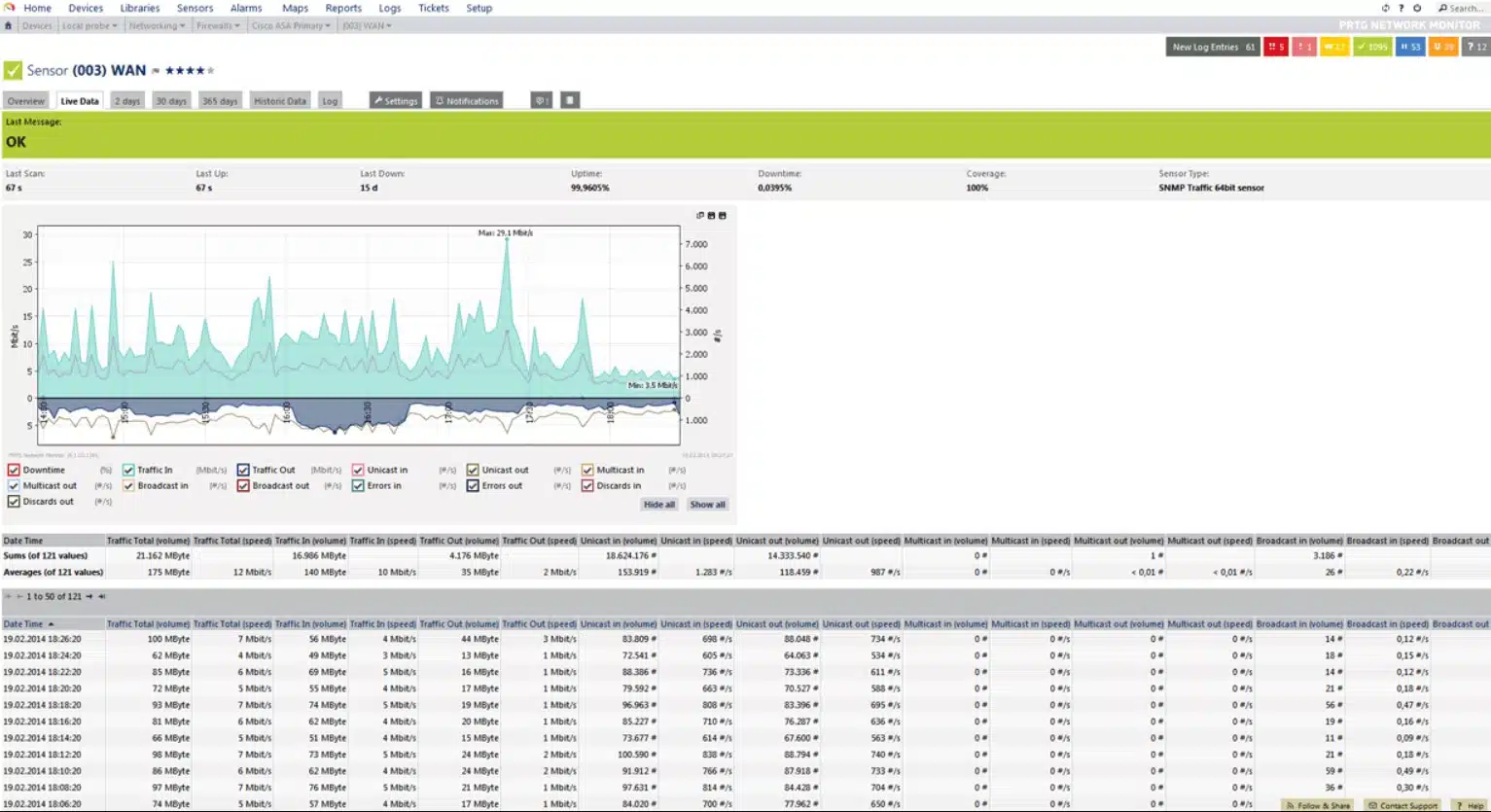
Setting up your monitoring environment is easy, with the assistance of an autodiscovery feature, which automatically discovers devices. Once they’ve been added you can choose between a range of out-of-the-box sensors to manage bandwidth usages such as the SNMP traffic sensor and the Packet Sniffer Sensor.
Who is it recommended for?
The PRTG system is available for in-house use but it can operate remotely, so it will be able to monitor multiple sites. Paessler also offers PRTG in a configuration for use by managed service providers (MSPs).
During our testing, we identified the following pros and cons related to PRTG Network Monitor.
Pros:
- VoIP Monitoring: Mean Opinion Score and IP-SLA
- Protocol Analysis: See bandwidth usage per application
- WiFi Analyzer: Tracks wireless traffic
Cons:
- No Version for Linux: Installs on Windows Server and is also available as a SaaS platform
Paid versions start at $1,750 (£1,378) and are available on Windows and macOS. You can download the 30-day free trial.
4. NetLimiter
Best for: Application-specific bandwidth usage.
Relevant for: Gamers, power users, and enterprises that need fine control over bandwidth usage.
Price: The standard license costs $29 for two years.
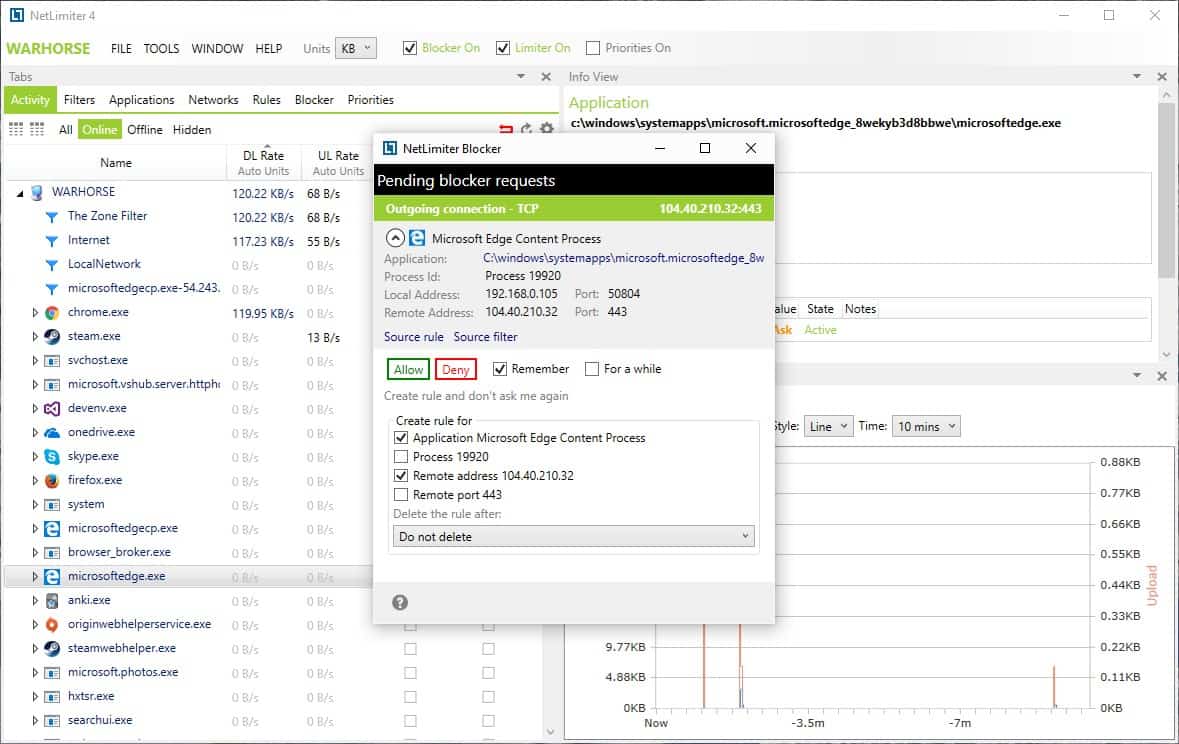
NetLimiter is a bandwidth throttling tool that enables the user to allow or block applications and control the amount of bandwidth they’re allowed to use. NetLimiter comes with three tools that let you control network traffic: Limits, Priorities, and Blocker. Limits enable you to set a maximum bandwidth transfer speed limit for an application.
When we tested NetLimiter we found the following key features.
Key Features:
- Control Application Bandwidth Usage: Throttle bandwidth per protocol
- Block Applications: Customizable filters
- Prioritize Traffic: Implement queuing
Unique Business Proposition
This is a Windows-only tool that offers per-app bandwidth management on every device on which it runs. With such detailed visibility, administrators can throttle traffic to ensure that critical applications have the required bandwidth. It’s also easy to block connections without requiring any specialized network appliance.
Feature in Focus: Dynamic Priority Engine
A highlight of this tool is its internal priority engine that automatically allocates bandwidth. When a high-priority app starts transmitting, it restricts the bandwidth availability for low-priority apps, so the critical ones have access to the required bandwidth.
Why do we recommend it?
NetLimiter is probably the closest service for this following the title of this article because it doesn’t just prioritize traffic – which limits capacity to non-prioritized applications – but it actually enables you to throttle specific types of traffic. With this system, you can block or slow down specific application traffic and also hold up some traffic while letting others straight through your network devices.

The Priorities tool allows you to pick which application traffic has priority. NetLimiter has an internal priority engine, which automatically restricts other applications when a high priority application is in use. There are four priority levels that can be assigned: Critical, High, Normal, and Low.
Blocker allows you to block particular applications such as non-work services to minimize distractions. All of these tools can be customized with filters with the Filter Editor. Here you can filter applications by a full path, part of the path, localhost/loopback traffic, local IP address, destination IP address, local port numbers, remote port numbers, and more.
Who is it recommended for?
This on-premises software is a great system for businesses that want to discourage certain types of user activity as well as manage traffic through queuing and prioritizing. The tool can be used to substitute for firewall rules to completely block some traffic. The software is only available for Windows and Windows Server.
During our testing, we identified the following pros and cons related to NetLimiter.
Pros:
- Bandwidth Limitation Guidance: Assemble network usage rules
- Custom Filters: Adapt a template or create new rules from scratch
- Internet Traffic Graph: Shows data transfers in both directions
Cons:
- Can Get Difficult to Read: Creates a lot of nested windows and tabs
NetLimiter is ideal for enterprises that desire a simple traffic monitoring tool for Windows. NetLimiter is available for Windows 7, Vista, 8, 10, Server 2008 R2, Server 2012, and Server 2016. A Standard License costs $29.95 (£24). You can download the software from this link here.
5. NetBalancer
Best for: Process-based bandwidth control.
Relevant for: Windows power users, gamers, and home users.
Price: Starts at $49.95.
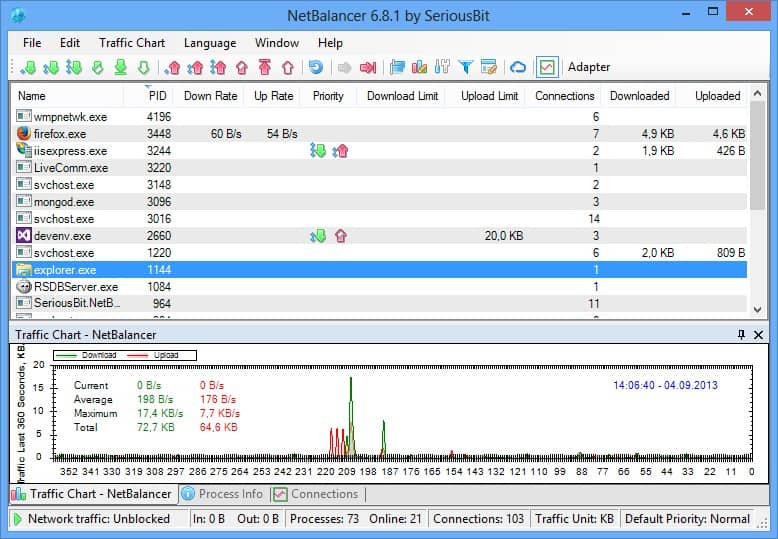
NetBalancer is a dynamic bandwidth limiter that lets you control traffic usage on your computer. With NetBalancer you can implement download and upload limits to determine how many network resources are limited to an application. Traffic rules and filters give you complete control over the applications being used on your network.
When we tested NetBalancer we found the following key features.
Key Features:
- Traffic Measurements: Depicted in upload and download graphs
- Traffic Limiter: Throttle bandwidth by application
- Traffic Shaping Services: Queueing and prioritization
Unique Business Proposition
NetBalancer is a Windows-only app that provides Deep Packet Inspection (DPI)-based control over network traffic on a per-process basis. Using this tool, you can assign upload and download priorities, set speed caps, implement geo-location-based rules, block or delta traffic, and more. It gives complete control and visibility to manage your traffic.
Feature in Focus: Rule-based Controls
NetBalancer supports rule-based controls to shape traffic at the process level. Besides getting complete control and visibility, you can assign priorities to limit, delay, and drop packets for any application. It also enables specific targeting to throttle or block traffic from any particular app.
Why do we recommend it?
NetBalancer is primarily a PC tool and will operate on the computer that hosts it. There is a Web console for central control of multiple devices but each computer still needs the software installed on it. This is a home use or small business version of the service that larger businesses would get from NetLimiter.
The software also provides you with transparency over traffic and processes. You can view a history of upload and download traffic history, which you can interact with to edit the color scheme and adjust the time frame. There are also pie charts that you can use to view traffic data such as the top processes IPs in the last 24 hours.

For managing multiple computers, NetBalancer has a web-based console where you can synchronize settings. Simply set a time frame for the sync to take place and then check the events, traffic, and command settings that will be synced. All data will be encrypted and protected by TLS and SHA2 for additional security.
Who is it recommended for?
NetBalancer is only available for Windows and is more for home use than business implementations. Big business would be better off with NetLimiter.
During our testing, we identified the following pros and cons related to NetBalancer.
Pros:
- Traffic Data Segmentation: Show top traffic generators
- Stores Traffic Data: Shows traffic patterns over time
- TLS and SHA2 Encryption: All monitoring traffic is protected
Cons:
- Only Available for Windows: No package for Linux or macOS
NetBalancer is a solid low-cost bandwidth limiting solution for Windows users. The software costs $49.95 (£40). You can start the 14-day free trial from this link here.
6. SolarWinds Bandwidth Analyzer Pack
Best for: Flow-based network bandwidth visibility.
Relevant for: MSPs and enterprises that need detailed bandwidth insights across multiple environments.
Price: Negotiated pricing.

The SolarWinds Network Bandwidth Analyzer Pack includes two network management modules. These are the Network Performance Monitor and the NetFlow Traffic Analyzer. The combination of the two systems gives network administrators complete control over a network.
When we tested Network Bandwidth Analyzer Pack we found the following key features.
Key Features:
- Network Discovery: Creates an inventory and topology map
- Continuous Device Monitoring: Uses the Simple Network Management Protocol
- Flow Protocols: NetFlow, sFlow, J-Flow, IPFIX, and NetStream
- Connection Testing: Path analysis
- Packet Capture: Protocol analysis
Unique Business Proposition
SolarWinds integrates Network Performance Monitor (NPM) and NetFlow Traffic Analyzer (NTA) into a single web console to provide comprehensive SNMP and flow-based traffic analysis. It supports hybrid and virtual environments as well, along with CBQoS compliance reporting.
Feature in Focus: Top Talker Alerts
This tool collects data from routers and switches, and ties them into class-based QoS policy monitoring (CBQoS). Using this information, administrators can verify the efficiency of the bandwidth prioritization policies. Its predefined or user-defined alert thresholds send alerts in real time for quick troubleshooting.
Why do we recommend it?
SolarWinds Bandwidth Analyzer Pack provides both network device monitoring and traffic analysis. This enables you to spot overloaded switches and make plans to reshape traffic around it. Other features include traffic queuing and prioritization, which can get you extra value out of your existing infrastructure.
The two tools combine in a number of cross-modular utilities, such as the drill-down analysis feature called PerfStack, which is a visual representation of all activities on the network, represented as a stack of services. This enables busy administrators to see straight away which service is the root cause of traffic problems. Other screens display traffic flows between two nominated points on the network, showing the statuses of each link.
The tool is able to capture router traffic for analysis and aggregate data per application or per endpoint. The tool also includes traffic shaping measures such as the implementation of QoS queuing and bandwidth limiting per application or endpoint.
Who is it recommended for?
SolarWinds produces on-premises system monitoring and management tools for in-house use. The service can also be used to manage networks on multiple sites. This system doesn’t have a cloud version and it isn’t available for Linux, so it is specifically aimed at businesses that run on Windows Server.
During our testing, we identified the following pros and cons related to Bandwidth Analyzer Pack.
Pros:
- Alerts for Device Problems: Get warnings of switch component errors
- Traffic Thresholds: Trigger notifications for excessive traffic
- Implement Traffic Shaping: Improve the performance of interactive applications
- Connection Quality Monitoring for VoIP: Mean Opinion Score and Quality of Service
- WiFi Monitoring: Track the performance of wireless networks
Cons:
- Only Available for Windows Server: No SaaS option
The SolarWinds Network Bandwidth Analyzer Pack installs on Windows Server and it is available for a 30-day free trial. Other SolarWinds modules can be added to the pack, such as the User Device Tracker, to enhance monitoring and control capabilities.
7. Zscaler
Best for: Cloud-based bandwidth shaping
Relevant for: Distributed teams and remote workers
Price: Negotiated pricing.
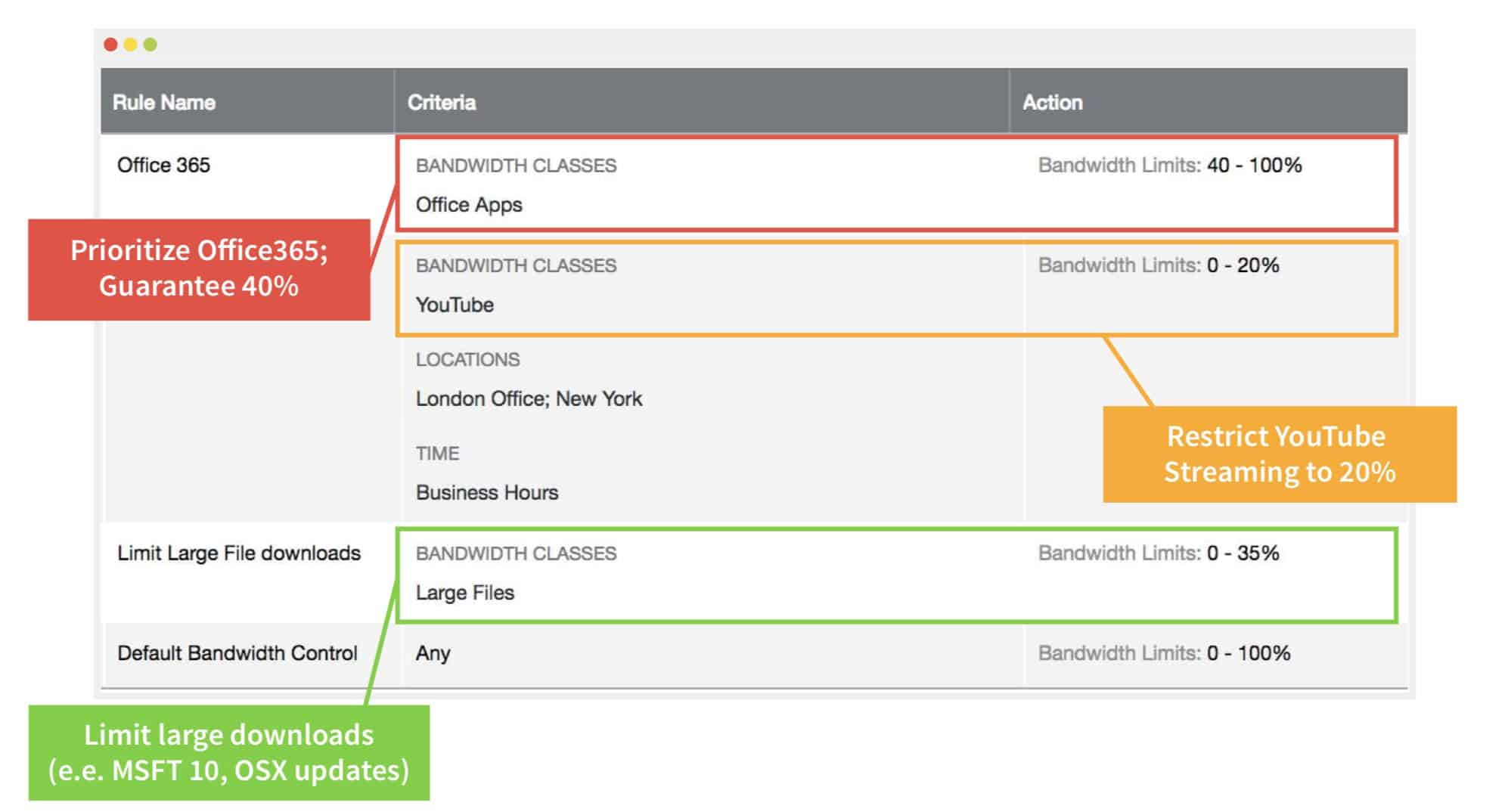
Zscaler is a cloud-based firewall that offers bandwidth controls. With Zscaler, you can route local traffic to your internet connection and apply bandwidth policies to prioritize essential applications. The platform allows you to set traffic rules by class, location, and time. For example, you can create a class for Office 365 applications and assign it to the top priority in the traffic hierarchy.
When we tested Zscaler we found the following key features.
Key Features:
- Creates Hybrid Networks: Blends LANs with internet connection between sites and to cloud services
- Traffic Shaping: Can prioritize traffic
- Bandwidth Limiter: Restrict capacity per application
Unique Business Proposition
Zscaler is a cloud-based tool for controlling your bandwidth usage. It comes with customizable configuration options that make it easy to apply your QoS policies. Additionally, its dashboards provide the in-depth visibility you need over bandwidth usage.
Feature in Focus: Categorization
A highlight of this tool is categorization, which lets you create bandwidth classes. These classes are groups of applications that can use a certain amount of bandwidth. For example, you can create a class containing critical applications and set a priority and bandwidth usage limits for this class. Such categorization ensures that your bandwidth is used optimally.
Why do we recommend it?
Zscaler creates a private network over the internet, combining on-site elements and the computers of home-based workers. This tool allows you to pick from a range of hybrid network configurations and you can also build in network security. Traffic capacity rules can be set per application, endpoint, or site.
When setting the rules, you can guarantee a particular percentage of bandwidth a class will have access to. For example, 40% for Office 365 while limiting non-essential applications like YouTube to 20%. You can speed limit large downloads to minimize the impact on network interface performance.
You can also use the program to monitor network usage with reports. Reports allow you to create graphs where you can view the difference in bandwidth usage among different applications.

Who is it recommended for?
This is a very sophisticated tool that offers a new way to manage traffic between multiple sites. It also provides an option to implement Zero Trust Access (ZTA) and base traffic access controls around cloud-based SaaS applications.
During our testing, we identified the following pros and cons related to Zscaler.
Pros:
- Based in the Cloud: Access the console through a Web browser
- SD-WAN Options: Create a virtual network across the network with an overlay address allocation
- Zero Trust Access: Control access to different areas of the network with access control lists (ACLs)
Cons:
- Lack of Price Transparency: Must contact sales for pricing
- Limited Reporting Functionality: Some users may find reports somewhat limited
- Simple Interface: Interface simple and easy to use but lacks details found in similar tools
Zscaler is a product designed for those using lots of cloud-based applications, who want a solution to manage bandwidth controls centrally. Zscaler has a subscription pricing model, but you need to contact the company directly for a quote. You can request a demo from this link here.
8. SoftPerfect Bandwidth Manager
Best for: MAC or IP-based quote shaping.
Relevant for: Network administrators of small organizations.
Price: A single license costs $49, while a site license costs $499.
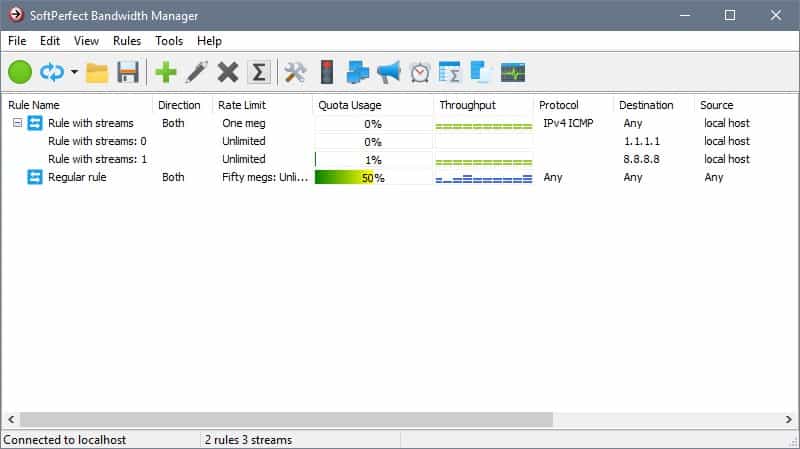
SoftPerfect Bandwidth Manager is a bandwidth limiter or traffic shaper that enables you to monitor and control network traffic. With SoftPerfect Bandwidth Manager, you can implement traffic prioritization rules to select which users have priority. You can also implement bandwidth throttling rules for IPs, MAC addresses, ports, and network interfaces, to make sure that network performance remains high.
When we tested SoftPerfect Bandwidth Manager we found the following key features.
Key Features:
- Live Usage Monitor: Shows traffic in numbers and charts
- Traffic Shaping Measures: Implements prioritization rules
- Email Notifications: Alerts for network overloading
Unique Business Proposition
This is a Windows-based traffic shaper that makes it easy to enforce speed limits and usage quotas per port or IP/MAC address. Moreover, it also supported bidirectional rules and scheduling, making it easy to control traffic at the gateway or server level. Other features, like live traffic monitoring, email alerts, and flexible controls, all without requiring client-side software, made it a convenient choice for network administrators.
Feature in Focus: Quota-based Throttling
Using the quota-based throttling feature, you can set the bandwidth usage limit for each application. Also, you can reduce the rate when the usage quota is reached. Such granularity provides complete control over bandwidth usage. Moreover, you have the option to tie these rules to a specific IP or MAC address.
Why do we recommend it?
SoftPerfect Bandwidth Manager is a very close competitor to NetBalancer in that it operates on the computer that hosts it and it only runs on Windows. This system also includes a live traffic monitor.
Email notifications keep you notified about any important traffic changes. If you want to be more proactive then you can use usage reports to take a closer look at the activities of users throughout your network. Notifications and reports are great for helping you to stay on top of usage trends.

If you want to monitor live traffic then you can use the Live Usage Monitor. Here you can view streams in real-time and the most active streams in the past 30 seconds. There are network usage graphs to help to illustrate traffic changes over time to help you make sense of what’s going on.
Who is it recommended for?
The Bandwidth Manager is a package for home use on PCs. It is also a possible option for small businesses. If you are considering this tool, you should also assess NetBalancer for a comparison of options.
During our testing, we identified the following pros and cons related to Bandwidth Manager.
Pros:
- Multiple Traffic Calming Solutions: Choose between bandwidth limiting and traffic shaping
- Simple Interface That’s Easy to Use: Good for smaller businesses and home use
- Protocol Analysis: Shows traffic volumes per protocol
Cons:
- Only Available for Windows: This is an on-premises package and there aren’t any versions for Linux or macOS
SoftPerfect Bandwidth Manager is a fit for companies that require a basic bandwidth throttling. A single license costs $49.00 (£39), and the software is available for Windows. You can download the 30-day free trial from this link here.
9. Arista NG Firewall
Best for: Guaranteed bandwidth for critical applications
Relevant for: SMBs, distributed enterprises, MSPs, and organizations already using the Arista ecosystem.
Price: Starts at $270 for a 12-month term covering up to 12 licensed devices.

Arista Bandwidth Control (formerly Untangle Bandwidth Control) is included with Arista NG Firewall Complete (formerly Untangle NG Firewall Complete). It helps organizations monitor bandwidth usage, create traffic rules, prioritize applications, and apply quotas for traffic usage.
When we tested Arista Bandwidth Control we found the following key features.
Key Features:
- Monitor Bandwidth Usage: Provides live displays and also reports
- Identifies the Source of Traffic: Shows peaks and troughs in traffic
- Traffic-Shaping Rules: Queue applications to prioritize others
Unique Business Proposition
Arista NG Firewall makes it easy to track and report usage in real time, so you can take the necessary steps to throttle or block traffic. It also enables you to create and implement policies to balance bandwidth usage across applications.
Feature in Focus: Rule-driven Quotas
A highlight of this tool is that you can create rules based on IP, groups, applications, protocols, locations, and time. Each rule can have a bandwidth limit associated with it, so you can easily deploy the rule when needed.
Why do we recommend it?
We recommend Arista NG Firewall as it simplifies network security while meeting the needs of your growing organization. Its many advanced features, like application-based shaping and content filtering, support the optimal use of existing bandwidth. Its browser-based interface is also a notable aspect, as it provides deep visibility into your traffic.

With such visibility, you can stop malware, hacking attempts, phishing schemes, and other threats from reaching users’ devices. These insights can also come in handy for making informed decisions about increasing bandwidth capacity and implementing policies that will limit bandwidth usage for non-critical applications.
Who is it recommended for?
It is highly recommended for organizations that need bandwidth control and visibility as part of the broader network security platform. It is particularly well suited for SMBs and mid-sized enterprises that need to improve network performance without deploying dedicated WAN optimization appliances.
During our testing, we identified the following pros and cons related to Arista Bandwidth Control.
Pros:
- Sold with a Hardware Firewall to Host it: Scans network traffic as well as internet connections
- Easy to Use: A wizard guides the creation of firewall rules
- Application Whitelisting: Ban all traffic and then allow the connections for specific applications
Cons:
- Hardware-Based: Requires a higher upfront payment than software firewalls
- Arista Dependency: Requires the Arista ecosystem.
Arista Bandwidth Control is suited to organizations that need traffic prioritization, bandwidth monitoring, rules, and quotas inside NG Firewall Complete. Bandwidth Control is included in NG Firewall Complete, which starts at $25.00 per month. A 30-day free trial is available.
Related post: Best Bandwidth Monitoring Tools
Choosing a Bandwidth Limiter Tool
It only takes a couple of rogue bandwidth hogs to disrupt your network’s performance. Whether certain applications are consuming too much bandwidth or individual users are downloading lots of content or streaming, the best bandwidth limiters will be able to minimize the impact on the network.
Our top picks for this article are Site24x7 and ManageEngine NetFlow Analyzer. They offer a mix of bandwidth monitoring visibility coupled with QoS controls for reigning in bandwidth hogs and delivering solid user experience.
Related post: The difference between Throughput and Bandwidth
Our Methodology for Choosing Bandwidth Limiter Tools
At Comparitech, we take a structured approach while evaluating tools to present the ones that work best across multiple real-world situations. Our goal is to help identify a tool that will solve your problem and add value to your tech stack. As a part of this goal, we used the following criteria to create our list of the best bandwidth limiter tools.
1. Granular Bandwidth Control
We prioritized tools that allow administrators to apply limits at multiple levels, including users, devices, applications, protocols, IP ranges, and traffic categories. The more precise the controls, the better, as they improve policy outcomes.
2. Traffic Identification and Classification
As bandwidth policies depend on accurate traffic recognition, we looked for tools that can classify traffic by application, service type, protocol, or network behavior to make traffic shaping more targeted.
3. Support for Policy Automation
Managing bandwidth manually becomes difficult as networks grow. This is where automations and workflows come in handy, as they handle the repetitive tasks. To support this transition, we favored solutions that support automated rule application, scheduling, conditional policies, and centralized configuration management.
4. Usage Visibility
One of the core functionalities of a bandwidth limiter tool is to provide usage visibility, and it is even better if these metrics are displayed through easy-to-understand charts and graphs. This is why we preferred tools that include reporting capabilities, trend analysis, and historical records that help teams understand long-term usage patterns and policy effectiveness.
5. Traffic Prioritization
We evaluated whether tools allow administrators to prioritize business-critical applications and assign bandwidth according to operational requirements. This feature can optimize resource consumption without disrupting operations.
Broader B2B software selection methodology
Along with the above factors, every tool goes through our standard B2B review methodology, where the following aspects are evaluated.
- Quality of vendor support
- Ease of use
- Scalability
- Pricing transparency
- User reviews
- Application across different real-world scenarios
Check out our detailed B2B software methodology page to learn more.
Why Trust Us?
We follow a consistent and transparent evaluation process across all software reviews. We assess tools against defined technical criteria and compare products using the same standards to keep recommendations objective and easy to understand. Our editorial content remains independent, with selections based on research and product capabilities rather than commercial influence, thereby helping you make the right decisions.
Bandwidth Limiter & Controller FAQs
What does bandwidth control do?
Bandwidth control allows you to restrict the amount of network capacity that is generated by a piece of software or handled by a piece of hardware. This is useful for businesses that do not have enough budget to provide the maximum required network bandwidth for all of its software and needs to prevent one application from overwhelming the system.
Does QoS slow down the internet?
The capacity of your internet gateway is finite. You can only slow it down by reducing the capacity of your gateway interface or lowering the bandwidth of your internet service plan. QoS gives priority to certain applications – usually interactive services such as streaming video or VoIP. The overall capacity of the internet connection remains the same, but some services get slowed to favor others.
How do I disable a bandwidth limiter on my network?
All bandwidth limiters can be turned off. However, where you go to remove the restriction depends on where the limiter is operating. If you didn’t activate the limit, you will need to analyze the traffic on your network to detect whether the limit is imposed within a piece of software, in an operating system, or on a network device.
Can I limit my network bandwidth manually?
Network bandwidth relies on the capacity of the cables and devices that serve it. Downgrading any piece of hardware will lower network bandwidth. However, this will more likely result in packet loss, where transmitted data packets fail to reach their destination, slowing performance down. Limit bandwidth for a particular function is to use the options within the software you want to limit or within the operating system of the device that you want to restrict.

Great review, found perfect entry point, thank you…