Relational Database Management Systems (RDBMS) are the most widely-used form of data storage in businesses. Find out about the theory and technology that lies behind these systems.
Relational Database Management Systems (RDBMS) form the foundation of modern data management, providing a structured approach to storing, retrieving, and manipulating information. Unlike other database models, RDBMS organizes data into tables and enables interaction through Structured Query Language (SQL), making data access and management efficient and consistent.
Relational databases power a wide range of business-critical applications, particularly websites. Key use cases include:
Access Control and User Management: Storing credentials, roles, and profiles to verify login attempts and manage access rights.
Content Organization: Platforms such as WordPress, Drupal, and Joomla rely on relational databases to manage articles, media, and user interactions for smooth content updates and retrieval.
Online Transactions and Inventory: Managing product catalogs, inventories, customer orders, and payment processing to ensure seamless e-commerce operations.
Social Networking and Interaction Tracking: Storing posts, messages, likes, comments, and follower relationships to enable personalized user experiences.
Search and Information Retrieval: Indexing content to deliver fast, relevant results for complex search queries.
Business Operations Data: Centralizing transactional data for ERP systems and other enterprise applications across multiple functions.
Data Analysis and Reporting: Feeding collected data into analytics tools or generating reports for decision-making.
User Behavior Analytics: Recording interactions such as page views, clicks, and conversions for monitoring and optimization.
Customer Relationship Management: Tracking customer interactions, sales, and support activities to maintain service quality.
Community Engagement Platforms: Storing discussion threads, posts, user profiles, and moderation actions to manage forums and online communities.
These examples highlight the versatility of relational databases in delivering reliable, data-driven applications.
This guide explores the core components, capabilities, and advantages of RDBMS, offering insights for beginners and seasoned IT professionals alike. Key concepts such as normalization, data integrity, and transaction management are examined, illustrating how RDBMS ensures consistency, reliability, and scalability. Whether optimizing an existing system or selecting a database solution, this guide provides the knowledge needed to make informed decisions.
The relational model
The “relational” term refers to the relational model, which was defined by Edgar Frank Codd, better known as E F Codd, in 1969 while he was working as a computer scientist for IBM.
There are 13 requirements in Codd’s definition for a database to be categorized as relational and almost none of the real-world implementations comply with all of these. However, the two main requirements for a relational database, in layman’s terms are:
Data should be normalized.
Data should be accessible through relational operators.
These two categories are explained further below.
Data normalization
Data is organized into “entities” and each entity has “attributes”. When planning a relational database, you gather all of the business’s documents and write down the headings that are there. For example, an invoice may have Invoice Number, Invoice Date, VAT or EIN Number, Business Name, Business Address, Customer Name, Customer Address, Invoice Line Number, Item Code, Item Description, Item Unit Price, Quantity, Line Total, and Invoice Amount. This collection of data has information at several levels. The process of sorting out the headings into different groups is called “normalization”.
There are many stages to normalization, but in practice, you only need to perform the first three. These are:
First normal form (1NF): Separate out repeating groups
Second normal form (2NF): Separate out partial key dependencies
Third normal form (3NF): Separate out attributes that are better identified by fields other than the primary key.
By the end of these three steps, each attribute in the group is dependent on the key, the whole key, and nothing but the key.
First normal form
Let’s take a look at an invoice example. In first normal form, we separate out repeating groups. Clearly, there are two levels of data on the invoice: the header information and the line data. In order to work out which attributes belong in which group, pick a field that seems to be the primary data element of the document – this is a unique identifier for this invoice and so must be the Invoice Number field. This primary identifier is called a “constraint” because you have to force uniqueness for this field on all records in the database. This will become the “primary key” of the table.
Ask how many times each of the other fields have different data for each invoice number. You will end up with two groups: INVOICE HEADER with attributes Invoice Number, Invoice Date, VAT or EIN Number, Business Name, Business Address, Customer Name, Customer Address, and Invoice Amount; and the INVOICE LINE with attributes Invoice Line Number, Item Code, Item Description, Item Unit Price, Quantity, and Line Total.
Line Number would not uniquely identify each record in the database, so the INVOICE LINE group needs Invoice Number added to it. In this case, the table has a composite key. Invoice Number is also a foreign key to the INVOICE HEADER group.
In the case of the INVOICE HEADER group, the Invoice Number should be unique for each invoice. However, that can’t be guaranteed, so it is usual to create a hidden unique identifier field on the table, which will be populated from a sequence to ensure that there can never be duplicated values in this field.
By adding Invoice Header ID to the INVOICE HEADER table, we provide a better value as the foreign key in the INVOICE LINE group, so we add an Invoice Header ID field into that table. It is quicker to “join” on one field when trying to specify a single record, and so it would be better to create a unique identifier for records in the INVOICE LINE group, called Invoice Line ID. Invoice Header ID is now the primary key of the INVOICE HEADER group and Invoice Line ID is the primary key of the INVOICE LINE group. Now we call the groups “entities” and the fields “attributes”.
Second normal form
To get to the second normal form, you need to split out attributes that are not dependent on all of the elements in a composite key. This requires no work in the INVOICE HEADER entity. The INVOICE LINE entity did have a composite key (Invoice Number and Line Number) but this has been replaced by the unique identifier Invoice Line ID. So, there are no partial key dependencies here.
Third normal form
In this step, you should split out attributes that are better identified by another attribute in the group. In the case of INVOICE HEADER, the attribute Business Address is more dependent on Business Name than the primary key. So, this would create a table called BUSINESS DETAILS, which would have attributes Business Name, and Business Address. It would be better to split out the lines of the business address into Address Line 1, Address Line 2, City, State, Country, and Postal Code. The VAT or EIN Number should also be removed from INVOICE HEADER to this entity.
Customer Address is related to Customer Name more than Invoice Header ID, so these fields should be split out, creating a CUSTOMER entity and a CUSTOMER ADDRESS entity.
Business Name is not a unique identifier, so you should add a Business Details ID field. You might invoice from several addresses. If this is the case, then you need to split out the address details to another entity called BUSINESS BRANCH. Add a unique identifier to this entity: Business Branch ID.
The CUSTOMER and CUSTOMER ADDRESS tables also need unique identifiers Customer ID and Customer Address ID.
You need to put a reference in each of the entities that have lost attributes to new entities so that they can relate to them. Therefore, Business Branch ID needs to go into the BUSINESS DETAILS entity, Customer Address ID should be added to CUSTOMER, and Business Details ID and Customer ID need to be attributes of the INVOICE HEADER attribute.
In the INVOICE LINE entity, Invoice Number is no longer needed, because it is wholly dependent on Invoice Header ID and already exists in the INVOICE HEADER entity. Item Code, Item Description, and Item Unit Price are all attributes of the item, not the invoice line, so these fields need to be split out to a new entity, called ITEM. You need to put a unique identifier Item ID on the ITEM entity and add that attribute to the INVOICE LINE as a foreign key.
Normalized data
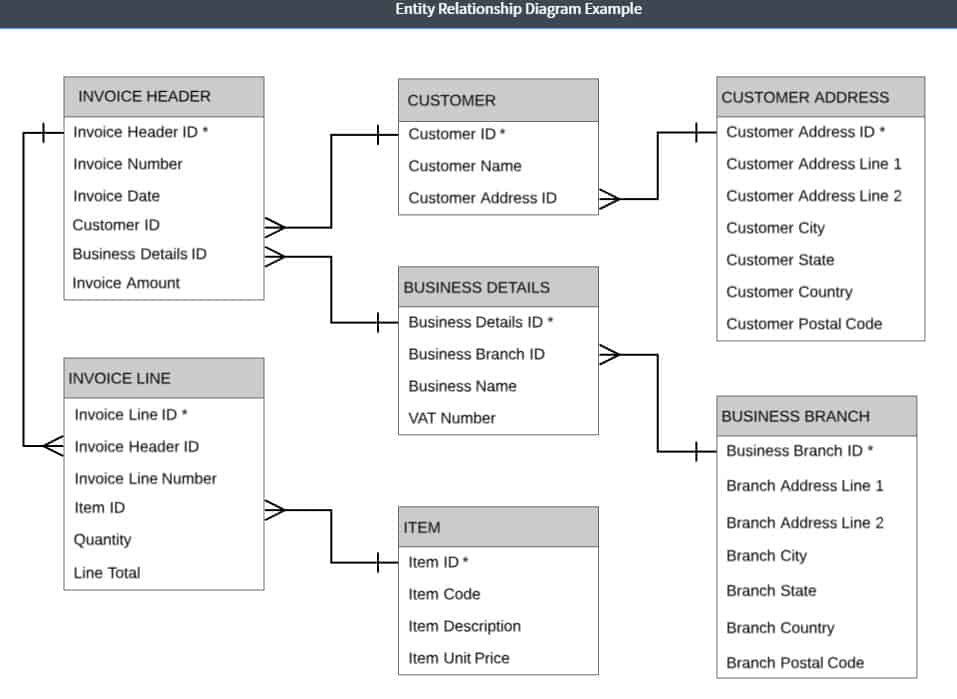
In the example above, you now have seven entities:
INVOICE HEADER
Invoice Header ID
Invoice Number
Invoice Date
Business Details ID
Customer ID
Invoice Amount
BUSINESS DETAILS
Business Details ID
Business Name
Business Branch ID
VAT Number
BUSINESS BRANCH
Business Branch ID
Branch Address Line 1
Branch Address Line 2
Branch City
Branch State
Branch Country
Branch Postal Code
CUSTOMER
Customer ID
Customer Name
Customer Address ID
CUSTOMER ADDRESS
Customer Address ID
Customer Address Line 1
Customer Address Line 2
Customer City
Customer State
Customer Country
Customer Postal Code
INVOICE LINE
Invoice Line ID
Invoice Header ID
Invoice Line Number
Item ID
Quantity
Line Total
ITEM
Item ID
Item Code
Item Description
Item Unit Price
As you can see, a relatively simple document has become a lot of structures. However, splitting out the data in this way will greatly reduce the amount of data that needs to be stored.
Database design
The next step is to put all of these entities in a plan, showing the attributes of each and marking the primary keys. It is then necessary to add on the relationships between these entities, which run from the foreign key in one table to the primary key in another.
This relationship must either be one-to-many, or many-to-one. This means that for an instance of a record in one entity, there must be several records in the related table. If you discover a one-to-one relationship, those two entities should be merged. If you see a many-to-many relationship, you must break it up by inserting an intermediate entity that will have a many-to-one relationship with the each of the two original entities.
The plan that this work creates is the Entity-Relationship Diagram, which is the foundation document for the relational database.
Database creation
Each of the elements in the Entity-Relation Diagram translates into database objects:
Entity = table
Attribute = table column
Constraint / primary key = unique index populated by a sequence
RDBMS have several command sets. Objects are created by a Data Description Language (DDL). The command to create an object is: