

A VPN (Virtual Private Network) creates an encrypted connection between your device and a VPN server. This makes it much more difficult for your internet provider, public Wi-Fi operators, and other network observers to easily see your online activity.
A VPN is useful if you:
- Use public Wi-Fi in cafés, airports, hotels, or other shared networks
- Want to reduce tracking by your internet provider
- Need to access services available in another country
- Want additional privacy when browsing, streaming, or working remotely
A VPN will not make you completely anonymous online, nor will it protect you from every cybersecurity threat. However, a reputable VPN can significantly improve privacy and security for most internet users.
Quick answer
If you’re wondering whether you should use a VPN, the answer is usually yes if you regularly use public Wi-Fi, travel internationally, work remotely, or value online privacy.
For most users:
- Choose a reputable VPN provider with a verified no-logs policy. We particularly recommend NordVPN and Surfshark.
- Install the VPN app on your devices.
- Connect before using public networks.
- Leave the VPN enabled during normal browsing.
For most users, a VPN is most valuable as a privacy and security tool rather than a way to access geo-restricted content.
How a VPN connection works
When you connect to a VPN, two things happen:
Your internet traffic is encrypted
Normally, your internet provider can see which websites you visit and when you access them. Anyone operating an unsecured public Wi-Fi network may also be able to monitor parts of your traffic.
A VPN encrypts traffic between your device and the VPN server. This makes it much more difficult for third parties to inspect your browsing activity while the VPN is active. Encrypted connections are particularly valuable on public networks such as hotel Wi-Fi, conference networks, airports, and cafés, where users have little control over the network’s security.
Your IP address changes
Every internet connection is assigned an IP address that reveals an approximate location. When connected to a VPN, websites typically see the VPN server’s IP address instead of your own. For example, connecting to a server in the United Kingdom will usually make websites appear to have a UK IP address.
This can help:
- Access services while traveling abroad
- Reduce location-based tracking
- Test how websites appear in different regions
- Bypass some regional content restrictions
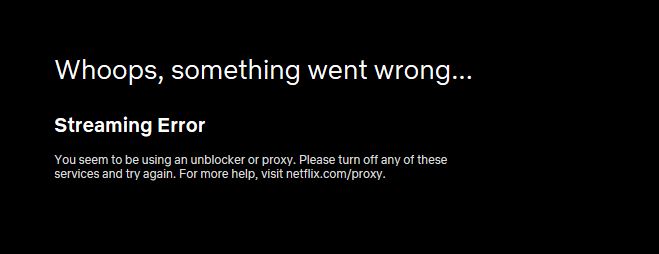
However, many streaming platforms actively detect and block VPN traffic, so results vary between providers and services.
What a VPN can and cannot do
Here’s an overview of what a VPN can and can’t do:
What a VPN can do
- Encrypt internet traffic between your device and the VPN server
- Protect data on public Wi-Fi networks
- Hide your IP address from websites
- Reduce ISP visibility into browsing activity
- Help access services from other regions while traveling
What a VPN cannot do
- Make you completely anonymous online
- Prevent phishing attacks
- Remove malware from infected devices
- Stop websites from tracking you if you are logged in
- Guarantee access to every geo-restricted service
Understanding these limitations is important because VPN marketing often exaggerates what the technology can realistically achieve.
How to choose a VPN
VPN performance, privacy practices, and streaming reliability can change over time. Our testing lab shows that a provider that performs well today may not necessarily remain the best choice indefinitely.

When comparing VPNs, we recommend focusing on the following six areas:
Security
Look for:
- Strong encryption
- Modern protocols such as WireGuard or OpenVPN
- DNS leak protection
- A kill switch
- An independently audited no-logs policy
Independent audits are often more meaningful than marketing claims because they provide external verification of privacy practices.
Value for money
Look for providers that offer:
- A clear pricing structure
- A money-back guarantee (this enables you to try it out before committing)
- Enough simultaneous connections to support all your devices
Speed
A VPN will always introduce some overhead because traffic must travel through an additional server.
For most users, the difference should be small enough that browsing, video calls, and streaming remain smooth. If performance is important, choose providers that support WireGuard, which generally offers faster speeds than older VPN protocols.
Streaming access
VPN providers’ claims about streaming access are not always reliable. We recommend testing a service yourself using a money-back guarantee or consulting a trusted third-party source that regularly verifies streaming access.
We recommend testing a service directly using a money-back guarantee, or consulting a trusted third-party source to confirm which providers work with specific platforms.
Ease of use
A VPN should be straightforward to install and use, even for non-technical users. Look for clear apps, simple server selection, and responsive customer support.
Check that the VPN supports:
- Windows
- macOS
- Android
- iPhone and iPad
- Linux (if required)
- Routers (if required)

System performance
Some VPNs are more resource-hungry than others. As this is difficult to gauge yourself, you’ll need to rely on third-party sources for information. Our public testing laboratory measures the impact VPNs have on CPU and memory usage during active connections.
Setting up a VPN
Most providers offer apps for Windows, macOS, Android, and iPhone, making setup largely a matter of signing in and clicking ‘Connect’.
- Create an account with your chosen provider. We’re big fans of
- NordVPN and Surfshark.
- Download the VPN application.
- Sign in.
- Select a server location.
- Connect.
- Verify that your IP address has changed (you can use a site such as whatismyipaddress.com to do this).
Once connected, you can continue using the internet normally. Many modern VPN apps can automatically connect whenever your device joins an untrusted network.

Is a VPN worth it?
For most people, a VPN is worth using if privacy and security are important concerns. They are particularly useful for travelers, remote workers, frequent public Wi-Fi users, and anyone who wants to reduce the amount of information their internet provider can see.
Some VPNs also provide a way to access geo-restricted streaming content — effectively expanding your choice of TV shows and movies from a particular service. However, if this is your sole reason for using a VPN, then choose carefully. The majority of providers are blocked by the big-name streaming platforms, despite their claims to the contrary.
Overall, the biggest mistake users make is expecting a VPN to provide complete anonymity or protection from every online threat. VPNs work best as one layer of a broader security strategy that also includes strong passwords, multi-factor authentication, software updates, and safe browsing habits.
VPN connection FAQs
Can I use a free VPN?
Once you start researching the various VPN services available, you’ll no doubt come across a ton of free offerings. Obviously, paying nothing for this type of service sounds very attractive. However, it is important to note that free VPNs often do more harm than good. Although these businesses don’t charge you directly, they are profiting from you somehow.
Many free VPNs track your activities and build profiles to sell to advertisers. Others exaggerate how secure they are, and some VPN apps carry malware. These services tend to be lacking in privacy and security. If this isn’t enough to put you off, consider the user experience as well.
How do I know if my VPN is working?
Your VPN app should clearly indicate when a connection to the VPN server has been made. But if you want to check you’re connected (and that the connection is to the right location), you can look up your IP address. A simple way to do this is to visit whatismyipaddress.com. If you want to go a step further and check that your VPN is not leaking any of your information, you can use a tool such as browserleaks.com and check for IP leaks.
Is it legal to use a VPN?
The good news is that VPNs are legal in the vast majority of countries. While some countries, such as China and Russia, actively block VPN connections, it’s not actually illegal to use them. However, you should always exercise caution when using a VPN, particularly in countries with a high level of censorship.





Trying to learn about VPN’s. thank you for the info, very helpful!