
SSH (Secure Shell) is a protocol that allows you to securely connect to remote computers and servers over a network. It is widely used by system administrators, developers, and IT teams to remotely manage systems, transfer files, and create encrypted network connections.
If you’re wondering what SSH is, how it works, or whether it’s safe to use, this guide explains the protocol in practical terms. You’ll learn what SSH is used for, how it secures communications, and the security best practices that help protect SSH deployments from attack.
SSH at a glance
SSH is a secure remote-access protocol that:
- Encrypts communications between devices
- Authenticates users and systems
- Allows secure remote administration
- Supports encrypted file transfers through SFTP and SCP
- Enables secure tunneling and port forwarding
For most users, the key recommendations are:
- Use modern SSH implementations such as OpenSSH.
- Disable the obsolete SSH-1 protocol.
- Use public-key authentication instead of passwords where possible.
- Keep SSH software up to date and use modern cryptographic algorithms
What is SSH?
SSH (Secure Shell) is a cryptographic network protocol designed to securely exchange data between two devices over an unsecured network. Most commonly, it is used to remotely access and manage servers, but it can also be used for file transfers, network tunneling, automation, and secure administration tasks.
Unlike older protocols such as Telnet and rlogin, SSH encrypts communications and verifies the identity of connected systems. This prevents attackers from intercepting credentials or reading data transmitted across the network.
Modern SSH deployments typically use OpenSSH, the open-source implementation of the protocol that is included with most Linux and Unix-based operating systems and is also available for Windows.
SSH consists of several components that work together to authenticate users, establish encrypted communications, and verify data integrity throughout a session.
A brief history of SSH
SSH was created in 1995 by Finnish researcher Tatu Ylönen after a password-sniffing attack occurred on a university network. The original SSH-1 protocol rapidly gained popularity because it provided secure alternatives to insecure protocols such as Telnet and FTP.
Researchers later identified security weaknesses in SSH-1, leading to the development of SSH-2. Today, SSH-2 forms the basis of modern SSH implementations.
In 1999, the OpenBSD project released OpenSSH, an open-source implementation that has since become the most widely deployed SSH software.
SSH-1 vs SSH-2 vs OpenSSH
| Version | Status | Recommendation |
|---|---|---|
| SSH-1 | Obsolete and insecure | Do not use |
| SSH-2 | Current protocol standard | Safe when properly configured |
| OpenSSH | Most popular SSH implementation | Recommended |
If a system still supports SSH-1, administrators should disable it and use SSH-2 exclusively.
What is SSH used for?
SSH is a versatile protocol with several common uses.
Remote access
Remote access is the most common use of SSH. It allows users to securely log in to another computer or server and perform administrative tasks without being physically present.
For example, a Linux administrator can use SSH to troubleshoot a web server, deploy updates, review logs, or restart services from another location. Organizations also use SSH to manage cloud infrastructure, network devices, and automated systems.
Because all traffic is encrypted, SSH protects login credentials and administrative actions from interception.
Port forwarding
SSH port forwarding allows network traffic to be securely redirected through an encrypted connection. Common uses include accessing services behind a firewall, securely connecting to remote databases, protecting otherwise unencrypted applications, and reaching systems that are not directly exposed to the internet.
SSH supports local, remote, and dynamic port forwarding depending on the use case.
Example: A developer needs to access a PostgreSQL database on a remote server that only accepts connections from localhost. They can run:
ssh -L 5432:localhost:5432 user@remote-server
This forwards their local port 5432 through the SSH tunnel to the database, allowing them to connect via their local machine as if the database were running locally — without ever exposing the database port to the internet.
Tunneling
SSH tunneling encapsulates traffic inside an encrypted SSH connection. This can be used to secure otherwise insecure communications or allow protocols to traverse networks that would not normally support them.
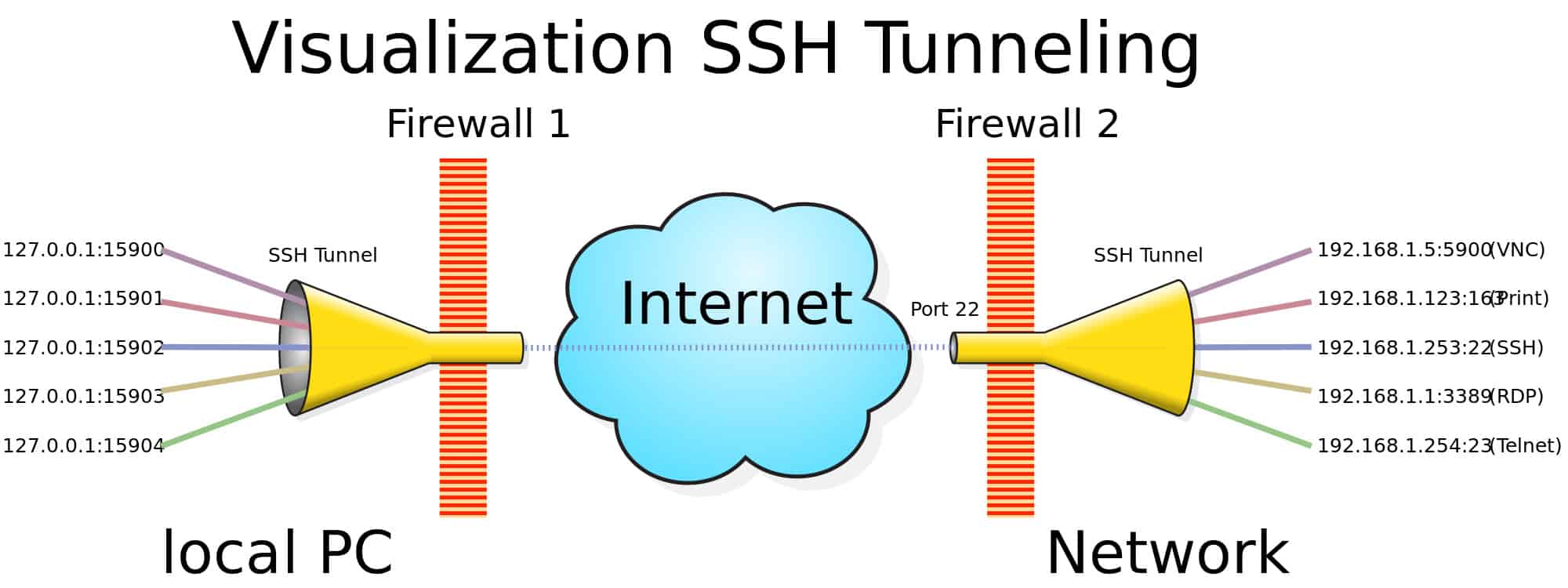
Organizations frequently use SSH tunnels to provide secure access to internal resources for remote users.
Example: A remote worker needs to access an internal company web app at http://intranet.company.local that isn’t publicly accessible. By setting up a dynamic SSH tunnel:
ssh -D 8080 user@company-vpn-server
They can configure their browser to use localhost:8080 as a SOCKS proxy, routing all browser traffic through the encrypted SSH connection and into the company network. This effectively gives them access to internal resources from anywhere.
Secure file transfers
SSH supports secure file transfer through two commonly used protocols:
- SFTP (SSH File Transfer Protocol) allows users to transfer, browse, and manage files securely on remote systems. It is often preferred over traditional FTP because it encrypts both authentication credentials and file contents.
- SCP (Secure Copy Protocol) provides a simpler method for securely copying files between systems. While it lacks some of SFTP’s advanced management features, it remains useful for straightforward file transfers.
How does SSH work?
At a high level, SSH establishes a secure connection between a client device and a server. The process typically works as follows:
- The client contacts the SSH server.
- The server proves its identity using a cryptographic key.
- Both parties negotiate encryption settings.
- A secure, encrypted channel is established.
- The user authenticates.
- Data is transmitted securely.
SSH protects communications through three core security mechanisms:
| Security Function | Purpose |
|---|---|
| Encryption | Prevents others from reading data |
| Authentication | Verifies identities |
| Integrity checking | Detects unauthorized modifications |
Together, these protections help ensure that data remains confidential and unaltered while in transit.
SSH authentication methods
SSH supports several authentication mechanisms.
Password authentication
The user provides a username and password, which are verified by the remote system. While widely used, password authentication is generally less secure than key-based authentication because passwords can be weak, reused, or targeted by brute-force attacks.
Public-key authentication
Public-key authentication is the preferred option for most environments. Users generate a cryptographic key pair consisting of:
- A public key stored on the server
- A private key stored securely on the client device
During login, the server verifies that the client possesses the corresponding private key without requiring it to be transmitted across the network. This method is generally more secure and more resistant to automated attacks.
Multi-factor authentication
Some SSH deployments also require an additional authentication factor, such as a one-time passcode, a hardware security key, or a mobile authenticator application. This provides an extra layer of protection if credentials are compromised.
SSH security best practices
Although SSH is generally secure, poor configuration can introduce risks. The following practices help strengthen SSH security:
- Use public-key authentication: Key-based authentication is generally more secure than passwords and should be used whenever possible.
- Disable SSH-1: SSH-1 contains known security weaknesses and should never be used.
- Restrict access: Limit SSH access to trusted users, devices, or IP addresses whenever practical.
- Disable direct root login: Preventing direct root logins reduces the impact of compromised credentials.
- Enable multi-factor authentication: Adding a second authentication factor significantly improves security.
- Keep software updated: Security vulnerabilities are occasionally discovered in SSH implementations. Keeping systems patched helps protect against known threats.
- Audit authorized keys: Regularly review user accounts and authorized keys to ensure former employees, contractors, or unused accounts no longer have access.
Summary
SSH remains one of the most important security protocols used on modern networks. It provides encrypted remote access, secure file transfers, and protected communications across untrusted networks. Modern implementations such as OpenSSH are considered highly secure and trusted by organizations worldwide. While vulnerabilities have occasionally been discovered, most real-world incidents stem from weak passwords, outdated software, or poor configuration rather than flaws in SSH itself.
For most users, the safest approach is to use OpenSSH, enable public-key authentication, keep software updated, and disable legacy protocols. When properly configured, SSH offers a secure and reliable way to manage systems remotely without exposing sensitive data to attackers.