
Third-party apps are apps made by a company or developer other than your device manufacturer or service provider. Most are perfectly safe — including familiar apps such as Firefox, Instagram, and Spotify — but installing apps from unverified sources can increase your exposure to malware, excessive permissions, and data collection.
This guide explains the different types of third-party apps, how they differ from first-party apps, and when they can pose a security risk. We’ll also show you how to check app permissions on Android and iOS so you can limit unnecessary access to your data.
The short answer
A third-party app is simply an app developed by someone other than the company responsible for the device, operating system, or service you’re using. Being third-party does not mean an app is unsafe.
For most users, the important distinction is where the app comes from. Apps downloaded from official stores such as Apple’s App Store and Google Play undergo platform security checks, although malicious apps can still occasionally get through. Apps downloaded from unofficial websites or marketplaces may not receive the same level of scrutiny.
To reduce the risks:
- Prefer official app stores or the developer’s official website.
- Check the developer and app reviews before installing.
- Avoid apps requesting permissions that don’t make sense for their purpose.
- Keep your operating system and apps updated.
- Regularly review permissions for sensitive features such as your camera, microphone, contacts, and location.
What are third-party apps?
In contrast to first-party apps, third-party apps are developed by a company or developer other than the one responsible for the device, operating system, or service.
Safari is a first-party iOS app because Apple developed it, but Google Chrome is a third-party app on iOS. Similarly, Google’s own apps and services may be considered first-party within Google’s ecosystem, while apps from other developers such as Firefox and Instagram are third-party.
The distinction can therefore depend on context. An app can be first-party in relation to one company’s service but third-party when installed on another company’s platform.
Types of third-party apps
Third-party apps come in several forms based on their source, purpose, and intended users.
Officially approved apps
These apps come from established sources that impose security and compatibility requirements, such as the Apple App Store, Google Play, or official stores operated by device manufacturers. Companies that manage these stores may check third-party apps for:
- Malware and other threats
- How user data is collected and used
- Compliance with store rules and standards
- Operating system compatibility
Malicious or deceptive apps can still occasionally slip through these checks. For the most part, though, third-party apps obtained through official channels present less risk than apps downloaded from unknown sources.
Unverified apps from external sources
Getting an app listed on a major app store means following its rules and review processes. Some developers instead distribute their apps through alternative marketplaces or directly from their own websites.
Alternative stores such as APKPure and F-Droid aren’t necessarily harmful and can provide apps with niche uses you won’t find elsewhere. However, the level and type of security review varies between stores, so users should check how a marketplace verifies apps before downloading from it.
Downloading apps from poorly controlled or unknown sources increases the risk of encountering fake apps or modified software containing ransomware, adware, or other malicious code. Be particularly cautious if an unofficial source offers a paid app for free or at an unusually low price.
Internal-use company apps
Companies sometimes build custom software strictly for in-house use, such as tracking inventory, organizing schedules, or accessing internal business systems. Naturally, you won’t find most of these apps on a public store.
These apps aren’t automatically safe simply because they’re intended for internal use. Their security depends on how they’re developed, distributed, updated, and managed. Organizations should therefore apply the same secure-development, access-control, and patching principles they would to other business software.
Add-ons or third-party integrations
Some third-party apps don’t need to be installed directly on your device because they integrate with other services. They act as add-ons, allowing new actions within the main app — whether it’s sharing Spotify content through another service, linking Microsoft Teams with Outlook for scheduling, or connecting Slack to Dropbox or Google Drive for file management.
These integrations may need permission to access account information or perform actions on your behalf. Before authorizing one, check exactly what data and permissions it requests. You should also remove integrations you no longer use, as an old connection can retain access to your account until its authorization is revoked.
Dangers of third-party apps
Third-party apps aren’t inherently dangerous. The risks mainly increase when an app comes from an untrusted source, requests unnecessary permissions, is poorly maintained, or deliberately behaves maliciously.
Data leaks and identity theft
Downloading apps from unknown or poorly controlled third-party websites can increase the risk of having your data exposed. A malicious or excessively intrusive app might collect and misuse information such as your phone number, email address, payment data, location, or other sensitive device information.
Besides the threat of having your accounts compromised, fraudsters can use stolen personal information to commit identity theft, potentially opening accounts in your name or making unauthorized transactions.
For this reason, check the source and developer before installing an unfamiliar app and pay attention to the permissions it requests.
Malware infections
Apps obtained from untrusted external sources may contain malicious code designed to steal data, bombard you with intrusive ads, or even lock your device and demand a ransom.
Check the developer and reputation of any unfamiliar app before downloading it. User reviews can sometimes reveal suspicious behavior, although reviews alone aren’t proof that an app is safe. It’s also worth using your device’s built-in security protections and, where appropriate, reliable antivirus software.
Related: Malware vs viruses
Exploiting system vulnerabilities
Malicious apps may attempt to exploit security flaws in an operating system or other software to gain unauthorized access. Successful exploitation could allow an attacker to bypass security controls, install malware, or access sensitive data.
Keep your device and apps updated so known vulnerabilities are patched, and avoid installing apps that require you to disable built-in security features unnecessarily.
Permissions abuse
Many apps request access to things like your contacts, microphone, camera, or location. Some need these permissions to function, but you should be wary when the requested access doesn’t match what the app actually does. A flashlight app requesting access to your contacts, for example, deserves closer scrutiny.
A malicious app with excessive permissions could potentially record audio, track your location, or collect private data.
Fortunately, both Android and iOS allow you to review and change app permissions.
How to change app permissions on Android
1. Open your Android Settings.
2. Scroll down and press Apps.
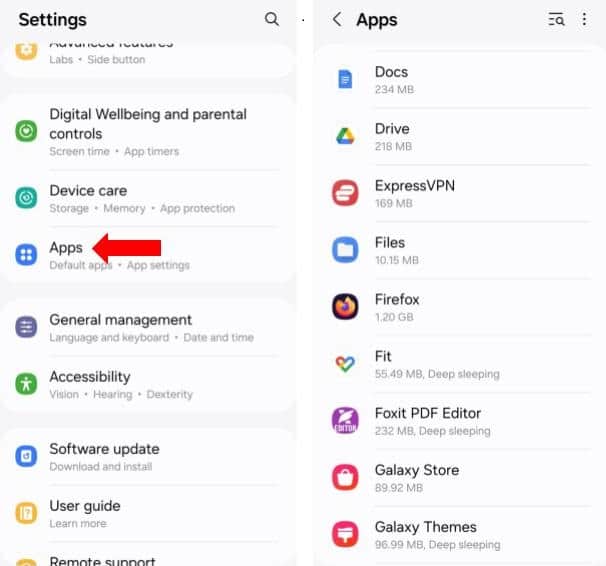
3. Choose the app you want to check.
4. Tap Permissions to see what the app can access.

5. Select a permission and change its access as needed.
6. You can also review permissions by type to see which apps can access features such as your camera, microphone, or location.
Note: Menu names can vary slightly depending on your Android version and device manufacturer.
How to change app permissions on iPhone and iPad
1. Go to Settings.
2. Scroll down and tap Apps.
3. Select the third-party app you want to review.
4. Review its available permissions, such as microphone, camera, or location.

5. Disable any access the app doesn’t need.
You can also go to Settings > Privacy & Security to review which apps have access to individual categories of data and device features.
Are third-party apps illegal?
Third-party apps are not illegal simply because they were developed by someone other than the platform or service provider. However, what an app does — and how you use it — can potentially violate a service’s terms or the law.
For example, apps that modify or interact with services in unauthorized ways may result in account restrictions or bans. Other apps may facilitate activities such as copyright infringement or bypassing access controls.
The technology itself isn’t necessarily illegal. Torrent clients, for example, have many legitimate uses, but they can also be used to download copyrighted material without permission.
Are third-party apps safe?
Most third-party apps from reputable developers and established app stores are safe to use. The term “third-party” describes who developed an app, not whether it can be trusted.
The greater risk comes from installing software from unknown sources, granting unnecessary permissions, or continuing to use apps that no longer receive security updates.
Before installing an unfamiliar app, check who developed it, where it came from, what permissions it requests, and whether it is still actively maintained. Sticking to reputable sources, keeping your device updated, and periodically reviewing app permissions will substantially reduce the risks associated with third-party apps.
Third-party apps: FAQs
What are some examples of third-party apps?
Some examples of third-party apps include photo editors, VPNs, social media tools, and messaging apps not made by your phone manufacturer or service provider, such as WhatsApp or Spotify. These apps function independently but may integrate with first-party services.
How do I know which apps are third-party?
You can tell an app is third-party if it’s not developed by your device manufacturer, operating system provider, or service provider. For example, on an iPhone, Safari, created by Apple, is first-party, while Chrome, created by Google, is third-party, but on an Android device it’s the other way around. App store listings usually show the developer’s name.
What are third-party apps for Snapchat?
Third-party apps for Snapchat are tools that interact with Snapchat’s features, like apps that save snaps or offer extra filters. Examples include Snapchat++, Phantom, and SnapTools. Using these can violate Snapchat’s terms of service and may result in a ban, so it’s best to stick to official features or apps that use Snap Kit.