

The term “VPN tunnel” refers to the encrypted connection between your device and your chosen VPN server. Whether you’re a cybersecurity novice or an experienced user looking to better understand your privacy tools, this guide has you covered. I’ll explain how VPN tunneling works, why it’s necessary, which protocols are the most popular, and more.
What is a VPN tunnel, and how does it work?
Every VPN connection has three key components: the client (typically a VPN app), the server, and the tunnel connecting them. This tunnel creates a wrapper for your data packets (encapsulation) and scrambles the contents (encryption). Afterward, your ISP can’t see which sites you visit, only that you’re sending requests to a VPN server. The server then decrypts your packets, forwards your request to the appropriate website, and returns the encrypted response.
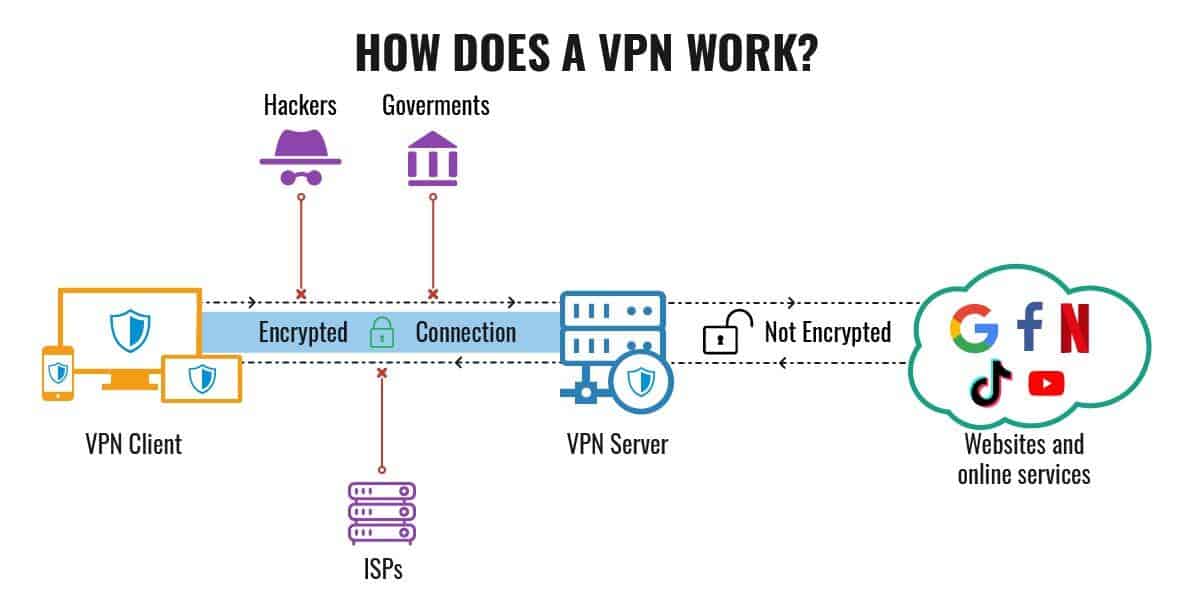
Usually, this creates a secure connection that’s extremely difficult to break into or monitor. However, in some cases, your website requests, real IP address, or chosen protocol can be revealed. Here are a few of the most common ways people’s data is exposed:
- DNS leaks: If your VPN doesn’t use its own DNS servers or wasn’t set up properly, you may experience DNS leaks. This sends your requests via your ISP’s DNS servers instead, effectively removing any privacy benefits the VPN offered.
- IPv6 leaks: There are two types of IP addresses: IPv4 and IPv6. Most VPNs only handle IPv4 traffic. This means anyone who accesses sites over IPv6 will reveal their true IP address, even with the VPN connected.
- WebRTC leaks: Video-messaging services can sometimes access a VPN user’s real IP address. This can be prevented by disabling WebRTC functionality.
- Improperly-configured client: Errors during manual configuration can cause all sorts of problems. Additionally, if your connection drops and the kill switch isn’t active, you could continue browsing with no idea you’re unprotected.
- Deep-packet inspection: High-security networks (and those in places with extreme digital censorship) often use deep-packet inspection to analyze traffic. This won’t reveal which sites you visit with a VPN active, but it can identify the protocol you’re using.
- Poor privacy policies: Some VPNs simply sell their users’ browsing histories, which is why choosing a no-logs provider is crucial.
Everything you’ve ever wanted to know about VPN tunneling
Now that you know the basics of how a VPN tunnel works, it’s time to get a bit more in-depth. We’ll learn how authentication works, what “split tunneling” is, and the differences between common connection protocols, plus how secure encryption keys are created.
VPN protocols explained
Before we can even think about connecting to a VPN, we first have to decide which protocol to use. OpenVPN was the industry standard for a long time, but it is slowly being phased out by WireGuard. That said, not every VPN supports every protocol (and some providers even have their own custom connection protocols).
Your choice of protocol matters for several reasons. Some are faster than others, some are more secure, and some offer benefits like built-in obfuscation. Equally important, the protocol determines what happens during the authentication process (more on this shortly). If you can’t decide which to use, letting your VPN choose automatically is usually the best option.
Let’s compare some of the most popular VPN protocols:
| Protocol | Is it secure? | Is it fast? | Notes |
|---|---|---|---|
| WireGuard | Yes | Extremely-high speeds | Very fast, widely supported, but still in development |
| OpenVPN | Yes | Reasonably-high speeds | Widely supported, offers a good blend of speed and security |
| IKEv2 | Yes | Reasonably-high speeds | Very quick connection time |
| PPTP | No | Very high speeds | Uses defunct encryption that can be broken in hours. Many known vulnerabilities. |
| L2TP/IPsec | Yes | Reasonably-high speeds | Combination of L2TP and IPSec, created in the 1990s. Widely considered outdated. |
VPN authentication: verifying legitimacy, privacy, and security
The next step is ensuring you’re actually connected to a genuine VPN server and not an attacker posing as one. To do this, the client and server exchange a “handshake”, sharing information about compatibility, relevant settings, and supported ciphers. Assuming everything goes well, they’ll create a secret encryption key that will allow server and client to communicate privately. 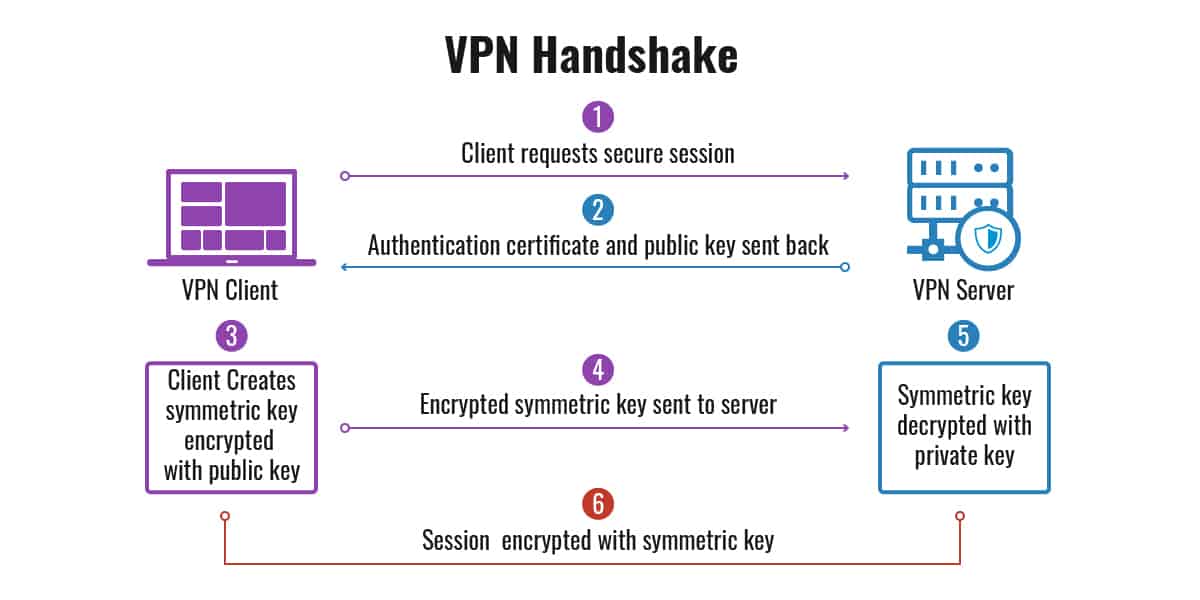
A typical OpenVPN exchange looks like this:
- Client establishes a connection and tells the server which ciphers and TLS versions it supports.
- The server sends back a TLS certificate containing the server name and public key. If the client detects anything suspicious (for instance, if the certificate is expired), the connection drops.
- Further authentication isn’t always required, but most consumer VPNs will verify you’re a real customer at this point. This is usually achieved by checking your username and password against login details stored in the company database. If there are no problems, the tunnel is created.
- Client and server perform a mathematical process called a Diffie-Hellman Key Exchange. This lets them agree on a shared secret number without ever sending it directly (so that observers can’t reverse-engineer it). Finally, this number is fed into an algorithm, creating a strong encryption key used to protect all tunneled traffic.

Simplified example of a Diffie-Hellman Key Exchange using paint instead of numbers - The VPN client and server can now securely send information back and forth. Anyone monitoring tunneled traffic will only see scrambled data that’s useless without the virtually impossible-to-crack key.
Different types of VPN tunneling
The examples above have primarily been concerned with consumer VPNs. Different configurations exist for different purposes, though. For instance, millions of people use remote-access VPNs to securely access their workplace’s network while away from the office.

Alternatively, you could use a site-to-site VPN to connect multiple networks together. This is helpful, for instance, if you have multiple offices spread across different countries but still need employees to be able to share resources.

Finally, there’s split tunneling, which is when only certain traffic passes through the VPN’s tunnel, with the rest handled normally. This does mean some traffic won’t be encrypted, but it can be helpful in certain situations. For instance, split tunneling is perfect for ensuring sensitive data is protected without impacting overall browsing speeds too much. You can also use it to access local sites while on foreign VPN servers or exclude specific apps to ensure they download updates as quickly as possible.
See also: How to split tunnel VPN traffic on Windows, MacOS, DD-WRT, and Tomato.
Conclusion
VPNs are extremely complex pieces of software, and understanding how they work requires a solid grasp of both computer networking and cryptography. However, no matter how sophisticated the setup, VPN tunneling is essentially just two or more devices using math to communicate securely over the internet. While most people will never need to know this information, it’s always a good idea to try to understand the tools you rely on regularly.



