

- If you’re concerned about your privacy on public networks while browsing on Chrome, a VPN is the best way forward.
- By connecting to a VPN server, you can also spoof your location and unblock geo-restricted content while using Chrome from anywhere in the world.
- We’ve performed hands-on testing on more than 70 top VPNs to find out which are best for using Chrome.
- NordVPN is our top recommendation for Chrome users. With high speeds, first-class unblocking ability, and strong security, it’s an excellent choice.
Whether you own a Chromebook or just use the Chrome browser, a VPN can improve your online privacy, bypass censorship, and unblock content. Many VPNs now make browser extensions, but not all of them are trustworthy, and some aren’t really Virtual Private Networks at all.
In this article, we’ll steer you clear of misleading plugins and look at what makes the best VPN for Chrome. This will allow you to use public networks stress-free and unblock your favorite streaming platforms, such as Netflix and HBO Max, while traveling overseas.
We cover a lot of detail, but in case you only have time for a summary, here is our list of the best VPNs for Chrome:
- NordVPN Our top choice VPN for Chrome. Easy-to-use apps and a corresponding Chrome extension. Extremely fast, private, and secure. Includes a 30-day money-back guarantee.
TIP In our testing we found that the cheapest NordVPN plan (Standard) works perfectly for Chrome. - Surfshark Budget VPN for Chrome. A fast and reliable VPN with a powerful Chrome add-on, plenty of security features, and no simultaneous connection limit.
- Total VPN A newcomer-friendly service with very high speeds, powerful privacy tools, and the ability to access all kinds of streaming sites. Great for Chrome.
- ProtonVPN Impressive Chrome extension that provides access to servers in 126+ countries and comes with split tunneling and auto-connect.
- ExpressVPN Chrome extension is well-designed and protects your browser’s traffic. When combined with the app, your device achieves a high level of security and privacy.
- IPVanish Advanced plan comes with a secure, cloud-based browser extension for Chrome. Allows unlimited connections and has speedy servers in 145+ locations.
- CyberGhost A highly reliable Chrome extension that provides online privacy, access to servers in 100+ countries, and excellent speeds for streaming Netflix and other platforms.
- PureVPN Simple Chrome extension that lets you access servers in 65+ countries. Comes with automatic obfuscation.
Many VPNs claim to protect your privacy and offer a fast, reliable connection but most (especially free VPNs) limit your connection speed or leak information.
We regularly test the top 70 VPNs for security and speed and this list only includes VPNs which are fast, reliable and are highly rated for privacy and security. Plus we only recommend VPNs which offer a full-money back guarantee allowing you to try them risk free.
Our criteria for the best VPNs for Chrome
There are hundreds of VPNs on the market, but they do not all have the same features. To ensure we only recommend the best possible VPNs for Chrome, we tested providers in the following areas:
- Ease of use: We prioritised VPNs with user-friendly services. We assessed each provider’s apps and customer support using 10 different metrics.
- Security and privacy: We used 16 different criteria to find the VPNs most able to keep you safe while using Chrome.
- Streaming suitability: We looked for providers with a large spread of servers. We then tested these servers’ ability to access geo-restricted websites and services. In particular, we tried them with stubborn platforms like Netflix and Amazon Prime Video.
- Speed: We carried out multiple speed tests for each provider. The results helped us weed out any VPNs that would bog your connection down and potentially ruin your Chrome browsing experience.
- Value for money: We’re always on the lookout for VPNs that offer consumers a good deal. Our eight test metrics help us identify the providers with generous money-back guarantees and a range of subscription terms and offers.
You can read more about our VPN testing methodology further in this article, but for now, let’s take a closer look at our top picks.
WANT TO TRY THE TOP VPN RISK FREE?
NordVPN is offering a fully-featured risk-free 30-day trial if you sign up at this page. You can use the best VPN for Chrome with no restrictions for a month—great for protecting your browsing activity or unblocking content.
There are no hidden terms—just contact support within 30 days if you decide NordVPN isn't right for you and you'll get a full refund. Start your NordVPN trial here.
Best Chrome VPNs: At a glance
We’ve compared the most important features of the top VPNs here. Prefer to read the in-depth reviews? Start with NordVPN – our #1 choice for Chrome.
| No value | NordVPN | Surfshark | TotalVPN | Proton VPN | ExpressVPN | IPVanish | CyberGhost | PureVPN |
| Website | NordVPN.com | Surfshark.com | TotalVPN.com | ProtonVPN.com | ExpressVPN.com | IPVanish.com | Cyberghost.com | PureVPN.com | Ranking for Chromecast: | 1 | 2 | 3 | 4 | 5 | 6 | 7 | 8 | Devices Supported | Windows, MacOS, iOS, Android, Linux | Windows, MacOS, iOS, Android, Linux, Amazon Fire TV, Apple TV | Windows, MacOS, Android, iOS, Apple TV | Windows, Linux, MacOS, iOS, Android, Chromebook | Windows, MacOS, iOS, Android, Linux, Smart TVs, Routers | Windows, MacOS, iOS, Android | Windows, MacOS, Linux, iOS, Android | Windows, MacOS, iOS, Android, Smart TVs, Chromebook, Routers | Total number of servers | 8,900 | 4,500+ | 1,800+ | 18,158 | Undisclosed | 3,200+ | 8,000+ | 6,000+ | Activity logs | No identifying data | No identifying data |
|---|---|---|---|---|---|---|---|---|
| Best deal (per month) | $3.09 Up to 76% off 2 year plans + 3 months free | $2.49 Up to 85% OFF + 3 months free | $1.59 SAVE 80% on an annual plan | $2.99 SAVE 70% on a 2-year plan | $2.49 SAVE 84% + 4 months free on 2 year basic plan | $12.99 Best MONTHLY Deal $12.99 | $1.59 SAVE 88% on the 2 year plan + 2 months free! | $1.99 Up to 87% off on 5 year plans |
Best VPNs for Chrome: Our in-depth reviews
At Comparitech, we thoroughly test each VPN ourselves before making any recommendations to you. The following reviews are based on our first-hand experiences and extensive testing.
Here’s our list of the best VPNs for Chrome:
1. NordVPN
 Jul 2026
Works with ChromeTested Jul 2026
Jul 2026
Works with ChromeTested Jul 2026
Apps Available:
- PC
- Mac
- IOS
- Android
- Linux
- FireTV
Website: www.NordVPN.com
Money-back guarantee: 30 DAYS
NordVPN is our top recommendation for a Chrome VPN. It checks off all of our criteria, has special servers for multi-hop connections, and avoids censorship. The service is entirely log-less and has top-of-the-line encryption standards.

It’s also very fast. In our tests, NordVPN was faster than all of the other providers. It was the only one to exceed 200 Mbps overall, averaging 200.12 Mbps. This makes it the ideal choice for intensive Chrome-based activities like 4K streaming or browser-based gaming.
NordVPN lets you securely access streaming sites from anywhere, including Netflix and Hulu, even on mobile apps. The apps let you connect easily by choosing a location on a map or a server from a list. NordVPN makes apps for Windows, macOS, Linux, Android, and iOS.

NordVPN makes a standalone browser extension that functions with or without installing the native NordVPN app. By itself, the extension only protects Chrome traffic. It also prevents WebRTC leaks that could expose your real IP address from your browser, even with the VPN enabled. Nord’s CyberSec feature comes built into both the extension and the app to block ads, trackers, and malware.
Buy this VPN if:
- You want a standalone Chrome extension that functions independently of the main VPN app.
- You need ultra-fast and consistent servers for high-resolution streaming and gaming while using Chrome.
- You prefer a large server network with proven ability to unblock a wide range of geo-restricted content.
- You want extensive customer support options, including live chat and comprehensive documentation.
Don’t buy this VPN if:
- You’re looking for a VPN with port forwarding.
BEST VPN FOR CHROME:NordVPN is our top pick. A superfast VPN that works well with Chrome. Connects up to 10 devices simultaneously. Also works well with most popular streaming services and packs excellent security features. 30-day money-back guarantee for a risk-free deal.
Read our full review of NordVPN.
2. Surfshark
 Works with ChromeTested Jul 2026
Apps Available:
- PC
- Mac
- IOS
- Android
- Linux
Website: www.Surfshark.com
Money-back guarantee: 30 DAYS
Surfshark is a budget-friendly VPN that offers apps for every major operating system. If you’d like, you can connect to one of its 4,500+ servers (in over 100 countries) using its Chrome extension instead.
While connected to the provider’s US servers, we recorded speeds averaging 192.08 Mbps. This is very fast and makes Surfshark suitable for just about anything you can do while using Chrome.
This VPN grants secure access to platforms including Netflix US and BBC iPlayer, plus it works in countries like China and the UAE. Better yet, Surfshark lets you connect as many devices as you like.

The Surfshark Chrome extension has plenty of security features, including HTTPS encryption, leak protection, and a built-in ad-blocker. However, certain features from the desktop apps are missing, namely the whitelister and kill switch.

Surfshark accepts Bitcoin, Ethereum, and Ripple for anonymous payments. It doesn’t log any personally identifiable data, so you’re protected, however you decide to pay. If you need any assistance, you can reach customer support 24/7 over live chat.
Surfshark provides apps for macOS, Android, iOS, Windows, and Linux. This service can also be manually installed on supported internet routers.
Buy this VPN if:
- You want a budget-friendly option that allows unlimited simultaneous device connections.
- You need a powerful Chrome extension that offers HTTPS encryption, leak protection, and a built-in ad-blocker.
- You are looking for a VPN that works in restrictive countries like China and the UAE.
- You need an easy-to-use Chrome extension that doesn’t require the main app to function.
Don’t buy this VPN if:
- You require advanced features like a kill switch or a whitelister in the browser extension.
- You want a VPN with more extensive customization and advanced features.
BEST BUDGET VPN:Surfshark has no connection limit, so it’s perfect for anyone looking to secure all of their devices at once. It also offers a strict no-logs policy, strong security features, and a 30-day money-back guarantee.
Read our full review of Surfshark here.
3. Total VPN

Apps Available:
- PC
- Mac
- IOS
- Android
- Linux
Website: TotalVPN.com
Money-back guarantee: 30 DAYS
Total VPN is an affordable, versatile service with a network that covers more than 90 countries around the world. While it doesn’t offer its own browser extensions, the mobile and desktop apps work perfectly with Google Chrome.
You’ll be able to securely stream Netflix, download files, or chat with friends on up to five devices simultaneously. If anything goes wrong, support is available via a ticket system.

We wanted to see what kind of speeds the average user can expect. For that reason, we ran multiple speed tests on Total VPN’s servers in the US while using a 250 Mbps connection (the average American broadband speed). We recorded an average speed of 165.19 Mbps, with results varying by just 7 Mbps. This service isn’t just one of the fastest on the market; it’s also one of the most reliable.
This provider is known for its simple, no-nonsense security offering. There’s automatic DNS and IPv6 leak protection, a kill switch (on most platforms), and uncrackable AES-256 encryption, backed up by a strict no-logs policy.
Total VPN also has a couple of more advanced tools, such as its obfuscated Hydra protocol and dual-mode split tunneling feature (which lets you block certain sites unless the VPN is active or allow a site to bypass the VPN’s encryption entirely).
Total VPN apps are available for Windows, Android, iOS, and macOS systems.
Buy this VPN if:
- You’d like an intuitive, novice-friendly service with a large network.
- You demand consistently high speeds and won’t tolerate bandwidth limits.
- You want a VPN that can take care of security for you.
- You’re looking to unblock region-locked sites while traveling abroad.
Don’t buy this VPN if:
- You want a VPN with its own Chrome browser extension.
- You need more than five simultaneous connections.
SPEEDY LOGLESS VPN:Total VPN is suitable for almost any day-to-day task, whether it’s streaming, torrenting, or just using Chrome anonymously. It’s quick too, plus there’s a 30-day money-back guarantee on annual plans (and a 14-day guarantee if you sign up for one month at a time).
Find out more in our full Total VPN review.
4. ProtonVPN

Apps Available:
- PC
- Mac
- IOS
- Android
- Linux
Website: www.ProtonVPN.com
Money-back guarantee: 30 DAYS
ProtonVPN is well-known for being one of the most private and secure providers available. It has a browser extension for Chrome that provides access to the company’s own servers that are housed in high-security locations in privacy-friendly countries. Other features include auto-connect and split tunneling.
ProtonVPN’s system-wide apps are great for Chrome, too. They’re able to access geo-restricted streaming services such as Netflix and Amazon Prime Video. 16,800+ servers in 126+ countries mean you’re spoilt for choice when it comes to trying out new content libraries.

While connected to ProtonVPN’s US servers, we measured speeds of between 136.45 Mbps and 143.78 Mbps. As well as being consistent, these speeds are also very fast – helping ensure interruption-free browsing and streaming.
ProtonVPN is one of the few providers that allows port forwarding, making it a great option for torrenters. Other features include obfuscation, a choice of connection protocols, and an ad, tracker, and malware blocker.

Well-designed apps are available for Windows, macOS, iOS, Android, and Linux. Subscriptions allow up to 10 simultaneous connections. If you need more, then manual router configuration is possible (which will only use up one of your permitted connections).
Buy this VPN if:
- You want a VPN with advanced features like port forwarding for torrenting directly through the extension.
- You need a secure and private VPN with strong encryption, split tunneling, and the ability to bypass strict censorship.
- You want a VPN with a Chrome extension that provides access to servers in 126+ countries for unblocking content.
- You prefer a provider that offers the ability to use the Stealth protocol to disguise VPN traffic in restricted regions.
Don’t buy this VPN if:
- You need a VPN with more budget-friendly pricing
- You require a more user-friendly interface – may be too complex for beginners.
PRIVATE & RELIABLE:ProtonVPN confidently overcomes geo-blocking with servers in 126+ countries. Chrome browser extension with great security features. Comes with a 30-day money-back guarantee.
Find out more in our ProtonVPN review.
5. ExpressVPN
 Works with ChromeTested Jul 2026
Apps Available:
- PC
- Mac
- IOS
- Android
- Linux
Website: www.ExpressVPN.com
Money-back guarantee: 30 DAYS
ExpressVPN offers great security and performance, combined with easy-to-use apps. Its performance was fast and stable in our tests for this article. It achieved an average download speed of 124.32 Mbps overall, with a difference of just 5 Mbps between its slowest and fastest results.
ExpressVPN is a great choice for pretty much any task, whether that’s bypassing the Great Firewall of China or securely streaming Netflix.

ExpressVPN makes apps for Windows, macOS, iOS, Android, Linux (command-line), and has its own firmware for routers.
The provider makes a user-friendly browser extension that manages your device’s native VPN connections. This is useful for Chromebook users who can’t run the Windows or iOS versions of the app. The extension does not function by itself and requires you to have ExpressVPN installed or configured first.
The extension adds in some extra privacy features, including the ability to randomize the location reported by Google’s geolocation API to somewhere around the chosen VPN server. This prevents websites from learning your real location both through Google and via your IP address.

ExpressVPN’s browser extension has passed an audit by a third-party cybersecurity firm, and all the code is open-source.
Buy this VPN if:
- You want a high-performance VPN with a user-friendly Chrome extension that integrates seamlessly with the main app.
- You prefer a VPN with strong privacy features, including randomized geolocation reporting and an open-source extension.
- You need a VPN that excels at accessing popular streaming platforms like Netflix and Hulu via its Chrome extension.
- You prefer a VPN that has been audited for security and works well even in highly restrictive countries like China.
Don’t buy this VPN if:
- You don’t want to install the main app, just a standalone extension.
- You are looking for a more budget-friendly option.
SOLID SECURITY:ExpressVPN has a large network of servers that is fine-tuned for fast connections. User-friendly Chrome extension and apps for all operating systems. Great privacy and security features. 30-day money-back guarantee.
Read our full review of ExpressVPN.
6. IPVanish
 Works with ChromeTested Jul 2026
Apps Available:
- PC
- Mac
- IOS
- Android
- Linux
Website: www.IPVanish.com
Money-back guarantee: 30 DAYS
IPVanish is a great choice for Chrome. It allows unlimited device connections and has servers in 145+ locations worldwide.

It’s also very fast. While connected to its servers in the US, we measured speeds of between 155.37 Mbps and 161.06 Mbps. These consistently quick speeds mean you can use it for everything from multiplayer gaming to video calling and high-resolution streaming.
In our tests, IPVanish was able to access a wide range of streaming services. These included Netflix, Amazon Prime Video, Hulu, and Disney Plus.

A secure browser extension for Chrome is available with the provider’s Advanced Plan. The extension (which is also available for Firefox and Edge) operates in the cloud and protects users’ devices from viruses and malware, as well as trackers and cookies.
IPVanish apps are available for Windows, macOS, iOS, and Android. These protect user-generated traffic with 256-bit AES encryption. Other features include split tunneling, obfuscation, leak protection, and a kill switch. The provider has an independently audited no-logs policy and provides 24-hour support via live chat and email.
Buy this VPN if:
- You’d like a cloud-based browser extension for Chrome that offers enhanced security against malware and trackers.
- You want a VPN that allows unlimited simultaneous device connections.
- You require fast server speeds for activities like streaming and gaming on Chrome.
- You want a VPN that allows torrenting on all servers.
Don’t buy this VPN if:
- You want access to the cloud-based Chrome extension on the standard plan.
- You’re concerned about possible privacy issues with a US-based VPN.
SECURE BROWSER:IPVanish's cloud-based Chrome extension keeps connections secure. Provides consistently fast speeds and works with Netflix and Amazon Prime Video. Unlimited device connections and a zero-logs policy. Comes with a 30-day money-back guarantee.
Read our full IPVanish review.
7. CyberGhost
 Works with ChromeTested Jul 2026
Apps Available:
- PC
- Mac
- IOS
- Android
- Linux
Website: www.Cyberghost.com
Money-back guarantee: 45 DAYS
CyberGhost’s Chrome extension brings a streamlined VPN experience to your browser. It ensures excellent stability and speedy connections to 11,500+ servers in 100+ countries. It even lets you connect to its streaming-optimized servers, which makes it a superb extension for watching Netflix and other popular international services.

In addition to streaming servers, CyberGhost also has servers for gaming, torrenting, and privacy (its NoSpy servers). The NoSpy servers are owned and operated by CyberGhost in the company’s Romanian data centre.

Setting up the VPN extension is hassle-free, which makes it an excellent choice for beginners. Unlike some VPN extensions, it isn’t just a proxy; it provides an encrypted connection for your browser data, which means it will provide you with online privacy.
In our speed tests for this article, CyberGhost averaged 134.44 Mbps. As a rough approximation, this is fast enough for streaming Netflix in 4K on five devices at the same time.
The extension can allow you to enjoy uninterrupted browsing without any data caps or constraints. This makes it a great option for bypassing blocks at work or in countries that enforce restrictions. CyberGhost follows a strict no-log policy, which means it never keeps any records of what you do while connected.
Plus, it allows up to seven simultaneous connections, which means you can also install it on your laptop, smartphone, and tablet using apps for Windows, Mac, iOS, and Android. Those apps have additional features such as a kill switch and DNS leak protection, which make them better for tasks that require the utmost privacy. Try it yourself using its 45-day money-back guarantee.
Buy this VPN if:
- You want a simple Chrome extension that encrypts browser data for better privacy.
- You want the ability to access servers optimized for streaming through a Chrome extension.
- You require a VPN that offers thousands of secure, fast connections in over 100 countries, accessible directly from the Chrome extension.
- You’re a tech novice looking for a beginner-friendly VPN experience.
Don’t buy this VPN if:
- You need more advanced features like split tunneling, multi-hop, or port forwarding.
- You need to connect more than 7 devices at once.
EASY TO USE:CyberGhost is good for beginners and has a decent Chrome extension that encrypts your browser data. Fast WireGuard connections are perfect for streaming, gaming, and torrenting. Servers are available in 100+ countries. Works to access popular streaming services, including Netflix. 24/7 live chat support and a 45-day money-back guarantee.
Read our full review of CyberGhost.
8. PureVPN
 Works with ChromeTested Jul 2026
Apps Available:
- PC
- Mac
- IOS
- Android
- Linux
Website: www.PureVPN.com
Money-back guarantee: 31 DAYS
PureVPN has a dedicated browser extension for Chrome, which allows users to choose any websites that they wish to use without the extension, spoof their GPS location, and protect against WebRTC leaks. At the time of writing, PureVPN is offering a seven-day free trial of the extension.
Of course, you can also use the main version of the PureVPN app with Chrome. This gives you access to servers in 65+ countries and works with a variety of streaming platforms. In fact, it has a page where it links a list of streaming services to the servers they work best with.

Speed-wise, it’s very fast. While connected to its US servers, we measured an average download speed of 142.24 Mbps. This is more than fast enough for any Chrome-based activity, whether that’s streaming, video calling, or gaming.
Your data is secured using strong 256-bit AES encryption and protected from IP and DNS leaks. There’s a kill switch, split tunneling, and automatic obfuscation that works in China and the UAE. There’s also a strict no-logs policy ensuring your personal information stays private.

Subscribers are permitted up to 10 simultaneous device connections per account. PureVPN apps, all of which have a full GUI, are available for Windows, macOS, Android, iOS, and Linux. Manual configuration is possible for select routers.
Buy this VPN if:
- You want a dedicated Chrome extension with features like spoofing your GPS location and preventing WebRTC leaks.
- You need a VPN with automatic obfuscation, which is useful for bypassing censorship in countries like China and the UAE.
- You prefer a simple, intuitive Chrome extension that is easy to use, with minimal setup required.
- You’re looking for a great value VPN with affordable short and long-term plans.
Don’t buy this VPN if:
- You need a more extensive server network or specialized servers tailored to streaming and gaming.
- You want advanced features, such as port forwarding, without paying extra.
EASY TO USE:PureVPN hits good speeds. Solid for using with Chrome. Stores no logs and has automatic obfuscation. Great for streaming and comes with a 31-day money-back guarantee.
Find out more in our PureVPN review.
How to use a VPN browser extension with Chrome
Follow our step-by-step instructions on how to use a VPN browser extension with Google Chrome. Don’t worry, it’s a quick and easy process.
Here’s how to set up a VPN for Chrome:
1. Choose a VPN that offers a browser extension for Chrome. We particularly recommend NordVPN. Sign up and enter your payment details.
2. Log in to the NordVPN website via Chrome and select ‘Downloads’.

3. Scroll down to the ‘VPN solution for browser’ section and click ‘Add extension’ next to where it says ‘Google Chrome’.

4. Click ‘Add to Chrome’ and then ‘Add extension’ when the pop-up appears.

5. Click the puzzle piece icon in the top right corner of the browser window. This will open the available extensions. Select ‘NordVPN’.
6. Sign in if required to do so and repeat Step 5. If not, go to Step 7.
7. Click ‘Quick connect’ to establish a secure connection to the fastest available server.

8. That’s it! Your browser is protected.
How to install a Chrome VPN
To get started with a VPN on Google Chrome, you will need to install it first. You have a couple of installation options, depending on what your VPN provider offers. Here’s how to install a VPN on Chrome:
How to install a VPN app on your operating system
Most VPN providers make “native” apps that install directly onto an operating system, such as Windows, macOS, iOS, or Android. You can download these from your device’s VPN provider’s website or an official app store.
- Sign up for the VPN (we recommend NordVPN).
- Download and install the app for your device
- Open the app and select a VPN server or location
- Hit the Connect button and wait a few seconds
- Once the connection has been established, open Chrome
All the internet traffic from Chrome and the rest of your device should now be encrypted and passed through the VPN server. Your IP address stays hidden, and you can unblock region-locked content.
How to install VPNs on Chromebook
Most VPN providers don’t make apps specifically for Chromebook as they do for Windows and Mac. Instead, VPNs must either be manually configured on Chrome or you must use a browser extension. The latter is undoubtedly the easier option if it’s available.
Follow these instructions from Google to manually configure a VPN:
- If you haven’t already, sign in to your Chromebook
- Click the status area where your account picture appears
- Click Settings
- In the “Internet connection” section, click Add connection.
- Click Add OpenVPN / L2TP
- In the box that appears, fill in the information below
- Click Connect
Methodology: What makes the best Chrome VPN?
We assess each VPN through practical testing and research, prioritizing the criteria most relevant to the specific use case discussed here. Depending on the topic, this can include performance, privacy and security features, ease of use, reliability, compatibility, and value for money.
Charts showing test results contain specific observations recorded during our testing. These findings help shape our recommendations, alongside editorial judgement about each VPN’s overall performance and the types of users for whom it is most suitable.
We’ve phased out the composite numerical scoring system that was previously used on this page. Rankings now reflect editorial recommendations based on the testing and analysis described above.
Free Chrome VPNs to avoid
Most free VPN services, whether they run as browser extensions or native apps, are severely limited. They impose bandwidth throttling, data caps, and waiting queues.
Many have been known to inject tracking cookies and advertisements into your browser, which, in effect, can take a counterproductive toll on user privacy. The worst of them use a decentralized peer-to-peer structure, which eats up idle bandwidth on users’ machines, exposes them to a litany of threats, and in one infamous case (Hola), leverages everyone connected to the network to perform a massive botnet attack and mine Bitcoin.
- Turbo VPN‘s Chrome store page doesn’t even link to a proper website. Instead, it just leads to a blog post about the VPN. There’s no privacy policy, no technical details, and no terms of service. Avoid at all costs!
- RusVPN stores some connection logs that could identify users.
- SetupVPN collects extensive logs about your online activity using “site analysis tools” to retrieve information from your browser, including the pages you view, the links you click, your IP address, browser type and language, access times, and referring website addresses.
- DotVPN logs the IP addresses of its users.
- Hola is a peer-to-peer VPN that uses idle bandwidth on other users’ devices instead of its own servers. It has, in the past, abused its access to user devices to launch botnet attacks.
As you can see, being at the top of Google search results does not always mean the VPN is good or trustworthy.
Browser extensions vs real VPNs
Turbo VPN, DotVPN, Hola … None of these browser plugins are real VPNs. In fact, most Chrome extensions cannot function as real VPNs. Instead, they are just encrypted proxies, usually SSL or HTTPS proxies. These Chrome extensions are VPNs in name only.
True, they function similarly to VPNs. Traffic is encrypted (we hope) and sent through an intermediary server. This can help get around censorship, unblock websites, and protect your privacy.
But these “clientless” VPNs only encrypt traffic coming from the Chrome browser. A true VPN will encrypt all traffic traveling to and from your entire device. Furthermore, so-called VPNs that run solely as Chrome extensions are vulnerable to a number of security issues because they do not use OpenVPN or an IPSec-encrypted VPN protocol (L2TP, IKE, SSTP), both of which require a native client to be installed on the user’s device. Finally, they do not extend your network to access remote machines, a key defining feature of a genuine VPN.
Charlie Hosner, a security expert from the University of Michigan, details the vulnerabilities of clientless SSL VPN extensions in a blog post. Those vulnerabilities include man-in-the-middle attacks, worms, keyloggers, and remote management tools.
See also: Best VPN browser extensions.
How to prevent WebRTC leaks
Some apps that run inside Chrome require a feature called WebRTC. Those include extensions for torrenting, voice calls, and video chats. WebRTC was built into Chrome and other browsers, so separate plugins wouldn’t have to be installed.
A key way that VPNs protect users’ privacy is by masking their true IP addresses. Unfortunately, WebRTC can expose a device’s original IP address even when the VPN is enabled, in what’s known as a WebRTC leak.
To prevent a WebRTC leak in Chrome, you’ll (somewhat ironically) require an extension. A handful are available, but this one is the official release from Google. Once installed, right-click the extension icon and go to Options. Check the box next to “Use my proxy server (if present):” and exit the pop-up window to save your settings.
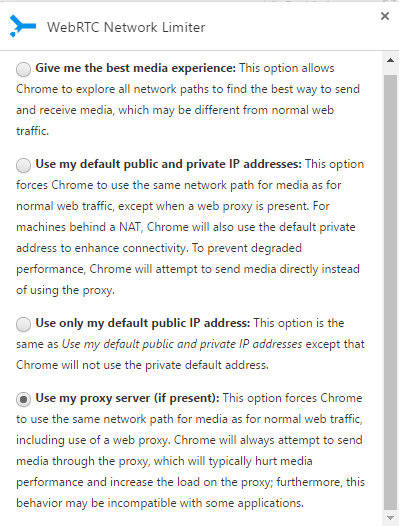
You should now be protected from WebRTC leaks when using a VPN.
VPNs for Chrome FAQs
Does Google Chrome have a built-in VPN?
Unfortunately, no, Google Chrome does not have a built-in VPN. Each VPN extension for Chrome is created by a third-party company and so will need to be installed manually. Incognito mode within the Google Chrome app allows you to browse without cookies and cache, but it does not provide the same protection as a VPN – more on that below.
Can Chrome extensions be viruses?
Technically, any piece of software you run on your PC has the potential to be a virus. This includes Chrome extensions, and Google is aware of the problem. After all, in 2020, it worked with Cisco to identify and remove hundreds of malicious extensions. Still, Google can’t check each extension individually, so it’s on the user to research new extensions before installing them.
Here’s how to ensure your Chrome extensions are safe:
- Only get extensions from the official Chrome Web Store
- Make sure the developer’s website is real and contact information is listed
- Watch out for cloned extensions that rip off logos and other marketing from genuine extensions
- Check the permissions required to use the extension. If it asks for more information than what is needed, move on
- Check the rating and reviews for feedback from other users
- Read the privacy policy
All of the VPN browser extensions we recommend above are safe to use.
Do VPNs give me more privacy than just using private browsing in Chrome?
Yes. Incognito mode, or private browsing, simply limits the cookies stored on your browser and prevents visited websites from being added to your browsing history. In other words, it only makes browsing private from other users of your device and browser.
Private browsing does not hide your IP address, and does not stop your online activities from being tracked by your internet service provider, office, school, or the websites you visit.
A VPN encrypts your data, which hides your online activity from your ISP, school, office, and anyone else who might be listening in. It also masks your IP address, so websites and apps can’t track you by your device’s IP address.
Using a VPN and incognito mode together is a great way to prevent being tracked online.