

The 2026 MLB season is in full swing, bringing us the excitement of America’s favorite pastime. However, despite the anticipation, blackouts continue to frustrate baseball fans. Suppose you find yourself away from home and yearn to enjoy uninterrupted streaming of your favorite MLB games while avoiding those pesky blackouts. In that case, we have the perfect solution for you – a Virtual Private Network (VPN).
Based on our research and testing, we’ll walk you through the step-by-step process of bypassing MLB.TV blackouts, allowing you to watch all the 2026 MLB games within and outside the United States. To successfully achieve this, you’ll need an active MLB subscription to eliminate blackouts and stream the entire MLB season without relying on cable TV. Additionally, you’ll require a desktop web browser like Chrome or Firefox, along with a reliable VPN.
Don’t let blackouts spoil your passion for the game. Let us guide you through unlocking a world of MLB entertainment in 2026 and beyond.
How to watch MLB blackout games with a VPN
Don’t worry if you don’t have time to read the full article, the instructions below have been fully tested by us and are quick and easy to follow.
Here’s how to watch MLB blackout games with a VPN and bypass blackouts:
- Sign up with a quality VPN provider with plenty of bandwidth and US server locations. We particularly recommend NordVPN.
- Download and install the VPN app on your device and run it. NordVPN has apps for Windows, Mac, Linux, Android, iOS, Amazon Fire TV, and Apple TV.
- Connect to a server in a location where the MLB game you want to watch is not blacked out.
- Open your web browser and go to MLB.TV to watch the game as you usually would.
- If you encounter any issues, try clearing your browser cookies and cache. If you have any problems after this, your VPN provider should be able to help.
WANT TO TRY THE TOP VPN RISK FREE?
NordVPN is offering a fully-featured risk-free 30-day trial if you sign up at this page. You can use the VPN rated #1 for MLB.tv with no restrictions for a month—great if you just want to catch a specific event or are going abroad.
There are no hidden terms—just contact support within 30 days if you decide NordVPN isn't right for you and you'll get a full refund. Start your NordVPN trial here.
Bypass MLB blackouts with a VPN
Major League Baseball fans in the United States who bought MLB.TV subscriptions feel betrayed by the fact that they can’t watch all the games promised to them due to live blackouts. MLB.com’s own website claims subscribers, who pay $29.99 a month or $149.99 a season, can “watch every out-of-market game regular season game live or on-demand.”
However, scroll down to the fine print, and the reality is quite different. Fans have expressed anger toward MLB.TV that many games are region-locked due to local licensing restrictions, forcing them to buy a cable or satellite TV subscription to watch. According to MLB.TV’s blackout policy:
“Clubs located within the United States may be subject to home television territory blackout restrictions that may expand to outside of the United States.”
Luckily, there’s a workaround. A VPN, or Virtual Private Network, reroutes all of a device’s internet traffic through a location of the user’s choosing. Fans can make it look like they are watching from a different state or country to bypass the blackout. Good VPNs usually require a monthly subscription fee, but it’s cheaper than buying cable TV.
What is a live blackout, exactly?
Before every MLB season, executives sit down and decide which broadcasting companies get the rights to which games. Often, a regional TV affiliate, such as your local Fox, NBC, or ABC TV station, gets exclusive rights to games played by the local teams, and they don’t share. They also don’t live stream games online much of the time. Even MLB can’t broadcast those games online or on TV within that geographic market.
You can find out which games will be blacked out in advance using MLB.TV’s regularly updated list or the MLB blackout map below.
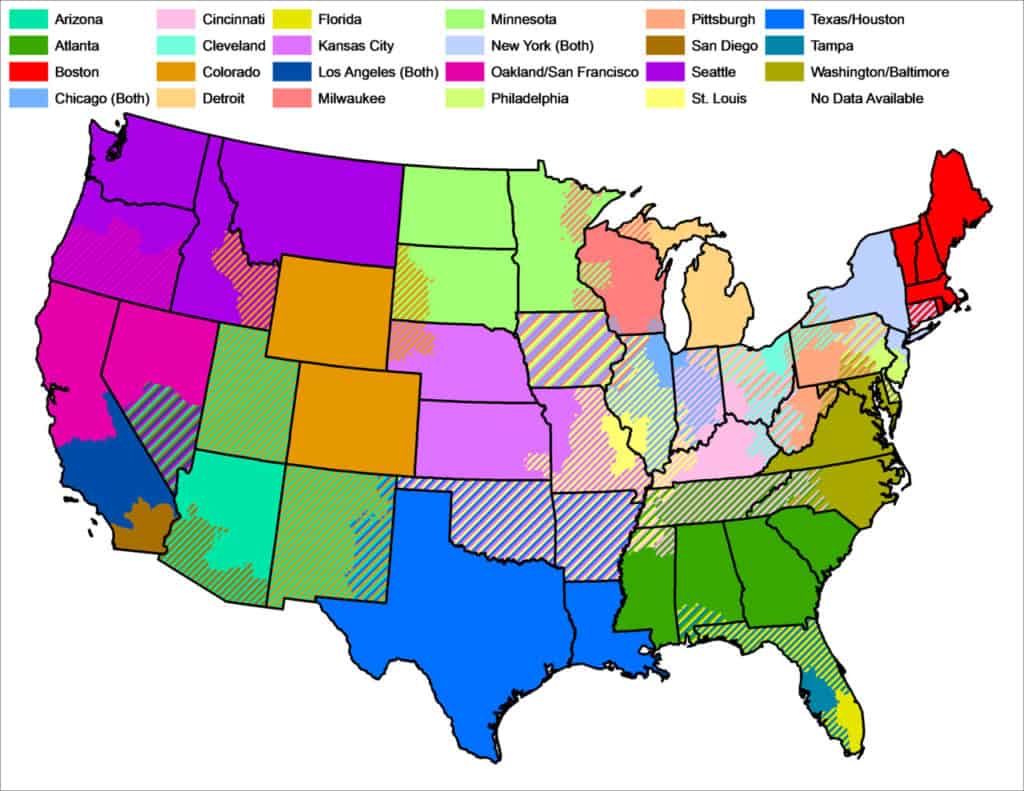
These content rights often bar MLB.TV subscribers from watching the teams they care about most – the ones closest to them. The home and visiting teams’ broadcasts are blacked out in their respective regions.
Whenever a fan goes to watch a game on a web browser or the MLB.TV app, the app or website checks the device’s IP address. The IP address is used to determine the viewer’s location. The live stream is blocked if that viewer falls within the blackout region. Instead of a live stream, you’ll get one of the following error messages:
- “We’re sorry. The broadcasters’ required blackout checks cannot be performed at this time. Please try again in a few moments.”
- “We’re sorry. We have determined that you are located inside one of the applicable Club’s home television territories and are therefore blacked out of watching the game you selected. Live Audio of this game is available as part of your MLB.TV subscription.”
- “Due to Major League Baseball exclusivities, live games occurring each Saturday with a scheduled start time after 1:10 PM ET or before 8:00 PM ET and each Sunday with a scheduled start time after 5:00 PM ET, will be blacked out in the United States.”
- “Media Error. This game is temporarily unavailable. Please try again in a few moments.”
- “This video is not currently available due to local or national blackout restrictions. Please click “Learn More” if you require assistance.”
The situation has been worsened by conflicts between TV companies like Comcast and Time Warner Cable, which further fragment the channels available on cable.
Bypass MLB.TV blackouts in a web browser
We have found, a VPN can change your IP address to that of another location. After you connect to a VPN server, clear your cookies and refresh the page where the game you want to watch is streaming.
Most VPNs have native clients you can easily download and install. After setup, just select a server location and hit connect.
We tested this out by connecting to a Chicago server and attempting to watch a Cubs game. Sure enough, we got a message alerting us the game was under a local blackout.
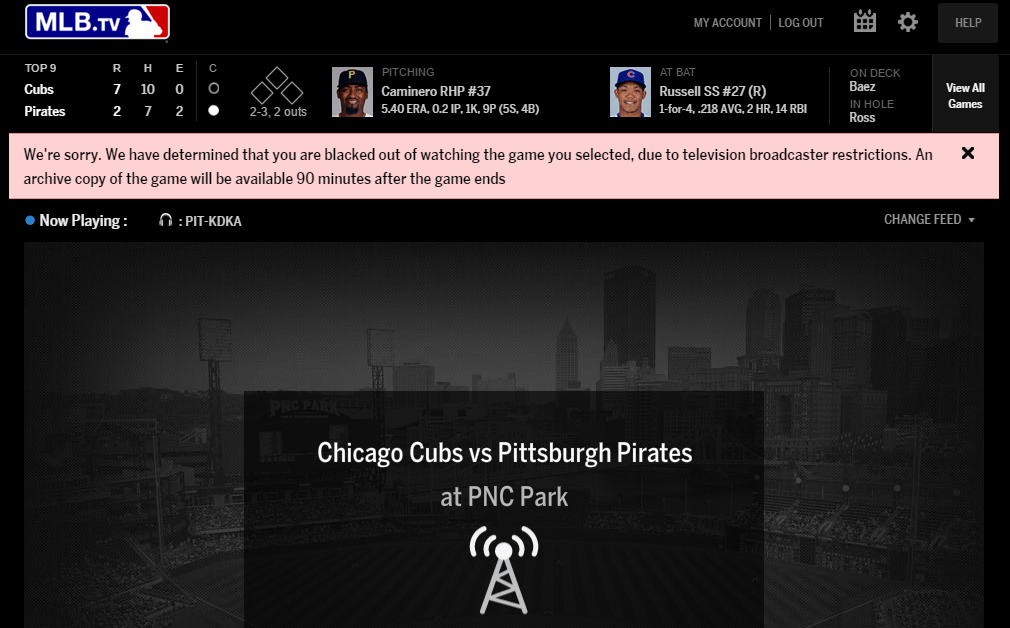
Next, we connected to servers in Canada using NordVPN, which worked flawlessly. A quick refresh was all that was needed to unblock the stream; no more blackout messages.
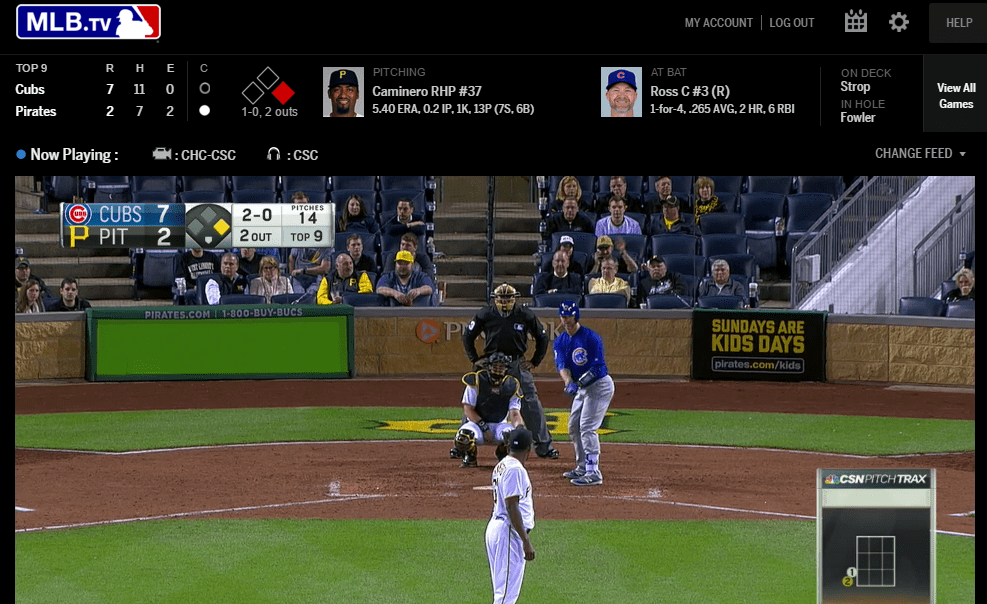
Some games are under national blackouts, so for this, we tested servers in Mexico and Argentina. This worked fine as well.
Ideally, you want to connect to the location closest to you but still beyond the blackout region. This speeds up the internet connection and results in a higher-quality stream. However, connecting to another country should work in case of a nationwide blackout. The one exception may be Canada, where some MLB teams hail from.
Bypassing MLB.TV blackouts on Android and iOS MLB+ app
If you want to bypass a blackout on the MLB+ app on iOS or Android, we’re sorry to inform you that this is much harder as of 2026. When we tested this before, we advised users to connect to a VPN server with an IP address outside their blackout market. Android users could then use a fake GPS app to spoof their location to match the one in their VPN.
This method no longer works. MLB+ now requires your GPS location before viewing any game and can detect whether a mock location is used in Android. It will block the stream accordingly, instead showing an error message.
As of the 2026 season, bypassing MLB+ blackout restrictions requires Android phones and tablets to be rooted and iPhones and iPads to be jailbroken.
2026 MLB Season Blackout dates
The full 2026 MLB season schedule has been released, but MLB hasn’t yet published a game-by-game blackout calendar. Currently, only general blackout rules and special event restrictions (such as national broadcasts, Opening Day on Netflix, All-Star Game, and Home Run Derby) are available.
Specific blackout information for individual games will be updated once full TV broadcast assignments are finalized. Fans can check local availability by ZIP code using MLB’s blackout checker, and MLB.com will eventually show blackout icons next to each game as the information becomes available.
MLB.TV streaming FAQs
Is it illegal to use a VPN to stream MLB.TV?
It is not illegal to use a VPN to stream MLB.TV, however, bypassing blackout restrictions is against MLB.TV’s terms of use, which state: “If you circumvent, or attempt to circumvent, any blackout restriction or other use restriction: your subscription will be subject to immediate termination and a charge of one hundred dollars ($100.00) for early termination; you may be subject to legal action; and MLB reserves the right to report such misconduct to appropriate law enforcement authorities.”
That being said, we haven’t seen any precedent of the MLB taking such action against VPN users.
How do I know if an MLB game is blacked out?
If you are in the local market of either the home or away baseball team, the game will most likely be blacked out. You can find a list of MLB blackout restrictions by entering your zip code here.
Does MLB Extra Innings have blackouts?
Yes, games on MLB Extra Innings are subject to the same blackouts as MLB.TV. The only games it consistently gives you live are out-of-market, non-exclusive broadcasts.
Can I watch MLB TV internationally?
Yes! In fact, watching from another country is an easy way to avoid blackout restrictions. If you’re in the USA, you could, for example, connect to a server in Canada or Mexico to bypass US blackouts.
Note that you may still need an American form of payment and a US zip code in order to sign up for MLB.TV.
Are MLB.TV blackouts also based on billing address?
You can check any US zip code on MLB.TV’s website to find out which games are blacked out in a given area. However, when it comes time to actually watch a stream, your IP address and device location services are used to determine your location and whether a stream is blacked out.
If you are watching in a web browser like Chrome or Firefox, only your IP address is used to determine your location. That’s why we recommend combining a VPN with a web browser to unblock MLB.TV streams.
The MLB app for iOS and Android uses your device’s GPS and other available location services to determine your location, and a VPN is less effective against these checks.
Are there any alternatives to MLB.TV?
Yes, various TV streaming services offer channels showing MLB games for the 2026 season.
These include the following:
- DirecTV
- FuboTV
- Hulu + Live TV
- Sling TV
- YouTube TV
Some of these services include MLB.TV as an add-on and offer free trials, giving you a chance to watch at least some of the 2026 MLB season for free.
These still require a US IP address and payment method to use, but they are much less strict than MLB.TV, especially if you prefer to watch with an app instead of a desktop web browser. You can get an American IP address with a VPN.
Learn more about how to live stream MLB baseball online without cable.
Can I use SmartDNS services to watch MLB games?
Maybe. A Smart DNS service is an alternative method that internet users can leverage to spoof their location elsewhere. This will allow you to access content that is usually restricted to where you live. The only important thing to remember is that Smart DNS services do not provide the additional privacy you get with a VPN.
For this reason, it is better to subscribe to a VPN service that also provides a Smart DNS service with a subscription. When you pay for your account, you then get access to both a full VPN, and all the privacy benefits that come along with it, and an additional Smart DNS service you can use to access content (as well as the VPN) if you want to.
Smart DNS services are useful for accessing content and devices that will not allow you to install a VPN directly, such as games consoles and certain smart TVs. The good news is that numerous of our top VPN recommendations for MLB throw in a free Smart DNS service for free with their VPN subscription. However, NordVPN only has one smart DNS server in the US, so if the game you want to watch is in the same blackout region as that server, then the game will still be blacked out.
Can I watch MLB during the blackout while abroad?
Yes, you can watch MLB during blackouts while abroad. The easiest way to do this is on a desktop device via a web browser. In this case, only your IP address is checked (mobile apps use GPS and other location services to determine your location). By connecting to a VPN server located outside of the local area of the team you want to watch, you should be able to navigate blackouts while overseas.
What can we expect from the 2026 MLB season?
The 2026 MLB season will consist of 30 teams, divided equally between the American League and National League teams. Teams will play against other teams in their league and division until the postseason, which includes the division series, league championship series, and finally, the World Series, when the champion of the AL and NL leagues will compete for the championship.
The 2026 MLB season is shaping up around a few clear favorites with the Los Angeles Dodgers and the New York Yankees widely viewed as the teams to beat. Led by superstars like Shohei Ohtani and Aaron Judge, both clubs head into the new season with high expectations.
Where will the baseball All Star Game be in 2026?
The 2026 MLB All-Star Game is scheduled for July 14, 2026, and will be held at Citizens Bank Park in Philadelphia, Pennsylvania. The event which is known as the Midsummer Classic, will bring together the top players from the American League and the National League for an exhibition game that showcases all the most exciting players from the opposing leagues.
How do I bypass MLB blackouts on Apple TV?
An increasing number of top-tier VPNs are introducing native apps for Apple TV (tvOS), making it easier than ever to bypass MLB blackouts on Apple TV. Previously, Apple TV didn’t support VPN software and required installing a VPN on the router to which Apple TV was connected. Fortunately, you now need only search for one of the best VPNs for Apple TV in the Apple App store, install it, and connect to a server in your preferred location.
Will any of the playoffs be blacked out?
Yes. MLB.tv enforces blackouts for all post-season playoffs unless you have a valid US Pay TV provider. Most fans agree that this is a huge issue. However, unfortunately, MLB is making a ton of cash by selling the live streaming rights for the playoffs to channels on cable TV, and unless you subscribe to one of these services MLB.tv will not be suitable for streaming the playoffs live.
The good news is that you can watch the games after they have happened. Once a playoff game has aired it will be added to the MLB.tv archive for you to watch. So, as long as you can keep your head out of the results (avoid any sports news broadcasts like the plague) you will be able to stream the games later in the evening.
Although it is pretty disappointing that you can’t watch them live on MLB.tv, the only silver lining is that you can fast-forward through the ads, so if you can find a decent routine and enjoy watching the games later – MLB.tv might still be a reasonable option.
Unfortunately, playoff blackouts are across the board on MLB.TV unless you have valid cable TV credentials that you can sign in with. Thus a VPN cannot help. It can, however, help to bypass any blackouts that are being enforced due to a local carrier having the rights to the broadcast. If this happens, you will still need to use a VPN to stream the game on MLB.TV.
If you want to learn more about streaming MLB playoffs with a VPN, you can find out more by reading our MLB playoff-specific guide.
“MLB Blackout Areas” by Braindrain0000 licensed under CC BY 3.0







I got this to work with Mozilla VPN. I had to connect from my normal ISP and accept the blackout restriction, audio only of the game. I switched to an out of market game. Then I made the VPN connection to an out of market location. When I switched back to my local team broadcast, I was able to watch the video.
I just use a vpn and shut off location services in my iPhone settings and I can watch blackout games on the iOS app
In 2021 MLB plans to have a full 162 game season, not just 60 games.
Fixed, thanks!
Just a thought, but is MLB.com using the address I used to sign up to block my access? I’m using ExpressVPN with my location in Houston to try unsuccessfully to access Rockies games. But I signed up with my real Colorado address.
I don’t believe so. Were they playing against another team who is blacked out in Houston, by chance? Or are you using a device with a GPS?
Paul! I was stymied last night for the opener with my VPN. I chose a Mexico server and just kept getting “An Error has occurred”
Has MLB done something to prevent this (finally)?!? What can we do?!?
I’m using a VPN as of July 23, 2020 and I can’t watch MLB.TV I’m trying to watch a game and I set my location across the USA. MLB.TV still recognizes that I’m in the area where I can’t watch the game. It’s being Blacked Out. Any suggestions? I’ve tried my iPhone with the MLB.TV app and I’ve tried my MAC. In both cases I cleared my cookies and my cahe. Also I tried two different VPN services neither are working. When I google what’s my IP it’s saying I’m across the country but both the MLB.TV app and web browser know where I am.
Wondering about Android TV box.
Being a recent cord cutter, I’m interested in doing this with my AtBat premium subscription and Roku app. My questions, since post season games are broadcast nationally, and thus blacked out nationally, have you tested to see if watching from another country is an option for MLB post season games? Or are they completely blacked out with no live broadcast on MLB.tv or AtBat premium?
It’s playoff time 2019 and I tried using VPN from Norton but it didn’t work.
Doesnt MLB care that they are losing little eyes, those same little eyes that someday may want to become ball players? Do they have their heads THAT FAR UP their butts that they can see that perhaps the reason for declining attendance and interest in baseball has nothing to do with whether its on TV or not? It has to do solely with access to the stadiums AND the cost of the tickets. When I was a kid I would go to dozens of games per year, I also lived less than 20 miles from two MLB teams in my city. My parents could afford to bring us to a game, too. Today, I am 800+ miles from that city I grew up in. There is no MLB team in my city. The closest MLB team is 245 miles away while the other two closest teams are 438 miles and 467 miles. When my favorite team plays at those locations, the At Bat app blacks out the games. I dont know who they think I am but there is no way I can go to even the game that is 245 miles to my west.
This is all insane. And for what reason? My kids are growing up WITHOUT baseball and they’re no alone. MLB can kiss their sport goodbye in another generation. If you ask me, this problem is no different than the streaming music problem of the late 1990s when the Internet was young and Napster emerged… It took about a decade before the music industry could wrap their thick skulls around the issue of the Internet and their product. I suspect the exact same thing is going on with the MLB folks in charge.
It works great with the Firestick!
How about Apple TV? That’s a big issue now where I live, in Thailand.
How about on a iMac desktop — would I run into the same problems as with an iPad or iPhone?
I think they found a way to block VPNs now. I used Cyber Ghost (free) last year just fine, but does not work this year
MLB.tv’s location checks are brutal, probably stronger than any other service I’ve encountered.
I would assume it’s a bit easier since MLB.tv can’t force you to turn on your GPS with a Macbook.
I can’t find the kodi app on the App Store (iOS)
Has anyone had success with Pure VPN? I’m planning on buying the VPN service and install on my router
Paul,
I’ve torn through the Internet looking for someone that can assist me.
I have a Firestick with MLB. I got IP Vanish installed and found out quickly that it wasn’t going to work because of the GPS issue.
So would I need to get my Firestick rooted and then install a GPS spoofing application to run in the background along with my VPN?
I use ip vanish… You need to enable scramble in the settings and it should work. Sometimes I need to disconnect and reconnect to better server to get it to load right but that one dies work. I use it everyday
Hey Ryan, I’m not sure if there’s a way to spoof a GPS location on a FTV even if you have root priveleges… one option would be to install Kodi and use the MLBMC add-on, which won’t require the GPS verification.
I have an Android phone. I installed the Kodi app then the mlb.tv add-on. In the add-on settings I entered a proxy from Canada. No more blackouts. Working as of 4/20/17.
All you have to do if you have a valid mlb.tv at bat login is install Kodi on your device then the mlb.tv video add-on. Under settings it has a proxy server input page. Put in your proxy server (Canada for example) and no more blackouts. It is all free and very easy.
Has anyone had an issue with Chromecast? I got the local game to play fine on my browser via VPN. Last week, i was about to use chromecast to watch it on TV…then tonight it gives me the blackout issue – yet it is fine on my computer. I guess it is reading my IP through chromecast on my router…i just don’t understand why it worked last week. I guess i will be getting some long HDMI cords and plug the computer right to the TV. Just wondering if something changed or any workaround is available…
Thanks
How vigilantly does MLB check for things like DNS or VPN? Netflix now blocks access if you’re using a DNS service, which makes it impractical to put this service on a router. Luckily I have three different devices (Tivo, SmartTV and Apple TV) that stream content so I can tie one up with the special DNS settings. But am I risking being blocked by MLB? It is technically against the terms of service to circumvent the blackouts, unfortunately.
Haven’t heard of them terminating or suspending accounts.
I tried expressVPN from a few different cities and countries last night to watch the Astros game in Houston, and it didn’t work. Any recommendations?
What device are you using?
Does this work for IPads and I phones?
Only if they are jailbroken. Read the whole article.
Hi,
I am trying this with Android- I am getting a ‘At Bat is unable to reliably verify your location. Tap Help below for more information about blackout restrictions. ‘
Any ideas of what I am doing wrong?
Hi Matt,
Are you using a VPN or DNS proxy? Is your GPS turned on?
Best,
Paul
Thanks for the quick response. I am using VPN (Private Internet Access – is what I currently have). I am testing this on an Samsung S6. I have location on I have tried all the methods. High accuracy, power saving, and gps only. The app ask for access to location. Not sure if I am doing the Fake location wrong. Another issue is that it is spring training and the blackouts are not in effect. On my iPhone the app shows a map saying that they determined I am the right viewing area. The android version doesn’t do that.
Another question – if I am going to vpn and view through browser – do I need to do anything special on a Mac? I am probably more likely to use this method.
Thanks again.
Hi Matt,
I’m afraid I’m not sure what’s wrong on the S6. It’s difficult to troubleshoot without being able to test it personally on that device. You could try a different GPS spoofing app. Make sure you’ve allowed mock locations in your developer settings.
For your second question, you shouldn’t have to do anything special on a Mac if you’re watching through a browser. Make sure you’re routing DNS requests through the VPN and not just normal web traffic (this usually happens by default on most VPN apps). You can test for DNS, IP, and WebRTC leaks here and find instructions for fixing any leaks you come across: https://www.comparitech.com/privacy-security-tools/dns-leak-test/
Best,
Paul
I got the same message “At Bat is unable to reliably verify your location. Tap Help below for more information about blackout restrictions”. It seems the At Bat app is able to detect if you are using “Allow mock locations”. I was able to get around it by only using the VPN portion of this guide (I turned off mock locations). So for me, using the VPN app was sufficient to get the stream.
On my Pixel 4 XL, I’ve been able to watch my local team with MLB TV without rooting. It’s actually just a very quick toggling of VPN and location settings. What I do is turn off location and my VPN (if it was on). Turn on the VPN, turn location on (I use quick tile toggles in the notification menu to make it fast), then open MLB TV and open the live broadcast as quick as possible. It takes some practice and depending on the data connection you might have to try several times but once connected it stays playing. There will be Google Play Services error pop-ups but I just tap close and keep watching. Oh and this is with mock GPS location on for my VPN app.
I am having the same problem with At Bat not able to verify my location.
I was able to do this last season using the method described above. I have tried the different gps settings, changing vpn apps, clearing the app cache, restarting phone, uninstalling the app.
Still can’t get it to work. I wonder if mlb got smarter and added additional ways to determine the location.
We’ve updated the article to reflect changes in the At Bat app. You now need root/jailbreak in order to bypass the GPS verification.
Will Express VPN work on TV using Raku to enable me to get Astro games on TV? I am using Raku.
Roku’s don’t have built-in VPN support, so you can either install ExpressVPN’s router firmware on your wifi router (if it’s compatible), buy a pre-configured router from Express, or install Express on a laptop and use the laptop as a virtual router, then connect the Roku to that. More details here: https://www.comparitech.com/blog/vpn-privacy/how-to-stream-us-netflix-on-chromecast-roku-amazon-fire-or-apple-tv/
Any idea what a pre-configured router from express costs? I’m not an IT geek and I’m looking for a way to get around blackouts that doesn’t require in-depth IT knowledge and/or routinely having to make adjustments in order to stream the games. I appreciate your advice.
Go to this ExpressVPN link and scroll halfway down the page, and you will send three options for
1) buying routers with ExpressVPN’s app for routers installed (from FlashRouters) — $199.99 or $299.99 options
2) installing ExpressVPN’s app on routers manually (with instructions for several routers) — $79.99 or less depending on where you buy it
3) manually setting up a VPN on your existing router — no cost if your router is one of those supported in the drop down list
https://www.expressvpn.com/vpn-software/vpn-router
The location faker does not prevent blackouts on iOS as far as I know. I believe they use a combination of ip address, gps location, and they check your AppStore api. So even with a VPN and a gps location tweak, you cant avoid the api check.
At least not right now that I know of.
Hi Ang,
Thanks for the update. I wasn’t able to test on iOS.
Best,
Paul
I’ve had ExpressVPN working on my laptop with location settings turned off. Avoids the Blackout. But can’t avoid the Blackout on either my iPad or Roku/TV WiFi setup.
I turn off location settings on my iPad, but MLB.tv accesses Settings, sees that location is off and won’t allow the game to start.
Do you have any tips or a website I can go to show me how to change my router configuration so wirelessly sends the same IP address that ExpressVPN sets for my laptop?
Hey Mark,
VPN router setup differs a lot based on your router’s firmware, which is why we don’t have a one-size-fits-all tutorial. You could, however, try setting up a virtual router on your laptop and connecting your Roku and iPad to that, which should route everything through the VPN that your laptop is connected to. We’ll be publishing a piece on how to do that in the next couple of days.
Best,
Paul
Would throwing your iPhone in airplane mode and then turning on just your wifi not work?
The app uses your IP address, not your mobile network or your GPS location, to verify your location. So no, that probably wouldn’t work.
Just tried IpVanish today, chose Chiago Servers, confirmed the visible location was chicago.
Then cleared Google Chrome cache, opened browser, clicked on mlb.tv, tried turning on the Nationals game and it says “we’ve determiend that your are located within the local broadcast area”