- As a major business hub, Singapore is home to people from all over the world. However, due to geo-restrictions, access to certain websites and services might be blocked.
- Fortunately, VPNs can help keep your connection secure and ensure users can continue watching their favorite shows in Singapore or abroad.
- I’ve personally tested more than 70 popular services with the goal of finding out which VPNs are best for Singapore.
- NordVPN is my top recommendation for Singapore. It works with most streaming sites, delivers a high degree of privacy, and is extremely fast. Plus, it comes with a risk-free 30-day money-back guarantee.
Singapore’s status as a business and technology hub in Southeast Asia has never been doubted, but there are question marks over the levels of internet freedom granted to residents of the Lion State.
The best Singapore VPNs can keep you safe while living or working in the country, but finding the right provider can be a time-consuming and expensive task. Luckily, I’ve taken the guesswork out of it for you through my rigorous research and uncompromised testing, factoring in key elements like robust security, absolute online privacy, and the power to unlock global streaming channels.
Short for Virtual Private Network, a VPN encrypts all the internet traffic flowing to and from your device and tunnels it via an intermediary server outside your location. Hackers or surveillance agencies can’t keep track of what you’re doing online, including which websites you’re visiting and the content you stream.
A VPN is also a handy tool for expatriates living in Singapore looking to securely access local media content from back home, such as BBC iPlayer, various Netflix libraries, Hulu, Amazon Prime Video, SkyGo, ESPN, BeIN Sports, or any other video streaming services. Several of these providers can also give you a Singaporean IP address to watch Singaporean content, such as shows on Singtel TV, while traveling outside the country.
This guide reveals my top picks for Singapore VPNs to help you stay safe while living or traveling in Singapore. I cover all of my recommended providers in more detail, but if you’re in a hurry, let’s start with a quick summary.
Discover the best VPNs for Singapore:
- NordVPN My top pick for Singapore. Veteran VPN provider with a strict no-logs policy, strong security, and anti-censorship tools. Great speeds make it an ideal choice for streaming. Risk-free 30-day money-back guarantee included.
TIP In our testing we found that the cheapest NordVPN plan (Standard) works perfectly for Singapore. - Surfshark The best budget VPN for Singapore. Offers a high level of security, a total lack of connection limits, and the ability to beat almost any online limitation.
- Total VPN This no-logs VPN boasts high-speed servers in Singapore and 90+ other countries. Powerful privacy tools are highly reliable when it comes to streaming.
- ProtonVPN A reliable no-logs VPN with a strong pedigree. Doesn’t compromise on security. Works with virtually every geo-blocked site I tested.
- ExpressVPN Well-designed apps with great security, fast speeds, and the ability to access stubborn platforms like Netflix US. Servers in Central Business District, Jurong, and Marina Bay.
- IPVanish A P2P-frendly, no-logs VPN with steady speeds, AES-256 encryption, and no connection limits. Can reliably access most streaming platforms and won’t be stopped by Singaporean censorship.
- PureVPN A fast VPN that’s perfect for streaming Singaporean content. Boasts always-on obfuscation and supports up to 10 simultaneous device connections.
- CyberGhost A reliable VPN service with an extensive server network. It has plenty of advanced features to protect your internet activity, and doesn’t keep any connection logs.
- Private Internet Access A speedy, versatile VPN. Its Singapore servers make accessing your favorite content abroad as easy as possible. High level of security and beginner-friendly apps.
Many VPNs claim to protect your privacy and offer a fast, reliable connection but most (especially free VPNs) limit your connection speed or leak information.
We regularly test the top 70 VPNs for security and speed and this list only includes VPNs which are fast, reliable and are highly rated for privacy and security. Plus we only recommend VPNs which offer a full-money back guarantee allowing you to try them risk free.
My criteria for the best Singapore VPNs
My ranking of the best VPNs for Singapore was based on the following factors:
- Speed: I conducted multiple tests to find out how fast each VPN was while I was connected to its servers in Singapore.
- Features: I checked whether providers had the ability to bypass blocks in China and protect users against rogue public wi-fi hotspots. I also evaluated them based on the number of countries in which they had a presence and the number of connections they permitted.
- Security and privacy: To find the VPNs most capable of keeping you safe online, I evaluated them against 16 unique criteria, including the level of encryption they used and whether they keep logs of user details or activities.
- Ease of use: I know that you’re probably not going to rely on a VPN if it’s a nuisance to use. That’s why I look for the most streamlined services by evaluating them on 10 individual metrics, including customer support and the ease of sign-up and cancellation processes.
- Streaming: Many people use VPNs to access streaming platforms, making this a key area for testing. I used nine different criteria to evaluate how suitable each VPN provider was for streaming.
You can read about the tests I carried out for each of these areas later in the article. More importantly, you can see the results for each test. First, let’s take a close look at my recommended services.
WANT TO TRY THE TOP VPN RISK FREE?
NordVPN is offering a fully-featured risk-free 30-day trial if you sign up at this page. You can use the VPN rated #1 for Singapore with no restrictions for a month—great if you want to access services from your home country while on vacation.
There are no hidden terms to be aware of, either—just contact support within 30 days if you decide NordVPN isn't right for you and they'll issue a full refund. Start your NordVPN trial here.
The best VPNs for Singapore: quick comparison
I’ve tested and compared the most important features of the top VPNs here. Prefer to read the in-depth reviews? Start with NordVPN – my #1 choice for Singapore.
| No value | NordVPN | Surfshark | TotalVPN | Proton VPN | ExpressVPN | IPVanish | PureVPN | CyberGhost | Private Internet Access |
| Website | NordVPN.com | Surfshark.com | TotalVPN.com | ProtonVPN.com | ExpressVPN.com | IPVanish.com | PureVPN.com | Cyberghost.com | PrivateInternetAccess.com | Ranking for Singapore: | 1 | 2 | 3 | 4 | 5 | 6 | 7 | 8 | 9 | Streaming Services | Netflix Amazon Prime BBC iPlayer Hulu Disney+ YouTube | Netflix Amazon Prime BBC iPlayer Hulu Disney+ YouTube | Netflix Amazon Prime BBC iPlayer Hulu | Netflix Amazon Prime BBC iPlayer Hulu | Netflix Amazon Prime BBC iPlayer Hulu Disney+ YouTube | Netflix Disney+ | Netflix Amazon Prime BBC iPlayer Hulu | Netflix Amazon Prime Disney+ | Netflix Amazon Prime BBC iPlayer Hulu | Popular Sites Unblocked | 95% | 88% | 88% | 87% | 86% | 85% | 80% | 85% | 70% | Simultaneous Connections | 10 | Unlimited | 5 | Free: 1, VPN Plus: 10 | 14 | Unlimited | 10 | 7 | Unlimited |
|---|---|---|---|---|---|---|---|---|---|
| Best deal (per month) | $3.39 Up to 74% off 2 year plans | $2.29 Up to 87% OFF + 3 months free | $1.59 SAVE 80% on an annual plan | $2.99 SAVE 70% on a 2-year plan | $2.44 SAVE 81% + 4 months free on 2 year basic plan | $12.99 Best MONTHLY Deal $12.99 | $1.99 Up to 87% off on 5 year plans | $2.19 SAVE 83% on the 2 year plan + 2 months free! | $2.19 SAVE 82% on the 2 yr plan + 2 months free |
The best VPNs for Singapore
From real-world testing, here’s my list of the best Singapore VPNs:
1. NordVPN

Apps Available:
- PC
- Mac
- IOS
- Android
- Linux
- FireTV
VPN Ratings:
| Overall score: | 9.5 / 10 |
|---|---|
| Ease of use: | 9.6 / 10 |
| Features: | 9.4 / 10 |
| Security & privacy: | 9.5 / 10 |
| Singapore Speed: | 10.0 / 10 |
| Streaming: | 9.2 / 10 |
Website: www.NordVPN.com
Money-back guarantee: 30 DAYS
NordVPN is one of the most popular VPN services and has been in the business for over a decade, a testament to the high standards the company maintains for itself.
It continues the tradition of holding zero data about its users – no real IP address, browsing habits, timestamps, or server information. The company has received requests for information in the past, but it says nothing on its servers could incriminate users. Best of all, it’s been professionally audited four times, meaning you don’t have to blindly trust its privacy claims.
NordVPN operates around 9,000 servers in 127+ countries, with some optimized for double VPN connections, beating censorship, and accessing the dark web. In other words, this VPN should cater to your needs regardless of your requirements. It also recently added a new proprietary protocol (NordWhisper) that’s designed to work in countries with strict digital censorship.

Around 70 of these servers are located in Singapore, which is ideal for local residents who want to access Singaporean websites while traveling abroad. Further, NordVPN works with many international services, such as Netflix, Hulu, and Disney+.
I tested how fast NordVPN’s servers in Singapore were by carrying out three speed tests over the course of a day. I used a connection with a base speed of 249.77 Mbps without a VPN, and you can see the results below.
NordVPN was consistently fast, with an overall average speed of 168.26 Mbps. This was more than 40 Mbps faster than the combined average speed of the other providers in my tests. If you like streaming in 4K, this is the provider for you.
Encryption standards are impressive – NordVPN uses the 256-bit AES protocol encryption standard by default, coupled with 2,048-bit SSL keys. DNS leak protection is enabled. NordVPN also offers automatic ad and tracker-blocking, plus wi-fi protection, which is especially handy if you connect to public wi-fi on a regular basis.
There’s support for Linux, Windows, macOS, iOS, and Android. Alternatively, you can follow manual setup instructions to get it running on most home routers.
Buy this VPN if:
- You want the fastest available connection speeds.
- You want access to a range of international streaming platforms.
- You want easy access to the Tor network.
- You want obfuscation that works in China.
Don’t buy this VPN if:
- You do a lot of torrenting and want port forwarding.
BEST VPN FOR SINGAPORE:NordVPN is my top pick. Solid security and privacy, and it works reliably in Singapore. Use up to 10 devices at once with great connection speeds. Offers a risk-free 30-day money-back guarantee.
Here’s the full review of NordVPN.
2. Surfshark

Apps Available:
- PC
- Mac
- IOS
- Android
- Linux
VPN Ratings:
| Overall score: | 9.4 / 10 |
|---|---|
| Ease of use: | 9.1 / 10 |
| Features: | 9.7 / 10 |
| Security & privacy: | 9.5 / 10 |
| Singapore Speed: | 9.6 / 10 |
| Streaming: | 9.2 / 10 |
Website: www.Surfshark.com
Money-back guarantee: 30 DAYS
Surfshark operates around 4,500 servers in 100+ countries, including Singapore. Users will appreciate that its speeds are fast enough for streaming live, high-definition video, and this service is capable of securely accessing all sorts of streaming platforms (Netflix, Hulu, and BBC iPlayer, to name a few).
Best of all, with no connection limit, you’re free to secure all of your devices with a single account.

I tested Surfshark’s servers in Singapore to find out how fast they were. The results are shown below.
Surfshark’s speeds were on a par with NordVPN, though not quite as consistent. Overall, the average download speed was 164.14 Mbps, which is 35 Mbps faster than the combined average speed of the other providers. Like NordVPN, Surfshark is a great choice for gaming or streaming in high resolution.
The provider takes your online security very seriously. It protects you from DNS, IPv6, and WebRTC leaks, uses 256-bit encryption to hide your traffic from snoopers, and automatically blocks ads and malware for you. There’s even a kill switch, which ensures you never accidentally browse without protection, even for a second. For maximum protection, I’d suggest turning on the NoBorders and rotating IP address features. Surfshark keeps no logs whatsoever of your online activities, meaning you’re almost completely anonymous when using it.
Surfshark apps are available for macOS, iOS, Android, Windows, and Linux. Manual installation is required for use with wireless routers.
Buy this VPN if:
- You want to share an account with friends and family.
- You want fast download speeds.
- You have a device running Linux.
- You want an easy way to create online personas.
Don’t buy this VPN if:
- You want a provider that isn’t based in a Nine Eyes country.
BEST BUDGET VPN:Surfshark lets you enjoy reliable streaming and browsing on any device, with no limit on connections. Highly affordable and offers a 30-day money-back guarantee.
Read the full review of Surfshark here.
3. Total VPN

Apps Available:
- PC
- Mac
- IOS
- Android
- Linux
VPN Ratings:
| Overall score: | 8.8 / 10 |
|---|---|
| Ease of use: | 9.4 / 10 |
| Features: | 7.6 / 10 |
| Security & privacy: | 9.1 / 10 |
| Singapore Speed: | 9.0 / 10 |
| Streaming: | 8.8 / 10 |
Website: TotalVPN.com
Money-back guarantee: 30 DAYS
Total VPN is another fantastic option for anyone hoping to improve their online privacy while in Singapore. Its network spans 90+ countries, and it’s one of the most reliable options I’ve seen for accessing geo-restricted content. Whether you’re hoping to shield your activities, prevent ISP throttling, or stream Netflix, this VPN has you covered.
It offers 24/7 support via its website’s ticket system, and users can connect up to five devices at once.

If you’re going to be using a VPN regularly, it has to be quick enough to handle whatever tasks you have in mind. That’s why I performed multiple speed tests on each VPN’s Singaporean servers. This way, I can see how its speeds change throughout the day and how much slowdown you can expect during busier times like evenings and weekends. The table below shows how quick Total VPN was when using a 250 Mbps connection:
This service delivered an average speed of 158.47 Mbps, placing it firmly amongst the fastest VPNs in this list. You’re unlikely to notice any performance issues, even when doing data-intensive tasks like live streaming, making video calls, playing fast-paced online games, or torrenting. Better still, there was only 6 Mbps of difference between its highest and lowest results, so it’s one of the most consistent VPNs around.
From a security perspective, Total VPN ranks very highly. It makes sure that your browsing habits remain private at all times with the help of 256-bit AES encryption and protection against DNS and IPv6 leaks. Additionally, it follows a no-logs policy and offers a kill switch (which stops sending data if your connection is interrupted) on most versions of the app. There’s also split tunneling functionality, plus a stealth protocol named Hydra that’s designed to bypass VPN-detection systems.
Total VPN apps are available for Windows, Android, iOS, and macOS.
Buy this VPN if:
- You’re looking for a comprehensive digital security package.
- You need a reliable, high-speed connection.
- You’re looking for a VPN that can access virtually any geo-blocked site.
- You only have a few devices that you use regularly.
Don’t buy this VPN if:
- You want to tweak and customize your security settings.
QUICK, VERSATILE VPN:Total VPN makes it easy to get a Singaporean IP address or browse safely within Singapore. Strong focus on security, with a no-logs policy and uncrackable encryption. Annual plans come with a 30-day money-back guarantee.
Find out more in the full Total VPN review.
4. ProtonVPN

Apps Available:
- PC
- Mac
- IOS
- Android
- Linux
VPN Ratings:
| Overall score: | 8.2 / 10 |
|---|---|
| Ease of use: | 9.6 / 10 |
| Features: | 6.0 / 10 |
| Security & privacy: | 9.3 / 10 |
| Singapore Speed: | 9.1 / 10 |
| Streaming: | 7.2 / 10 |
Website: www.ProtonVPN.com
Money-back guarantee: 30 DAYS
ProtonVPN is a flexible service that’s perfect for experienced users and newcomers alike. It is based in Switzerland and was developed by the creators of the well-regarded ProtonMail. It boasts an unmatched 18,000 servers in 129+ countries, with around 234+ in Singapore itself.
My tests revealed that ProtonVPN works with Singaporean streaming services like meWATCH, StarHub Go, and Singtel TV GO, as well as international apps such as Netflix, Hulu, HBO Max, and BBC iPlayer.

I can safely say that ProtonVPN is one of the most secure providers. It keeps you safe using 256-bit AES encryption, DNS and IPv6 leak protection, a kill switch, and a verified no-logs policy, but that’s just the beginning. It also offers a different routing system to ensure you can still access the ProtonVPN website in places with severe online restrictions and a Stealth protocol designed to beat even the toughest censorship.
I tested out its servers in Singapore to find out how fast they were. You can see the results below (note that my base connection speed without a VPN was 249.72 Mbps).
As you can see, Proton VPN was a little erratic in its speed test. It pegged the fastest single speed of all the providers at noon, but then saw a large slump in its evening speeds. This averaged out to a speed of 159.68 Mbps, which is excellent and makes it the third fastest provider in my tests, though I would like to see more consistency.
ProtonVPN’s customer support is accessible 24/7 through live chat, and you can try the VPN risk-free using its 30-day money-back guarantee. Finally, it’s a fantastic option for torrenting, thanks to its split tunneling and port forwarding functionality.
Buy this VPN if:
- You want top-notch security and privacy features.
- You like being able to choose between individual servers.
- You prefer using open-source software.
- You want advanced customization features.
Don’t buy this VPN if:
- You’re looking for the most consistent speeds available.
- You’re looking for a low-cost long-term subscription.
HIGHLY SECURE:ProtonVPN is a reliable and trusted VPN with servers in 129+ countries, including Singapore. It works to access Singaporean streaming services abroad or while at work within Singapore. Strong AES encryption and a kill switch. Includes a 30-day money-back guarantee.
Read the full ProtonVPN review.
5. ExpressVPN

Apps Available:
- PC
- Mac
- IOS
- Android
- Linux
VPN Ratings:
| Overall score: | 7.9 / 10 |
|---|---|
| Ease of use: | 9.0 / 10 |
| Features: | 8.7 / 10 |
| Security & privacy: | 9.2 / 10 |
| Singapore Speed: | 3.3 / 10 |
| Streaming: | 9.2 / 10 |
Website: www.ExpressVPN.com
Money-back guarantee: 30 DAYS
ExpressVPN combines a neat, minimalistic, and functional design with impeccable service, making it a great choice for anyone in Singapore. The company operates over 3,000 secure VPN servers spread across 105 countries. In fact, this includes servers in three locations in Singapore: Central Business District, Jurong, and Marina Bay.
This allows users to access websites like StarHub TV, Netflix, and BBC iPlayer while traveling abroad.

Speed-wise, the provider achieved respectable results in my tests. It wasn’t the fastest, but neither was it the slowest.
An average download speed of 101.33 Mbps is plenty fast enough for streaming high-resolution content – provided you have a fast base connection speed (mine was 249.72 Mbps). At the same time, there is always room for improvement in this area.
ExpressVPN does not store any traffic logs, so it ranks well from a privacy and anonymity perspective. It does record some minimal user information, such as the “date (not time) of internet connection, choice of VPN Singapore and server location, and total bandwidth used.” This can’t be used to identify you and is only used to improve service quality standards. If you’re still feeling uneasy, it’s possible to sign up for the service via a burner email account and pay through Bitcoin. There’s no way for the activity to be traced back to you.
Security features and encryption standards are robust. The service leverages 256-bit AES-CBC protocols as well as HMAC authentication and perfect forward secrecy. An internet kill switch is included, referred to as a ‘network lock’, which means all web traffic will be temporarily halted if the connection drops unexpectedly. Just recently, this service launched an Advanced Protection feature that can block ads, malicious sites, and trackers automatically.
There are Android and iOS apps and desktop clients for Windows, macOS, and Linux. Also, this is the only major VPN with its own custom router firmware.
Buy this VPN if:
- You want always-on obfuscation.
- You want to protect all devices on your home network.
- You want easy access to a range of streaming platforms.
- You want the most responsive 24/7 customer service.
Don’t buy this VPN if:
- You’re looking for the cheapest option.
- You want the fastest speeds.
EXTREMELY VERSATILE:ExpressVPN is a reliable choice. Works extremely well with Netflix and other stubborn streaming sites. Has an app for routers and effective built-in obfuscation. 30-day no-quibbles money-back guarantee.
Here’s the in-depth review of ExpressVPN.
6. IPVanish

Apps Available:
- PC
- Mac
- IOS
- Android
- Linux
VPN Ratings:
| Overall score: | 7.9 / 10 |
|---|---|
| Ease of use: | 8.1 / 10 |
| Features: | 6.5 / 10 |
| Security & privacy: | 8.7 / 10 |
| Singapore Speed: | 8.2 / 10 |
| Streaming: | 7.8 / 10 |
Website: www.IPVanish.com
Money-back guarantee: 30 DAYS
IPVanish is another excellent choice for anyone hoping to browse the web safely in Singapore. It delivers impressive performance and has just recently expanded its network to cover 50 new countries, so the network now spans over 100 countries. This means it’s easier than ever to access platforms like Netflix, Prime Video, or BBC iPlayer while traveling.
What’s more, this is one of the only major VPNs that doesn’t have a connection limit.

If you’re concerned about security, IPVanish has you covered. It uses 256-bit encryption on the WireGuard protocol by default, SHA512 authentication, and a DHE-RSA 2,048-bit key exchange with perfect forward secrecy. In the unlikely event that a hacker gains control of your account, they will still be unable to decrypt past session data to figure out what you’ve been up to on the web. This VPN has been independently audited to prove it doesn’t keep logs of your activities.
IPVanish also includes an internet kill switch, which means traffic will be temporarily halted if the VPN connection drops out, and recently added a Secure Browser feature for added peace of mind.
Servers are optimized for speed, stability, and security, with almost 3,100 of them spread across 100+ countries (almost 40 of which are in Singapore itself). I tested the speed of the Singapore servers over the course of a day using a connection with a base speed of 249.77 Mbps without a VPN. You can see the results below.
Speeds were consistently above 140 Mbps, which is a great result. It was faster than the combined average speed of the other providers, and the third-fastest VPN I tested overall. In real-world scenarios, this means you shouldn’t notice any performance hiccups when gaming, making video calls, or torrenting.
Anybody looking for a VPN that offers unbeatable value for money will definitely want to consider the IPVanish Advanced plan. The advanced plan is a comprehensive privacy suite that includes an unlimited VPN, 1 TB of encrypted cloud storage, and a cloud-based browser that isolates your online activity.
Unlike traditional browsing, this system uses pixel pushing, meaning you’re essentially watching a live stream of your browsing session instead of accessing sites directly.

I connected to the US cloud server and checked my IP, and was happy to see that I was indeed browsing from the US. This means you can easily use it to privately access region-locked content from 10 different countries.
Because the browsing happens on a remote cloud server, not your device, your ISP and local network have no way of tracking or logging what you do online. While this makes it less ideal for HD video playback, it’s a must-have tool for users in surveillance-heavy environments who need to access the web without leaving a trace.
At its current price ($3.29 per month), the plan is an unbeatable deal, as you’re essentially getting a premium VPN and cloud browser for free (compare it to Google Cloud storage, for example, which costs more for the same amount of space).
There are mobile apps for both iOS and Android, as well as desktop support for Windows and macOS. IPVanish can also be manually installed on routers.
Buy this VPN if:
- You want unlimited simultaneous device connections.
- You want a budget-friendly VPN without a long-term commitment.
- You’d use a SOCKS5 proxy.
- You like being able to select individual servers.
Don’t buy this VPN if:
- You’re not comfortable using a US-based provider.
- You’re connecting from China.
SECURE EVERY DEVICE:IPVanish has fast Singaporean servers and is extremely versatile. Adhere to the highest standard of digital privacy and works well with popular streaming sites. Long-term plans come with a 30-day money-back guarantee.
Read the full review of IPVanish.
7. PureVPN

Apps Available:
- PC
- Mac
- IOS
- Android
- Linux
VPN Ratings:
| Overall score: | 7.8 / 10 |
|---|---|
| Ease of use: | 9.1 / 10 |
| Features: | 8.8 / 10 |
| Security & privacy: | 8.7 / 10 |
| Singapore Speed: | 4.9 / 10 |
| Streaming: | 7.3 / 10 |
Website: www.PureVPN.com
Money-back guarantee: 31 DAYS
PureVPN is a practical and cost-effective way to keep your browsing habits private while in Singapore. With more than 6,000 servers in around 65 countries, including Singapore, it’s ideal for anyone hoping to stream, use online banking safely, or protect themselves while using public wi-fi networks. What’s more, you can connect up to 10 devices at the same time.
The provider is ideal for unblocking geo-restricted content on Singaporean platforms like meWATCH and StarHub, as well as Netflix US, Hulu, Max, Disney+, Amazon Prime Video, British TV, and many more. You can also use it to bypass blocks at workplaces or on campus within Singapore.

I carried out several speed tests while connected to PureVPN’s servers in Singapore. For reference, my base connection speed was 249.72 Mbps.
PureVPN performed well in all three tests, with an overall average speed of 116.95 Mbps, making it suitable for activities like streaming, gaming, and torrenting.
In terms of security, PureVPN offers strong protection with AES encryption, a kill switch, DNS leak prevention, and a stringent no-logging policy. You can also choose to let certain apps pass through the VPN unencrypted (for instance, if you want to access local services as well as those from other countries simultaneously).
Though customer support response times can be slow, I believe the overall reliability of PureVPN offsets this minor caveat. You can check it out yourself on any device using its 31-day money-back guarantee.
PureVPN has apps for iOS, Android, Windows, macOS, and Linux (both GUI and command line). Alternatively, you can manually configure it with most home routers.
Buy this VPN if:
- You’re looking for a cheap long-term subscription.
- You frequently have to evade VPN blocks.
- You’re running Linux on one of your devices.
Don’t buy this VPN if:
- You want a built-in ad and malware blocker.
- You want access to multi-hop servers.
LOW COST:PureVPN is a low-cost VPN ideal for accessing Singaporean services on vacation. It has servers in over 65 countries, including Singapore. Robust privacy and security features. Fast WireGuard protocol and apps for all platforms.
Find out more in the full PureVPN review.
8. CyberGhost

Apps Available:
- PC
- Mac
- IOS
- Android
- Linux
VPN Ratings:
| Overall score: | 6.8 / 10 |
|---|---|
| Ease of use: | 9.1 / 10 |
| Features: | 5.0 / 10 |
| Security & privacy: | 8.9 / 10 |
| Singapore Speed: | 3.2 / 10 |
| Streaming: | 7.8 / 10 |
Website: www.Cyberghost.com
Money-back guarantee: 45 DAYS
CyberGhost really makes an effort to be as beginner-friendly as possible. While you could choose one of its 11,500+ servers manually, it also lets you see which are best for a given task. For instance, there are servers dedicated to accessing Netflix Singapore, torrenting anonymously, and getting the best performance while gaming.

I carried out multiple speed tests while connected to CyberGhost servers in Singapore. You can see the results below.
The provider achieved an average speed of 99.55 Mbps, which is good enough for streaming in 4K or making international video calls. I was impressed by how little its speeds varied throughout the day.
CyberGhost is a security-conscious VPN with 256-bit AES encryption on the WireGuard protocol by default, 2,048-bit RSA keys, and MD5 HMAC authentication. It includes all of the necessary safeguards (kill switch, leak protection, and a zero-logs policy), plus a few more advanced tools like random port connection. In short, there’s no need to worry about your online activities being monitored while connected.
Apps are available for both Android and iOS, as well as desktop support for Windows, macOS, and Linux. To get this VPN up and running on routers, you’ll have to follow manual setup instructions.
Buy this VPN if:
- You solely want a VPN for streaming.
- You don’t want to spend much on a subscription.
- You’ve never used VPN software before.
Don’t buy this VPN if:
- You’re connecting from China.
- You want to connect more than seven devices simultaneously.
NOVICE FRIENDLY:CyberGhost is easy to use. Achieves safe and reliable connections with an impressive range of servers. Great online privacy with zero logs and DNS leak protection. 45-day money-back guarantee.
Read the full review of CyberGhost.
9. Private Internet Access
Apps Available:
- PC
- Mac
- IOS
- Android
- Linux
- FireTV
VPN Ratings:
| Overall score: | 6.8 / 10 |
|---|---|
| Ease of use: | 8.6 / 10 |
| Features: | 6.3 / 10 |
| Security & privacy: | 9.3 / 10 |
| Singapore Speed: | 1.0 / 10 |
| Streaming: | 8.6 / 10 |
Website: www.PrivateInternetAccess.com
Money-back guarantee: 30 DAYS
Private Internet Access (PIA) has a larger network than most other providers, offering access to nearly 35,000 servers in 90+ countries, including Singapore. I’ve had great results using this service to access region-locked platforms like Netflix and Hulu abroad, though it’s not a reliable option if you’re planning on visiting China.

So, how does this VPN fare in performance? I tested PIA’s speeds at multiple times of day using its Singaporean servers to find out. Here are the results:
It delivered an average speed of 73.25 Mbps. That’s not the fastest result I’ve seen, but it’s still more than enough for interruption-free streaming, provided that you have a good base connection speed to start with (mine was 249.72 Mbps).
Users don’t have to worry about their privacy, either. Traffic is hidden using 256-bit encryption (though you can lower this for slightly faster speeds), a kill switch, and protection against DNS and IPv6 leaks. It’s even possible to automate your connection or activate obfuscation to help you get around Singaporean censorship.
Notably, PIA includes a tool that can block ads and malware automatically. You can also switch to the speedy WireGuard protocol if you’d like, or use a different port to help obfuscate your OpenVPN traffic. Having trouble? No problem: customer support is free and on-hand 24/7 over live chat.
PIA apps are available for Linux, macOS, Windows, Android, and iOS. You’ll have to follow manual setup instructions to get it running on supported routers.
Buy this VPN if:
- You want to share an account with friends or family.
- You want a cheap long-term subscription.
- You want access to lots of servers.
Don’t buy this VPN if:
- You’re connecting from China.
- You’re uncomfortable using a US-based provider.
UNLIMITED CONNECTIONS:Private Internet Access can handle almost anything you throw at it. It offers powerful privacy tools and quick servers all over the world (including in Singapore), plus a 30-day money-back guarantee.
Check out the full review of PIA.
Recent VPN product updates
VPN providers can’t afford to stagnate if they want to remain at the head of the pack. After all, the field of digital privacy is constantly evolving, so updates are needed to ensure that users remain protected in the face of new threats.
With that in mind, here are some of the most significant updates to my top VPNs for Singapore:
NordVPN
- Windows users now receive AI-powered “Fastest server” recommendations based on live network conditions (December 2025).
- Threat Protection Pro™ added inbox link scanning for Gmail and Yahoo webmail (December 2025).
- Linux apps were updated with expanded tray controls and compatibility fixes (December 2025).
- The Linux app’s source code was made public to support independent auditing (October 2025).
- Timezone spoofing support was added to NordVPN browser extensions (October 2025).
Surfshark
- An AI-driven email scam detection tool was added to Surfshark One and One+, scanning messages for phishing risks (December 2025).
- Linux GUI users gained access to Dedicated IP functionality for greater IP control (December 2025).
- Surfshark deployed 100Gbps servers in Amsterdam to improve capacity (October 2025).
- Server numbers grew to over 4,500 locations worldwide (October 2025).
- A new tool designed to block inappropriate content for minors was rolled out (October 2025).
Total VPN
- Introduced a kill switch on Android, with similar functionality available on macOS and iOS devices.
- Added WireGuard support to all versions of the app and stopped them from defaulting to OpenVPN.
- Updated the Windows app, adding support for dual-mode split tunneling.
- WireGuard protocol available on all platforms.
Proton VPN
- Proton VPN dropped support for iOS 16 and iPadOS 16, requiring an OS upgrade for continued updates (January 2026).
- tvOS version 1.4.0 added the ability to choose a preferred city when connecting (December 2025).
- Linux CLI improvements now allow users to select P2P, Secure Core, and Tor servers directly (December 2025).
- Server lists on iOS devices were reordered based on load rather than name (December 2025).
- More cryptocurrencies were added for payments, including Monero, Litecoin, and Ethereum (October 2025).
ExpressVPN
- ExpressVPN released Router v4.2.8, updating Lightway for improved reliability (December 2025).
- Linux users received a redesigned app with faster navigation, built-in speed testing, and server Favorites (November 2025).
- The iPad interface was refreshed for improved tablet usability (October 2025).
- New pricing tiers—Basic, Advanced, and Pro—were introduced (September 2025).
- EventVPN launched as ExpressVPN’s free VPN offering (September 2025).
IPVanish
- IPVanish released its Q4 2025 transparency report, restating its no-logs commitment (January 2026).
- App updates added the ability to sort servers by RAM-only status (December 2025).
- Support for Amazon’s Vega OS expanded IPVanish availability on Fire TV platforms (December 2025).
- RAM-only servers launched in locations including France, the Netherlands, and the US (October 2025).
- Network expansion pushed total IPs past 56,000 worldwide (October 2025).
My methodology: How I found the best VPNs for Singapore
▼
How to use a VPN for Singapore (a first-person guide)
Whether you’re a traveler looking to stream TV from back home or a Singapore native who wants a little extra security while browsing the web, a VPN is a great tool to have. Below, I’ll explain how to get set up in a few simple steps:
- First, you’ll have to sign up for a reputable VPN. In this example, I’ve used NordVPN, but after years of testing these services, I can safely say that most of them look quite similar. This means that you shouldn’t have any issues following along, even if you chose one of the other providers mentioned in this post.
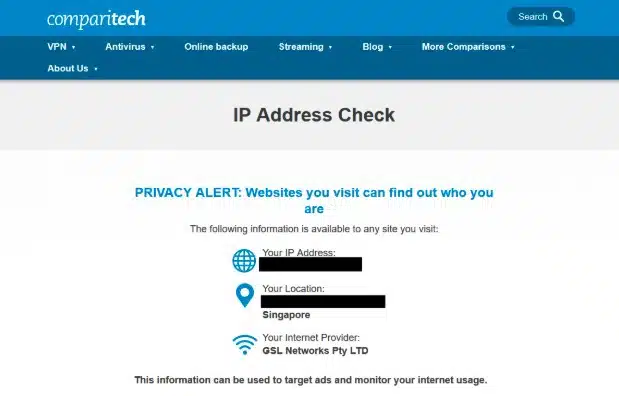
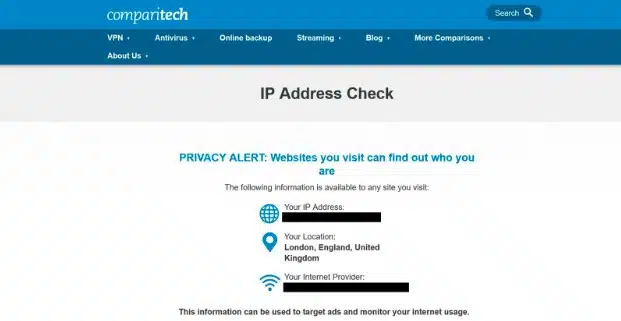
- Begin by visiting Comparitech’s IP address checking tool and making a note of the IP address that’s shown. This way, you’ll be able to verify that the VPN is working properly in a couple of minutes.

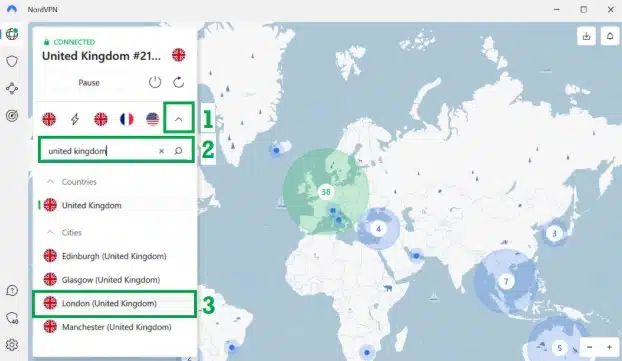
Notice that websites can tell roughly where you are just by looking at your IP address. You can sidestep this issue, keeping your actual location hidden from snoopers. - Now, open up your VPN app. In NordVPN, you have to click the downwards arrow in the top-left to show the full server list, but this is visible by default in Surfshark (ExpressVPN users have to click the Selected Location button).
- You’ll usually get the fastest speeds from a nearby server, so I’d suggest using a Singaporean server if you’re concerned about security. On the other hand, if you want to access region-exclusive services like BBC iPlayer, you’ll have to select a server from that specific country. On this occasion, I searched for “United Kingdom” and picked a server in London.

NordVPN is one of the few VPNs that lets you choose a location on a map. That said, I’ve always found it’s quicker to just search for a specific country directly. - After a moment, the screen will change to let you know that you’re connected to the VPN. You can verify that it’s actually working by going back to the IP address checker – it should now think that you’re in the same country as the server you chose earlier.

With a VPN active, most websites have no way of telling where you actually are in the world. As far as I’m concerned, this extra privacy can only ever be a good thing. - From this point on, you should be able to access your usual streaming services and torrent anonymously and play games with friends in other countries. However, if you’re having trouble, you might want to try a different server or open the website in a private tab to make sure that old location data isn’t what’s causing the issue.
- Still having trouble? In that case, I’d recommend getting in touch with your VPN’s support team. All of the providers above offer live chat (just click the pop-up in the bottom-right of their website), and in my experience, this is the quickest and easiest way to get help.
Be aware: VPNs to avoid while in Singapore for secure content access
Many people are wary of the steadily increasing online censorship in Singapore and choose to use a VPN to protect themselves. However, this only works if the VPN has a strong record on privacy.
The VPNs mentioned in this article have had no documented cases of violating that trust, but there are some others floating around that have compromised their ethical commitment to maintaining privacy without a second thought. I recommend you turn your back on them. Here’s an example:
HolaVPN
Israel-based Hola, which once boasted a user base of almost 50 million, shockingly turned this critical mass into a massive botnet in 2015.
Part of users’ bandwidth was illegally bifurcated by the company for Distributed Denial of Service Attacks and for distributing copyrighted content. That’s without any user consent whatsoever. I recommend you avoid Hola like the plague.
While Comparitech doesn’t condone the use of VPNs to commit illegal acts, which is clearly what both Cody Kretsinger and Chris Dupuy were accused of doing, we do maintain that a VPN company needs to put ethics and privacy as its top priorities. So when it violates that principle, there should be no second chances.
Internet surveillance in Singapore
The Singapore government monitors the country’s internet. The Infocomm Media Development Authority (IMDA) oversees this, and all Internet Service Providers (ISPs) must adhere to the Internet Code of Practice. Over the years, the government has increased its control over online content, leading to concerns about internet freedom. They’ve used advanced technology to monitor citizens, including tracking apps and other tools, especially during the COVID-19 pandemic.
This is why I highly recommend that privacy-conscious netizens use a VPN while living, working, or traveling in Singapore.
Read related articles here:
FAQs about VPNs for Singapore:
Should I use a free VPN for Singapore?
Free VPN services are plentiful on the web, and they’re not terribly hard to come across. Users might be tempted to sign up because there’s no upfront payment involved, but there’s more to it than what meets the eye.
Such services aren’t charities – they have to make money to pay for VPN server maintenance, salaries, and other overhead costs – and the most likely route they’ll choose for this is via unsuspecting users in Singapore.
Examples are free VPN providers inserting tracking cookies, mining that data, and selling it to third-party advertisers. Privacy and anonymity are far from guaranteed. And even if you miraculously escape this scenario, you should still be prepared for invasive advertisements and the threat of a malware infection.
The VPNs given in this list for Singapore offer robust encryption and a wide array of servers. Free VPN accounts provide you with a fraction of the same service standards – expect data caps, bandwidth throttling, and only one or two servers to pick from. I recommend you avoid these traps.
Are VPNs legal in Singapore?
Yes, despite the Singaporean government’s tendency to censor and prosecute those who disagree with it online, anonymity tools like VPNs remain legal in Singapore. To avoid repercussions simply for airing your opinions online, I recommend always using a VPN, particularly if you’re a journalist or activist.
Disclaimer: Although Comparitech has spent hours researching this topic, we are not legal experts. As such, nothing we’ve said above should be taken as legal advice. If you’re unsure, we encourage you to consult local laws or perhaps even seek a professional’s opinion before attempting to use a VPN in Singapore.
How will I know if my location has been changed to Singapore?
Connecting to a VPN server in Singapore ensures your location has been changed to Singapore. Within the VPN app itself, you should be able to see the location to which you’re connected as well as the corresponding IP address. If that’s not enough, you should use Comparitech’s IP address check tool, which tells you your current IP address and provides an approximate location. If you have a Singapore IP address, the location should display as Singapore.
Is porn legal in Singapore?
The city-state forbids the download or distribution of any form of material showing sexual acts – these could be movies, pictures, or books. You won’t be arrested if you accidentally stumble across a porn website, but it’s illegal to stick around and try to download content, and many porn websites are blocked in Singapore.
Having said that, such laws are rarely enforced, with very few instances of residents being prosecuted for violating the act.
But I don’t recommend taking this risk. Using a VPN service keeps you anonymous on the internet. So if streaming or downloading porn is what you’re after, a VPN provider will help you bypass blocks and stay out of trouble.
Can I use a VPN to watch the Premier League in Singapore?
If you’re a football fan living in or visiting Singapore, you’re in luck. You have a few options to watch the English Premier League (EPL) live online in Singapore. Locally, it’s StarHub that holds the broadcasting rights for the Premier League, and you’ll need a paid subscription to watch. The contract-free option costs S$40.74 a month.
With this option, a VPN isn’t compulsory to watch, but it allows for secure streaming. However, if you travel outside Singapore, you’ll want to connect to a server in Singapore in order to bypass the geographic restrictions and continue watching as normal.
Of course, it may be that you’re visiting Singapore from the UK. If so, you’ll want to access your usual streaming platform as normal. Back in the UK, the Premier League is available to stream on Sky Sports (215 matches), TNT Sports (52 games), and Prime Video (20 matches).
All of these options become region-locked when you travel outside the UK but you can get around this with a VPN and UK IP address.
What about the Champions League?
beIN Sports is the official broadcast partner of the UEFA Champions League in Singapore. It may be that you already have access to this via a local pay TV provider. If not, there’s a contract-free option too with beIN Sports Connect, the network’s dedicated streaming platform. This costs S$14.98 a month or S$139 yearly.
Due to the fact that beIN Sports Connect Singapore is only available in Singapore, a VPN and Singapore IP address is required to watch from overseas. As for UK streaming options for British tourists in Singapore, you’ll need access to TNT Sports or Amazon Prime. Again, a British IP address via a VPN is needed to watch the Champions League from Singapore.