

Are you eager to access Channel 4’s live broadcasts and on-demand content from anywhere around the globe? If so, you’ll need a VPN — but not just any VPN. It’ll need UK servers and the ability to bypass Channel 4’s blocks. After extensive research and rigorous testing, I’ve found a selection of VPNs that do all this and more.
If you only have time for a quick summary, here is an overview of the best services for unblocking Channel 4 (previously known as All 4) from abroad:
- NordVPN My top VPN for unblocking Channel 4! Strong all-rounder with over 8,000 servers in 160+ countries. Able to unblock almost anything. Incredible speeds and a 30-day money-back guarantee.
TIP In our testing we found that the cheapest NordVPN plan (Standard) works perfectly for Channel 4. - Surfshark The best budget Channel 4 VPN. Provides a decent server network and is easy to use with Channel 4 and other platforms. Connect all your devices at once.
- Total VPN This VPN works perfectly with most UK streaming sites, including Channel 4 and ITVX. Delivers very fast speeds and a high level of privacy.
- ProtonVPN A zero-logs service with one of the largest networks around. Perfect for unblocking UK streaming platforms abroad. Very strong on security.
- ExpressVPN Large network of fast servers around the globe that are optimized for high-speed connections. Great privacy options.
- IPVanish Fast and private. Works well with Kodi devices and allows any number of simultaneous connections on one account.
- CyberGhost Good value and beginner-friendly apps. Secure and fast connections are great for streaming.
- PrivateVPN Servers in London and Manchester, strong security, and excellent streaming abilities. Works great with Channel 4.
Many VPNs claim to work with Channel 4 but most (especially free VPNs) are often blocked.
We regularly test the top 70 VPNs with all major streaming sites and this list only includes VPNs which reliably unblock Channel 4 and offer a full money-back guarantee, allowing you to try them risk-free.
How to watch Channel 4 outside of the UK
New to streaming with a VPN? It’s actually relatively simple to unblock geo-restricted platforms, just follow the steps below.
Here’s how to watch Channel 4 or All 4 with a VPN:
- Sign up for one of the VPN services listed below (I recommend NordVPN).
- Download and install the client software. There will be a few different versions, so be sure to get the right one for your operating system.
- Connect to a server in the appropriate country. For Channel 4, you’d use a British server to get a UK IP address.
- Try watching available content on the Channel 4 site. It should load quickly with minimal, if any, buffering. Note that you may have to reload the page to see any changes.
- If you have any issues, try clearing your cookies and trying the service again.
WANT TO TRY THE TOP VPN RISK FREE?
NordVPN is offering a fully-featured risk-free 30-day trial if you sign up at this page. You can use the VPN rated #1 for All 4 with no restrictions for a month—great if you want to binge your favorite show during a short trip overseas.
There are no hidden terms—just contact support within 30 days if you decide NordVPN isn't right for you and you'll get a full refund. Start your NordVPN trial here.
The best VPNs for Channel 4 compared
I’ve compared the most important features for the top VPNs here. Prefer to read the in-depth reviews? Start with NordVPN – my #1 choice for watching Channel 4 On Demand, from anywhere.
| No value | NordVPN | Surfshark | TotalVPN | Proton VPN | ExpressVPN | IPVanish | CyberGhost | PrivateVPN |
| Website | NordVPN.com | Surfshark.com | TotalVPN.com | ProtonVPN.com | ExpressVPN.com | IPVanish.com | Cyberghost.com | PrivateVPN.com | Ranking for Channel 4 | 1 | 2 | 3 | 4 | 4 | 3 | 5 | 6 | Avg Speed for All 4 | 199.97 Mbps | 189.33 Mbps | 172.12 Mbps | 149.72 Mbps | 131.20 Mbps | 151.66 Mbps | 134.15 Mbps | 59.90 Mbps | UK servers | 440+ servers | 3 cities | 4 locations | 4 locations / 100+ servers | 3 cities / 585 servers | 2 cities | Streaming services | Channel 4 BBC iPlayer Netflix (US, UK + more) ITV Hub Sky Go | Channel 4 BBC iPlayer Netflix UK ITV Hub Sky Go | Channel 4 BBC iPlayer Netflix UK ITV Hub Sky Go | Channel 4 BBC iPlayer ITV Hub | Channel 4 Netflix UK ITV Hub Sky Go | Channel 4 BBC iPlayer ITV Hub Amazon Prime Video | Channel 4 BBC iPlayer ITV Hub | Channel 4 BBC iPlayer Netflix UK | Devices Supported | Windows, MacOS, iOS, Android, Linux | Windows, MacOS, iOS, Android, Linux, Amazon Fire TV, Apple TV | Windows, MacOS, Android, iOS, Apple TV | Windows, Linux, MacOS, iOS, Android, Chromebook | Windows, MacOS, iOS, Android, Linux, Smart TVs, Routers | Windows, MacOS, iOS, Android | Windows, MacOS, Linux, iOS, Android | Windows, MacOS, iOS, Android, Amazon Fire TV |
|---|---|---|---|---|---|---|---|---|
| Best deal (per month) | $3.09 Up to 76% off 2 year plans + 3 months free | $2.49 Up to 85% OFF + 3 months free | $1.59 SAVE 80% on an annual plan | $2.99 SAVE 70% on a 2-year plan | $2.49 SAVE 84% + 4 months free on 2 year basic plan | $12.99 Best MONTHLY Deal $12.99 | $1.59 SAVE 88% on the 2 year plan + 2 months free! | $2.00 Save 85% on a one year plan + 24-months free |
Criteria for choosing Channel 4 VPNs
It’s not easy finding a suitable VPN when all you have to go on are company websites. I objectively evaluate providers though hands-on testing, which makes choosing the best considerably easier. Here are the areas I focussed on for this article:
- Network features: I started by evaluating providers on their UK server presence, before moving on to assess their overall network spread. I tested them with Channel 4 as well as other free UK streaming channels. I then tried them out with international services such as Netflix.
- Speed: The best VPNs offer stable connections and have minimal impact on your download speed. I found which providers were fastest by carrying out multiple speed tests while connected to their UK servers.
- Security and privacy: Not all VPNs are able to keep your online activities hidden from your ISP or hackers. I rejected any that performed poorly against my 16 security and privacy criteria.
- Ease of use: I’m always on the look out for VPN services that are easy for anyone to use. I used 10 different metrics to evaluate each provider’s overall user-friendliness.
- Value for money: To find you the best subscription deals, I used eight metrics that took into account everything from the number of permitted connections to the length of any money-back guarantees.
You can read more about how I test and rank the VPNs I recommend in the methodology section below. For now, let’s take a closer look at the ones that made the grade.
The best VPNs for watching Channel 4
Here’s my list of the best VPNs for watching Channel 4 online:
1. NordVPN
 Jul 2026
Unblocks Channel 4Tested Jul 2026
Jul 2026
Unblocks Channel 4Tested Jul 2026
Apps Available:
- PC
- Mac
- IOS
- Android
- Linux
- FireTV
Website: www.NordVPN.com
Money-back guarantee: 30 DAYS
NordVPN
9.3Scores calculated algorithmically.
| Ease of use | 9.6 |
|---|---|
| Network suitability | 9.6 |
| Security & privacy | 9.5 |
| UK speed testing | 10.0 |
| Value for money | 7.9 |
NordVPN leads the way when it comes to network size. This VPN provider has almost 8,000 servers across 160+ countries, and around 440 to choose from in the UK.

In my speed tests, NordVPN was the only VPN to reach 200 Mbps. Overall, it was 58 Mbps faster than the combined average speeds of the other tested providers. In practice, it was easily fast enough for me to stream live HD video from Channel 4 without any problems.
In addition to streaming UK TV services such as Channel 4 and BBC iPlayer, I was able to use NordVPN to access Netflix, Amazon Prime Video, and Disney+.

This veteran provider puts a huge emphasis on security. 256-bit encryption is enabled by default, but users can also take advantage of DNS/IPv6 leak protection, an application-specific kill switch, Tor over VPN functionality, and the ability to use multiple VPNs at once. This service stores no personally identifiable information and accepts cryptocurrency payments, so you can browse entirely anonymously.
This VPN offers apps for macOS, Linux, iOS, Windows, and Android. NordVPN can be manually installed on supported network routers.
Buy this VPN if:
- You want the fastest streaming experience for Channel 4, including live HD content
- You’re looking for the most reliable UK server selection (over 440 servers)
- You want a VPN that also works with other UK platforms like BBC iPlayer and ITVX
- You need features like multi-hop and Tor over VPN to bypass VPN blocks
- You prefer user-friendly apps with strong customer support
Don’t buy this VPN if:
- You only need a VPN for short-term Channel 4 access, and want the lowest possible price
BEST VPN FOR CHANNEL 4 ON DEMAND:NordVPN is my top choice VPN. No issues with most UK on-demand streaming services, including Channel 4. Great online privacy and security credentials. Try it risk-free with its 30-day money-back guarantee.
Read Comparitech’s full review of NordVPN.
2. Surfshark
 unblocks channel 4Tested Jul 2026
Apps Available:
- PC
- Mac
- IOS
- Android
- Linux
Website: www.Surfshark.com
Money-back guarantee: 30 DAYS
Surfshark
9.1Scores calculated algorithmically.
| Ease of use | 9.1 |
|---|---|
| Network suitability | 9.3 |
| Security & privacy | 9.5 |
| UK speed testing | 9.3 |
| Value for money | 8.1 |
Surfshark is a low-cost VPN that nevertheless has a lot to offer. It has over 4,500 servers in 100+ countries, including the UK. In my tests, it easily unblocked Channel 4 as well as other UK platforms like ITVX, BBC iPlayer, Channel 5 (My5), and Dave.

Unlike most VPNs, which allow up to 10 simultaneous connections, Surfshark has no connection limit, making it ideal for families or homes with lots of devices. Of course, this isn’t much use if the provider is too slow to support lots of devices. The good news here is that Surfshark is very fast. In my tests, it averaged 189.33 Mbps. This is fast enough to stream 4K video on up to seven devices simultaneously.
Surfshark excels in its security offering, too. It uses 256-bit encryption, a kill switch, and DNS, WebRTC, and IPv6 leak protection to keep your activities safe from prying eyes at all times. There’s even a feature that automatically blocks ads and scans for malware. Surfshark has a strict no-logging policy, so your privacy is guaranteed. 24/7 customer support is available over live chat, should you need it.

Surfshark has apps for Windows, macOS, Android, iOS, and Linux. It can be manually installed on home routers.
Buy this VPN if:
- You need an affordable VPN that reliably unblocks Channel 4 and other UK services
- You’re connecting lots of devices and want no simultaneous connection limit
- You want a high-speed provider (averaging nearly 190 Mbps)
- You want to customize app-level routing via Surfshark’s Bypasser
Don’t buy this VPN if:
- You want the very fastest VPN for streaming Channel 4 live (Nord is faster)
BEST BUDGET VPN:Surfshark is affordable, secure, and able to securely access all kinds of services from abroad. Has no device limit, so you can stream anywhere, anytime. 30-day money-back guarantee.
Read Comparitech’s full review of Surfshark here.
3. Total VPN

Apps Available:
- PC
- Mac
- IOS
- Android
- Linux
Website: TotalVPN.com
Money-back guarantee: 30 DAYS
TotalVPN
8.5Scores calculated algorithmically.
| Ease of use | 9.4 |
|---|---|
| Network suitability | 7.4 |
| Security & privacy | 9.1 |
| UK speed testing | 8.0 |
| Value for money | 8.5 |
Total VPN is something of a rarity: it’s an affordable, versatile service that was designed with beginners in mind. There are more than 1,800 servers to choose from, spanning 80 countries, including England. While connected, I was able to watch Channel 4, Netflix UK, or ITVX without issue.
Users can secure five devices at the same time and get help via a ticket system if anything doesn’t work as expected.

Total VPN has historically been quite a speedy service, but I decided to test its British servers again to get the most up-to-date information. This provider achieved an average speed of 172.12 Mbps, meaning it was faster than most other services I tried, and far quicker than is required for streaming. The chart below breaks down the results by time of day and shows how much slowdown you can expect:
Total VPN makes it as easy as possible to protect yourself online. By default, Total VPN keeps you safe using a kill switch, DNS and IPv6 leak protection, and 256-bit AES encryption (which experts agree is currently uncrackable). Better still, it refuses to log details of your online activities. Finally, users can take advantage of the obfuscated Hydra protocol or split tunneling functionality in situations where they need a little more privacy.
Total VPN offers beginner-friendly apps for Windows, macOS, Android, and iOS.
Buy this VPN if:
- You want a low-cost VPN that punches well above its weight
- You demand consistently high speeds
- You’re in the market for a VPN and an antivirus app
- You want a high level of security, but don’t like tinkering with settings
Don’t buy this VPN if:
- You need to protect lots of devices at the same time
IDEAL FOR BEGINNERS:Total VPN is an easy-to-use service with strong streaming ability, pre-configured security tools, and very high speeds. In other words, it’s perfect for novices hoping to watch UK TV on a short trip abroad. Annual plans come with a 30-day money-back guarantee, and there’s a 14-day guarantee on monthly plans.
Interested? Read Comparitech’s complete Total VPN review.
4. ProtonVPN

Apps Available:
- PC
- Mac
- IOS
- Android
- Linux
Website: www.ProtonVPN.com
Money-back guarantee: 30 DAYS
Proton VPN
8.5Scores calculated algorithmically.
| Ease of use | 9.6 |
|---|---|
| Network suitability | 9.7 |
| Security & privacy | 9.3 |
| UK speed testing | 6.5 |
| Value for money | 7.3 |
ProtonVPN is a no-logs provider with a fantastic pedigree, coming from the team behind Proton Mail. It has more than 15,000 servers spread across 120+ countries, including Scotland, England, Northern Ireland, and Wales. I had a great experience using this VPN to access BBC iPlayer, Channel 4, and Netflix. Up to 10 devices can be connected simultaneously, and 24/7 customer support is available over live chat.

I performed hands-on testing of ProtonVPN’s British servers to gauge their speeds. I used a 250 Mbps connection to approximate the average user’s experience. With an average speed of 149.72 Mbps, this VPN is significantly faster than is needed for streaming live or even 4K content. In fact, you should be able to torrent, play games, or video call at the same time without any noticeable stuttering, buffering, or lag. Here are the full test results:
This provider has a fantastic reputation where privacy is concerned, having had its no-logging policy independently audited several times. That’s not all, though; ProtonVPN also offers uncrackable encryption, a kill switch, automatic ad and tracker-blocking, and protection against DNS and IPv6 leaks, plus a stealth mode. Simply put, whether you want to watch TV or browse safely, you’re in good hands.
ProtonVPN has its own apps for iOS, Android, Windows, macOS, and Linux. Alternatively, you can try its browser extensions or follow a manual setup guide to get it running on your home router.
Buy this VPN if:
- Privacy is your top priority
- You’d like to use regional streaming apps like STV Player as well as Channel 4
- You’re interested in trying one of the fastest VPNs on the market
- You want a highly versatile service that can handle anything
Don’t buy this VPN if:
- You’re planning a trip to China or another high-censorship country
WATCH TV PRIVATELY:ProtonVPN is packed with security features and can access virtually any major streaming site, including Channel 4. This super speedy provider has five British server locations and doesn’t keep logs of your activities. Paid plans include a 30-day money-back guarantee.
Take a look at Comparitech’s full ProtonVPN review.
5. ExpressVPN
 Unblocks Channel 4Tested Jul 2026
Apps Available:
- PC
- Mac
- IOS
- Android
- Linux
Website: www.ExpressVPN.com
Money-back guarantee: 30 DAYS
ExpressVPN
8Scores calculated algorithmically.
| Ease of use | 9.0 |
|---|---|
| Network suitability | 9.7 |
| Security & privacy | 9.2 |
| UK speed testing | 5.2 |
| Value for money | 7.0 |
ExpressVPN is great for streaming: it currently boasts more than 3,000 servers spread throughout 105 countries, including five server locations in the UK. Further, it can beat all but the most stringent geo-restriction measures. During testing, I was able to stream catch-up content from Channel 4 as well as movies and TV shows from Sky Go, Disney Plus, and Netflix.

In my tests for this article, ExpressVPN achieved speeds of between 128.53 Mbps and 133.17 Mbps. This makes it fast enough for a range of everyday activities, including streaming, gaming, and torrenting.
ExpressVPN offers excellent security features, including 256-bit AES encryption, a kill switch, and DNS/IPv6 leak protection. It doesn’t log any data that could identify you and even allows you to pay using Bitcoin to anonymize yourself as much as possible. You can reach customer support 24/7 via live chat, and they’ll usually respond in seconds.

Cost used to be ExpressVPN’s biggest downside, as it was significantly more expensive than alternative options. To resolve that, they’ve moved to a tier-based pricing structure, letting customers match their plan to their own budget and needs: Basic at $3.49/month, Advanced at $4.49/month, and Pro at $7.49/month. It’s still not the cheapest provider around, but the shift is a positive one, and it raises the connection limit to 10-14, depending on the plan.
ExpressVPN has user-friendly apps for Windows, macOS, Linux, Android, and iOS devices. It also offers custom firmware that makes installing the service on your router as easy as possible.
Buy this VPN if:
- You want an easy-to-use VPN that consistently unblocks Channel 4 with minimal fuss
- You value fast UK servers across five locations, and global coverage in 105 countries
- You’re using the VPN on a router and want the simplest setup process
- You need knowledgeable customer service available 24/7
Don’t buy this VPN if:
- You’re on a budget and looking for the best value VPN
- You want a full complement of advanced features
QUICK AND RELIABLE:ExpressVPN is easy to use and reliably unblocks Channel 4. Fast speeds for flawless streaming. Strong security and privacy. 30-day money-back guarantee.
Read Comparitech’s full review of ExpressVPN.
6. IPVanish
 Unblocks Channel 4Tested Jul 2026
Apps Available:
- PC
- Mac
- IOS
- Android
- Linux
Website: www.IPVanish.com
Money-back guarantee: 30 DAYS
IPVanish
8Scores calculated algorithmically.
| Ease of use | 8.1 |
|---|---|
| Network suitability | 9.2 |
| Security & privacy | 8.7 |
| UK speed testing | 6.6 |
| Value for money | 7.3 |
IPVanish has servers in Belfast, Birmingham, London, Glasgow, and Manchester — all of which worked with Channel 4 during my testing. Overall, the provider has more than 3,200 servers in 140 locations.

Across my three speed tests, IPVanish achieved an overall average download speed of 151.66 Mbps. This was fast enough for me to flawlessly stream HD video and play multiplayer games.
In addition to Channel 4, IPVanish works with BBC iPlayer, ITVX, Netflix, Now TV, and Hulu. Further, this service permits any number of connections, whereas many of its rivals allow 10 at most.

Although its apps are lightweight, they include plenty of advanced functionality. 256-bit encryption, DNS leak protection, and a kill switch are enabled by default, but users can also choose to obfuscate their OpenVPN traffic and block all local connections. IPVanish does not log any personally identifiable information, so your activities remain private at all times.
IPVanish has dedicated versions for Android, Windows, iOS, and macOS. This service can be manually configured to work with Linux and select routers.
Buy this VPN if:
- You want strong UK regional server distribution (Belfast, Birmingham, Glasgow, London, and Manchester)
- You need unlimited simultaneous connections to cover your entire household
- You’re using Kodi and want a lightweight VPN that integrates easily
- You’re looking for consistently fast speeds (over 175 Mbps)
Don’t buy this VPN if:
- You want the option to pay anonymously with cryptocurrency
- You prefer a provider based outside of Five Eyes countries
NO CONNECTION LIMIT:IPVanish is great for families and multiple connections. Unblocks Channel 4 as well as ITVX and BBC iPlayer. 30-day money-back guarantee.
Read Comparitech’s full review of IPVanish.
7. CyberGhost
 Unblocks Channel 4Tested Jul 2026
Apps Available:
- PC
- Mac
- IOS
- Android
- Linux
Website: www.Cyberghost.com
Money-back guarantee: 45 DAYS
CyberGhost
7.8Scores calculated algorithmically.
| Ease of use | 9.1 |
|---|---|
| Network suitability | 8.3 |
| Security & privacy | 8.9 |
| UK speed testing | 5.4 |
| Value for money | 7.2 |
CyberGhost works a little differently than most: it allows you to choose either a specific server to use (there are 680+ in the UK and more than 11,000 worldwide) or have one assigned based on its suitability for a given task, like streaming or gaming. I think this feature is particularly handy for those who are new to VPNs. Too much choice can sometimes feel a little intimidating.

This VPN allows you to unblock Channel 4 and other UK and international streaming services with ease. I had no issues accessing ITVX, BBC iPlayer, Netflix, and Amazon Prime Video in addition to Channel 4. It’s a great VPN for British expats who want to access UK content from abroad.

Connection speeds during testing were solid, with an overall average of 134.15 Mbps. Speeds were a little more variable than some of the other providers, which suggests it’s worth switching servers if you need faster speeds. That said, even the slowest result was more than fast enough to stream Channel 4 without buffering.
Despite its simple, user-friendly design, CyberGhost has some powerful security features built in. For instance, you can have it automatically block ads and scan for malware. There’s also 256-bit encryption, a kill switch, and protection against DNS, IPv6, and port forwarding leaks. It doesn’t log any session or internet traffic details, so it cannot divulge details of your activities to anyone.
CyberGhost has dedicated Windows, macOS, Android, Linux, and iOS apps. With manual configuration, you can install it on some home routers too.
Buy this VPN if:
- You want streaming-optimized UK servers that are specifically labeled for Channel 4
- You’re looking for great value with a generous 45-day money-back guarantee
- You want a wide UK server selection (680+ servers)
Don’t buy this VPN if:
- You’re in a country with heavy censorship, like China
- You want full control over advanced VPN settings
Beginner friendly:CyberGhost is easy to use. A well-priced, solid performer. Has special servers for streaming Channel 4. Comes with a 45-day money-back guarantee.
Read Comparitech’s full review of CyberGhost.
8. PrivateVPN
 Unblocks Channel 4Tested Jul 2026
Apps Available:
- PC
- Mac
- IOS
- Android
- Linux
Website: www.PrivateVPN.com
Money-back guarantee: 30 DAYS
PrivateVPN
6.2Scores calculated algorithmically.
| Ease of use | 8.2 |
|---|---|
| Network suitability | 6.7 |
| Security & privacy | 8.6 |
| UK speed testing | 1.0 |
| Value for money | 6.5 |
PrivateVPN has fewer servers (just two in the UK, and roughly 200 worldwide) than similar services, but I’ve found that it can securely access streaming platforms many others can’t — including BBC iPlayer, Netflix, Sky Go, ITVX and, most importantly, Channel 4.

It’s not as fast as the above providers, with tested speeds that averaged 59.90 Mbps. While this is easily fast enough for streaming Channel 4 in HD, you might want to look for an alternative provider if you have a very slow base connection (for reference, mine was 250 Mbps).
This service enables IPv6 and DNS leak protection by default. It uses 256-bit encryption coupled with a kill switch to ensure your traffic is hidden at all times, and with no personally identifiable information stored, your activities can’t be traced back to you. PrivateVPN really shines when it comes to customer support: its team is available 24/7 via live chat, and they’re even capable of installing and configuring the software for you remotely, with your permission.

PrivateVPN comes with specific apps for Android, iOS, Windows, and macOS systems. Manual installation is required for Linux-based platforms and wireless routers.
Buy this VPN if:
- You want a compact, easy-to-use VPN that reliably unblocks Channel 4, despite its small size
- You’re in a restrictive country and need stealth features to disguise VPN traffic
- You want a low-cost, great value provider
Don’t buy this VPN if:
- You want access to dozens of UK server locations
- You need ultra-fast or consistent speeds for demanding streaming tasks
GREAT SPEED:PrivateVPN is a good family choice. Unblocks Channel 4 and is generally suitable for browsing and torrenting. Allows up to 10 devices. Could do with more servers. 30-day money-back guarantee.
Read Comparitech’s full review of PrivateVPN.
Can I watch Channel 4 On Demand with a free VPN?
Although you might be tempted to use a free VPN, there are several reasons I recommend avoiding them. Despite having more users than premium services, free VPNs usually don’t have the network infrastructure required to support them. In practical terms, this means you’re more likely to encounter long buffering times, stuttering video playback, and possibly even random disconnection from the VPN. These factors all point to a poor streaming experience, but when you consider that free VPNs are the first to be blocked by major platforms, their viability is reduced even further.
Lastly, consider the security risk that free VPNs pose. In 2016, researchers surveyed more than 200 free Android VPN apps and found that almost 40% contained some form of malware. Additionally, many of these purported VPNs didn’t actually encrypt anything. Even using a high-profile service doesn’t guarantee your safety; I’ve seen a major free VPN facilitate a botnet with its users’ bandwidth before.
You can’t be too careful when it comes to online security. To protect yourself, your devices, and your personal information, I recommend using a reputable VPN with a tried and tested no-logging policy. If you’re really concerned about cost, try a quality VPN with a free trial, or make the most of the money-back guarantees offered by the VPNs listed above. That way, you can be sure you’re 100% happy before you commit long-term.
Read UK TV articles here:
Recent updates to my recommended VPNs
To keep my reviews current, I track the latest developments from leading VPN services. Here are the most notable recent additions:
NordVPN
- An AI-assisted “Fastest server” feature now recommends optimal Windows servers using live network data (December 2025).
- Threat Protection Pro™ began scanning email links in Gmail and Yahoo to identify potentially dangerous URLs (December 2025).
- Linux users received tray enhancements alongside stability and compatibility improvements (December 2025).
- NordVPN released its Linux app as open source, supporting public security review (October 2025).
Surfshark
- AI-based phishing detection for emails was launched within Surfshark’s One and One+ plans (December 2025).
- The Linux GUI app now supports Dedicated IP connections (December 2025).
- Surfshark upgraded infrastructure with 100Gbps servers in Amsterdam (October 2025).
- Network expansion pushed the server count past 4,500 worldwide (October 2025).
Total VPN
- Apple TV compatibility through new tvOS app
- “Always on” kill-switch implemented for Android
- “Connect on demand” protection for iOS and macOS users
- WireGuard protocol rollout completed universally
- Android split tunneling feature now live
- Windows split tunneling nearing completion
Proton VPN
- Support for older Apple operating systems ended, with iOS 16 and iPadOS 16 no longer receiving updates (January 2026).
- A tvOS update (v1.4.0) introduced city-level server selection (December 2025).
- Proton VPN expanded Linux CLI controls to include specialized P2P, Secure Core, and Tor servers (December 2025).
- iOS users now see server lists sorted by load to help identify less crowded options (December 2025).
ExpressVPN
- Lightway improvements arrived with the release of Router v4.2.8 (December 2025).
- The Linux app was refreshed with new visuals, faster navigation, speed testing, and support for WireGuard (November 2025).
- A tablet-specific redesign was applied to the iPad app (October 2025).
- ExpressVPN added new subscription tiers ranging from Basic to Pro (September 2025).
IPVanish
- A new transparency report for Q4 2025 reiterated IPVanish’s no-logs policy (January 2026).
- Apps now allow direct connection to RAM-only servers on iOS, Android, macOS, and Fire TV (December 2025).
- IPVanish launched on Amazon’s Vega OS as part of expanded Fire TV support (December 2025).
- RAM-only servers were rolled out across several global regions (October 2025).
How do you sign up for Channel 4?
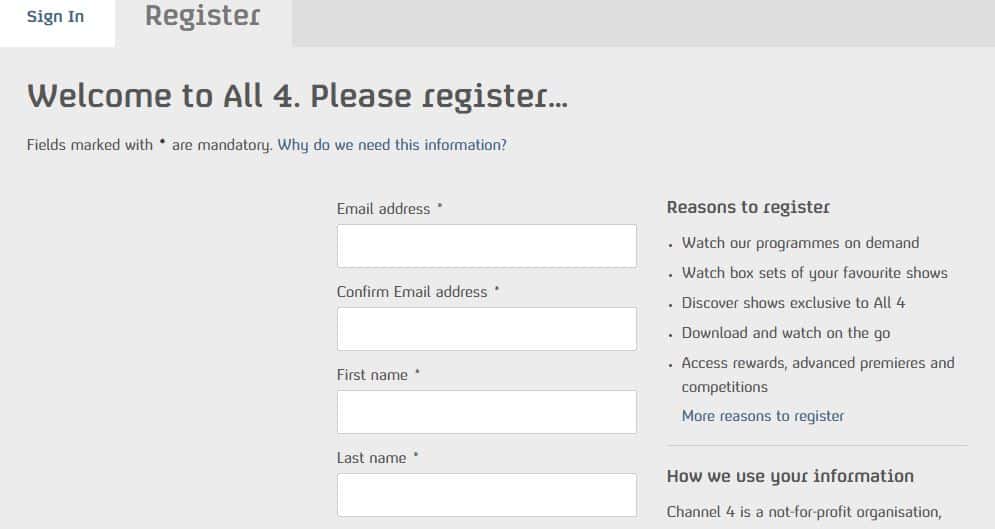
While Channel 4 is free to use, you will have to create an account beforehand. This is a relatively straightforward process: just go to the registration page and enter your email address, password, and date of birth. You’ll also be asked for a UK postcode; the service uses this to find your address, but there are no further verification measures in place. In fact, there isn’t even common-sense postcode filtering, so it’s possible to create an account using Buckingham Palace’s postcode.
Once registered, you can immediately log in and start streaming. However, you should note that UK law requires you to have a TV License to watch content as it’s airing on TV. Channel 4 doesn’t make users aware of this before loading the live stream, so it’s easy to overlook. A TV License isn’t necessary for watching on-demand content, unlike with the BBC iPlayer, to which different rules apply.
Channel 4 (previously All 4): FAQs
Is it illegal to use a VPN for Channel 4?
No — VPNs are not illegal in the UK (or in most other countries). Remember, though: you will need a valid TV license if you intend to watch live broadcasts on All 4. Further, you’ll still be liable for any crimes you commit while connected to the VPN.
Disclaimer: Although Comparitech’s writers have researched this topic thoroughly, they are not legal experts. As such, nothing said above should be taken as legal advice.
What can I watch on Channel 4?
Channel 4 offers access to hundreds of popular TV shows including:
- Hollyoaks
- Rick and Morty
- Made in Chelsea
- Gogglebox
- Come Dine with Me
- First Dates
- The Simpsons
- Peep Show
- The Inbetweeners
- The IT Crowd
How do I download the Channel 4 app outside of the UK?
The Channel 4 app is only available in the UK and as such, won’t appear in other countries’ app stores. However, there are a couple of ways around this problem. First, you could try changing your Google Play Store or Apple region to the UK, after which you should be able to install Channel 4 as normal.
Alternatively, you may be able to find a website hosting the Channel 4 app’s APK file. This can be downloaded and installed manually, although I’d advise against doing so unless you can verify that the downloaded APK is actually safe. Remember: whichever method you choose, you’ll still need a VPN to watch, since the app itself checks your location.
Will a Channel 4 VPN slow down my internet?
Some VPNs will slow your internet connection to an extent. This is due to the encryption process and the fact that your data is routed via the VPN server before reaching its destination (in this case Channel 4). The good news is that you likely won’t notice a difference with the fastest VPNs, all of which include unlimited bandwidth so you can stream in high resolution without lag or buffering.
How do I get Channel 4 on my TV while abroad?
In order to get Channel 4 (All 4) on your TV while abroad, you’ll need to install a VPN app that’s compatible with the TV in question. Many major VPNs offer apps for Amazon Fire TV as well as Android TV, allowing you to change your location and watch Channel 4 from anywhere. Alternatively, there’s the option of installing your VPN on your router. This requires some manual configuration but once set up, allows you to connect all of your devices at the same time.
What devices can I watch Channel 4 on?
Channel 4 is available to stream on all major platforms and devices. This includes the following:
- Desktop: Windows and Mac
- Mobile: Android and iOS
- Streaming devices: Amazon Fire TV, Apple TV, Roku
- Game consoles: PlayStation (4 and 5) and Xbox
- Smart TV: Samsung Smart TV



Express VPN doesn’t work for Chnnel 4, as advertised, in Socal. Complete waste of time
Hi James, while ExpressVPN might have unblocked All 4 at the time of writing, this is no longer the case. Streaming services often update their geo-restriction measures, meaning VPNs have to scramble to find a workaround. I have confirmed that NordVPN and PrivateVPN still work, though, and I’ll continue to test the other VPNs recommended in this post. Thanks for letting me know, Ian
Private VPN does not work either on C4
Hi Fab, I’ve just tested PrivateVPN and can confirm it works with C4, but only on specific servers. I’d recommend contacting PrivateVPN support to find out which server to use, and to make sure that there’s no other reason why you couldn’t access the service. Thanks, Ian