

ExpressVPN has long been one of the most impressive and trusted VPNs on the market. In 2026, the VPN (Virtual Private Network) officially went into overdrive. Express is known for robust privacy, exceptional speeds, and a strict no-logs policy. It also comes with 10-Gbps servers in 105 countries and the Lightway protocol, which always performs exceptionally well for streaming (Netflix, Disney+, Hulu), gaming, P2P (torrenting), and secure public wifi.
In 2026, you get all of that for just $3.49, down from $4.99 last year. This price point makes it far easier to recommend ExpressVPN for pure value. And you still get TrustedServer technology (RAM-only servers), AES 256-bit encryption, DNS leak protection, a reliable kill switch (Network Lock), split tunneling, post-quantum protection, and obfuscation for restrictive networks. This makes it one of the most feature-rich VPNs on the planet.
So what justifies my overdrive ranking? ExpressVPN has introduced tiered plans with a slew of new features. Advanced adds ExpressVPN Keys, a standalone version of its password manager. Pro expands the suite further with upgrades like a Dedicated IP (you choose the location), ExpressMailGuard, and Identity Defender. I’ll explain each feature later.
The introduction of Lightway Turbo means you can get even faster speeds for high-bandwidth tasks. And if you opt for Pro, you’ll even be eligible for a discount on ExpressVPN’s Aircove router and custom firmware: ideal if you want to protect the whole house. Support stays solid with 24/7 live chat and a 30-day money-back guarantee. Plus, you even get a more generous simultaneous connections allowance.
I tested ExpressVPN to see if it still earns a place among the Best VPN for 2026, especially now that the standalone VPN is cheaper.
ExpressVPN Key Data
| OVERALL RANK: #5 of 62 VPNs | |
|---|---|
| Speed | Score: 9.5 |
| Average Speed*: | 152 Mbps |
| Video Streaming Support: | 4K UHD |
| Streaming | Score: 9.2 |
| Netflix: | Yes |
| Other Streaming Services: | Prime Video, Disney+, Max, Hulu, BT Sports, Now TV, ITVX, Sky TV, Apple TV, Discovery+, Youtube, ESPN, BBC iPlayer, Paramount |
| Security | Score: 9.2 |
| Encryption Type: | 256-bit AES w/ Perfect Forward Secrecy |
| Kill Switch: | Yes |
| Log Policy: | No identifying logs |
| Protocols: | OpenVPN, Lightway |
| Value for Money | Score: 8.9 |
| Lowest Monthly Cost: | $3.49 |
| Money Back Guarantee: | 30 days |
| Website | https://www.expressvpn.com |
ExpressVPN review: Pros and cons
If you’re looking for a VPN that prioritizes privacy, security, and streaming performance, ExpressVPN is well worth considering. Below, I’ve summarized the pros and cons based on my extensive testing. Keep reading for detailed explanations about all these features.
What I liked about ExpressVPN:
- TrustedServer technology: RAM-only servers ensure data is wiped with every reboot, enhancing data protection and minimizing risks.
- Proprietary Lightway protocol: Delivers fast and secure connections, with post-quantum protection and a new Turbo mode for even better speeds.
- Excellent for streaming: Unblocks major platforms like Paramount+, Netflix, Hulu, Disney+, and BBC iPlayer without interruptions.
- Fast speeds: Consistently among the fastest VPNs, especially with the Lightway Turbo protocol.
- Extensive server network: Servers in over 105 countries, offering broad geographic coverage for accessing international content.
- Split tunneling: Provides flexibility to route specific apps or websites through the VPN.
- User-friendly apps: Offers intuitive apps for all major platforms, including routers like the Aircove Router.
- Network Lock (kill switch): Prevents data leaks if the VPN connection drops.
- Additional features: MediaStreamer for devices without VPN support, Threat Manager to block trackers, ExpressVPN Keys for secure password management, ExpressMailGuard, and Identity Defender.
- Regular third-party audits: Offers transparency and trust in all its privacy features and no logging policies.
What I disliked about ExpressVPN:
- Limited simultaneous connections: Allows only 10 devices at a time on Basic. Increases to 12 with Advanced, and 14 with Pro.
- Fewer extra features: Lacks some advanced tools like multi-hop connections, port forwarding, and Tor-over-VPN.
Do I recommend ExpressVPN?
Yes, I strongly recommend ExpressVPN. It is a highly versatile VPN service that is feature-packed and easy to use. The selection of VPN security features is outstanding, easily competing with other market-leading services.
What’s more, ExpressVPN Basic provides full access to every VPN feature with no limitations, which means you can now get this VPN for $1.50 less per month than this time last year. That is a massive push in the right direction for users who demand value for money.
ExpressVPN still operates from the British Virgin Islands (BVI), a privacy-friendly jurisdiction outside the Five Eyes alliance. It is also one of the few VPNs to have completed independent security audits, which helps back up its no-logs policy and encryption claims.
Advanced feature set
ExpressVPN supports multiple VPN protocols, including OpenVPN and IKEv2 (both using AES-256 encryption) and its proprietary Lightway protocol, which now comes with Turbo mode to give you even faster speeds. It has also introduced Data Channel Offload (DCO) on OpenVPN, which boosts speeds on that protocol too.

Its TrustedServer technology has been rolled out network-wide. That means you always connect to RAM-only servers, so ExpressVPN does not store data on hard drives. If a server ever needs to be taken offline, it can be wiped instantly, which is exactly what I want from a privacy-first VPN.
Impressive streaming
My latest tests reveal that ExpressVPN still excels at streaming. With servers to pick from in 105+ countries, and the ability to bypass geo-blocking on platforms like Netflix, Paramount+, Hulu, HBO Max, Prime Video, Disney+, and BBC iPlayer, most people will get what they need. It also succeeded in accessing a broad range of international TV platforms.
VPN utilities like split tunneling, Network Lock (kill switch), and MediaStreamer Smart DNS help to improve device compatibility, giving you better versatility than many of its competitors. Additional tools, such as Advanced Protection, Threat Protection, and native DNS leak protection, also help the VPN block trackers, malicious sites, and adult sites, which means it doubles up as a basic parental controls option.
Better value and new bundles
The new low-cost plans and bundles are genuinely impressive. The fact that Advanced includes ExpressVPN’s password manager (ExpressVPN Keys), plus identity tools under Identity Defender, for $4.49 per month on the long plan is a big win for privacy enthusiasts. That price is also 50 cents cheaper than what ExpressVPN used to charge as its entry-level rate. Availability for Identity Defender features can vary by region, so it is worth checking what is included where you live.
All of this demonstrates that, since taking over, Kape Technologies has clearly invested in keeping ExpressVPN moving toward the top of the VPN market. And the increase to a 10-device limit on Basic pushes ExpressVPN into the category of services that work well for couples and families who want to protect multiple devices at once.

ExpressVPN features
ExpressVPN was launched in 2009. It is one of the most trusted and established VPN providers. Its strong reputation and reliability helped set a benchmark for competitors, many of whom owe their success to emulating its services.
To give you a precise idea of what you get with an ExpressVPN subscription, I’ve listed all of its features below:
Core VPN features
ExpressVPN gives users everything they need to gain online privacy and security. Its proprietary Lightway protocol is built to provide faster speeds and optimal security, making Express an ideal choice for users wanting to stream or play games with added protection.
OpenVPN and IKEv2 protocols (iOS) are also available, giving you plenty of options. These protocols are implemented using watertight AES-256 encryption, which can’t be easily cracked.
Users seeking added protection can leverage the OpenVPN protocol, which is obfuscated by default. This makes it a reliable VPN for users in regions with overreaching censorship and surveillance.
A strict no-logs policy means that ExpressVPN never tracks user activities, source IP addresses, or records of the VPN servers used each session. TrustedServer technology gives users access to RAM-based servers that are wiped clean with every reboot. This helps protect against the threat of server raids – and provides the VPN with added control over its infrastructure in case of an emergency.
The VPN has undergone independent third-party audits, which were carried out by PricewaterhouseCoopers and Cure53. These audits and penetration tests mean you can trust the VPN to work as advertised for privacy and security purposes.
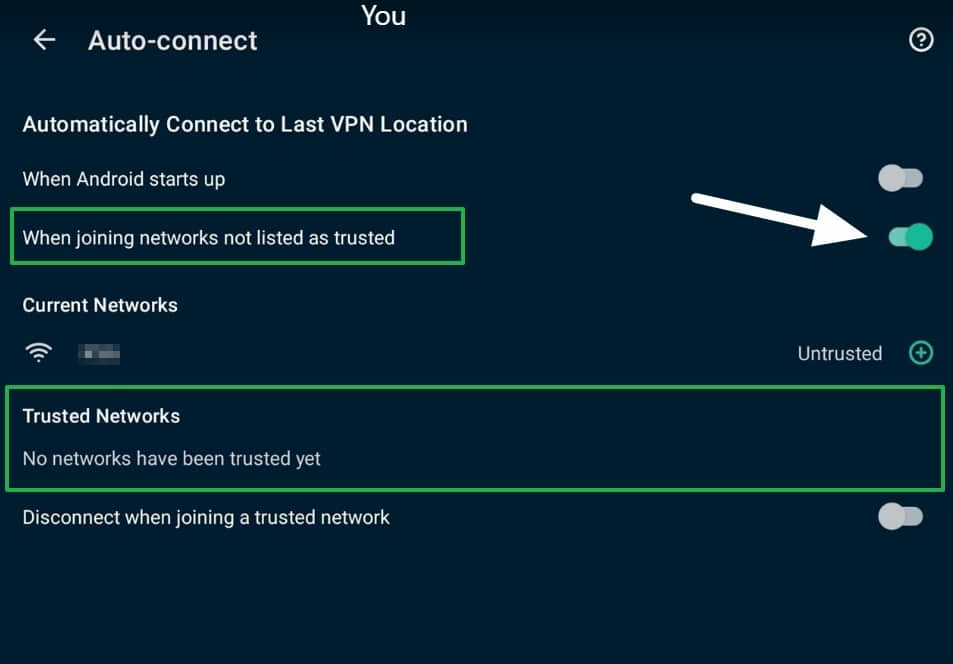
The auto-connect feature differs depending on which version of the app you use. On Windows, the auto-connect only connects to the VPN when you launch the VPN. When enabled, the VPN connects as soon as you launch your computer.
On Android, the auto-connect feature is a bit more substantial. You can set the VPN to auto-connect when you join networks not listed as trusted. This ensures that the VPN connects automatically whenever you join an unfamiliar network.
Advanced security & privacy features
ExpressVPN’s security features offer the highest levels of online VPN protection. Below, I listed additional features ExpressVPN offers to optimize your privacy and protect against browser vulnerabilities.
- Kill switch (Network Lock): Prevents accidental data leaks by blocking internet access if the VPN connection drops.
- Split tunneling: This allows you to route some apps or websites through the VPN while keeping others on your standard internet connection.
- DNS leak protection: Prevents IP, DNS, and WebRTC leaks to ensure your activities are always hidden from local networks, ISPs, government snoops, and malicious actors.
- Post-quantum protection: This future-proofs the VPN’s encryption to prevent it from being vulnerable to emerging threats posed by quantum computing.
- Obfuscation: This feature is available by default when you select the OpenVPN protocol. It conceals VPN traffic as regular HTTPS bound for a website, making connecting easier and preventing ISPs from detecting VPN use. This is useful for avoiding detection in countries where VPN use could get you in trouble.
Additional features
ExpressVPN used to focus on a standalone VPN. In 2026, that has changed. The Basic plan still gives you all the privacy features you would expect from a premium VPN, at a lower cost than ever before. However, you now also get the option to bundle extra privacy tools.
The key thing to note is that ExpressVPN Basic offers a fully-featured VPN experience. You still get all the same core features, the same apps, and the same security protections. So, if you only want a VPN, Basic just became an exceptionally good deal.
If you want more than a VPN, Advanced and Pro add bundled tools that make ExpressVPN an impressive all-in-one privacy and security suite.
What you get with ExpressVPN Advanced
The new Advanced plan introduces a few additional features, protections, and convenience tools on top of the VPN.
The headline feature is ExpressVPN Keys, which gives you a dedicated password manager app with secure storage and autofill. You can easily migrate from any other password manager and safely store a wide selection of secure vault items (addresses, credit card details, etc.) for autofill.
The password manager now has a standalone app that makes it a fully featured manager with biometric unlock, a password generator, a password health check, and simple auto-sync across all devices. And it is a zero-knowledge service where you fully control the keys to your vault. This brings it in line with other leading password managers.
Advanced Protection includes ExpressVPN’s DNS-based blocking tools, which block trackers and malicious domains. And if you are in the US, you also get Identity Defender to monitor your exposure to cyberattacks, check your credit rating, get ID Theft Insurance, and remove your personal information from online data brokers and people finder sites.
This massively reduces the risk from common privacy threats.
What you get with ExpressVPN Pro
ExpressVPN Pro expands the bundle further. The standout VPN feature is the included Dedicated IP. When you log in to the Pro plan, you will be asked to choose your location, and once that is set, you get a VPN IP address reserved exclusively for your use.

Now the interesting part. With competitors like Surfshark and NordVPN, you usually need to purchase the VPN subscription and then add a bolt-on dedicated IP. With Surfshark, this can bring the cost to around US $8.25 per month, and with NordVPN, a premium plan with a dedicated IP can cost around US $9–10 per month on a long-term deal. ExpressVPN Pro costs US $7.49 per month, which means this service is now king of the hill when it comes to getting a premium VPN bundle with a dedicated IP.
Bottom line: If you want a consistent IP address for logins, allowlists, or services that dislike shared VPN IPs, ExpressVPN is now my top pick.
Pro also adds ExpressVPN’s newest suite of products. And I actually prefer what you get with ExpressVPN over many competing VPN bundles.
Firstly, it includes ExpressAI, an interface that allows you to ask multiple AI models (you can even get side-by-side answers for comparison) questions via a secure enclave model. TLDR? The LLMs don’t know who you are, and ExpressVPN can’t see your prompts thanks to end-to-end encryption. (This feature is being added to Pro soon, so watch this space.)
Finally, my favorite feature: ExpressMailGuard. It lets you set up an email forwarding service with any existing provider. With MailGuard, you can create an unlimited number of aliases, which means you can use a different email for every new service you join. If you cancel a service or stop wanting emails, just delete the alias to sever your ties.

Tired of Gmail not giving you true aliases? It is frustrating to have to hand your email address to so many apps and services.
With MailGuard, you can create unlimited email aliases that forward to your Gmail, Outlook, or any other popular inbox that doesn’t currently offer aliases. And if one alias starts to receive spam, you can create a new one, update the original service so it points to the new alias, and close down the spammed alias. This massively reduces the amount of spam that reaches your real inbox.
I absolutely love this service, which gives you the freedom to control the flow of your email without the need to switch services.
Most VPN bundles pad the checklist, but this one actually changes how you use the internet. Other VPNs will follow (which has become the norm for Express over the years: it was ahead of the curve on 24/7 live chat support and set the pace with RAM-only servers).
Extra utilities that improve versatility
On top of the bundles, ExpressVPN still includes a number of unique extras that help to improve device compatibility. MediaStreamer gives you Smart DNS access for devices that don’t support VPN apps. This lets you unlock streams on game consoles, smart TVs, set-top streaming boxes, or any other device that won’t let you install a VPN directly.
Another excellent ExpressVPN-exclusive feature is its Aircove router. This is a VPN-enabled router that lets you protect every device in your home. This is ideal if you want your family to gain privacy, or if you’re an expat with a family and you want the internet to behave as if you were back home. It remains one of the easiest ways to protect an entire home network without installing the VPN on every device.
Finally, you also get ShuffleIP, which rotates your IP address every time you visit a new website. This gives you an extra layer of privacy and makes it much harder for cross-website scripts to follow you around the web.
Smart DNS at no added cost
Streaming enthusiasts will appreciate ExpressVPN’s MediaStreamer Smart DNS service. It allows you to access US streaming platforms on devices that don’t natively support VPN apps, such as smart TVs and gaming consoles.
MediaStreamer proved invaluable for watching Netflix USA on an older Samsung TV during my tests. I could also switch my IP address location on my Xbox and Quest 3 headset, which allowed me to access regional game servers and rent US-only movies on BigScreen.
Remember that the Smart DNS feature does not provide the privacy protection you get when using the full VPN app.
What ExpressVPN still doesn’t offer
Although ExpressVPN has massively expanded its feature set, you still don’t get some specific features available with some competitors. These include multi-hop routing, specialized server categories, and port forwarding. For most people, this won’t matter. However, if you torrent regularly or want to bounce through two servers for extra protection, you may decide to shop elsewhere.
ExpressVPN price and plans
ExpressVPN pricing has gotten more complicated due to the addition of new plans. However, this is only the case if you want extra non-VPN-related features. If you only want a VPN, you only need to preoccupy yourself with the Basic plan, as this includes everything. What’s more, the new tiered pricing makes the standalone VPN much cheaper. So not only do you still get everything, but you also get it for much less.

Remember that the advertised prices typically apply to your first billing cycle only. When your subscription period ends, it will auto-renew at the non-discounted rate, which is usually higher. For this reason, I recommend keeping track of when you’re due to renew and cancelling to shop around for a better rate.
ExpressVPN is much cheaper now
The two-year plan is still your best bet if you’re after the best value. The big difference is that ExpressVPN no longer feels overpriced. Last year, the standalone VPN was all you could get (which is now the Basic plan). And the lowest price point was $4.99 per month if you committed for two years. As you can see, this has been reduced to $3.49 per month. As a result, Express now sits in the same pricing bracket as NordVPN, which is truly excellent news for consumers.
You also get a 30-day money-back guarantee with every plan, which means you are free to take it for a test run without worrying that you won’t be able to get a refund if you change your mind.
Of course, the best upgrade that ExpressVPN has made is that you can now expand into a broader privacy and security bundle. If you want more than a VPN, Advanced and Pro add tools like a password manager, secure email forwarding, identity monitoring (US), and a Dedicated IP, which puts ExpressVPN in the same conversation as competitors that also offer broader security bundles.
Subscription plans
| Term | Plan | Monthly cost | Discount | Billed total |
|---|---|---|---|---|
| 2 Years | Basic | $3.49/mo | Save 73% | $97.72 billed |
| 2 Years | Advanced | $4.49/mo | Save 67% | $125.72 billed |
| 2 Years | Pro | $7.49/mo | Save 63% | $209.72 billed |
| 1 Year | Basic | $4.99/mo | Save 62% | $74.85 billed |
| 1 Year | Advanced | $5.99/mo | Save 57% | $89.85 billed |
| 1 Year | Pro | $8.99/mo | Save 55% | $134.85 billed |
| 1 Month | Basic | $12.99 | – | $12.99 |
| 1 Month | Advanced | $13.99 | – | $13.99 |
| 1 Month | Pro | $19.99 | – | $19.99 |
The 2-year plan comes with four additional months for free, so you get 28 months in total.
Discounts
ExpressVPN offers discounts to users willing to commit for longer. The monthly price drops sharply if you choose a one or two-year plan, and the new tiered pricing makes those long-term deals even more appealing, especially if you only want the VPN.
To make the VPN even better value, Comparitech has a special offer for our readers. Using this link, you can unlock long-term savings – save 73% on Basic, 67% on Advanced, or 62% on Pro. You also get 4 extra months free, so you get 28 months in total on the 2-year deal. In other words, by using my link, you can pick up extra months and bigger savings that aren’t always available directly on the ExpressVPN website.
These reader-only Comparitech deals add even more value, so follow the link on this page to get the biggest discount currently available.
Money-back guarantee
ExpressVPN provides a 30-day money-back guarantee on all plans. New users can test out the service on any device without restrictions.
If you aren’t happy with the service for any reason (or if you are simply new to VPNs and want to give one a test run risk-free), you can easily request a full refund within 30 days. ExpressVPN operates a no-quibbles guarantee, which means you don’t need a reason to cancel.
Refund requests are handled directly by ExpressVPN, which makes it a simple and reliable process. All you need to do is contact live chat or email support to start the process.
Testing the money-back guarantee
I decided to test ExpressVPN’s money-back guarantee to ensure that it behaves exactly as advertised. To do so, I subscribed to a one-month plan and requested a refund after three weeks. I was not asked to provide a reason for requesting a refund. ExpressVPN’s support team processed my refund within five business days, and the cash appeared back in my account.
Payment methods
ExpressVPN accepts a wide range of payment options:
- Credit cards and PayPal.
- Bitcoin payments for users seeking greater anonymity (via BitPay).
- Alternative methods like UnionPay, iDeal, Sofort, GiroPay, and Mint Prepaid.
Does ExpressVPN offer value for money?
ExpressVPN has always been an excellent VPN service, but the price often turned users off. That made it a premium service that people on a budget would ignore. In 2026, the situation has changed. The new pricing structure makes it far easier to recommend to a broader range of users around the globe.
The new Basic plan now gives you the full VPN experience at a much lower cost than before. This makes ExpressVPN an excellent option for anybody who wants a workhorse VPN at a decent price point.
Despite lowering the cost of the VPN by US $1.50, it remains high-performance, with excellent security features and the ability to unblock a wide range of streaming platforms.
Its wide server network, robust privacy protections, and proprietary features, such as Lightway and TrustedServer technology, make it an attractive choice for privacy-conscious users and streaming enthusiasts.
Overall, ExpressVPN’s performance makes it a highly reliable and versatile VPN. The two-year plan is now genuinely affordable, and the refund policy lets you test the VPN on your devices risk-free.
And if you want more than a VPN, the new bundles open up a whole new layer of value, with extra tools that boost security and make everyday internet use easier and safer.
Speed – Is ExpressVPN Fast?
When choosing a VPN, speed is always critical. A slow VPN makes it hard to stream, tricky to make video calls without lag, frustrating to download files and torrents, and impossible to play multiplayer games that require low latency.
Like most other internet users, I need a VPN that protects my privacy without affecting my browsing, streaming, or gaming performance. For this reason, I always prioritize VPN speeds when testing popular VPNs.
The good news? ExpressVPN’s high-quality server infrastructure consistently delivers some of the fastest VPN speeds. This makes it one of the best VPNs for data-intensive tasks like HD streaming, seamless video conferencing, and speedy downloads, even during peak usage hours.
If you’re curious about how I tested speeds, follow the link to learn more about my speed testing methodology. Here is a list of things I looked for when testing ExpressVPN’s speeds:
- Server selection: I tested servers in multiple regions (the US, the UK, and Hong Kong) to see how well ExpressVPN performs locally and internationally.
- Time of day: To account for varying levels of internet congestion, I conducted multiple tests in the morning, at noon, and in the evening. I used these results to get an average for each session and a global average.
- Test environment: I used a Windows virtual machine installed on a UK-based test. I then used Speedtest by Ookla to measure download and upload speeds. The baseline connection speed without a VPN was 206 Mbps.
Below, I have provided all my test results in a table. These results demonstrate that ExpressVPN knocks it out of the park in terms of VPN speeds. The VPN offered excellent consistency across a wide variety of locations and at different times of day:
Speed test results
| Location | AM | Noon | PM | Average |
|---|---|---|---|---|
| London (UK) | 149.93 Mbps | 180.19 Mbps | 167.78 Mbps | 165.97 Mbps |
| New York (USA) | 210.86 Mbps | 166.51 Mbps | 168.34 Mbps | 191.90 Mbps |
| Hong Kong | 87 Mbps | 98.35 Mbps | 109.47 Mbps | 98.27 Mbps |
| Global Average | 152.05 Mbps |
Next, I decided to test the new ExpressVPN Lightway Turbo protocol on normal home broadband to see how it performs in real-world conditions. Professional server-based tests are excellent for comparing VPNs apples to apples. They let me calculate global averages, check the VPN’s top speeds, and see whether distant servers experience bigger drops.
However, most home users don’t have access to a standalone test server. That’s why I decided to test Turbo using an Asus Zenbook laptop on UK Virgin Media. On the day of testing, my baseline speed without the VPN was 155.04 Mbps.
Next, I switched ExpressVPN to Lightway UDP with Turbo mode enabled.

With that done, I connected to a server in London to see how the VPN would affect my home internet speed. As you can see, it reduced my speed to 137.48 Mbps, which is a drop of 11.33%.

That’s an incredibly impressive result, and it makes ExpressVPN a great choice for anybody who wants to keep their internet running as close to full speed as possible for streaming, gaming, torrenting, and other data-intensive tasks.
Device compatibility (VPN apps)
ExpressVPN offers superb device compatibility, making it accessible across many platforms to a broad user base. The service has custom apps for Windows, macOS, Android, iOS, Android TV, Fire TV, and Linux (full GUI app). It offers browser extensions that make it easier to secure your browsing activities without leaving your browser.
ExpressVPN makes custom router firmware that you can install on compatible routers. This allows you to set up your whole Wi-Fi network on ExpressVPN and protect every device in your home with just one of your permitted connections.
Regarding simultaneous connections, ExpressVPN allows users to connect up to ten devices at the same time (or more if you choose Advanced-12 or Pro-14). This is usually enough for most power users and families. However, competitors like IPVanish and Surfshark come with unlimited device connections.
Overall, I found the apps to be user-friendly. They have a clean interface and are intuitively designed to allow for quick setup and easy access to advanced features like split tunneling and network lock (kill switch).
ExpressVPN is compatible with a wide range of devices:
- Desktop Operating Systems: Windows, macOS, Linux, Chromebook.
- Mobile Operating Systems: Android, iOS (iPhone/iPad).
- Smart TVs and streaming devices: Apple TV, Amazon Fire TV/Fire Stick, Android TV, Samsung Smart TVs, Chromecast, Roku, Nvidia Shield, Mi Box.
- Gaming consoles: PlayStation, Xbox, Nintendo Switch, Steam Deck.
- Other devices: Kindle, Blackberry.
- Web browsers: Browser extensions are available for Chrome, Firefox, and Edge.
- Routers: ExpressVPN can be used with many VPN-compatible router models (including ASUS WRT, ASUS Merlin, DD-WRT, Linksys, Netgear, Sabai, and Tomato.) Alternatively, you can buy ExpressVPN’s Aircove router, which comes with the VPN pre-installed. This router gives you a seamless out-of-the-box experience. Anybody wondering how to set up ExpressVPN on a router can find setup guides for various models on its website.
Platform-specific details
Here’s an overview of the features available on each of the most popular platforms:
Windows
| Features Available | Not Available |
|---|---|
| Core VPN functionality, including server selection options, DNS leak protection, a choice of protocols (Lightway and OpenVPN) | IKEv2 protocol. |
| Auto-connect on start-up | |
| Advanced features like Split Tunneling, Network Lock (killswitch), DNS leak protection, obfuscation (OpenVPN protocol) | |
| Shuffle IP | |
| Threat Protection to block ads, malicious websites, trackers, and adult content |
macOS
| Features Available | Not Available |
|---|---|
| Core VPN features (server selection, protocol options, DNS leak protection.) | Split Tunneling is currently not supported on macOS |
| Network Lock | |
| Auto-connect on start-up | |
| Lightway and OpenVPN protocols | |
| Obfuscation for OpenVPN |
Android
The app is optimized for mobile use, and it has a reputation for providing a smooth experience even on older smartphones and tablets.
| Features Available | Not Available |
|---|---|
| Core VPN features(Server selection, DNS-leak protection) | IKEv2 protocol |
| Shuffle IP | |
| Split Tunneling | |
| auto-connect (with advanced auto-connect that works to connect when joining untrusted networks) | |
| Threat Manager (ad block, block trackers, block malicious sites, and block adult sites) | |
| TrustedServer technology |
iOS
| Features Available | Not Available |
|---|---|
| Core VPN tools (including server selection, and DNS leak protection) | Split Tunneling |
| Auto-connect (with Trusted Networks to ensure you are protected when connecting to untrusted wifi networks and public hotspots). | OpenVPN protocol. |
| Lightway, and IKEv2 protocols | |
| Threat Manager to block ads and tracker |
Linux
ExpressVPN does not offer a full GUI client for Linux; instead, you can control it using the browser extensions for Chrome and Firefox. You will need to use the Command Line Interface to install the VPN on Linux and control advanced features like the kill switch.
Once that’s done, you can use the browser extension as a GUI workaround! This gives Linux users plenty of options for setting up and using ExpressVPN on distros like Debian and Ubuntu. Linux users can access a full list of Linux VPN commands on ExpressVPN’s website.
| Features Available | Not Available |
|---|---|
| Core VPN functionality | IKEv2 protocol |
| Obfuscation for OpenVPN | Split Tunneling |
| Network Lock (controlled using commands) | Auto-connect on launch |
| Browser extensions work as a GUI | ExpressVPN keys (password manager) |
| Full GUI app (but can be controlled via browser extension |
Browser extensions
ExpressVPN offers lightweight browser extensions for Chrome, Firefox, and Edge. A primary benefit of ExpressVPN’s browser extensions is that they are designed to remote control the main VPN client, which provides the same level of protection as the main client. Many VPNs only offer a browser-based proxy without encryption.
The only potential drawback of this setup is that you will need to install both the browser extension and the main client. This could be an issue for people in offices who have restrictions on installing applications. In this case, a standalone browser proxy (like those offered by many other VPNs) may be more useful. Whereas a VPN app might violate your office IT policy, a standalone browser extension might not.
Is ExpressVPN easy to use?
I tested ExpressVPN on Windows, iOS, and Android to evaluate its usability and reliability across platforms. I’m pleased to report that ExpressVPN’s apps performed seamlessly and offered excellent functionality. The consistent design across devices ensures an intuitive and smooth transition between platforms.
During my tests, ExpressVPN proved to be exceptionally easy to use. This makes it a decent VPN option for beginners needing reliable privacy and location spoofing services. The installation process was quick and straightforward on all platforms.
After downloading the app, enter the activation code from your ExpressVPN dashboard, and you’re ready to go. This straightforward setup process makes it easy for beginners to get started.
ExpressVPN for Windows
ExpressVPN’s Windows app excels as a VPN for streaming, torrenting, and gaming. While it lacks port forwarding, the app’s ease of use and ability to bypass geo-restrictions make it an outstanding choice for accessing region-locked content.
ExpressVPN’s ability to bypass network blocks makes it a useful VPN for Netflix. As well as accessing other regional streaming services from around the globe. You can learn more about my experience using ExpressVPN to access region-locked content later in this guide.
Downloading the app from the website takes less than a minute. A setup wizard handles installation, ensuring you get all the necessary VPN components and TAP adapters without needing to do anything technical.
Once installed, the app opens to a clean interface with an on/off button and a smart location automatically selected for optimal performance.

The first time you connect, ExpressVPN gives you a message that reminds you to use the VPN with all your devices:

Overall, I felt that the Windows app was highly polished. Its design focuses on ease of use without sacrificing functionality, making it a fantastic VPN for home users who want online privacy without the headache caused by more complicated VPNs.
Features are easy to find
During my tests, I found navigating the app to be highly intuitive. Thanks to the app’s well-organized menu, I found features like split tunneling, network lock (kill switch), and Advanced Protection (including Threat Manager and content filtering) easily.

The only real caveat is that you won’t find any use-specific servers. With ExpressVPN, all servers are for all use cases and should work for streaming, torrenting, and other use cases. However, you may sometimes need to test a few different servers to find one that works for streaming. It’s not necessarily a deal breaker, but it is also not as easy to find a streaming-optimized server as with some competitors.
The app includes post-quantum protection for enhanced future-proof security, but you will need to select this by choosing its proprietary Lightway protocol. This was probably the hardest feature to locate in the menu, so I’m mentioning it here.

Advanced options, such as choosing a VPN protocol, are easy to find for those who need more control.
I liked ExpressVPN’s unique NAT heartbeats feature (part of the Lightway protocol by default). This ensures stable connections and prevents unwanted disconnections from the VPN, giving you seamless VPN protection even if your device goes idle.
Reliable split tunneling
During my tests, I used Split Tunneling to route my Chrome browser outside of the VPN while leaving other applications protected by the VPN.
This allowed me to browse using my regular IP while ensuring all my torrenting activities were routed through the VPN. This makes it a powerful VPN for travel and for people who rely on secure connections for some activities while still accessing local content.
For example, split tunneling can be useful for preventing ISPs from becoming suspicious in countries where VPN use is frowned upon, such as the UAE or China. Routing specific data outside the VPN allows your ISP to see ordinary internet activity, helping you blend in more effectively in restrictive regions.
Did ExpressVPN for Windows work as advertised?
Yes. During my three weeks of testing, the Windows app performed reliably without crashes or slowdowns. I could easily play games like Call of Duty: Warzone and stream 4K videos on Netflix and other platforms without issues.
I tested the kill switch by forcing the app to crash, and it successfully blocked all internet traffic until the VPN connection was re-established. This demonstrates that the Network Lock feature operates at the system level, ensuring activities like torrenting remain private and never leak to your ISP.
This level of reliability makes ExpressVPN for Windows an excellent choice for bypassing blocks at work or in countries with heavy censorship.
Auto-connect is lacking
My only real quibble is that the auto-connect feature for Windows isn’t as robust as the version available on Android. Since I frequently use public wifi, I’d like to see the Trusted Networks feature included in the Windows app, which is on Android and iOS.
That said, the auto-connect feature worked for me without issues—it launched and connected the VPN automatically whenever I started my computer. The VPN also connected each time I logged into Windows, though this behavior can be disabled in the settings.
ExpressVPN for Android
The Android app is perfectly optimized for mobile use, providing a smooth experience even on older devices. This is a testament to the fact that the app was designed to go easy on system resources.
The one-tap connection feature provides instant VPN access, and advanced settings like split tunneling, protocol selection, and post-quantum protection are intuitively organized within the app.
My only real issue was locating the Advanced Protection tab to enable Threat Manager (ExpressVPN’s ad and tracker blocking feature). I searched the “Options” menu for around ten minutes (with a lot of head-scratching and double-checking), before ultimately finding it in Upgrades.

Did ExpressVPN for Android work as advertised?
Yes. Besides that one minor quibble mentioned above, the app worked without issues to provide me with privacy and freedom of access (I tested using a Samsung tablet around 4 years old). I was happy with the app, which maintained a stable, quick connection to all the server locations I needed.
I liked the NAT heartbeats feature (which you can turn on by clicking Advanced Options under the Lightway protocol). It regularly sends packets to ensure the VPN connection doesn’t go idle. This ensures that notifications arrive promptly and helps prevent VPN disconnections that could put you at risk.

I was highly impressed by ExpressVPN’s auto-connect functionality on Android (and iOS). It connects the VPN automatically at startup and activates when joining unknown or untrusted networks. This makes ExpressVPN an exceptional VPN for travel and mobile security.
The app’s flexibility allows me to customize all its most important settings easily. For instance, enabling auto-connect and configuring Split Tunneling for specific apps gave me greater control when multi-tasking.
Whether you need a VPN for gaming on Android, bypassing geo-restrictions while traveling, or accessing restricted content at work or on campus, ExpressVPN for Android provides a dependable and user-friendly experience.
Overall user experience
ExpressVPN impressed me with its consistent performance across Windows, Android, and iOS apps. What stood out most is how its mobile VPN apps are almost more impressive than the desktop versions – which is not usually the case. This makes ExpressVPN well worth considering if your priority is a highly reliable VPN for a smartphone or tablet.
The mobile apps’ intuitive design and advanced features like auto-connect on untrusted networks and Split Tunneling deliver exceptional usability and reliability. Combined with strong geo-unblocking capabilities, ExpressVPN is a standout option for users seeking a robust VPN for travel, streaming, and everyday privacy.
Server network
ExpressVPN’s server network is extensive, providing wide options for accessing geo-restricted content and maintaining online privacy. During my tests, I focused on server availability, connection stability, and speed consistency across locations. ExpressVPN excelled in all these areas, proving to be a robust choice for casual and advanced users.
Below, I have broken down ExpressVPN’s server metrics, highlighted unique features, and compared the VPN with competitors.
Server metrics:
- Server count: ExpressVPN operates over 3,000 servers across 105+ countries, offering substantial global coverage. This extensive network ensures access to IP addresses in virtually any region, making it a strong choice for travelers, ex-pats, and those bypassing geo-restrictions.
- Country coverage: With servers in 105+ countries, ExpressVPN provides broad coverage rivaling top VPNs. Its network includes regions often underserved by competitors, ensuring users can reliably access services like streaming and online gaming worldwide.
- Physical and virtual servers: ExpressVPN combines physical and virtual servers. Physical servers provide IP addresses from their actual location, while virtual servers use DNS routing to offer IPs from other regions. However, ExpressVPN does not label virtual servers in its app, requiring users to check its website for this information – a feature that competitors like NordVPN handle better.
- ShuffleIP: This unique feature provides you with a different IP address when you visit different domains. This is achieved by providing you with dynamic IPs from a pool (in the location that you require).
Comparison with competitors
While ExpressVPN’s server count of 3,000 is smaller than that of some competitors like CyberGhost (11,500+) or Private Internet Access (35,000+), its focus on speed and geographic diversity ensures consistently excellent performance. Additionally, the network’s high-quality infrastructure prioritizes user privacy and security.
ExpressVPN doesn’t categorize its servers by use cases like some VPNs (e.g., CyberGhost’s streaming-optimized servers). All servers are designed to handle streaming, torrenting, gaming, and general browsing. During testing, I found ExpressVPN’s servers reliable for bypassing geo-restrictions and unblocking services like Netflix and Disney+.
Below, you can see how ExpressVPN’s network compares to its closest rivals:
| VPN Provider | Number of Servers | Number of Countries |
|---|---|---|
| ExpressVPN | 2,000 | 105 |
| Private Internet Access | 35,000 | 91 |
| CyberGhost VPN | 11,500 | 100 |
| Proton VPN | 11,000 | 117 |
| NordVPN | 7,200 | 118 |
| Surfshark | 3,200 | 100 |
| IPVanish | 2,400 | 100 |
Unique or rare locations
ExpressVPN impressed me when accessing servers in unique or less common locations, including Africa, South America, and Asia-Pacific. This extensive global reach makes it a top choice for users needing reliable IPs in remote or underrepresented areas.
Additionally, ExpressVPN’s ability to mask IP addresses and bypass website blocks helps access restricted content at work, school, or in countries with heavy censorship. Features like ShuffleIP further bolster privacy and anonymity in these scenarios.
My only quibble is that ExpressVPN does not label its virtual server locations in its apps. Instead, you must check where your data is routed on its website. The best of its competitors, such as NordVPN, clearly label which servers are virtual inside the app. I would prefer this kind of labeling to be added to the ExpressVPN clients.
Does ExpressVPN work in China?
Yes. ExpressVPN is one of the few VPNs that can still bypass China’s Great Firewall. The service reliably obfuscates VPN traffic when you use the OpenVPN protocol, making it indistinguishable from regular HTTPS traffic. Users get secure access to restricted websites and services while in China.
Getting a subscription to ExpressVPN (and other popular VPNs) can be difficult inside China because the ISPs block VPN websites. For this reason, I recommend getting your VPN subscription before traveling to China.
For users in China struggling to access ExpressVPN’s website, the service offers a Dark Web mirror accessible through the Tor network. This ensures anyone can subscribe or manage their account, even in countries with strict internet censorship.
ExpressVPN for streaming and unblocking
ExpressVPN is one of the most reliable VPNs for streaming libraries and bypassing geo-restrictions globally. Its expansive server network and high-speed infrastructure ensure a seamless and lag-free streaming experience. Below, I have outlined ExpressVPN’s streaming capabilities and the key features that make it a top choice for accessing geo-restricted content.
Streaming overview
ExpressVPN works consistently with all major streaming platforms, delivering fast speeds that support HD and 4K streaming. One of its standout features is its ability to bypass geo-restrictions, allowing users to access regional libraries on Netflix, Disney+, Hulu, BBC iPlayer, Amazon Prime Video, and Sling. During testing, I could reliably unblock various Netflix libraries, including Netflix US and UK, Netflix Japan, and Netflix Canada, without buffering or interruptions.
ExpressVPN’s split tunneling feature lets users optimize their connection by routing only their streaming app through the VPN, preserving bandwidth for other applications. This functionality is particularly useful for households with multiple users or devices, ensuring lag-free streaming even during peak hours.
Smart DNS (MediaStreamer)
ExpressVPN’s MediaStreamer offers an alternative for devices that don’t support VPN apps natively. This Smart DNS feature allows users to bypass geo-restrictions on devices like Apple TV, Roku, Streaming Boxes (like Nvidia Shield and Mi Box), Samsung Smart TVs, and Chromecast. While MediaStreamer prioritizes speed over encryption, it delivers high-quality streaming performance on platforms like Netflix and sports streaming services like ESPN, FOX, and NBC.
Streaming service compatibility
| Streaming Service | Access via ExpressVPN | Performance |
|---|---|---|
| Netflix | Yes. 12+ Regions | Generally smooth but some regions like Japan and Australia may require testing a few servers to find one that works. |
| Amazon Prime Video | Yes | Consistently smooth with minimal buffering. |
| Hulu | Yes | High speeds, reliable connections. |
| HBO Max | Yes | Reliable and lag-free streaming experience. |
| Disney+ | Yes | Supports multiple regions without issues. |
| BBC iPlayer | Yes | Consistent and reliable access via UK servers. |
| Sling | Yes | City-specific content available with consistent performance to watch blackout games. |
| Paramount+ | Yes | Smooth and reliable access to regional catalogs. |
| Regional Platforms (ITV, Channel 4, Joyn, Ten Play, etc) | Yes | Supports regional TV platforms (more on this below) |
As you can see in the table above, ExpressVPN impressed me with its streaming reliability and performance. The service maintained consistent speeds when using nearby and distant servers, and it worked smoothly to watch 4K movies.
The Lightway protocol delivered the best performance, though the OpenVPN protocol also held its own. Another positive aspect of ExpressVPN is its US servers in 12 cities like New York and Los Angeles. It’s fantastic for bypassing blackout games on ESPN, MLB TV, and NFL Network.
Note: ExpressVPN’s website claims to offer servers in 18 US cities. However, I checked the Windows, Android, and iOS apps, which only listed 12 US cities.
Netflix
Are you interested in using a VPN to access your home Netflix catalog on vacation? Perhaps you want to watch foreign movies—a great reason for foreign language students to get a VPN!
ExpressVPN works with Netflix in more than 15 different Netflix regions, including the US, the UK, Canada, Germany, France, Italy, Japan, and Australia. This makes it a fantastic option for streaming Netflix abroad, at work, or in school.
| Region | Access via ExpressVPN | Performance |
|---|---|---|
| United States | Yes | Excellent |
| United Kingdom | Yes | Excellent |
| Canada | Yes | Excellent |
| Australia | Yes | High speeds, may require testing a few servers. |
| Japan | Yes | Reliable, may require testing a few servers. |
| Slovakia | Yes | Excellent |
| Bulgaria | Yes | Excellent |
| India | Yes | Reliable and consistent |
Does ExpressVPN work with international streaming platforms?
At Comparitech, we primarily test VPNs on popular US TV platforms. However, we also want to ensure each VPN caters to a global audience. With this in mind, I decided to test a selection of international servers to see whether I could access free-to-view TV streams. Below, you can see the results of my tests using ExpressVPN.
- Germany: I watched ARD Mediathek. This channel is usually region-locked to Germany, but I could stream it from Canada using ExpressVPN.

- France: I used the ExpressVPN Paris server to watch France.tv. I was able to stream live TV. However, the quality was pretty bad for me as you can see in the screenshot below.

- Brazil: I could watch GloboPlay Brazil using a free account while connected to the ExpressVPN Brazil-2 server. The quality was fantastic.
- Canada: I connected to an ExpressVPN server Canada Toronto-2 to watch CBC Gem for free. The VPN worked great and the quality was decent.
- Australia: Lastly I tested the Australian server to watch 10 Play. I watched The Drew Barrymore Show while connected to the Australia-Sydney server.
Does ExpressVPN allow torrenting?
Yes, ExpressVPN supports torrenting. Unlike some VPNs that require you to use dedicated P2P servers, all of ExpressVPN’s servers support torrenting. You don’t need to search for specific servers. You can even use the Smart Location feature to automatically connect to the fastest server for your location and use that for torrenting.
ExpressVPN’s emphasis on privacy and security makes it a great torrenting VPN. The Network Lock (kill switch) ensures that you will never leak your torrents to your ISP. I tested the kill switch using an extension called autorefresh.io to refresh an IP checking tool every 0.4 seconds. I then crashed ExpressVPN using Task Manager. The kill switch completely cut off my internet until I reconnected, which means that it works at the system level to block all traffic from escaping the secure tunnel.
The service is compatible with popular torrent clients like qBittorrent, uTorrent, and BitTorrent. I tested ExpressVPN using qBittorrent on an Asus Zenbook laptop. The file downloaded in under 2 minutes, which is extremely impressive. I used a server in the US (New York), which is close to my test location. For the best speeds, I recommend you use a server close to your location.
Frequent torrent users aiming to maintain a better leech-to-seed ratio should note that ExpressVPN does not offer port forwarding. This feature facilitates peer connections for seeding. Additionally, ExpressVPN does not provide a SOCKS5 proxy, which some users use to bypass torrenting restrictions and get faster torrent downloads.
Overall, I found ExpressVPN to be good for casual torrenting. Its fast and secure connections ensure you can download torrents privately without exposing your IP address to the swarm. Power users who prioritize port forwarding may prefer alternatives like ProtonVPN, PureVPN, or PrivateVPN.
Is ExpressVPN safe?
ExpressVPN has a reputation for being a safe and secure VPN. It employs robust encryption, a strict no-logs policy, and TrustedServer technology to safeguard user privacy. It also undergoes regular third-party audits. This helps it catch any issues before they arise and allows it to stay ahead of hackers.
Below, I have compiled a list of features that make ExpressVPN secure for privacy purposes:
Security features
ExpressVPN’s apps offer robust tunneling protocols that offer watertight encryption. You can see the various protocols and security features it offers below:
- AES-256 encryption: ExpressVPN employs this military-grade encryption standard, ensuring your data remains secure against potential attackers.
- Network lock (kill switch): This feature blocks all internet traffic if the VPN connection drops, preventing data leaks.
- Split tunneling: Allows users to choose which apps route through the VPN and which do not, offering flexibility.
- Threat manager: This feature can be toggled on and off in the desktop and mobile VPN apps. It blocks trackers and malicious domains for added protection while browsing.
- TrustedServer technology: Ensures all server data is erased with every reboot, as servers run entirely on RAM.
- ShuffleIP: Changes your IP address during sessions, causing different domains to detect different IPs. This reduces the likelihood of tracking and helps prevent correlation attacks.
- DNS leak protection: This prevents any DNS request information from escaping the encrypted VPN tunnel. As a result, DNS queries are always routed securely through ExpressVPN’s servers.
- Leak testing: I carried out tests to check ExpressVPN for DNS, WebRTC, and IP leaks. You can see the results of my tests below, which all came back negative. This means the VPN is working as advertised to provide privacy for its users.

Logging policy
ExpressVPN is an entirely logless VPN, which means it never retains any records of your activities or the VPN servers you connect to. This includes keeping no connection logs that might create a threat of correlation attacks. I checked the policy carefully to see whether it had any grey areas and was happy to find the company does not log IP addresses, browsing histories, or session activity.
Here are the key points of their no-logs policy:
- No usage logs: ExpressVPN never keeps records of its users’ activities, communications metadata, or websites visited.
- No connection logs: ExpressVPN does not store your source IP address, outgoing VPN IP address, connection timestamps, or session durations.
- Aggregate Data: The service only collects minimal, non-identifiable data, such as app version and aggregate bandwidth usage. This is used internally for troubleshooting and service optimization (such as figuring out when a server location requires additional IPs or bandwidth). It does not affect user privacy.
- Jurisdiction: ExpressVPN is based in the British Virgin Islands, which means it benefits from being in a privacy-friendly jurisdiction with no data retention laws.
- Transparency: ExpressVPN’s no-logs policy has been independently audited multiple times. This means you can trust the VPN is doing the things it claims in its policies.
Encryption protocols
When you open the ExpressVPN app settings, you will see various options that allow you to customize the VPN security. You can pick between multiple VPN protocols and even fiddle with how those protocols are implemented. Here are your options:
- Lightway Protocol: This protocol is proprietary to ExpressVPN and designed for speed and security. It has been upgraded to DTLS 1.3 and includes post-quantum support. You can enable Lightway with AES-256 or ChaCha20 encryption, and you can enable NAT heartbeats in the app.
- OpenVPN, IKEv2: These widely trusted protocols are available across the various ExpressVPN apps. IKEv2 is found in the iOS app and macOS apps only. OpenVPN can be set up using UDP or TCP depending on your needs (UDP offers faster speeds while TCP is slightly more robust in terms of security). OpenVPN and IKEv2 both leverage strong AES-256 encryption. OpenVPN comes with obfuscation by default.
- ChaCha20 and AES-256-GCM: Available through the Lightway protocol, these encryption methods provide strong security and excellent performance.
- Perfect Forward Secrecy: This feature is available by default for OpenVPN, Lightway, and IKEv2 connections. PFS ensures unique encryption keys for every session, which prevents past data from being compromised if a future key is exposed.
Controversies
Although ExpressVPN has maintained a strong reputation for privacy, it has suffered a few minor controversies during its 15 years of business. Only one of these directly affected VPN users. Despite this, I have included all three incidents below for greater transparency.
Acquisition by Kape Technologies (2021)
In 2021, ExpressVPN was acquired by Kape Technologies. That raised eyebrows in the privacy world, because Kape used to operate under the name Crossrider, which had links to adware.
However, the reality is that the business shifted direction years ago. Crossrider rebranded as Kape Technologies in 2018 and moved its focus fully into privacy and security services. In other words, the rebrand wasn’t about hiding the past – it was about changing what the company does. Adware has limited scope, and it also creates backlash. Privacy is a much bigger long-term business, and Kape clearly decided that moving into VPNs and privacy services would be the better long-term play – a choice that has proven to be correct.
Since then, Kape has invested heavily in privacy brands, including CyberGhost, PIA, and ZenMate. So while the history explains the skepticism, there’s no clear evidence that Kape runs ExpressVPN in a way that harms users’ privacy. In fact, the opposite is true – ExpressVPN keeps submitting to independent security audits and shipping privacy-focused upgrades. Independent audits matter because they offer users transparency and help ensure the VPN lives up to its privacy claims.
To date, there haven’t been any known cases of ExpressVPN users coming forward with privacy breaches or incidents where ExpressVPN supplied user data.
It is also worth noting that since being acquired by Kape, the VPN has continued making impressive strides to improve the service. New features keep arriving, and the VPN has committed to ongoing security audits, which is what I like to see.
CIO’s involvement in UAE hacking (2021)
In 2021, the US government disclosed that ExpressVPN’s CIO, Daniel Gericke, aided the UAE in hacking American targets as part of “Project Raven.” This led to fines for Gericke, who agreed to a settlement with US authorities.
Following these revelations, ExpressVPN acknowledged knowing about Gericke’s hacking history when hiring him, explaining that they brought him on for his expertise in penetration testing to enhance the VPN’s security.
In 2023, Gericke parted ways with ExpressVPN on his own terms. There is no evidence that Gericke’s history as a state-sponsored hacker negatively impacted the VPN. On the contrary, it is widely believed that his contributions improved ExpressVPN’s security.
Split tunneling bug (2024)
In 2024, researchers uncovered a bug in ExpressVPN’s Windows app that caused the Split Tunneling feature to expose the domains some users visited. ExpressVPN disabled Split Tunneling until they fixed the issue. ExpressVPN patched the vulnerability quickly. It also led to the implementation of additional safeguards.
While these bugs are unfortunate, there is always an underlying threat of bugs in any software. Overall, ExpressVPN’s handling of the incident was professional.
ExpressVPN safety conclusion
While these incidents may sound concerning, ExpressVPN has moved past them by addressing potential vulnerabilities, implementing regular audits, and maintaining a bug bounty program to stay ahead of hackers.
The company has also emphasized that it operates independently under its strict privacy policies and has not made any changes to its business practices following its acquisition by Kape Technologies.
ExpressVPN regularly undergoes audits by reputable third parties such as PwC and Cure53. These audits have validated the security of its no-logs policy, its TrustedServer technology (which runs on RAM-only servers), and the overall safety of its apps.
ExpressVPN customer support
ExpressVPN offers a variety of customer support channels to assist users with inquiries or technical issues. While its support system is effective for most questions, some limitations may frustrate users during urgent or complex situations. Here’s an overview of my experience and a breakdown of the available support options:
My experience with customer support
I contacted ExpressVPN’s live chat support during my testing to ask various simple and more complicated questions. The chat connected me to an agent quickly each time, but the process wasn’t always as smooth as I had hoped.
Some ExpressVPN agents will ask you to provide the email associated with your account before proceeding with live chat support. However, other agents do not request this, so you can always start a new chat and avoid handing over your email if you want to.

I noticed that the agents would sometimes disappear for a few minutes after asking you how they could help. The agents likely handle multiple chats simultaneously, which overwhelms them. These minor quibbles aside, I found the ExpressVPN agents knowledgeable and polite.
Customer support channels
ExpressVPN provides several methods for contacting its customer support. It also offers resources on its website that you can use to fix any problems yourself:
- 24/7 live chat: The live chat feature connects users directly to an agent for real-time assistance. It is fast and effective for resolving most inquiries. However, delays may occur if agents multitask with several chats during peak hours.
- Email support: If you don’t need help on the spot, you can send an email. Response times vary, with some users reporting delays of up to two days. However, when I sent a few questions via email, I received responses within 12 hours. The system emails you summaries of live chat sessions, allowing you to review what the agent said, which is especially helpful for technical requests.
- In-app support: ExpressVPN offers customer support directly through the ExpressVPN app. In the desktop app, this will launch support in your browser, while on Android and iOS, it launches a window within the app for you to chat to the agent.
- Online knowledge base: ExpressVPN’s website provides an extensive knowledge base with setup guides, troubleshooting instructions, and FAQs. This recourse lets you find solutions to problems yourself and serves as an extra resource for agents trying to talk you through resolving an issue or setting up the VPN.
Customer support improvement areas
Nothing is perfect. Here are some areas for improvement:
- Email response time: While email support is helpful, waiting up to two days could be annoying. I did not experience such long wait times, but plenty of people on forums like Reddit claim they have.
- Phone support: ExpressVPN does not offer phone support, which could be a drawback for users who prefer verbal communication. I prefer 24/7 live chat because I would rather not spend money on calls. However, your feelings may vary.
- Agent availability: I found that agents occasionally had to multitask during live chats, resulting in delayed responses. This can be annoying, and Express should increase its pool of agents.
Overall, I found ExpressVPN’s customer support to be excellent. Yes, there may be room for improvement, but it is obvious that the VPN is trying to provide constant support to its users. Despite some minor inconveniences, I found the service reliable and effective in answering my questions.
ExpressVPN review conclusion
ExpressVPN has always been a top-tier VPN, but the price often pushed it into “premium-only” territory. In 2026, that changes. The new tiered pricing makes Basic far easier to recommend, because you now get the full VPN experience for much less than before – without losing any of the security features that made ExpressVPN a standout in the first place.
In my latest tests, ExpressVPN continued to deliver fast, reliable performance for streaming, gaming, and torrenting (P2P). It remains one of the most comprehensive VPNs for streaming access internationally, with consistently strong results across a wide range of platforms and regions. Lightway Turbo is also a welcome upgrade, because it helps the VPN stay even closer to full speed for high-bandwidth tasks.
Core protections remain excellent, including TrustedServer technology (RAM-only servers), AES-256 encryption, DNS leak protection, a kill switch (Network Lock), split tunneling, post-quantum protection, and obfuscation for restrictive networks.
What’s more, ExpressVPN now gives you room to expand. If you only want a VPN, Basic offers outstanding value. If you want a broader privacy and security bundle, Advanced and Pro add useful tools like ExpressVPN Keys, Dedicated IP, and ExpressMailGuard, plus newer suite features that make the service feel closer to an all-in-one privacy platform.
Users who need features like port forwarding or multi-hop routing may want to shop elsewhere. For most people, however, ExpressVPN now hits the sweet spot on performance, privacy, and price. The VPN can also consistently bypass censorship in regions like China, the UAE, Pakistan, and Turkey.
What are the best alternatives to ExpressVPN?
ExpressVPN might feel a bit pricey for some users. If you’re looking for something more affordable with similar security and features, NordVPN and Surfshark are excellent alternatives. For those who need port forwarding or unlimited connections, other options might suit you better. Surfshark is the best pick if you’re after the cheapest VPN with unlimited connections, while Proton VPN is ideal for advanced users who need port forwarding. If you prioritize a wider selection of US servers, IPVanish is a better fit.
ExpressVPN video review
Further reading: ExpressVPN comparisons
How does ExpressVPN compare to some of the other leading VPNs? You can find out in the guides below:
ExpressVPN Reviews FAQ
Is ExpressVPN legal?
Yes, using any VPN including ExpressVPN is completely legal except for a small handful of countries where VPNs are banned or otherwise restricted. Note that while VPN usage itself is not illegal in most places, you’re still liable for any crimes you commit while connected.
Disclaimer: Although I’ve spent hours researching this topic, I am not a legal expert. As such, nothing I’ve said above should be taken as legal advice. I encourage you to consult local laws before using a VPN if you have any doubts.
Does ExpressVPN record my data?
ExpressVPN doesn’t record user’s online activity or any identifying information about them. Its privacy policy states that it records what app and app version you use, dates (not times) of connections, VPN location connected to (not specific server or IP address), from which country and ISP you connect from (not source IP address), and total sum of data transferred in a 24-hour period. This information is used for diagnostics and is not shared with any third parties.
Users can opt into sharing additional anonymous app diagnostics like crash reports, usability diagnosis, and VPN connection diagnostics. This includes info about failed connection attempts and speed test data.
Will anyone know if I use ExpressVPN?
It’s possible. A VPN is private, but not necessarily anonymous.
Your internet service provider, for example, can check whether you are connecting to a known ExpressVPN server. If you’re logged into your Facebook account and use Facebook while connected to ExpressVPN, then Facebook can check whether you are connecting from a known VPN server.
That being said, your ISP cannot see what you’re doing while connected to the VPN, and websites and apps cannot see your real IP address.
Can ExpressVPN block ads?
Yes.
ExpressVPN has recently introduced an ad blocker for its Windows, Mac, Android, and iOS apps. It will also be coming to Linux.
ExpressVPN’s ad blocker filters out most display ads (but not video or audio ads). The blocklist is created from publicly available and open source ad lists and is regularly updated.
To use the ad blocker of ExpressVPN, you have to toggle it on via ExpressVPN’s app settings. Note also that you must be using ExpressVPN’s Lightway protocol.
How good are ExpressVPN's mobile apps?
ExpressVPN makes mobile apps for Android and iOS. Both are well-designed apps with all of the same features and security that you get on the desktop versions. In fact, the Android app even offers some extras such as the Security Assistant and Data Breach Alert.
ExpressVPN’s app is fast and lightweight, so you don’t have to worry about it bogging down your device. I would recommend opting for the Lightway protocol for maximum speed and efficiency on mobile.
Will using ExpressVPN stop bandwidth throttling?
That depends. If your internet service provider is throttling bandwidth from a specific source or a specific type of data, then yes. ExpressVPN’s encryption will hide the contents of your data and routing it that data through the VPN server hides what website, app, or service you’re accessing. Because your ISP can’t see what you’re doing when using the VPN, it cannot discriminate against specific sources or types of traffic.
However, a VPN won’t help if all of your data is being throttled. If you’ve hit your monthly data cap, for example, ExpressVPN won’t help much. Although encrypted, VPN data still has to pass through your ISP’s network and will count against your data cap.
Does ExpressVPN offer a lifetime subscription?
No. ExpressVPN only offers consumers with three different subscription plans: one month, six months, and annual.
Running a VPN incurs continual running costs and VPN providers, like ExpressVPN, know that the cost of providing their service could alter over time. This makes it an unsound business practice to offer a lifetime subscription that it may not always be able to honor.
Ultimately, paying a VPN provider for a lifetime subscription is a huge gamble. The service could alter over time, leaving you with a service that is no longer secure and reliable. Alternatively, the VPN could change its business practices, policies, or become acquired by a company you do not trust.
Under both of these circumstances, you would have paid for a service you no longer want. As a result, it is better not to pay any VPN for a lifetime subscription and services that do not offer these long-term plans are generally acting in a more genuine and trustworthy manner.
How do I cancel ExpressVPN?
Whether you want to invoke the money-back guarantee or cancel an ongoing, recurring subscription, you can do so by either emailing the VPN or contacting its live chat support. As soon as you ask ExpressVPN to cancel the account, you will either receive your money back or stop being charged when the current contractual subscription period ceases.
Does ExpressVPN use virtual locations?
Yes. ExpressVPN fully admits that some of the locations it provides are virtual. This means that it is providing certain of its IP addresses using clever DNS routing rather than physical servers located within the country in question.
ExpressVPN provides virtual server location in some instances, because it has been unable to source servers that offer the speeds, reliability, and security that ExpressVPN promises to its customers. For example, India recently started requiring VPNs operating in the country start logging their customer’s personal info. ExpressVPN removed its server from India in response, but users can still connect to a virtual server with an India IP address.
By providing virtual locations, users can benefit from an IP address in the target country, while still getting the benefit of fast connections and the promise of a robust, private, no logs service.
On the other hand, when you connect to a virtual server, your data is actually being routed to a server in an alternative county. This means that your data is being processed by a server that could potentially be raided or served an injunction by the authorities of that nation.
This definitely raises certain, different privacy considerations, which is why ExpressVPN offers a comprehensive and transparent list of all virtual server locations and where they are being physically routed to.
Can I install ExpressVPN on my router?
Yes.
ExpressVPN makes its own router app, so protecting your home network is far simpler than you might expect. Instead of following a long, complicated manual installation guide, you can simply flash ExpressVPN’s firmware to your router and be done with it. That being said, it only works with a few Asus, Netgear, and Linksys models.
If you prefer manual setup on another firmware like DD-WRT, Tomato, or pfSense, ExpressVPN has handy setup guides for those and more.
Does ExpressVPN support game consoles?
Yes, ExpressVPN does support gaming consoles. It can be used with PlayStation, Xbox, and Nintendo Switch to enhance your online gaming experience. Though it doesn’t have a dedicated app for consoles, you can connect it using a router. With ExpressVPN connected, you will have access to more content while playing games and secure your connection from any malicious attacks. It also offers a fast connection, which makes it perfect for gaming as you will get less lag and better ping times. With ExpressVPN, your console can be protected from any external threats while playing online games.
Where is ExpressVPN based?
ExpressVPN is a British Virgin Islands-based company. It was founded in 2009 and has since become one of the most popular VPN services in the world. It offers a wide range of features, including reliable encryption, fast speeds, and unrestricted access to content from different countries around the world. ExpressVPN is committed to providing maximum privacy and security to its users, which is why it operates in a jurisdiction where there are no data retention laws. This ensures that your personal data is protected and your online activities remain private.
Does ExpressVPN block malware?
Yes! ExpressVPN blocks malware like a boss, and it’s not trying to be cool about it. Think of it as the bouncer of your online security, standing guard 24/7 in case any shady characters try to slip in under the radar. So don’t let malware ruin your online fun – with ExpressVPN on your side, you won’t even have to worry about it!
All ExpressVPN reviews
All Star ExpressVPN reviews
All ExpressVPN positive reviews
All ExpressVPN critical reviews
All related ExpressVPN reviews
See all reviewsWas a customer for over 4 years.renewed my subscription untill October 2022 already, but last week our account was suspended, we didn’t get any explanation, didn’t get any refunds, the live support and bill department keeps ignoring us and don’t reply with any answers. Just be aware if you choose to use their products, from my personal experience I can sure state that these guys from express VPN are just liars, they provide no service, no help and no support. Be aware of what service you choose!!!!
I’ve been a customer of ExpressVPN’s for 3 years and have noticed a real increase in speeds since the new Lightway protocol was introduced. I regularly torrent and sometimes stream in 4K and now never have buffering issues. I use Comcast Xfinity and regularly see speeds over 100Mbps with ExpressVPN connected.
My one complaint is that I’ve had some issues connecting to US servers recently, although uninstalling and reinstalling the app seems to fix these.
I do not know why people are still using VPNs, when it is well known that they keep logs and do not respect users’ privacy; neither are they safe. The future is in decentralized VPNs. No logs, and no monthly fees. Communication takes place in a p2p manner and payment is completed using crypto also p2p. That means that other users act as server and client, but so do you.
I bought what I consider is the first decentralized VPN 4 months ago on an Indiegogo campaign and I just received it. It is called Deeper Connect, and since there was a small delay in the shipping process I actually received two models, the so call Mini and the smaller one called Nano. If you are familiar with Tor, this is something similar but without the typical slow Internet speed. It has an add block function, and it block trackers and cookies, but I am mainly interested in the dVPN functions.
I have been using Expressvpn for around seven year and always found it reliable. However, since August 2020 I’ve been unable to use BBCiPlayer. However, despite numerous emails and promises of ‘fixing’ the issue BBCiPlayer is still not working as well as itvhub and britbox.
I read positive reviews about NordVPN and decided to try it out.
What a surprise! I was immediately able to stream all my 🇬🇧 TV shows from BBCiPlayer and the others!
Very disappointed with Expressvpn and their technical team!
NORDVPN 👍👍👍👍😁
I mainly use ExpressVPN for streaming TV when abroad as travel a lot with work and have found it way faster than PureVPN which I’ve used in the past. I do think it’s a little over-priced compared to other services but until something equally fast comes along at a lower price I’ll take it.
Written 2019-08-22.
I recently upgraded ExpressVPN’s OpenWRT firmware for the Linksys WRT3200ACM router from version 1.5.6 to version 2.0.4.
Version 2.0.4 is an unmitigated disaster. Here are the issues I encountered within the first 3 minutes of using version 2.0.4:
1. The default LAN address has been mysteriously changed from 192.168.42.1 to 192.168.132.1. This caused me a world of grief until I realized they made this change. ExpressVPN acknowledges this change was made, with no explanation for the change.
2. Once you set the WiFi settings, they cannot be changed. Any attempt to change the settings results in a red X when you drag the mouse over the Save button. ExpressVPN acknowledges this is a bug.
3. VPN settings have been removed from the VPN Options menu (why?) and placed on the new Dashboard. From there you can list all of the devices connected to the router, except that all that shows up are empty “slots” where you would normally see something identifying the device (the MAC address, the IP address, a name). Thus, it’s impossible to assign a VPN connection to a particular device because there’s no way to identify the device from the presented, but empty list of devices. ExpressVPN acknowledges this is a bug.
4. You cannot change the default LAN address (i.e. you’re stuck with 192.168.132.1). This means that any device connected to the router may need to have its network settings re-established.
5. All of the firewall settings have been removed. Need to forward a port? Tough. You can’t do any normal router configurations with this firmware. ExpressVPN acknowledges this CRITICAL functionality has been removed.
I reverted back to version 1.5.6. I can no longer trust ExpressVPN with my Router’s firmware.
I find it unconscionable that ExpressVPN would release router firmware full of bugs and lacking critical functionality. It appears ExpressVPN has forgotten that a router is a critical hardware resource.
Anyone “upgrading” their ExpressVPN router firmware should FIRST backup their configuration. Also, make absolutely certain you have an .img file for the version you are currently running (before the backup).
I could swear ExpressVPN is throttling speeds lately. Have noticed it particularly on weekends, when I believe their subscriber load is heavier than the rest of the week. Very frustrating. They cost more than many other VPN’s. Because of that wouldn’t have expected them to pull down on quality. Would not renew with them, can get equal service at much lower prices, and throttling speeds isn’t acceptable.
Ex NordVPN customer here. I loved Nord but moved to ExpressVPN as couldn’t get Nord working on my Android TV. Other than that I can’t tell a lot of difference. Both are fast, both work with the Netflix app on my phone, both have responsive customer service. My only complaint with ExpressVPN is it cost more than NordVPN and has less simultaneous connections.
I love ExpressVPN but I cannot renew with Bitcoin. Also, you cannot pay for more than 12 months. So every year I have to waste time finding a new email or I need contact their support. Supper annoying and such a simple fix, I don’t know why they won’t just fix it.
I’m from UAE and would like to use Skype. Will ExpressVPN properly work in UAE?
Hi. The ExpressVPN phone apps have no Kill Switch (Network Lock).
I have tried several VPN’s including Pure VPN, Private Internet Access, Mullvad and Express VPN. Mullvad is the most secure, Express VPN works well but speed is dependent on which server you’re connected to as some are far from fast. For the Hong Kong servers, my choice would be Mullvad. For Price and speed, Private Internet Access wasn’t the fastest on some servers but the difference wasn’t worth the difference in cost with respect to the others. Nord VPN has the worst speed and support and its not one that I would consider regardless of who promotes it. I wasn’t entirely happy with Pure VPN as it falls into the average category. Truth be known, I’m not sure as to which VPN I would recommend but HideMyAss is one that I would pass on without bothering to read its reviews. If you’re looking for a VPN for streaming, Netflix or other streaming services, I strongly recommend you look for a VPN service that supports this as you may not need a VPN service for this purpose but chances are you will at some point. Kill switch is also a big plus to look for.
Hi,
I am from S.F. California and currently living in the Philippines. Can I use EspressVPN to watch USA TV?
How can i tell if my router is compatible with VPN Express?
Arne from Thailand.
11.04.2018
Can I use ExpressVPN to Norwegian, Netflix all Surfing included 24/7 from start till I turn off my computer.
Or is it just a server in the US that tackles Netflex, Thanks for the answer.
Arne from Thailand.
Hello,
I’m new to VPN. Can I sent up Express VPN on the home router to take care of all my connected devices? (2 MacBooks, 2 iPads, 2 iPhones and 2 smart TVs)
Thanks!
More dependable than the competition. Unlike some the other VPN services, ExpressVPN actually connects to a server and delivers as stated on their website. Nice work ExpressVPN!
I actually believe that BitCoin is the ultimate currency in privacy protection and will hide my hacktivist/activist activity. Do you recommend ExpressVPN over that other nightmare VPN service that was established by “activists” and “hacktivist” as so far as privacy is concerned? At least ExpressVPN is a highly functional VPN service by comparison which has been proven.
I’m using this product. Interface is fine, easy to use, nothing special except it doesn’t get in the way. I’ve had a nailed up connection for over 24 hours. No issues with that.
One thing to note, that I’ve tried a few different servers (locations) and can’t connect to certain sites. One in particular is Bank of America. Their support people stated that it may be a result of the IP being registered to another BofA user. That’s possible. OR, their IPs could just be black listed in general. Either way, I don’t know. I haven’t found a way to connect to BofA yet while their connection is on.
Does it work with Amazon prime video?
I tried expressvpn today. WITHOUT expressvpn i get between 345 and 380Mb download speed. WITH expressvpn i get 184Mb download. Not worth the reduction in speed. I have the higher bandwidth for a reason.
Been using this for 3 years now, sure it slows speeds a little but still fine for streaming in HD and well worth it to stop ISPs and big brother looking over my shoulder.
Can Express VPN be turned on and off as needed so full speed can be re-established?
is expressvpn compatible with ATT uverse
I do not trust this company. ExpressVPN, Hidemyass and PureVPN were all caught using fake server locations. See discussion here: https://www.reddit.com/r/VPN/comments/6n9phu/vpns_are_using_fake_server_locations/
Hi all:
I’m very much a noob with vpn. I’m moving to China in a few weeks and want to be able to use my Xbox to connect and play multiplayer games with my son back in Canada. I will also be using iPhones, iPads MacBook, etc.. Will ExpressVPN fit the bill?
Hi, Recently I have tried a well known VPN service for streaming through my Amazon stick with Kodi. Downloaded all ok. IP changed. However, when I tried to connect to a site on the internet I was blocked over and over again by my internet provider.
I had done reasearch and was assured that if I downloaded it just to the stick all would be ok, it wasn’t. So, do I have to download to my Virgin Media router? Because how else do they not manage to block me?
I am leaving for China to teach for a year and a half. I live in Toronto. will I be able to access my gmail and banking online services?
What if I just want to protect my network and not change my location?
Hi ,
I want to use VPN on my Andorid Box specifically to kill buffering issues of streaming in KODI add ons . I am on 10 Meg Fibre line and want to know VPN can only be used for andorid app and will it slows downs my internet speed.
Thanks,
Chandra
Just installed on my iPhone as my first vpn and it was very easy. I was up and running in seconds. Been using all day and no issues. I am impressed.
Which location should I select when I’m in China? Under the list of countries, I can’t find China in it.
hi, how easy is it to configure ExpressVPN on a Linux computer.
I live in South Africa and need a fast internet connection with Vietnam. Will Express VPN increase my internet speed? We have a 4 MBbp line but will be on fiber during the course of the month.
Express VPN is the fastest and best service I have used, only way to use torrents so as to keep away the nastygrams from my ISP. I have tried many but overall Express does it all along with good tech support.
MIKLO
I have a 300 Mbps. If I get a Express VPN what could I expect the speeds to drop to? I know there are large variables but if you could give me some idea on how much a VPN reduces your connection
Under ‘Servers and Performance’ this sentence needs to be crossed out, as it is no longer accurate: “This is further frustrated by the lack of a kill switch option, which would block all internet traffic while the VPN reconnects.”
Thanks for the thorough review and for trying to keep it up to date, though. That’s more than many sites do. Much appreciated!
The reason I signed up was, because I heard they had great speed, great customer support and great uptime.
Turns out though that their customer support is the worst, they are far from experts and just read from manuals which are similar the articles they already have online. They can’t actually troubleshoot any problems.
Initially I liked the service and the software, but I’ve been plagued by slow speeds, all servers closest to me perform poorly and 1 doesn’t connect. So I have to choose between low ping and low speed or high ping and high speed.
They don’t support 1 single travel router, I still got one and I’m not getting more than 1mbps when its 12mbps normally. Customer support couldn’t do anything to help.
The extra price doesn’t get you more sadly.
Hi
I’m not sure what a connection log is and what information is collected. Can you help please.
Roy
I’m going to China the first of March and basically I just want to connect to Facebook and Google as well as my email. I will be connecting an iphone and a kindle (and possibly another iphone). I will only need it for 10 days but I understand that I can get a month’s subscription and just cancel before the month end. Will it work to access Facebook and Google in China on my devices? Thanks.
Totally agree with the review. I use ExpressVPN in China and it works pretty well.
We moved from San Francisco to Paris about 8 months ago, and started with a DNS hider. That quickly proved to be insufficient, so we switched to ExpressVPN. We had to do some tweaking, but customer support is excellent. I’ve been able to live chat with someone each time I had a problem, and they stayed on the line offering alternate DNS addresses and servers until we got everything up and running. They then took my feedback to give their engineers so they knew which servers were working and which weren’t. Things have been flawless since then. And we have 3 teenage girls who keep their phones and/or laptops streaming almost constantly, plus my wife and myself on the Apple TV at night. We use the US version of Netflix and Hulu primarily, but also watch HBO. And so far this is the only workable solution I’ve found.
Hi,
I’m concerned that with the possibility of disconnects and with no kill switch, doesn’t that render this useless if for any period you and unprotected? Am missing something? Thanks.
I live in Bali/Indonesia and have fiber with 50+ mbps in my villa. But when i use ExpressVNP to connect to Denmark (my home country) the speed falls to 0.50 – 2.00 mbps (tested with Ookla speedtest MANY times). It’s makes streaming unusable. If anyone know a better solution or a workaround – i’m in!
Novice User here, i live in UAE for now, and i only tried one other paid VPN service, which worked fine for me a while until they updated their system and app. Now i have a hard time connecting or maintaining a connection and i am strongly considering trying something else asap so that i can cancel my subscription renewal which is due in couple of days. So i have to ask anybody who tried expressvpn german servers in online gaming, share your experience or rating.
I’m in China. After lots of free methods to bypass China’s GFW been blocked, I started using paid VPNs. I’ve tried a lot, ExpressVPN is the only one I’ve found so far that’s a always working & allows torrent traffics & unlimited data and speed. Sure sometimes it got difficult connecting, but by retrying and changing locations (and connecting methods) it worked good, even when times that other VPNs been blocked here in China. It one of the more expensive ones, but data and speed is unlimited is nice, so I don’t have to constantly checking a dashboard to see how much I’ve left.
I don’t know how this VPN performed on other countries, but it worked fine for me, it’s nice they’ve got clients for just about any platform, make things more convenient. (You can use OS default ways like L2TP to connect too. With or without a client) I’ve tried setting this up on my DD-WRT router and it worked great, making everything go through VPN, without having to set each device up individually. I’ve made two Wi-Fi signals for my house, one with this ExpressVPN and one without, needs a bit of work to set this up, but it’s fun and convenient. Pretty much any DD-WRT router can do it, you don’t have to buy theirs (those routers on ExpiresVPN website), they’re over priced.
I am seeing the same thing. I have 150/20 biz line and when the VPN is active I only get about 60/12 on the fastest server tested by their app on the Mac client. Pretty disappointing performance for those with high speed connections
Hi, I am a dead-set novice so need some advice. I frequently travel to Asia from Australia and get very frustrated when i can’t watch my Australian home paid Foxtel Sports programs when I am in Asia. Will this VPN allow me access to this site or is there alternative channels i could access through the VPN to view the likes of Aust rules football, Motogp and F1 motor sports.
I’ve been trying to use ExpressVPN with a RaspberryPi running OpenELEC / Kodi. I can’t get it to work and the online chat at ExpressVPN says this configuration is not supported so they can’t help me.
Didn’t work out for me, but their customer service was better than expected. I gave them a try thinking that they had the best speeds available. Maybe they did since I haven’t tried anything else, but once I started using them, my internet speed slowed down to back the the dial up modem days. Even loading just simple websites would take a minute or two. I chatted with their service rep which I got a hold of via their live chat quite fast. Changed a few settings, but it was still slow. Changing locations of different servers didn’t help either. So a few days later I cancelled and asked for a refund. A few days after that, I got my refund back. Overall, it didn’t work out for me, but at least they didn’t try to scam me out of my money and their customer service was pretty good.
Hi there, I am a Canadian living overseas (Asia) and am interested in the best VPN for connecting to Canadian based sites. I read one complaint with ExpressVPN on accessing (apparently) their single/only Canadian server (in Montreal), for example. I have no experience using VPN’s, so I’m starting from scratch here. Would BufferedVPN (or something else) be a better choice for accessing Canadian content? Appreciate any help you can provide!
ExpressVPN and I go way back. The first time I ever used a VPN was a no cost service that my colleague told me about when we went to China for a business conference. My friend and I decided that we needed some good old american entertainment to cool off after our intense days of negotiation. We would switch on our VPN and unblock Netflix, and spent hours watching movies. We binge watched entire seasons after unblocking geo-restricted websites.We never had any problems, thanks to the 78 ExpressVPN servers. We would use a different VPN server every day and we never had any problems bypassing the great firewall. The best bit was that we could unblock Netflix US. I’d read about it in a few ExpressVPN reviews but we’d never tried this out back home in Australia and the kids were psyched when I got back home and told him that they could unblock all the movies and shows on Netflix US using ExpressVPN.Logged in to post this comment because I’ve got a friend at work who uses another VPN service and is complaining about streaming speeds and payment issues with the service every second day. But I always say that
I just had an on-line chat with the folks at ExpressVPN. They said I could use ANY 3 supported devices at the same time. So 3 computers would be OK if no other of your devices were connected. Or 2 computers and one mobile device… They said Any 3.